Skip to content

Bug in Nodebb route when clicking title

Moved Configure
3 2 884 1
  • This forum:
    https://aignite.nodebb.com/
    is on v3.2, awaiting upgrade to latest version …

    if you go into a category, then click the forum title
    On Mobile, it doesnt go back to home page, it refreshes and stays in the same category

    On desktop, if you click on the icon (flame image) it will go to the home category list as expected, but if you click on the word (Aignite) it trys to load something, then says page not found!

    Interestingly, Sudonix site doesn’t have this flaw. Not sure if its been fixed in v 3.2.1 or @phenomlab has set something up that I haven’t?

    In Admin the Home Page route is set to Categories, (default setting)

  • This forum:
    https://aignite.nodebb.com/
    is on v3.2, awaiting upgrade to latest version …

    if you go into a category, then click the forum title
    On Mobile, it doesnt go back to home page, it refreshes and stays in the same category

    On desktop, if you click on the icon (flame image) it will go to the home category list as expected, but if you click on the word (Aignite) it trys to load something, then says page not found!

    Interestingly, Sudonix site doesn’t have this flaw. Not sure if its been fixed in v 3.2.1 or @phenomlab has set something up that I haven’t?

    In Admin the Home Page route is set to Categories, (default setting)

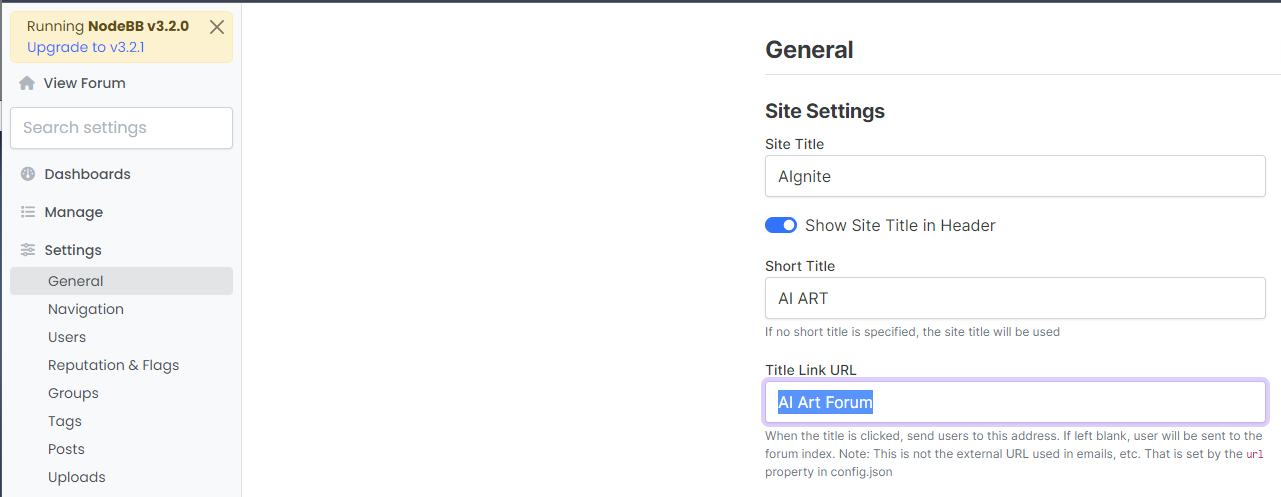
    @Panda That looks to be because of this setting you have
    bd21bcbc-6e6f-4af2-a355-c8cdc5a3b28a-image.png

    Title Link URL cannot be freeform text - it needs to be a hyperlink. If you leave this blank, it will use the siteUrl

  • Ah silly me, thanks for finding that!

  • phenomlabundefined phenomlab moved this topic from Bugs on

Related Topics
  • Nodebb to Xenforo

    Solved Configure xenforo nodebb
    3
    0 Votes
    3 Posts
    119 Views
    @cagatay as @downpw stated, there isn’t a native tool that will do this for you. You’d need to either develop your own or ask the nodebb team to assist which will be a paid exercise.
  • Opening links in nodebb widget

    Solved Configure nodebb
    6
    4 Votes
    6 Posts
    2k Views
    A more efficient way of including this would be to not over complicate it and leverage a standard iframe (providing the CSP headers of the remote site permit this) like below <iframe src="https://www.classmarker.com/online-test/start/?quiz=gag66aea7922f0a5" width="700" height="800"></iframe> This works first time every time on your site as intended.
  • Composer options on nodebb

    Solved Configure nodebb
    8
    1
    3 Votes
    8 Posts
    2k Views
    @Panda You should be able to expose the CSS for these using F12 to get into console [image: 1686833368846-3591518c-e3a3-4ada-a43c-6b32a5e0359c-image.png] [image: 1686833399483-a2b8ed46-4157-4ff2-85f0-576543380107-image.png] That should then expose the element once selected [image: 1686833431032-89d9c545-a47a-40d1-98f4-80cf3b958e8f-image.png] Here’s the below CSS you need based on the screenshot provided. .composer .formatting-bar .formatting-group li[data-format="picture-o"], .composer .formatting-bar .formatting-group li[data-format="spoiler"] { display: none; }
  • Gettin Erors NodeBB

    Solved Configure nodebb eror
    7
    0 Votes
    7 Posts
    1k Views
    @phenomlab no forum is working goods. there is no eror message since yestarday.
  • Podcast Share NodeBB

    Solved Configure podcast nodebb
    15
    4 Votes
    15 Posts
    3k Views
    @cagatay You could experiment with nodebb-plugin-ns-embed but I expect the x-origin tag on the remote site to prevent playback.
  • [NODEBB] Help for my custom CSS

    Solved Customisation nodebb css bugfix
    237
    49 Votes
    237 Posts
    100k Views
    @baris said: You should change your selectors so it doesn’t look at the entire document. You probably only want to apply fancybox to stuff inside the #content element which is what changes when the user navigates around the page. So use $('#content a').... for your selectors then the forum logo in the header won’t be selected. I modified the JS Fancybox code now and this code and it seem better // --------------------------------------------- // Fancybox Media Reader (Without Website Logo) // --------------------------------------------- if (top.location.pathname !== '/login') { $(window).on('action:posts.loaded', function(data) { console.log("Polling DOM for lazyLoaded images to apply Fancybox"); $(document).ready(function() { $('#content a').not('.forum-logo').not(".avatar").not(".emoji").not(".bmac-noanimate").each(function() { $('#content a[href*=".jpg"], #content a[href*=".jpeg"], #content a[href*=".png"], #content a[href*=".gif"], #content a[href*=".webp"]').addClass("noanimate"); }); }); }); } if (top.location.pathname !== '/login') { $(document).ready(function() { $(window).on('action:ajaxify.end', function(data) { $('#content a').not('.logo').not(".avatar").not(".emoji").not(".bmac-noanimate").each(function() { $('#content a[href*=".jpg"], #content a[href*=".jpeg"], #content a[href*=".png"], #content a[href*=".gif"], #content a[href*=".webp"]').addClass("noanimate"); data.preventDefault() // Strip out the images contained inside blockquotes as this looks nasty :) $('#content blockquote img').remove(); }); Fancybox.bind( '#content a[href*=".jpg"], #content a[href*=".jpeg"], #content a[href*=".png"], #content a[href*=".gif"], #content a[href*=".webp"]', { groupAll: true, } ); }); }); } // Chat fancybox - fires when chat module loaded and AJAX calls new chat $(document).ready(function() { $(window).on('action:chat.loaded', function(data) { // >>> Se limiter au contenu principal uniquement <<< $('#content img').not('.forum-logo').not(".avatar").not(".emoji").not(".bmac-noanimate").each(function() { var newHref = $(this).attr("src"); $(this).wrap("<a class='fancybox' href='" + newHref + "'/>"); $('#content a[href*=".jpg"], #content a[href*=".jpeg"], #content a[href*=".png"], #content a[href*=".gif"], #content a[href*=".webp"]').addClass("noanimate"); data.preventDefault(); // Strip out the images contained inside blockquotes as this looks nasty :) $('#content blockquote img').remove(); }); Fancybox.bind( '#content a[href*=".jpg"], #content a[href*=".jpeg"], #content a[href*=".png"], #content a[href*=".gif"], #content a[href*=".webp"]', { groupAll: true, } ); }); }); For the logo, I must use overflow: visible !important; on [component="brand/logo"] /* --- Logo --- */ [component="brand/logo"] { max-height: 50px; width: auto; height: auto; max-width: 100%; display: block; object-fit: contain; object-position: left center; overflow: visible !important; } Better result !!
  • NodeBB - Created pages not found?

    General
    20
    3 Votes
    20 Posts
    4k Views
    @jac Exactly. Hard point to argue.
  • Iframely (Nodebb)

    Solved Configure
    40
    4 Votes
    40 Posts
    9k Views
    @DownPW This is now resolved. The issue was an incorrect URL specified in the Nodebb plugin. I’ve corrected this, and now it works as intended.