Skip to content

Bug in Nodebb route when clicking title

Moved Configure
3 2 884 1
  • This forum:
    https://aignite.nodebb.com/
    is on v3.2, awaiting upgrade to latest version …

    if you go into a category, then click the forum title
    On Mobile, it doesnt go back to home page, it refreshes and stays in the same category

    On desktop, if you click on the icon (flame image) it will go to the home category list as expected, but if you click on the word (Aignite) it trys to load something, then says page not found!

    Interestingly, Sudonix site doesn’t have this flaw. Not sure if its been fixed in v 3.2.1 or @phenomlab has set something up that I haven’t?

    In Admin the Home Page route is set to Categories, (default setting)

  • This forum:
    https://aignite.nodebb.com/
    is on v3.2, awaiting upgrade to latest version …

    if you go into a category, then click the forum title
    On Mobile, it doesnt go back to home page, it refreshes and stays in the same category

    On desktop, if you click on the icon (flame image) it will go to the home category list as expected, but if you click on the word (Aignite) it trys to load something, then says page not found!

    Interestingly, Sudonix site doesn’t have this flaw. Not sure if its been fixed in v 3.2.1 or @phenomlab has set something up that I haven’t?

    In Admin the Home Page route is set to Categories, (default setting)

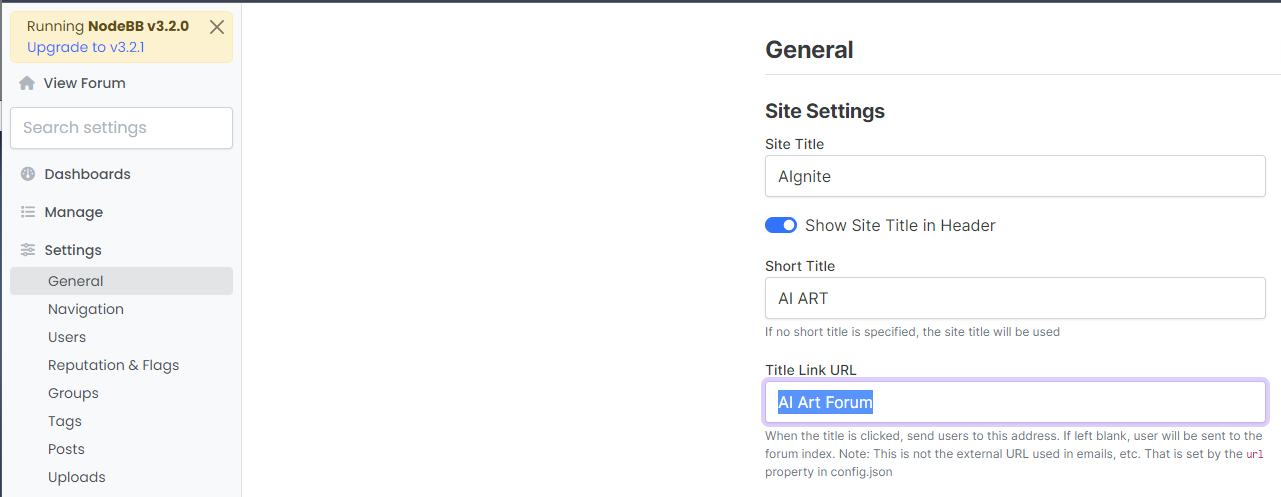
    @Panda That looks to be because of this setting you have
    bd21bcbc-6e6f-4af2-a355-c8cdc5a3b28a-image.png

    Title Link URL cannot be freeform text - it needs to be a hyperlink. If you leave this blank, it will use the siteUrl

  • Ah silly me, thanks for finding that!

  • phenomlabundefined phenomlab moved this topic from Bugs on

Related Topics
  • Page control arrows for PWA

    Solved Customisation nodebb
    27
    25 Votes
    27 Posts
    9k Views
    @crazycells it is, yes - I think I’ll leave it as there is no specific PWA CSS classes I know of. Well, you could use something like the below, but this means multiple CSS files for different operating systems. /** * Determine the mobile operating system. * This function returns one of 'iOS', 'Android', 'Windows Phone', or 'unknown'. * * @returns {String} */ function getMobileOperatingSystem() { var userAgent = navigator.userAgent || navigator.vendor || window.opera; // Windows Phone must come first because its UA also contains "Android" if (/windows phone/i.test(userAgent)) { return "Windows Phone"; } if (/android/i.test(userAgent)) { return "Android"; } if (/iPad|iPhone|iPod/.test(userAgent) && !window.MSStream) { return "iOS"; } return "unknown"; // return “Android” - one should either handle the unknown or fallback to a specific platform, let’s say Android } Once you’re in that rabbit hole, it’s impossible to get out of it.
  • Composer options on nodebb

    Solved Configure nodebb
    8
    1
    3 Votes
    8 Posts
    2k Views
    @Panda You should be able to expose the CSS for these using F12 to get into console [image: 1686833368846-3591518c-e3a3-4ada-a43c-6b32a5e0359c-image.png] [image: 1686833399483-a2b8ed46-4157-4ff2-85f0-576543380107-image.png] That should then expose the element once selected [image: 1686833431032-89d9c545-a47a-40d1-98f4-80cf3b958e8f-image.png] Here’s the below CSS you need based on the screenshot provided. .composer .formatting-bar .formatting-group li[data-format="picture-o"], .composer .formatting-bar .formatting-group li[data-format="spoiler"] { display: none; }
  • Further Widgets question

    Solved Configure nodebb
    4
    1
    1 Votes
    4 Posts
    1k Views
    @Panda category is for a category in its own, so for example, “fruit” whereas categories is the page that contains all categories as a list.
  • NodeBB: Consent page

    Solved Configure nodebb consent
    16
    4 Votes
    16 Posts
    4k Views
    @DownPW I still do not see any issues.
  • NodeBB: Creating pages

    Solved Configure nodebb create page
    9
    0 Votes
    9 Posts
    2k Views
    OK, I think I have figured out how to place a link in the footer which will click to a new page.
  • restarting nodebb on boot

    Unsolved Configure nodebb
    3
    1 Votes
    3 Posts
    1k Views
    @eeeee said in restarting nodebb on boot: can I just run nodebb under nodemon for auto restarts? It’s a better method. Nodemon just looks for file system changes and would effectively die if the server was rebooted meaning you’d have to start it again anyway. Systemd is the defacto standard which is how the operating system interacts in terms of services, scheduled tasks etc.
  • NodeBB v3 and Harmony Theme

    Discussion nodebb theme
    22
    13 Votes
    22 Posts
    7k Views
    Been playing with the user profile page this afternoon. Thought I’d post a video as I’m really pleased with how this came out profile-screen-capture.webm
  • nodebb dropdown menu

    Solved Configure nodebb
    5
    1
    0 Votes
    5 Posts
    2k Views
    @phenomlab said in nodebb dropdown menu: @kurulumu-net You set it like the below example taken from this site [image: 1637939951821-aae36790-3257-4bb2-ad5a-0d744309876a-image.png] Which presents this [image: 1637939983445-77f47260-2941-4afe-9614-8e17dcfc8c19-image.png] Very interesting… I actually thought this wasn’t possible, as I remember it being asked in the NodeBB forum. Is this something new that’s been implemented? I’ll 100% be doing that when I’m on the laptop over the weekend.




