Skip to content

Bug in Nodebb route when clicking title

Moved Configure
3 2 755 1
  • This forum:
    https://aignite.nodebb.com/
    is on v3.2, awaiting upgrade to latest version …

    if you go into a category, then click the forum title
    On Mobile, it doesnt go back to home page, it refreshes and stays in the same category

    On desktop, if you click on the icon (flame image) it will go to the home category list as expected, but if you click on the word (Aignite) it trys to load something, then says page not found!

    Interestingly, Sudonix site doesn’t have this flaw. Not sure if its been fixed in v 3.2.1 or @phenomlab has set something up that I haven’t?

    In Admin the Home Page route is set to Categories, (default setting)

  • This forum:
    https://aignite.nodebb.com/
    is on v3.2, awaiting upgrade to latest version …

    if you go into a category, then click the forum title
    On Mobile, it doesnt go back to home page, it refreshes and stays in the same category

    On desktop, if you click on the icon (flame image) it will go to the home category list as expected, but if you click on the word (Aignite) it trys to load something, then says page not found!

    Interestingly, Sudonix site doesn’t have this flaw. Not sure if its been fixed in v 3.2.1 or @phenomlab has set something up that I haven’t?

    In Admin the Home Page route is set to Categories, (default setting)

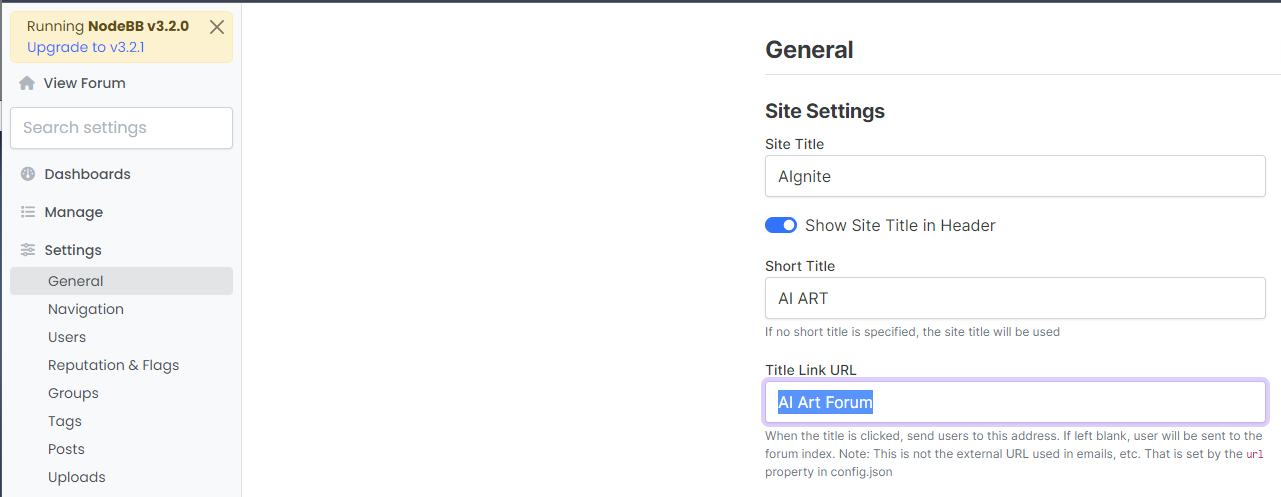
    @Panda That looks to be because of this setting you have
    bd21bcbc-6e6f-4af2-a355-c8cdc5a3b28a-image.png

    Title Link URL cannot be freeform text - it needs to be a hyperlink. If you leave this blank, it will use the siteUrl

  • Ah silly me, thanks for finding that!

  • phenomlabundefined phenomlab moved this topic from Bugs on

Related Topics
  • Where are widgets stored?

    Solved Configure nodebb
    3
    1 Votes
    3 Posts
    850 Views
    @phenomlab Thanks, have DMed you
  • Composer options on nodebb

    Solved Configure nodebb
    8
    1
    3 Votes
    8 Posts
    1k Views
    @Panda You should be able to expose the CSS for these using F12 to get into console [image: 1686833368846-3591518c-e3a3-4ada-a43c-6b32a5e0359c-image.png] [image: 1686833399483-a2b8ed46-4157-4ff2-85f0-576543380107-image.png] That should then expose the element once selected [image: 1686833431032-89d9c545-a47a-40d1-98f4-80cf3b958e8f-image.png] Here’s the below CSS you need based on the screenshot provided. .composer .formatting-bar .formatting-group li[data-format="picture-o"], .composer .formatting-bar .formatting-group li[data-format="spoiler"] { display: none; }
  • Want to use Sudonix themes ?

    Chitchat themes nodebb
    80
    1
    34 Votes
    80 Posts
    14k Views
    omg thank you Mark.
  • NodeBB: Consent page

    Solved Configure nodebb consent
    16
    4 Votes
    16 Posts
    4k Views
    @DownPW I still do not see any issues.
  • NodeBB: Upgrading to NodeBB v3.x

    Solved Configure nodebb v3.x
    6
    0 Votes
    6 Posts
    1k Views
    @mventures You’d need to connect to the server and execute it directly - not on your local terminal. Review the guide below, which will show you how to gain access via SSH to your server https://docs.ovh.com/gb/en/dedicated/ssh-introduction/ Once you have access, you’ll need to navigate to the actual folder where NodeBB is installed You’ll then need to change to the directory as shown below /home/unbuntu/nodebb [image: 1680448167972-fdffe673-bf63-4b6d-a728-5506fddc1aff-image.png] In most cases, initial access takes you to the root of the file system. You can always issue pwd in a Linux terminal which will show you the Present Working Directory. From there, you can issue the command cd /home/ubuntu/nodebb Once in the NodeBB directory, you’d use the below commands ./nodebb stop git fetch && git checkout develop && git reset --hard origin/develop ./nodebb upgrade ./nodebb start Line 1 stops the NodeBB instance Line 2 gets the latest files from GIT (repository) and then checks out the development branch. It then resets the version you are using to the development branch ready for v3 Line 3 Runs the upgrade once the new branch is set, and code pulled Line 4 Restarts the NodeBB instance after the upgrade has completed Note that when you restart NodeBB and log back in, things will look very different to what you had in v2.
  • Podcast Share NodeBB

    Solved Configure podcast nodebb
    15
    4 Votes
    15 Posts
    2k Views
    @cagatay You could experiment with nodebb-plugin-ns-embed but I expect the x-origin tag on the remote site to prevent playback.
  • Adding fileWrite to nodebb code

    Solved Configure nodebb
    16
    1
    5 Votes
    16 Posts
    3k Views
    @eveh this might be a question for the NodeBB Devs themselves. In all honesty, I’m not entirely sure without having to research this myself.
  • nodebb dropdown menu

    Solved Configure nodebb
    5
    1
    0 Votes
    5 Posts
    1k Views
    @phenomlab said in nodebb dropdown menu: @kurulumu-net You set it like the below example taken from this site [image: 1637939951821-aae36790-3257-4bb2-ad5a-0d744309876a-image.png] Which presents this [image: 1637939983445-77f47260-2941-4afe-9614-8e17dcfc8c19-image.png] Very interesting… I actually thought this wasn’t possible, as I remember it being asked in the NodeBB forum. Is this something new that’s been implemented? I’ll 100% be doing that when I’m on the laptop over the weekend.