Configure SMTP for Nodebb
-
Hello guys,
What’s the best way to configure smtp for nodebb, I used all sorts of methods, SSL/TLS, Encrypted, etc… but none of them seems to work. All I am doing, is enabling SMTP transport and pooled connection, I already tried it with only smtp transport but it still does not work. What can I do? By the way, I use port 587
-
@marusaky based on the work completed thus far (in relation to PM exchanges), I’m going to mark this completed. Sending email from the server itself works fine without issue, and DNS appears to be clean (valid SPF, DMARC, and DKIM records).
It appears that only Gmail marks incoming messages from your domain as spam - perhaps because of the domain age, which there is nothing we can do to prevent this. Mail delivery to all other domains appears to work fine in al of my tests.
-
Hello guys,
What’s the best way to configure smtp for nodebb, I used all sorts of methods, SSL/TLS, Encrypted, etc… but none of them seems to work. All I am doing, is enabling SMTP transport and pooled connection, I already tried it with only smtp transport but it still does not work. What can I do? By the way, I use port 587
@marusaky Are you using your own SMTP server, or an external one ?
Mark Cutting also advises organisations as a Fractional CIO, Fractional CISO and Executive Advisor, helping boards improve technology governance, cyber resilience and executive decision making. Learn more at Phenomlab Ltd
-
@phenomlab said in Configure SMTP for Nodebb:
@marusaky Are you using your own SMTP server, or an external one ?
my own, from the hestia cp
-
@phenomlab said in Configure SMTP for Nodebb:
@marusaky Are you using your own SMTP server, or an external one ?
my own, from the hestia cp
@marusaky see this example
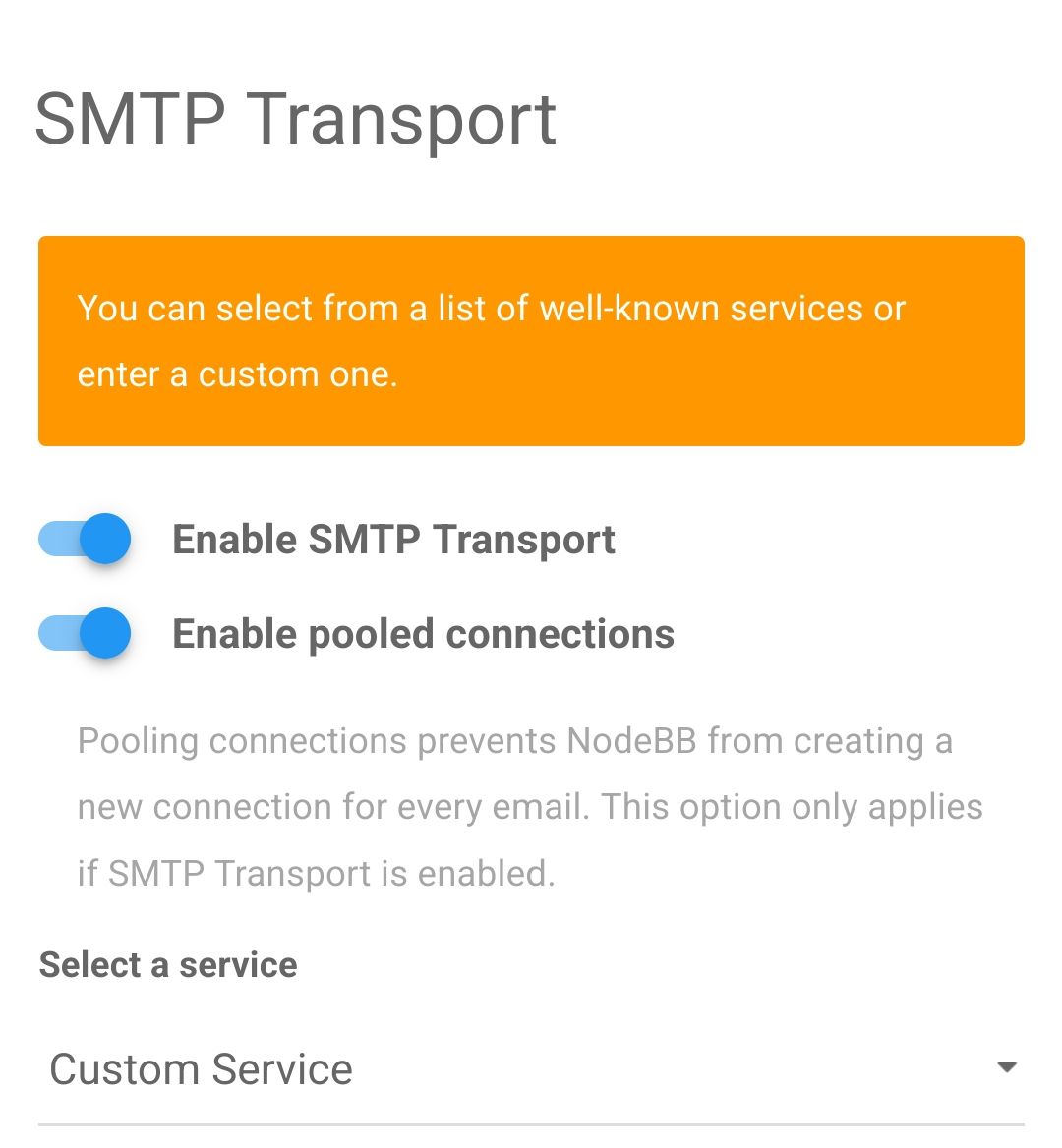
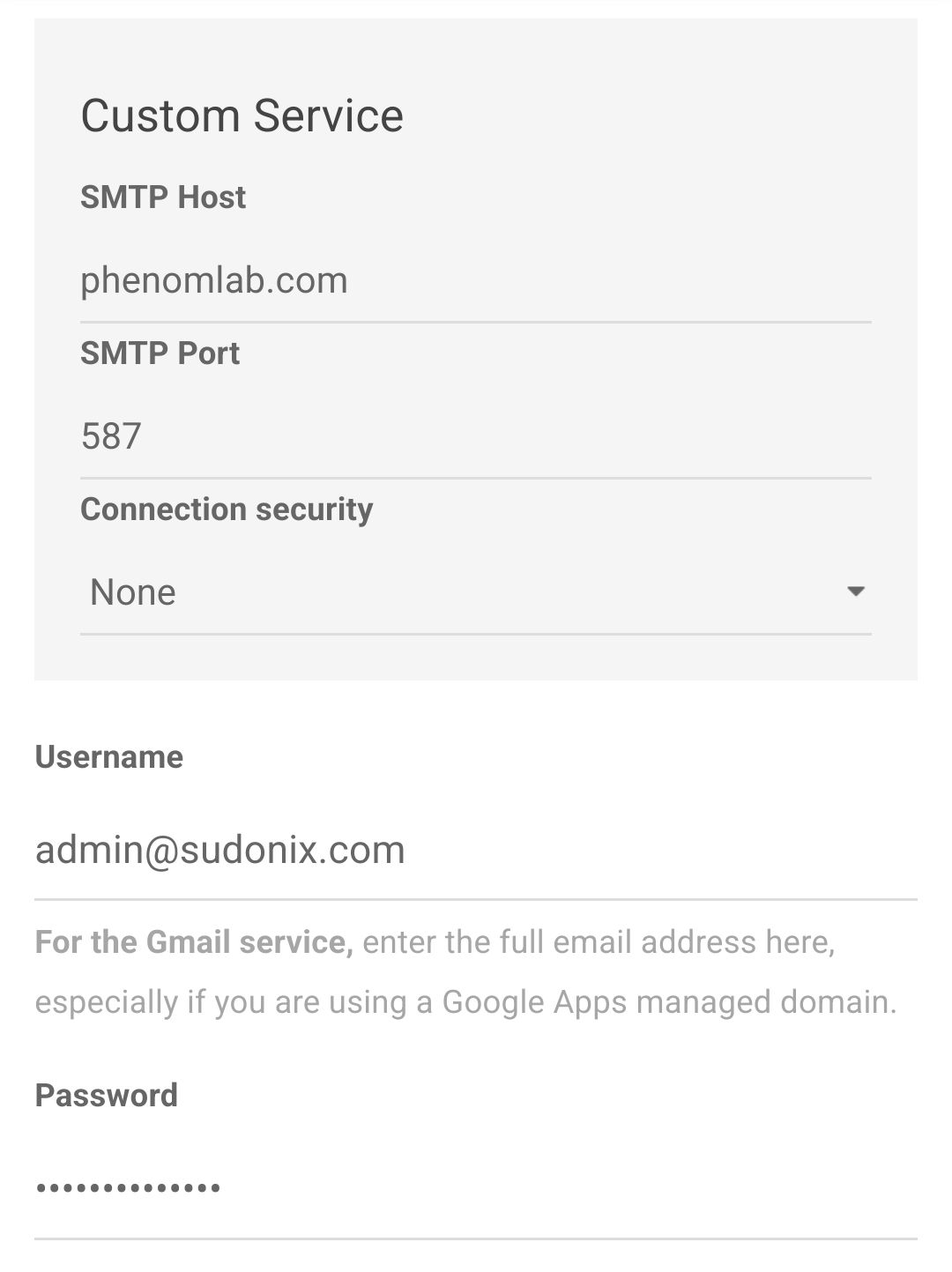
Obviously, you’ll be using your own credentials and mail host, but ensure you have the same selections as I do.
-
still doesn’t work… I have tried to put even mail. at smtp host, but still the same, I also tried with all the connection security, nothing… and I don’t think it’s a problem from my e mail, I set it up with SSL encryption, DNS is also set… tried with port 465 also… any ideas? thank you!
-
still doesn’t work… I have tried to put even mail. at smtp host, but still the same, I also tried with all the connection security, nothing… and I don’t think it’s a problem from my e mail, I set it up with SSL encryption, DNS is also set… tried with port 465 also… any ideas? thank you!
@marusaky is your server permitted to send outbound email directly? Several hosting companies disable this by default so you might need to contact them and ask them to release or permit.
Another test would be to see if the server is in fact listening. You can do this with a simple telnet command, for example
telnet server.com 587where you obviously replaceserver.comwith the actual mail host name. If you get a response, then it’s working. If nothing, then you’ll need to call the hosting company as I suggested.Mark Cutting also advises organisations as a Fractional CIO, Fractional CISO and Executive Advisor, helping boards improve technology governance, cyber resilience and executive decision making. Learn more at Phenomlab Ltd
-
@marusaky is your server permitted to send outbound email directly? Several hosting companies disable this by default so you might need to contact them and ask them to release or permit.
Another test would be to see if the server is in fact listening. You can do this with a simple telnet command, for example
telnet server.com 587where you obviously replaceserver.comwith the actual mail host name. If you get a response, then it’s working. If nothing, then you’ll need to call the hosting company as I suggested.@phenomlab said in Configure SMTP for Nodebb:
@marusaky is your server permitted to send outbound email directly? Several hosting companies disable this by default so you might need to contact them and ask them to release or permit.
Another test would be to see if the server is in fact listening. You can do this with a simple telnet command, for example
telnet server.com 587where you obviously replaceserver.comwith the actual mail host name. If you get a response, then it’s working. If nothing, then you’ll need to call the hosting company as I suggested.yep, the e mail is working as it should, I even contacted the support, they helped me set up the e mail again and entering it in the nodebb settings fields, but it still doesn’t work, I am going crazy lol
-
@phenomlab said in Configure SMTP for Nodebb:
@marusaky is your server permitted to send outbound email directly? Several hosting companies disable this by default so you might need to contact them and ask them to release or permit.
Another test would be to see if the server is in fact listening. You can do this with a simple telnet command, for example
telnet server.com 587where you obviously replaceserver.comwith the actual mail host name. If you get a response, then it’s working. If nothing, then you’ll need to call the hosting company as I suggested.yep, the e mail is working as it should, I even contacted the support, they helped me set up the e mail again and entering it in the nodebb settings fields, but it still doesn’t work, I am going crazy lol
@marusaky Happy to take a look if you want to provide me with temporary admin.
Mark Cutting also advises organisations as a Fractional CIO, Fractional CISO and Executive Advisor, helping boards improve technology governance, cyber resilience and executive decision making. Learn more at Phenomlab Ltd
-
@phenomlab said in Configure SMTP for Nodebb:
@marusaky Happy to take a look if you want to provide me with temporary admin.
of course, I will send you the details
-
@phenomlab said in Configure SMTP for Nodebb:
@marusaky Happy to take a look if you want to provide me with temporary admin.
of course, I will send you the details
@marusaky After checking:
- Email appears to work without issues. I am able to send new user registration emails with no issues
- Test template email also works fine without issues
- Emails sent to GMAIL accounts are sent to Spam. This is due to no DMARC DNS record being configured. You should also check that the
AandAAArecords (for Ipv6) are present in DNS - Your server IP address appears on one blacklist. You should contact the owner of this list to have the block removed
-
@marusaky it looks like your SMTP connector in NodeBB is set to use StartTLS (which makes sense on port 587), although the message seems to be discarded. I changed this so it looks like the below
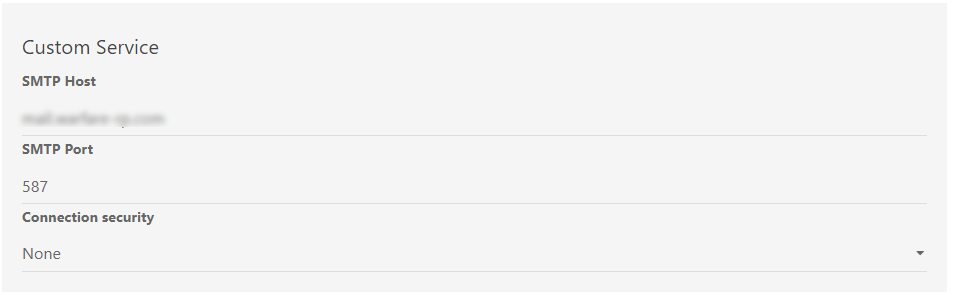
This seems to work in my testing. Let me know. Essentially, we change
StartTLStoNone -
@marusaky seems there are some DNS records missing or are there but not configured correctly. I’ve corrected this so hopefully (in the next 48 hours) the
spf,dmarc, anddkimshould function as required and mail won’t be classed as spam.As discussed in PM though, some mail servers will still send messages to spam from new domains less than x days old. This is standard security practice and not much you can do to avoid unfortunately, but what we have is best practice.
Mark Cutting also advises organisations as a Fractional CIO, Fractional CISO and Executive Advisor, helping boards improve technology governance, cyber resilience and executive decision making. Learn more at Phenomlab Ltd
-
@marusaky seems there are some DNS records missing or are there but not configured correctly. I’ve corrected this so hopefully (in the next 48 hours) the
spf,dmarc, anddkimshould function as required and mail won’t be classed as spam.As discussed in PM though, some mail servers will still send messages to spam from new domains less than x days old. This is standard security practice and not much you can do to avoid unfortunately, but what we have is best practice.
@marusaky I checked again this morning and it seems that messages are still going to spam when using Gmail, so a little more investigation and configuration is needed. However, it seems to work fine with other domains I tested.
Will look into this further.
-
@marusaky based on the work completed thus far (in relation to PM exchanges), I’m going to mark this completed. Sending email from the server itself works fine without issue, and DNS appears to be clean (valid SPF, DMARC, and DKIM records).
It appears that only Gmail marks incoming messages from your domain as spam - perhaps because of the domain age, which there is nothing we can do to prevent this. Mail delivery to all other domains appears to work fine in al of my tests.
-
 undefined phenomlab has marked this topic as solved on

Hello! It looks like you're interested in this conversation, but you don't have an account yet.
Getting fed up of having to scroll through the same posts each visit? When you register for an account, you'll always come back to exactly where you were before, and choose to be notified of new replies (either via email, or push notification). You'll also be able to save bookmarks and upvote posts to show your appreciation to other community members.
With your input, this post could be even better 💗
Register LoginDid this solution help you?
Related Topics
-
Nodebb to Xenforo
Solved Configure -
Nodebb and emails
Solved Configure -
-
NodeBB: hCaptcha
Solved Configure -
restarting nodebb on boot
Unsolved Configure -
-
Iframely (Nodebb)
Solved Configure -