Skip to content

Bug in Nodebb route when clicking title

Moved Configure
3 2 755 1
  • This forum:
    https://aignite.nodebb.com/
    is on v3.2, awaiting upgrade to latest version …

    if you go into a category, then click the forum title
    On Mobile, it doesnt go back to home page, it refreshes and stays in the same category

    On desktop, if you click on the icon (flame image) it will go to the home category list as expected, but if you click on the word (Aignite) it trys to load something, then says page not found!

    Interestingly, Sudonix site doesn’t have this flaw. Not sure if its been fixed in v 3.2.1 or @phenomlab has set something up that I haven’t?

    In Admin the Home Page route is set to Categories, (default setting)

  • This forum:
    https://aignite.nodebb.com/
    is on v3.2, awaiting upgrade to latest version …

    if you go into a category, then click the forum title
    On Mobile, it doesnt go back to home page, it refreshes and stays in the same category

    On desktop, if you click on the icon (flame image) it will go to the home category list as expected, but if you click on the word (Aignite) it trys to load something, then says page not found!

    Interestingly, Sudonix site doesn’t have this flaw. Not sure if its been fixed in v 3.2.1 or @phenomlab has set something up that I haven’t?

    In Admin the Home Page route is set to Categories, (default setting)

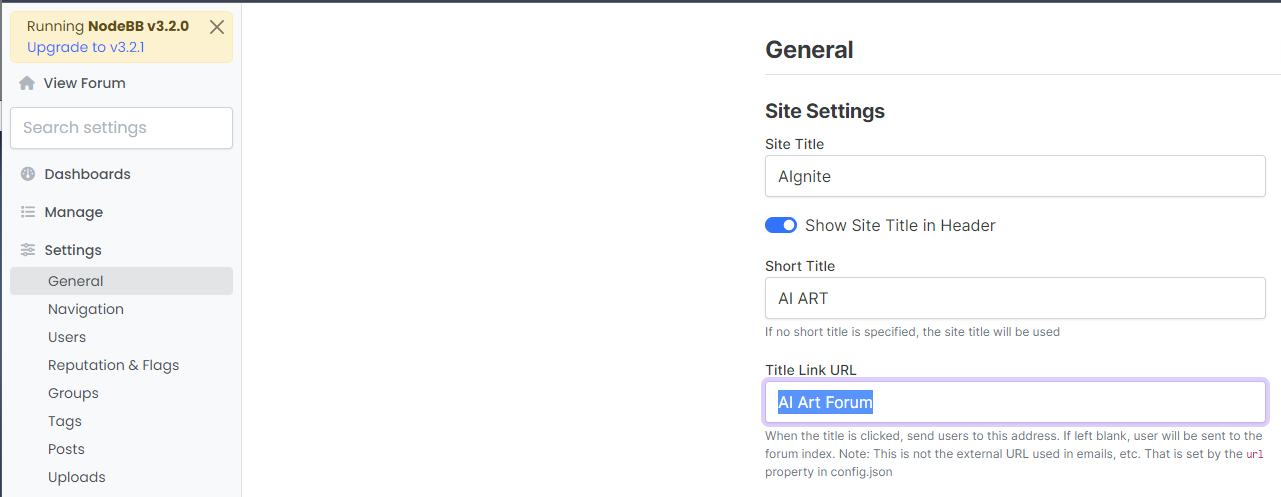
    @Panda That looks to be because of this setting you have
    bd21bcbc-6e6f-4af2-a355-c8cdc5a3b28a-image.png

    Title Link URL cannot be freeform text - it needs to be a hyperlink. If you leave this blank, it will use the siteUrl

  • Ah silly me, thanks for finding that!

  • phenomlabundefined phenomlab moved this topic from Bugs on

Related Topics
  • Upgrade issues

    Solved Configure nodebb
    2
    1
    2 Votes
    2 Posts
    786 Views
    Use this code git fetch # Grab the latest code from the NodeBB repository git checkout v3.x git reset --hard origin/v3.x And you will have the latest version without specifying it https://docs.nodebb.org/configuring/upgrade/
  • Whitespace fixes in Nodebb

    Solved Customisation nodebb
    18
    2
    7 Votes
    18 Posts
    3k Views
    @Panda Just circling back here with something of an update (which I think you’ll like). I’ve completely restructured the ranking system. There are now less ranks, with a higher point threshold to reach them. More importantly, if you reload the site, you’ll notice that the ranks are now icons. I also removed the “Author” badge, and made this a single icon, which (to me) looks much better.
  • Composer options on nodebb

    Solved Configure nodebb
    8
    1
    3 Votes
    8 Posts
    1k Views
    @Panda You should be able to expose the CSS for these using F12 to get into console [image: 1686833368846-3591518c-e3a3-4ada-a43c-6b32a5e0359c-image.png] [image: 1686833399483-a2b8ed46-4157-4ff2-85f0-576543380107-image.png] That should then expose the element once selected [image: 1686833431032-89d9c545-a47a-40d1-98f4-80cf3b958e8f-image.png] Here’s the below CSS you need based on the screenshot provided. .composer .formatting-bar .formatting-group li[data-format="picture-o"], .composer .formatting-bar .formatting-group li[data-format="spoiler"] { display: none; }
  • 36 Votes
    55 Posts
    12k Views
    @DownPW I see why. The code relies on the existence of [component="topic/quickreply/container"] However, this by definition means that the below has to be enabled [image: 1679077966615-aeef638f-4188-489d-a9f2-f3a26dbca9d8-image.png] It will then work [image: 1679077992245-7fb38631-e0f3-46ef-b652-00929d927b13-image.png] For some unknown reason, this is hidden in Harmony, and only shows if you select it. In v2, it seems that the <section> is deleted altogether in Persona if “Quick Reply” is disabled, meaning it won’t fire as it can’t locate that specific component. The downside is that you might not want the quick reply function, but I think it’s a PITA to scroll up to the top of the post just to reply, so I have it on
  • MailGun Not Working NodeBB

    Solved Configure mail mailgun
    6
    1 Votes
    6 Posts
    1k Views
    @phenomlab did it i did not create smtp user on mailgun. everything is working now. [image: 1667569376261-6cc6061f-ed5d-41f6-8eb7-5d98f98b3706-image.png]
  • Forum Icons NodeBB

    Solved Customisation icons forum nodebb
    13
    0 Votes
    13 Posts
    2k Views
    @cagatay That matches what I see [image: 1667218162107-4f0f858d-9812-42b1-9f61-ffb13d31dccd-image.png]
  • 0 Votes
    9 Posts
    2k Views
    @downpw I’m inclined to agree with this. There isn’t much else you can do, and provided it works with no odd looking artefacts in other browsers, then ok. The :before and :after are pseudo classes and very well supported across all browsers (except perhaps Internet Exploder, but who uses that these days ?)
  • Iframely (Nodebb)

    Solved Configure

    40
    4 Votes
    40 Posts
    7k Views
    @DownPW This is now resolved. The issue was an incorrect URL specified in the Nodebb plugin. I’ve corrected this, and now it works as intended.