Skip to content

[NODEBB] Help for my custom CSS

Solved Customisation
258 5 168.0k 3
  • wrote on last edited by DownPW

    @cagatay said:

    yes @downpw

    So is taht the problem.
    The core migrated to FA6 and no longer automatically includes the compatibility layers. The all.css alone is no longer enough because it only loads icons in native FA6 syntax (fa-solid, fa-regular, etc.). Your old icons using FA4 syntax (fa fa-something) are no longer recognized without the shims.

    Hence the need for the three files:

    • all.css: the FA6 icons themselves
    • v4-shims.css: the mapping table that remaps the old FA4 names to their FA6 equivalents (many icons were renamed between FA4 and FA6)
    • v4-font-face.css: redeclares the FontAwesome @font-face with the old family names (FontAwesome instead of "Font Awesome 6 Pro"), so CSS selectors targeting the old font-family keep resolving

    So if your customs still use FA4 syntax, all three are required.

    I load my Custom FA like this in my ACP/Headers :

    <link href="/assets/customfonts/FontAwesome.Pro.6.x.x/css/all.css" rel="stylesheet" />
    <link href="/assets/customfonts/FontAwesome.Pro.6.x.x/css/v4-shims.css" rel="stylesheet" />
    <link href="/assets/customfonts/FontAwesome.Pro.6.x.x/css/v4-font-face.css" rel="stylesheet" />
    
  • wrote on last edited by

    how i create those folders. i added ACP/HEADERS the codes but not working.

  • how i create those folders. i added ACP/HEADERS the codes but not working.

    wrote on last edited by DownPW

    @cagatay said:

    how i create those folders. i added ACP/HEADERS the codes but not working.

    Adapt path to your custom installation. I don’t know where is your custom FA Folder nor how you use it

  • wrote on last edited by

    You need to load your Font Awesome CSS files by adjusting this code to the path where you saved them.

    But honestly, I don’t know how you’ve configured your site in this regard.

  • wrote on last edited by

    <meta http-equiv=“Content-Type” content=“text/html; charset=utf-8” />
    <link href=“/assets/fonts/fonts.min.css?version=1” rel=“stylesheet”>
    <link href=“/assets/customfonts/FontAwesome.Pro.6.x.x/css/all.css” rel=“stylesheet” />
    <link href=“/assets/customfonts/FontAwesome.Pro.6.x.x/css/v4-shims.css” rel=“stylesheet” />
    <link href=“/assets/customfonts/FontAwesome.Pro.6.x.x/css/v4-font-face.css” rel=“stylesheet” />
    <script src=“https://cdn.jsdelivr.net/npm/@fancyapps/ui@5.0/dist/fancybox/fancybox.umd.js”></script>
    <link rel=“stylesheet” href=“https://cdn.jsdelivr.net/npm/@fancyapps/ui@5.0/dist/fancybox/fancybox.css”/>
    <a id=“pageUp” class=“”><i class=“fas fa-chevron-up”></i></a>
    <div id=“readingposition” class=“reading-meter” style=“bottom: 0px;”>
    <div class=“reading-meter-background rounded-1 border border-gray-300 ready”>
    <div class=“reading-meter-progress-bar rounded-1” id=“progress-bar”>
    </div>
    </div>
    </div>

    what i have now

  • <meta http-equiv=“Content-Type” content=“text/html; charset=utf-8” />
    <link href=“/assets/fonts/fonts.min.css?version=1” rel=“stylesheet”>
    <link href=“/assets/customfonts/FontAwesome.Pro.6.x.x/css/all.css” rel=“stylesheet” />
    <link href=“/assets/customfonts/FontAwesome.Pro.6.x.x/css/v4-shims.css” rel=“stylesheet” />
    <link href=“/assets/customfonts/FontAwesome.Pro.6.x.x/css/v4-font-face.css” rel=“stylesheet” />
    <script src=“https://cdn.jsdelivr.net/npm/@fancyapps/ui@5.0/dist/fancybox/fancybox.umd.js”></script>
    <link rel=“stylesheet” href=“https://cdn.jsdelivr.net/npm/@fancyapps/ui@5.0/dist/fancybox/fancybox.css”/>
    <a id=“pageUp” class=“”><i class=“fas fa-chevron-up”></i></a>
    <div id=“readingposition” class=“reading-meter” style=“bottom: 0px;”>
    <div class=“reading-meter-background rounded-1 border border-gray-300 ready”>
    <div class=“reading-meter-progress-bar rounded-1” id=“progress-bar”>
    </div>
    </div>
    </div>

    what i have now

    wrote on last edited by

    @cagatay if you look in the console (developers console in browser) do you see any error messages being returned?

    Linux is case sensitive, and it’s possible to have the same filename and folder name in upper and lower case.

    I suspect this might be the issue, but I could be wrong.

  • wrote on last edited by

    Mark, the situation is that since I used your CSS files, I don’t even have the Frontawese folder. Because of that, I really need your direct help. I’d really appreciate it if you could take a look whenever you have some free time.

  • wrote on last edited by

    Hi Mark, hope you’re doing well. Are you going to be able to help me with this?

  • Hi Mark, hope you’re doing well. Are you going to be able to help me with this?

    wrote on last edited by phenomlab

    @cagatay Just looking at this now. Do you have a FA Pro 6 license, or are you trying to use the free version? It’s not immediately clear, and the directory structure on your server is a mess to be honest. Not sure what has happened here.

    EDIT - I have it working. DM me.

  • wrote on last edited by

    thank you Mark.

  • wrote on last edited by

    so what is the problem of @cagatay mark @phenomlab ?

  • wrote on last edited by

    i do not know 🙂 Mark resolved.

  • so what is the problem of @cagatay mark @phenomlab ?

    wrote on last edited by

    @DownPW the FA library was missing with no paths defined. I’ve set these in the headers and uploaded the source, including necessary shim files which resolves the issue.

  • wrote on last edited by

    OK
    Likely deleted by mistake from the NodeBB ACP headers.

  • OK
    Likely deleted by mistake from the NodeBB ACP headers.

    wrote on last edited by

    @DownPW Possibly, but the source files were also missing, and @cagatay has a custom theme developed by me.

  • wrote on last edited by

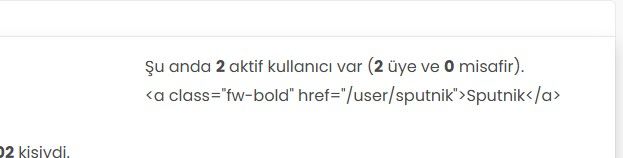
    fa0eee3c-239c-4d9b-b8c9-7fd7d7cbbd7c-image.jpeg

    Hi, the active users are not showing correctly. Instead of the usernames, I’m seeing code. What should I do to fix this?

  • fa0eee3c-239c-4d9b-b8c9-7fd7d7cbbd7c-image.jpeg

    Hi, the active users are not showing correctly. Instead of the usernames, I’m seeing code. What should I do to fix this?

    wrote on last edited by

    @cagatay sorry for late response. This looks too be one of the widgets, and I’m wondering if you have custom code that targets this.

    Had this recently happened after an upgrade or other changes?

  • wrote on last edited by

    mark hi,
    Refused to apply style from ‘https://efelsefe.com/assets/customfonts/FontAwesome-6-Pro/pro/css/v4-font-face.css’ because its MIME type (‘text/plain’) is not a supported stylesheet MIME type, and strict MIME checking is enabled.

    I keep getting this error.


Did this solution help you?
Did you find the suggested solution useful? Support 💗 Sudonix with a coffee ☕
If your organisation needs deeper expertise around infrastructure, security, or technology leadership, learn more about Phenomlab Ltd. Many of the deeper technical guides behind Sudonix are published there.

Related Topics
  • Widget | CSS customization

    Solved WordPress css
    53
    17 Votes
    53 Posts
    19k Views
    phenomlab
    @Sala the only way you can achieve this is to use a robots.txt file and disallow access to those links.
  • Nodebb design

    Solved General nodebb
    2
    1 Votes
    2 Posts
    1k Views
    phenomlab
    @Panda said in Nodebb design: One negative is not being so good for SEO as more Server side rendered forums, if web crawlers dont run the JS to read the forum. From recollection, Google and Bing have the capability to read and process JS, although it’s not in the same manner as a physical person will consume content on a page. It will be seen as plain text, but will be indexed. However, it’s important to note that Yandex and Baidu will not render JS, although seeing as Google has a 90% share of the content available on the web in terms of indexing, this isn’t something you’ll likely lose sleep over. @Panda said in Nodebb design: The “write api” is preferred for server-to-server interactions. This is mostly based around overall security - you won’t typically want a client machine changing database elements or altering data. This is why you have “client-side” which could be DOM manipulation etc, and “server-side” which performs more complex operations as it can communicate directly with the database whereas the client cannot (and if it can, then you have a serious security flaw). Reading from the API is perfectly acceptable on the client-side, but not being able to write. A paradigm here would be something like SNMP. This protocol exists as a UDP (UDP is very efficient, as it is “fire and forget” and does not wait for a response like TCP does) based service which reads performance data from a remote source, thus enabling an application to parse that data for use in a monitoring application. In all cases, SNMP access should be “RO” (Read Only) and not RW (Read Write). It is completely feasible to assume complete control over a firewall for example by having RW access to SNMP and then exposing it to the entire internet with a weak passphrase. You wouldn’t do it (at least, I hope you wouldn’t) and the same ethic applies to server-side rendering and the execution of commands.
  • NodeBB: The global Search option

    Solved Configure search nodebb
    5
    0 Votes
    5 Posts
    1k Views
    phenomlab
    @mventures Yes, exactly. The other icon will restart NodeBB whilst the first icon I referenced will rebuild (recompile) it. The huge strength of NodeBB over Flarum (for example) is that the code is precompiled, and called once at boot. PHP’s code has to repeatedly reload code from source making it much slower.
  • Upgrade Problem from 2.8.3 to 2.8.4

    Solved Configure nodebb
    35
    1
    8 Votes
    35 Posts
    12k Views
    phenomlab
    @cagatay No, you can ignore that.
  • optional "snow falling" theme

    Solved Customisation nodebb
    6
    6 Votes
    6 Posts
    2k Views
    phenomlab
    @Sala ok, but that’s still the same loop which is going to have an impact on the CPU.
  • The best css to customize our logo?

    Solved Customisation css
    2
    1 Votes
    2 Posts
    3k Views
    phenomlab
    @Sala This should look better .sidenav .navbar-brand { padding-top: 0.5rem; padding-bottom: 0.5rem; } [image: e5cec20e-be36-4ee8-9129-fd11ad4656ac-image.png] You can increase the top and bottom padding by increasing the values above.
  • CSS codes for fa-info icon

    Solved Customisation nodebb
    9
    1
    6 Votes
    9 Posts
    3k Views
    crazycells
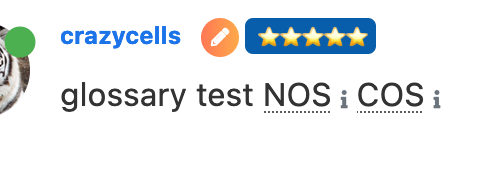
    I have just figured it out… it can be targeted with text-decoration-color: I was mistakenly using color
  • NodeBB customisation

    Locked Customisation
    332
    27 Votes
    332 Posts
    274k Views
    phenomlab
    @jac Given your departure away from your previous project, I’m going to close this thread…