Skip to content

NodeBB: The global Search option

Solved Configure
5 2 799 1
  • Hi,
    I noticed both on the NodeBB forum, Sudonix forum, and mine also, there is no Search functionality. I would like this very much because I would like people to search for a past answer before asking for a new one. Maybe, I am looking at the wrong place, or do I need to activate it from admin?

  • My apologies! I have found the Search field on NodeBB and your site. I just need to figure out how to get it on my site. Could it be because I have no posts yet?

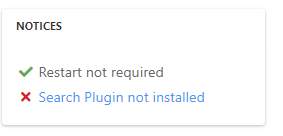
    @mventures Not quite - it’s because of this
    ff0a9849-5815-4c7a-853a-808fd325a779-image.png

    It’s installed, but not activated by default
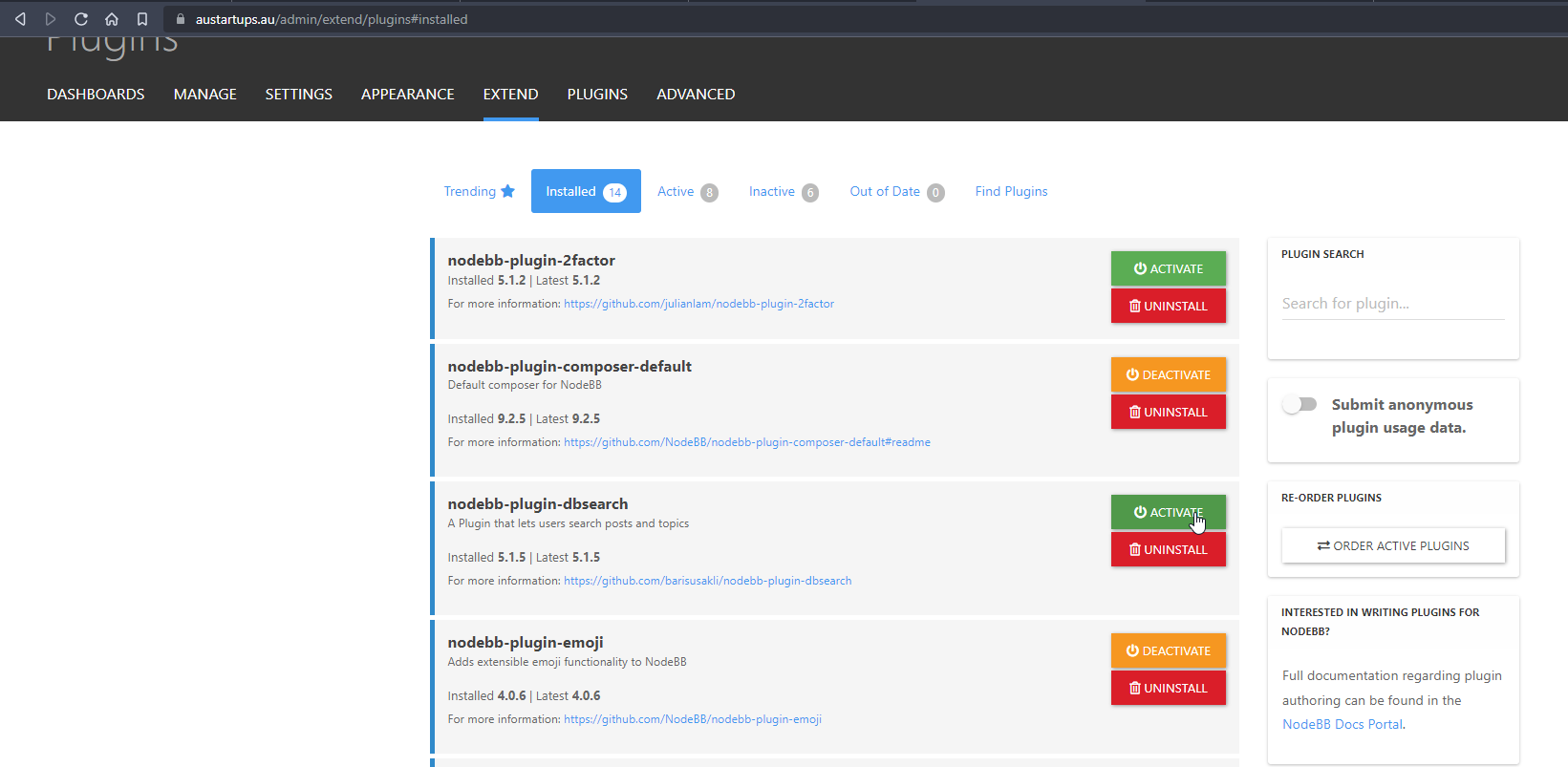
    f6280a04-ace2-43a6-8e9a-4614efecba84-image.png

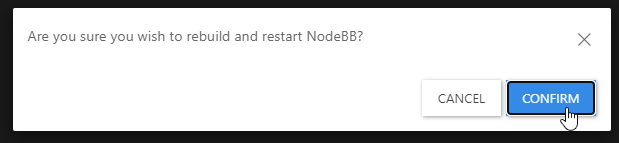
    Every time you install or uninstall a plugin, you need to rebuild NodeBB
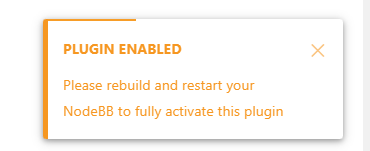
    c638615a-4597-41f6-ad32-b552c8433c06-image.png

    f539df98-cb0c-4875-abf4-b61a60333ad5-image.png

    f311a7a0-05b7-4036-820d-85661410369b-image.png

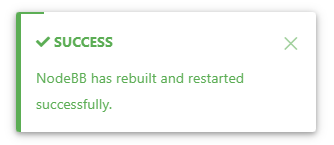
    Confirm, and wait for NodeBB to restart

    bd46bebc-58c6-400a-a3f3-1bd09e17a5b0-image.png

    b1b5263e-f68a-4a34-99b6-5147979fb8af-image.png

    Now go back to your site

    You should see that Search has appeared

    39af2e82-15ec-4add-a758-f422b60c43ba-image.png

    I’ve done all of this for you, so this is for reference.

    Regds

  • My apologies! I have found the Search field on NodeBB and your site. I just need to figure out how to get it on my site. Could it be because I have no posts yet?

  • My apologies! I have found the Search field on NodeBB and your site. I just need to figure out how to get it on my site. Could it be because I have no posts yet?

    @mventures Not quite - it’s because of this

    ff0a9849-5815-4c7a-853a-808fd325a779-image.png

    It’s installed, but not activated by default

    f6280a04-ace2-43a6-8e9a-4614efecba84-image.png

    Every time you install or uninstall a plugin, you need to rebuild NodeBB
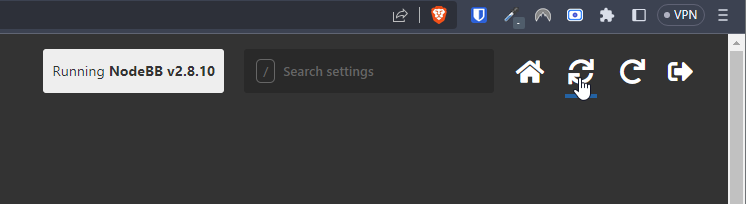
    c638615a-4597-41f6-ad32-b552c8433c06-image.png

    f539df98-cb0c-4875-abf4-b61a60333ad5-image.png

    f311a7a0-05b7-4036-820d-85661410369b-image.png

    Confirm, and wait for NodeBB to restart
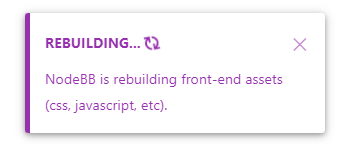
    bd46bebc-58c6-400a-a3f3-1bd09e17a5b0-image.png

    b1b5263e-f68a-4a34-99b6-5147979fb8af-image.png

    Now go back to your site

    You should see that Search has appeared

    39af2e82-15ec-4add-a758-f422b60c43ba-image.png

    I’ve done all of this for you, so this is for reference.

    Regds

  • phenomlabundefined phenomlab has marked this topic as solved on
  • That’s awesome @phenomlab! Thank you. I can see it 🙂

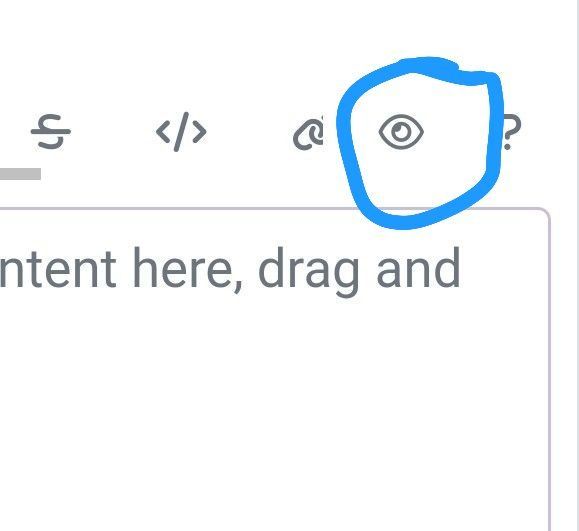
    What did you mean by, “rebuild NodeBB”? And the whole rebuild happens by just clicking that “recycle” button?

  • That’s awesome @phenomlab! Thank you. I can see it 🙂

    What did you mean by, “rebuild NodeBB”? And the whole rebuild happens by just clicking that “recycle” button?

    @mventures Yes, exactly. The other icon will restart NodeBB whilst the first icon I referenced will rebuild (recompile) it.

    The huge strength of NodeBB over Flarum (for example) is that the code is precompiled, and called once at boot. PHP’s code has to repeatedly reload code from source making it much slower.


Did this solution help you?
Did you find the suggested solution useful? Support 💗 Sudonix with a coffee
If your organisation needs deeper expertise around infrastructure, security, or technology leadership, learn more about Phenomlab Ltd. Many of the deeper technical guides behind Sudonix are published there.

Related Topics
  • Nodebb and emails

    Solved Configure nodebb
    27
    5 Votes
    27 Posts
    4k Views
    @Panda it will use SMTP. In all cases, I never use any plugin to send email. I’ll always send it raw.
  • Upgrade issues

    Solved Configure nodebb
    2
    1
    2 Votes
    2 Posts
    786 Views
    Use this code git fetch # Grab the latest code from the NodeBB repository git checkout v3.x git reset --hard origin/v3.x And you will have the latest version without specifying it https://docs.nodebb.org/configuring/upgrade/
  • 2 Votes
    2 Posts
    616 Views
    @dave1904 that’s a really good point actually. I know it was there previously on Persona, but you’re right - no such function exists on harmony. However, putting something in place to mimick the behaviour of Persona won’t be hard from the js standpoint, although I wonder if perhaps we should ask the NodeBB developers is this feature was overlooked?
  • NodeBB: Upgrading to NodeBB v3.x

    Solved Configure nodebb v3.x
    6
    0 Votes
    6 Posts
    1k Views
    @mventures You’d need to connect to the server and execute it directly - not on your local terminal. Review the guide below, which will show you how to gain access via SSH to your server https://docs.ovh.com/gb/en/dedicated/ssh-introduction/ Once you have access, you’ll need to navigate to the actual folder where NodeBB is installed You’ll then need to change to the directory as shown below /home/unbuntu/nodebb [image: 1680448167972-fdffe673-bf63-4b6d-a728-5506fddc1aff-image.png] In most cases, initial access takes you to the root of the file system. You can always issue pwd in a Linux terminal which will show you the Present Working Directory. From there, you can issue the command cd /home/ubuntu/nodebb Once in the NodeBB directory, you’d use the below commands ./nodebb stop git fetch && git checkout develop && git reset --hard origin/develop ./nodebb upgrade ./nodebb start Line 1 stops the NodeBB instance Line 2 gets the latest files from GIT (repository) and then checks out the development branch. It then resets the version you are using to the development branch ready for v3 Line 3 Runs the upgrade once the new branch is set, and code pulled Line 4 Restarts the NodeBB instance after the upgrade has completed Note that when you restart NodeBB and log back in, things will look very different to what you had in v2.
  • restarting nodebb on boot

    Unsolved Configure nodebb
    3
    1 Votes
    3 Posts
    1k Views
    @eeeee said in restarting nodebb on boot: can I just run nodebb under nodemon for auto restarts? It’s a better method. Nodemon just looks for file system changes and would effectively die if the server was rebooted meaning you’d have to start it again anyway. Systemd is the defacto standard which is how the operating system interacts in terms of services, scheduled tasks etc.
  • How to fix header side as boxed

    Solved Customisation header boxed sudonix nodebb
    10
    1
    6 Votes
    10 Posts
    2k Views
    @phenomlab yes it caused a problem for mobile users. thank you for helping …
  • [NODEBB] Help for my custom CSS

    Solved Customisation nodebb css bugfix
    237
    49 Votes
    237 Posts
    80k Views
    @baris said: You should change your selectors so it doesn’t look at the entire document. You probably only want to apply fancybox to stuff inside the #content element which is what changes when the user navigates around the page. So use $('#content a').... for your selectors then the forum logo in the header won’t be selected. I modified the JS Fancybox code now and this code and it seem better // --------------------------------------------- // Fancybox Media Reader (Without Website Logo) // --------------------------------------------- if (top.location.pathname !== '/login') { $(window).on('action:posts.loaded', function(data) { console.log("Polling DOM for lazyLoaded images to apply Fancybox"); $(document).ready(function() { $('#content a').not('.forum-logo').not(".avatar").not(".emoji").not(".bmac-noanimate").each(function() { $('#content a[href*=".jpg"], #content a[href*=".jpeg"], #content a[href*=".png"], #content a[href*=".gif"], #content a[href*=".webp"]').addClass("noanimate"); }); }); }); } if (top.location.pathname !== '/login') { $(document).ready(function() { $(window).on('action:ajaxify.end', function(data) { $('#content a').not('.logo').not(".avatar").not(".emoji").not(".bmac-noanimate").each(function() { $('#content a[href*=".jpg"], #content a[href*=".jpeg"], #content a[href*=".png"], #content a[href*=".gif"], #content a[href*=".webp"]').addClass("noanimate"); data.preventDefault() // Strip out the images contained inside blockquotes as this looks nasty :) $('#content blockquote img').remove(); }); Fancybox.bind( '#content a[href*=".jpg"], #content a[href*=".jpeg"], #content a[href*=".png"], #content a[href*=".gif"], #content a[href*=".webp"]', { groupAll: true, } ); }); }); } // Chat fancybox - fires when chat module loaded and AJAX calls new chat $(document).ready(function() { $(window).on('action:chat.loaded', function(data) { // >>> Se limiter au contenu principal uniquement <<< $('#content img').not('.forum-logo').not(".avatar").not(".emoji").not(".bmac-noanimate").each(function() { var newHref = $(this).attr("src"); $(this).wrap("<a class='fancybox' href='" + newHref + "'/>"); $('#content a[href*=".jpg"], #content a[href*=".jpeg"], #content a[href*=".png"], #content a[href*=".gif"], #content a[href*=".webp"]').addClass("noanimate"); data.preventDefault(); // Strip out the images contained inside blockquotes as this looks nasty :) $('#content blockquote img').remove(); }); Fancybox.bind( '#content a[href*=".jpg"], #content a[href*=".jpeg"], #content a[href*=".png"], #content a[href*=".gif"], #content a[href*=".webp"]', { groupAll: true, } ); }); }); For the logo, I must use overflow: visible !important; on [component="brand/logo"] /* --- Logo --- */ [component="brand/logo"] { max-height: 50px; width: auto; height: auto; max-width: 100%; display: block; object-fit: contain; object-position: left center; overflow: visible !important; } Better result !!
  • Iframely (Nodebb)

    Solved Configure

    40
    4 Votes
    40 Posts
    7k Views
    @DownPW This is now resolved. The issue was an incorrect URL specified in the Nodebb plugin. I’ve corrected this, and now it works as intended.