Skip to content

[NODEBB] Help for my custom CSS

Solved Customisation
258 5 167.9k 3
  • Hi Mark, hope you’re doing well. Are you going to be able to help me with this?

    wrote on last edited by phenomlab

    @cagatay Just looking at this now. Do you have a FA Pro 6 license, or are you trying to use the free version? It’s not immediately clear, and the directory structure on your server is a mess to be honest. Not sure what has happened here.

    EDIT - I have it working. DM me.

  • wrote on last edited by

    thank you Mark.

  • wrote on last edited by

    so what is the problem of @cagatay mark @phenomlab ?

  • wrote on last edited by

    i do not know 🙂 Mark resolved.

  • so what is the problem of @cagatay mark @phenomlab ?

    wrote on last edited by

    @DownPW the FA library was missing with no paths defined. I’ve set these in the headers and uploaded the source, including necessary shim files which resolves the issue.

  • wrote on last edited by

    OK
    Likely deleted by mistake from the NodeBB ACP headers.

  • OK
    Likely deleted by mistake from the NodeBB ACP headers.

    wrote on last edited by

    @DownPW Possibly, but the source files were also missing, and @cagatay has a custom theme developed by me.

  • wrote on last edited by

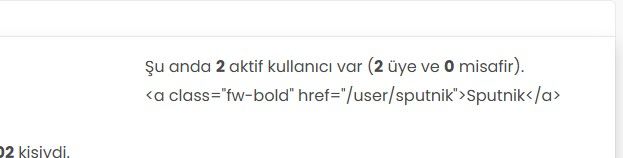
    fa0eee3c-239c-4d9b-b8c9-7fd7d7cbbd7c-image.jpeg

    Hi, the active users are not showing correctly. Instead of the usernames, I’m seeing code. What should I do to fix this?

  • fa0eee3c-239c-4d9b-b8c9-7fd7d7cbbd7c-image.jpeg

    Hi, the active users are not showing correctly. Instead of the usernames, I’m seeing code. What should I do to fix this?

    wrote on last edited by

    @cagatay sorry for late response. This looks too be one of the widgets, and I’m wondering if you have custom code that targets this.

    Had this recently happened after an upgrade or other changes?

  • wrote on last edited by

    mark hi,
    Refused to apply style from ‘https://efelsefe.com/assets/customfonts/FontAwesome-6-Pro/pro/css/v4-font-face.css’ because its MIME type (‘text/plain’) is not a supported stylesheet MIME type, and strict MIME checking is enabled.

    I keep getting this error.


Did this solution help you?
Did you find the suggested solution useful? Support 💗 Sudonix with a coffee ☕
If your organisation needs deeper expertise around infrastructure, security, or technology leadership, learn more about Phenomlab Ltd. Many of the deeper technical guides behind Sudonix are published there.

Related Topics
  • Difficult to move posts now, on mobile.

    Bugs nodebb
    16
    1
    5 Votes
    16 Posts
    5k Views
    phenomlab
    @DownPW Yes, it is. It’s set far too low meaning other elements with a higher preference will sit over the top of it.
  • 1 Votes
    1 Posts
    2k Views
    No one has replied
  • restarting nodebb on boot

    Unsolved Configure nodebb
    3
    1 Votes
    3 Posts
    2k Views
    phenomlab
    @eeeee said in restarting nodebb on boot: can I just run nodebb under nodemon for auto restarts? It’s a better method. Nodemon just looks for file system changes and would effectively die if the server was rebooted meaning you’d have to start it again anyway. Systemd is the defacto standard which is how the operating system interacts in terms of services, scheduled tasks etc.
  • Custom badges

    Solved Customisation nodebb
    103
    2
    49 Votes
    103 Posts
    60k Views
    DownPW
    Perfect
  • is "night mode" shifting the forum several pixels up?

    Solved Configure nodebb
    8
    4 Votes
    8 Posts
    3k Views
    phenomlab
    @crazycells hmm. Good point. I actually use my own version of the dark mode plugin, so not entirely sure. However, I think the CSS is probably the same. I’m not at my PC currently but can check and advise later.
  • [NODEBB] CSS Style Sheets SelectBox

    Locked Solved Customisation css
    112
    24 Votes
    112 Posts
    63k Views
    phenomlab
    @DownPW as discussed in PM Seems to have been solved with the new JS code that you added allowing the version CSS file change!! Cache problem therefore with the JS of the Switcher theme Based on this, I will close this thread and reference https://sudonix.com/topic/207/nodebb-help-for-my-custom-css/27
  • [NodeBB] First post customization

    Solved Customisation nodebb
    5
    4 Votes
    5 Posts
    3k Views
    crazycells
    @phenomlab thanks
  • NodeBB Design help

    Solved Customisation
    8
    3
    2 Votes
    8 Posts
    4k Views
    phenomlab
    @riekmedia I’ve applied some new CSS to your site. Can you reload the page and try again ? For the record, this is what I added #footer { background: #2d343e; border-top: 4px solid #2d343e; font-size: 0.9em; margin-top: 70px; padding: 80px 0 0; position: relative; clear: both; bottom: 0; left: 0; right: 0; z-index: 1000; margin-left: -15px; margin-right: -338px; } The /categories page seems a bit messed up, so looking at that currently EDIT - issued some override CSS in the CATEGORIES widget <!--- CSS fix for overspill on /categories page - DO NOT DELETE --> <style> #footer { margin-right: -45px; } </style> That should resolve the /categories issue.