NodeBB Design help
-
Unfortunately I still have a few design problems where I need your help again

li.row.clearfix.category-1, li.row.clearfix.category-2, li.row.clearfix.category-3, li.row.clearfix.category-4, li.row.clearfix.category-5, li.row.clearfix.category-6, li.row.clearfix.category-7, li.row.clearfix.category-8, li.row.clearfix.category-9, li.row.clearfix.category-10 {
    border: 1px solid;
    border-radius: 4px;
    margin-left: 10px;
    background: #ffffff;
    border-left: 5px solid #0088cc;
    margin-top: 10px;
}
You gave me the box design
it would be possible to make the sub-categories like here in the photo
Screen for my forum

Image

Here is a line
KategorieSubcategorie
The second design problem is my buttons

Many greetings
RiekMedia -
Unfortunately I still have a few design problems where I need your help again
li.row.clearfix.category-1, li.row.clearfix.category-2, li.row.clearfix.category-3, li.row.clearfix.category-4, li.row.clearfix.category-5, li.row.clearfix.category-6, li.row.clearfix.category-7, li.row.clearfix.category-8, li.row.clearfix.category-9, li.row.clearfix.category-10 {
    border: 1px solid;
    border-radius: 4px;
    margin-left: 10px;
    background: #ffffff;
    border-left: 5px solid #0088cc;
    margin-top: 10px;
}
You gave me the box design
it would be possible to make the sub-categories like here in the photo
Screen for my forum
Image
Here is a line
KategorieSubcategorie
The second design problem is my buttons
@riekmedia Without modifying the template itself (which you could do with
nodebb-plugin-customize), this is not going to be easy. The nearest I can get with pure CSS is the below
Even then, the amount of CSS required to get this look is excessive
.categories>li .content, .category>ul>li .content {
    padding: 10px 15px;
    border-right: 1px solid #0088cc;
}
.categories .description, .category .description, .subcategory .description {
    margin-bottom: 10px;
    margin-left: -15px !important;
}
.categories .category-children, .category .category-children, .subcategory .category-children {
    display: inline;
}
.categories>li .content, .category>ul>li .content {
    margin-bottom: -10px;
}
.description {
    margin-right: -16px;
}
.categories .category-children, .categories .description, .category .category-children, .category .description, .subcategory .category-children, .subcategory .description {
    line-height: 1.8;
}
Mark Cutting also advises organisations as a Fractional CIO, Fractional CISO and Executive Advisor, helping boards improve technology governance, cyber resilience and executive decision making. Learn more at Phenomlab Ltd
-
@riekmedia Without modifying the template itself (which you could do with
nodebb-plugin-customize), this is not going to be easy. The nearest I can get with pure CSS is the belowEven then, the amount of CSS required to get this look is excessive
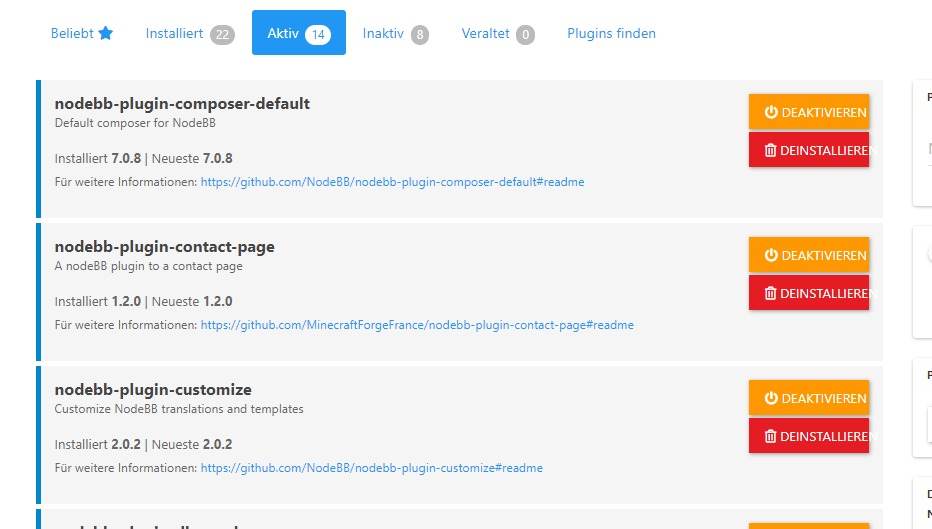
.categories>li .content, .category>ul>li .content { padding: 10px 15px; border-right: 1px solid #0088cc; } .categories .description, .category .description, .subcategory .description { margin-bottom: 10px; margin-left: -15px !important; } .categories .category-children, .category .category-children, .subcategory .category-children { display: inline; } .categories>li .content, .category>ul>li .content { margin-bottom: -10px; } .description { margin-right: -16px; } .categories .category-children, .categories .description, .category .category-children, .category .description, .subcategory .category-children, .subcategory .description { line-height: 1.8; }@phenomlab okay, the plugin is not working. is installed and no Menü point
You helped me with the footer, unfortunately it doesn’t work as it should. As soon as I put a widget in the sidbar, it shreds the footer

Many greetings
RiekMedia -
@phenomlab okay, the plugin is not working. is installed and no Menü point
You helped me with the footer, unfortunately it doesn’t work as it should. As soon as I put a widget in the sidbar, it shreds the footer
@riekmedia said in NodeBB Design help:
okay, the plugin is not working. is installed and no Menü point
Did you rebuild and restart ?
-
@phenomlab okay, the plugin is not working. is installed and no Menü point
You helped me with the footer, unfortunately it doesn’t work as it should. As soon as I put a widget in the sidbar, it shreds the footer
@riekmedia said in NodeBB Design help:
As soon as I put a widget in the sidbar, it shreds the footer
This sounds like the HTML is incorrect (in the sense that a DIV tag is missing or not properly closed). Can you confirm that the login you provided for your forum (for me) is still active ? I’ll need to login and take a look.
-
Hey @phenomlab , yes the login is still active. You can also register if you want and I’ll join the admin group. Regarding the design, I rebuilt the template as an html file over the weekend and then re-cleaned it. So that there are no Div errors. However, the forum generally has a problem with a div with the container. it says class=“row container”. Actually, this is without the row.
usually it’s just class=“container” without row
I can also send you the html template if you want to have a look at it before
Many greetings
RiekMedia -
Hey @phenomlab , yes the login is still active. You can also register if you want and I’ll join the admin group. Regarding the design, I rebuilt the template as an html file over the weekend and then re-cleaned it. So that there are no Div errors. However, the forum generally has a problem with a div with the container. it says class=“row container”. Actually, this is without the row.
usually it’s just class=“container” without row
I can also send you the html template if you want to have a look at it before
@riekmedia said in NodeBB Design help:
I can also send you the html template if you want to have a look at it before
Thanks. Can you send the template ? Either here or via PM is fine.
-
Hey @phenomlab , yes the login is still active. You can also register if you want and I’ll join the admin group. Regarding the design, I rebuilt the template as an html file over the weekend and then re-cleaned it. So that there are no Div errors. However, the forum generally has a problem with a div with the container. it says class=“row container”. Actually, this is without the row.
usually it’s just class=“container” without row
I can also send you the html template if you want to have a look at it before
@riekmedia I’ve applied some new CSS to your site. Can you reload the page and try again ?
For the record, this is what I added
#footer {
    background: #2d343e;
    border-top: 4px solid #2d343e;
    font-size: 0.9em;
    margin-top: 70px;
    padding: 80px 0 0;
    position: relative;
    clear: both;
    bottom: 0;
    left: 0;
    right: 0;
    z-index: 1000;
    margin-left: -15px;
    margin-right: -338px;
}
The
/categoriespage seems a bit messed up, so looking at that currentlyEDIT - issued some override CSS in the CATEGORIES widget
<!--- CSS fix for overspill on /categories page - DO NOT DELETE -->
<style>
#footer {
    margin-right: -45px;
}
</style>
That should resolve the
/categoriesissue. -
 undefined RiekMedia has marked this topic as solved on

Hello! It looks like you're interested in this conversation, but you don't have an account yet.
Getting fed up of having to scroll through the same posts each visit? When you register for an account, you'll always come back to exactly where you were before, and choose to be notified of new replies (either via email, or push notification). You'll also be able to save bookmarks and upvote posts to show your appreciation to other community members.
With your input, this post could be even better 💗
Register LoginDid this solution help you?
Related Topics
-
Forum Icons NodeBB
Solved Customisation -
-
-
-
-
-
Customising NodeBB
Locked Customisation -