Skip to content

[NODEBB] Help for my custom CSS

Solved Customisation
258 5 167.9k 3
  • <meta http-equiv=“Content-Type” content=“text/html; charset=utf-8” />
    <link href=“/assets/fonts/fonts.min.css?version=1” rel=“stylesheet”>
    <link href=“/assets/customfonts/FontAwesome.Pro.6.x.x/css/all.css” rel=“stylesheet” />
    <link href=“/assets/customfonts/FontAwesome.Pro.6.x.x/css/v4-shims.css” rel=“stylesheet” />
    <link href=“/assets/customfonts/FontAwesome.Pro.6.x.x/css/v4-font-face.css” rel=“stylesheet” />
    <script src=“https://cdn.jsdelivr.net/npm/@fancyapps/ui@5.0/dist/fancybox/fancybox.umd.js”></script>
    <link rel=“stylesheet” href=“https://cdn.jsdelivr.net/npm/@fancyapps/ui@5.0/dist/fancybox/fancybox.css”/>
    <a id=“pageUp” class=“”><i class=“fas fa-chevron-up”></i></a>
    <div id=“readingposition” class=“reading-meter” style=“bottom: 0px;”>
    <div class=“reading-meter-background rounded-1 border border-gray-300 ready”>
    <div class=“reading-meter-progress-bar rounded-1” id=“progress-bar”>
    </div>
    </div>
    </div>

    what i have now

    wrote on last edited by

    @cagatay if you look in the console (developers console in browser) do you see any error messages being returned?

    Linux is case sensitive, and it’s possible to have the same filename and folder name in upper and lower case.

    I suspect this might be the issue, but I could be wrong.

  • wrote on last edited by

    Mark, the situation is that since I used your CSS files, I don’t even have the Frontawese folder. Because of that, I really need your direct help. I’d really appreciate it if you could take a look whenever you have some free time.

  • wrote on last edited by

    Hi Mark, hope you’re doing well. Are you going to be able to help me with this?

  • Hi Mark, hope you’re doing well. Are you going to be able to help me with this?

    wrote on last edited by phenomlab

    @cagatay Just looking at this now. Do you have a FA Pro 6 license, or are you trying to use the free version? It’s not immediately clear, and the directory structure on your server is a mess to be honest. Not sure what has happened here.

    EDIT - I have it working. DM me.

  • wrote on last edited by

    thank you Mark.

  • wrote on last edited by

    so what is the problem of @cagatay mark @phenomlab ?

  • wrote on last edited by

    i do not know 🙂 Mark resolved.

  • so what is the problem of @cagatay mark @phenomlab ?

    wrote on last edited by

    @DownPW the FA library was missing with no paths defined. I’ve set these in the headers and uploaded the source, including necessary shim files which resolves the issue.

  • wrote on last edited by

    OK
    Likely deleted by mistake from the NodeBB ACP headers.

  • OK
    Likely deleted by mistake from the NodeBB ACP headers.

    wrote on last edited by

    @DownPW Possibly, but the source files were also missing, and @cagatay has a custom theme developed by me.

  • wrote on last edited by

    fa0eee3c-239c-4d9b-b8c9-7fd7d7cbbd7c-image.jpeg

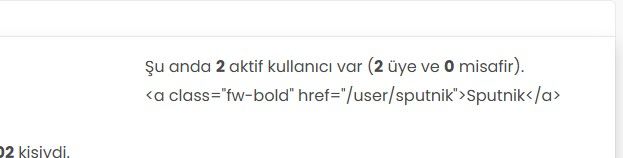
    Hi, the active users are not showing correctly. Instead of the usernames, I’m seeing code. What should I do to fix this?

  • fa0eee3c-239c-4d9b-b8c9-7fd7d7cbbd7c-image.jpeg

    Hi, the active users are not showing correctly. Instead of the usernames, I’m seeing code. What should I do to fix this?

    wrote on last edited by

    @cagatay sorry for late response. This looks too be one of the widgets, and I’m wondering if you have custom code that targets this.

    Had this recently happened after an upgrade or other changes?

  • wrote on last edited by

    mark hi,
    Refused to apply style from ‘https://efelsefe.com/assets/customfonts/FontAwesome-6-Pro/pro/css/v4-font-face.css’ because its MIME type (‘text/plain’) is not a supported stylesheet MIME type, and strict MIME checking is enabled.

    I keep getting this error.


Did this solution help you?
Did you find the suggested solution useful? Support 💗 Sudonix with a coffee ☕
If your organisation needs deeper expertise around infrastructure, security, or technology leadership, learn more about Phenomlab Ltd. Many of the deeper technical guides behind Sudonix are published there.

Related Topics
  • 2 Votes
    1 Posts
    639 Views
    No one has replied
  • Please help me, I can't install nodebb

    Locked Solved Customisation nodebb
    7
    5 Votes
    7 Posts
    2k Views
    phenomlab
    Installation completed, verified, and tested. Correct installation methodology is below https://docs.nodebb.org/installing/os/ubuntu/
  • Bug Report

    Solved Bugs nodebb bugs
    47
    1
    26 Votes
    47 Posts
    20k Views
    phenomlab
    @crazycells Good points, thanks. I completely forgot that classes are added - makes life much simpler! EDIT - seems this is pretty straightforward, and only needs the below CSS .upvoted i { color: var(--bs-user-level) !important; } This then yields [image: 3f072f8a-ebfa-4910-8723-73c493b8e4eb-image.png] However, the caveat here is that the .upvoted class will only show for your upvotes, and nobody else’s. However, this does satisfy the original request however I would love to see my upvoted posts more clearly, because currently, when I upvote, nothing on the post tool is changing, it would be nicer if there is an indication that I have upvoted (like a filled or colored triangle?)
  • Dark Theme Upper Padding

    Solved Customisation nodebb
    7
    1
    6 Votes
    7 Posts
    2k Views
    crazycells
    @DownPW great! thanks a lot… this code solves my problem.
  • [NodeBB] First post customization

    Solved Customisation nodebb
    5
    4 Votes
    5 Posts
    3k Views
    crazycells
    @phenomlab thanks
  • Nodebb Hashtag plugin

    Solved General
    15
    1 Votes
    15 Posts
    6k Views
    phenomlab
    @jac Great ! I’ll close this off.
  • NodeBB Design help

    Solved Customisation
    8
    3
    2 Votes
    8 Posts
    4k Views
    phenomlab
    @riekmedia I’ve applied some new CSS to your site. Can you reload the page and try again ? For the record, this is what I added #footer { background: #2d343e; border-top: 4px solid #2d343e; font-size: 0.9em; margin-top: 70px; padding: 80px 0 0; position: relative; clear: both; bottom: 0; left: 0; right: 0; z-index: 1000; margin-left: -15px; margin-right: -338px; } The /categories page seems a bit messed up, so looking at that currently EDIT - issued some override CSS in the CATEGORIES widget <!--- CSS fix for overspill on /categories page - DO NOT DELETE --> <style> #footer { margin-right: -45px; } </style> That should resolve the /categories issue.
  • [NodeBB] custom Gravatar image not showing

    Solved Customisation
    6
    1 Votes
    6 Posts
    3k Views
    JAC
    @jac said in [NodeBB] custom Gravatar image not showing: @phenomlab said in [NodeBB] custom Gravatar image not showing: @jac are you using Custom ? Sure am mate Confirmed Fixed