Ubuntu 22.04 to Ubuntu 24.04 Unable to ping
-

@abcabc123 Hmm - ok. Let’s try this instead
To set a permanent DNS on the latest version of Ubuntu (e.g., Ubuntu 22.04 or later), you typically configure DNS settings via Netplan, the network configuration tool. Here’s how you can do it:
1. Locate the Netplan Configuration File
Netplan configuration files are located in the
/etc/netplan/directory. Typically, the file is named something like01-netcfg.yamlor50-cloud-init.yaml. Use the following command to list the files:ls /etc/netplan/
2. Edit the Configuration File
Open the appropriate Netplan file for editing. For example:
sudo nano /etc/netplan/01-netcfg.yaml
3. Modify the DNS Configuration
Add or modify the
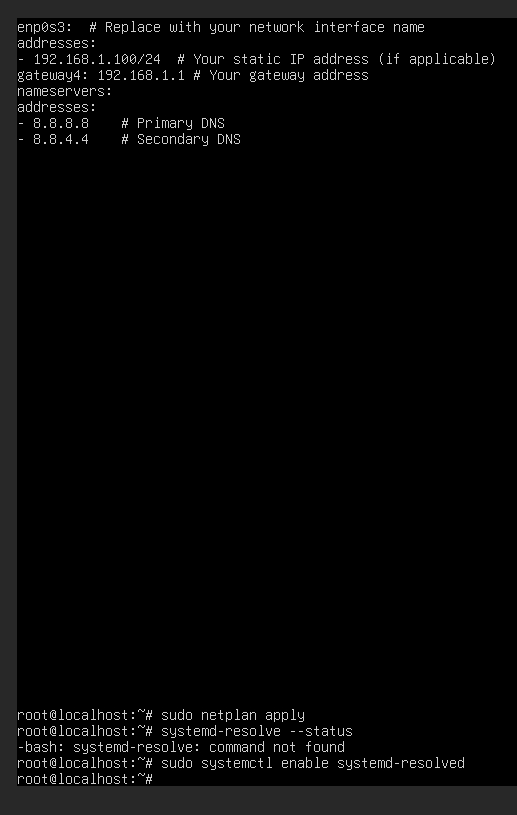
nameserverssection under the relevant interface. Your file might look like this:network: version: 2 ethernets: enp0s3: # Replace with your network interface name addresses: - 192.168.1.100/24 # Your static IP address (if applicable) gateway4: 192.168.1.1 # Your gateway address nameservers: addresses: - 8.8.8.8 # Primary DNS - 8.8.4.4 # Secondary DNS-
Replace
enp0s3with your actual network interface name, which you can find using:ip a -
Adjust the DNS servers (
8.8.8.8,8.8.4.4) to your preference.
4. Apply the Configuration
Save the file and apply the changes:
sudo netplan apply
5. Verify the DNS Configuration
Confirm that the DNS settings are applied:
systemd-resolve --statusLook for the
DNS Serversunder your active interface.
Additional Notes:
-
If you use NetworkManager (common on desktop installations), you can configure DNS through the GUI or by editing
/etc/NetworkManager/NetworkManager.conf. -
If your system uses systemd-resolved, ensure it’s enabled and running:
sudo systemctl enable systemd-resolved
sudo systemctl start systemd-resolved
This setup ensures the DNS settings persist across reboots. Let me know if you run into any issues!
-
-
-
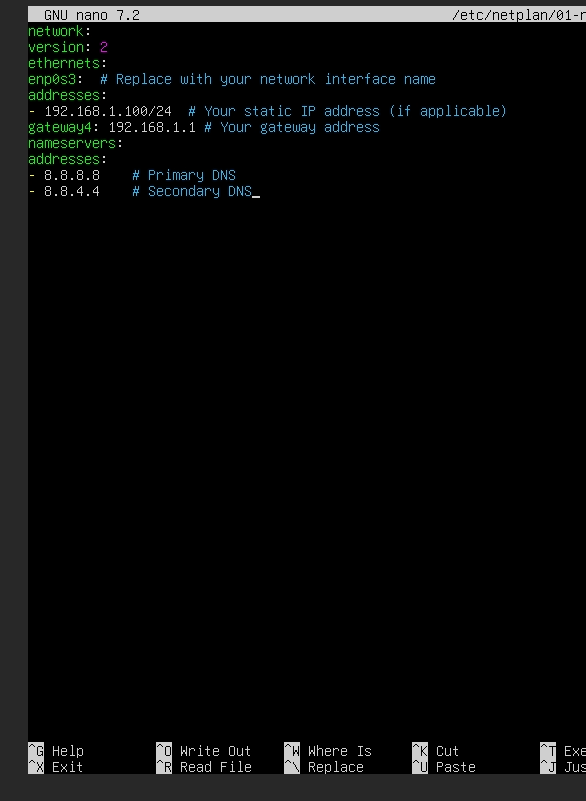
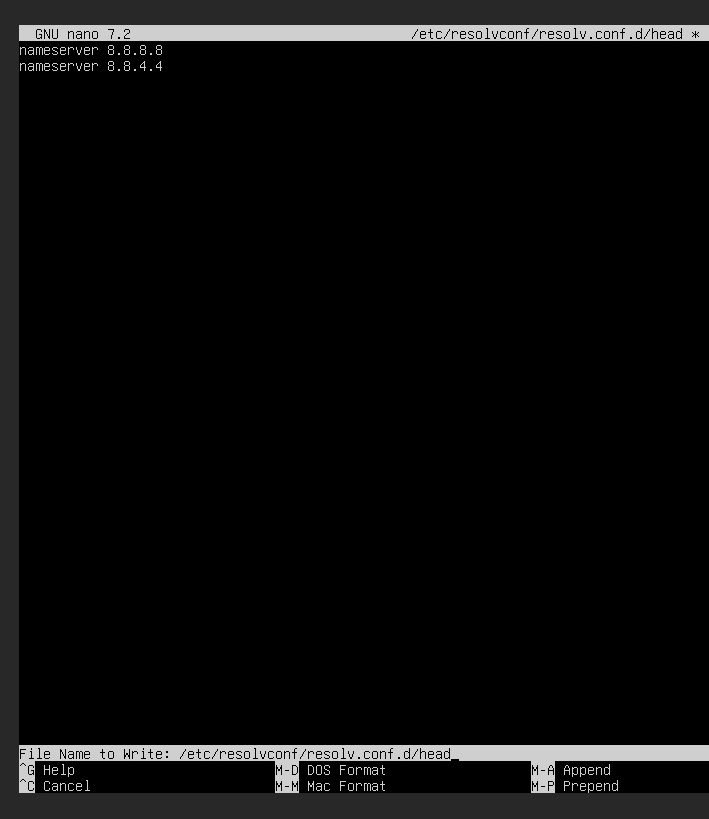
Is that right?
@abcabc123 Looks correct, yes.
-
-
-
-
What operating system, install nodebb forum is the best
@abcabc123 What happened to the build I completed yesterday? Have you erased it? If you have, I will not be rebuilding it again for you as this is not what this site is for. I am more than happy to provide assistance, but that does not extend to setting up and maintaining your instance for you.
Ubuntu is not complicated at all, but like all new technologies you are not conversant with, there is a learning curve, and you need to be prepared to invest the time in order to become comfortable with the system.
The approved build documentation can be found here
Mark Cutting also advises organisations as a Fractional CIO, Fractional CISO and Executive Advisor, helping boards improve technology governance, cyber resilience and executive decision making. Learn more at Gratmore Ltd
-
-
-
I think it’s most stable to install .nodebb with Ubuntu 22.04
@abcabc123 Ok, but make sure you go for the LTS version which is supported up until 2027. At some point, you will need to familiarise yourself with Ubuntu and Linux in general as you will not be able to support your NodeBB installation without that knowledge.
-
@abcabc123 What happened to the build I completed yesterday? Have you erased it? If you have, I will not be rebuilding it again for you as this is not what this site is for. I am more than happy to provide assistance, but that does not extend to setting up and maintaining your instance for you.
Ubuntu is not complicated at all, but like all new technologies you are not conversant with, there is a learning curve, and you need to be prepared to invest the time in order to become comfortable with the system.
The approved build documentation can be found here

@phenomlab said in Ubuntu 22.04 to Ubuntu 24.04 Unable to ping:
What happened to the build I completed yesterday? Have you erased it? If you have, I will not be rebuilding it again for you as this is not what this site is for. I am more than happy to provide assistance, but that does not extend to setting up and maintaining your instance for you.
you surprise me

-
-
I use Ubuntu 22.04, can it help me to install, I really won’t install.
@abcabc123 Ubuntu 22.04 is fully supported so the installation will work fine if you follow the guide from NodeBB themselves IO posted earlier.
-
-
I tested it just now and it didn’t install successfully. Can you help me with the installation
@abcabc123 What part did not work? Did you use the guide?
-
-
-
The order is wrong, and there are some explanations that I don’t understand.
@abcabc123 the order isn’t wrong. I followed it yesterday step by step and it worked fine.
-
Do you have time to help me install now
@abcabc123 unfortunately, no.
-

Hello! It looks like you're interested in this conversation, but you don't have an account yet.
Getting fed up of having to scroll through the same posts each visit? When you register for an account, you'll always come back to exactly where you were before, and choose to be notified of new replies (either via email, or push notification). You'll also be able to save bookmarks and upvote posts to show your appreciation to other community members.
With your input, this post could be even better 💗
Register LoginRelated Topics
-
-
-
-

Ubuntu Upgrade All Packages
Solved Linux -
-
-
-