Skip to content

Avoid network traffic jam with BBR

Linux
2 2 847 1
  • From time to time, here or there, we see subjects flourish on an abnormally limited speed in FTP.
    To overcome this kind of slowdown, simply activate the TCP BBR protocol

    Without going into details, this protocol makes it possible to make better use of the bandwidth available during the exchange of TCP packets. Created by Google, you can find more information here.

    Integrated into the Linux Kernel since version 4.9, all you have to do to activate it is to edit the kernel parameters (/etc/sysctl.conf) and add :

    net.ipv4.tcp_congestion_control = bbr
    net.core.default_qdisc = fq
    

    A TCP command acting in both IPv4 and v6,

    save and load with :

    sudo sysctl -p
    

    And we go from a restricted FTP speed
    crazy 🙂

    If you are under Proxmox or ESXi, this must be done both on the host and in the VM/CT.

  • DownPWundefined DownPW marked this topic as a regular topic on
  • From time to time, here or there, we see subjects flourish on an abnormally limited speed in FTP.
    To overcome this kind of slowdown, simply activate the TCP BBR protocol

    Without going into details, this protocol makes it possible to make better use of the bandwidth available during the exchange of TCP packets. Created by Google, you can find more information here.

    Integrated into the Linux Kernel since version 4.9, all you have to do to activate it is to edit the kernel parameters (/etc/sysctl.conf) and add :

    net.ipv4.tcp_congestion_control = bbr
    net.core.default_qdisc = fq
    

    A TCP command acting in both IPv4 and v6,

    save and load with :

    sudo sysctl -p
    

    And we go from a restricted FTP speed
    crazy 🙂

    If you are under Proxmox or ESXi, this must be done both on the host and in the VM/CT.

    @DownPW interesting. Does this have any effect on data transfers over SCP


Related Topics
  • To the Window to the Linux . . .

    Pinned Linux arch linux windows endoflife
    22
    19 Votes
    22 Posts
    2k Views
    @phenomlab said: @Madchatthew ouch. Sounds nasty. Did you get to the bottom of why it happened? I believe it is due to not everything getting upgraded because i wasn’t checking on the different packages I had installed from the AUR. Then when I ran yay it was like, hey would you like to update all of these things that you haven’t updated in months, perhaps years or ever for that matter and I was like yes please If you don’t have yay there are no notifications that you need more updates than what you realize. Chrome was staying updated because it would give me a notification, but there was the nvidia package that needed to be upgraded as well and I had never upgraded it. I didn’t realize it and should have. Then some of those packages use cmake and that needed to be updated as well. So using yay is beneficial to make sure you get all the updates you need.
  • Arch Linux | Reflector

    Linux arch linux pacman reflector updates
    4
    4 Votes
    4 Posts
    2k Views
    I have another update for reflector that I just figured out. You will want to edit the following file and add details to make sure that every time it updates the mirror list, it is grabbing them from your country and I grab 10 and sort them by rate. This will ensure that your mirrorlist isn’t getting populated with links from other countries which can slow down you downloads. sudo nano /etc/xdg/reflector/reflector.conf This is what the file looks like. # Reflector configuration file for the systemd service. # # Empty lines and lines beginning with "#" are ignored. All other lines should # contain valid reflector command-line arguments. The lines are parsed with # Python's shlex modules so standard shell syntax should work. All arguments are # collected into a single argument list. # # See "reflector --help" for details. # Recommended Options # Set the output path where the mirrorlist will be saved (--save). --save /etc/pacman.d/mirrorlist # Select the transfer protocol (--protocol). --protocol https # Select the country (--country). # Consult the list of available countries with "reflector --list-countries" and # select the countries nearest to you or the ones that you trust. For example: --country US # Use only the most recently synchronized mirrors (--latest). --latest 10 # Sort the mirrors by synchronization time (--sort). --sort rate Here are the different flag options that you can change or add to this file. I found this on google by searching arch linux reflector flags. Filtering Options (What to find) --country <CODE/Name>: Selects mirrors from specific countries (e.g., US, France,Germany). Use {Link: reflector --list-countries https://archlinux.org/mirrors/status/}, for a full list. --protocol <http|https>: Filters for HTTP or HTTPS mirrors. --age <hours>: Only includes mirrors synced within the last X hours (e.g., --age 12). --delay <hours>: Limits to mirrors with a reported sync delay of X hours or less (e.g., --delay 0.25 for 15 mins). --latest <N>: Limits results to the top N newest mirrors. Sorting Options (How to order) --sort rate: Sorts by download speed (requires testing, can be slow). --sort age: Sorts by most recently synced. --sort score: Sorts by overall score. --sort country: Sorts by country, useful with multiple countries. Output Options (Where to put it) --save <path>: Writes the filtered/sorted list to a file (e.g., /etc/pacman.d/mirrorlist). --verbose or -v: Shows detailed progress and mirror info.
  • Ubuntu 22.04 to Ubuntu 24.04 Unable to ping

    Locked Unsolved Linux ubuntu
    37
    3 Votes
    37 Posts
    6k Views
    Okay, you have time, let me know
  • Linux Certification

    Linux linux certs
    4
    2 Votes
    4 Posts
    787 Views
    @Madchatthew You might be sorry you asked This is the mentoring category below. Presently, it’s unused, but we have a dedicated area for it. https://sudonix.org/category/8/mentoring Other services https://sudonix.org/services
  • 3 Votes
    30 Posts
    5k Views
    @DownPW any update?
  • Error certification on virtualmin/Nginx

    Solved Linux cert virtualmin nginx
    17
    2
    0 Votes
    17 Posts
    3k Views
    @DownPW anytime
  • Ubuntu Upgrade All Packages

    Solved Linux mangodb sudonix
    3
    3 Votes
    3 Posts
    877 Views
    @phenomlab Upgraded, everything works
  • Testing out Webdock.io

    Moved Announcements webdock recovery speed
    2
    5
    5 Votes
    2 Posts
    1k Views
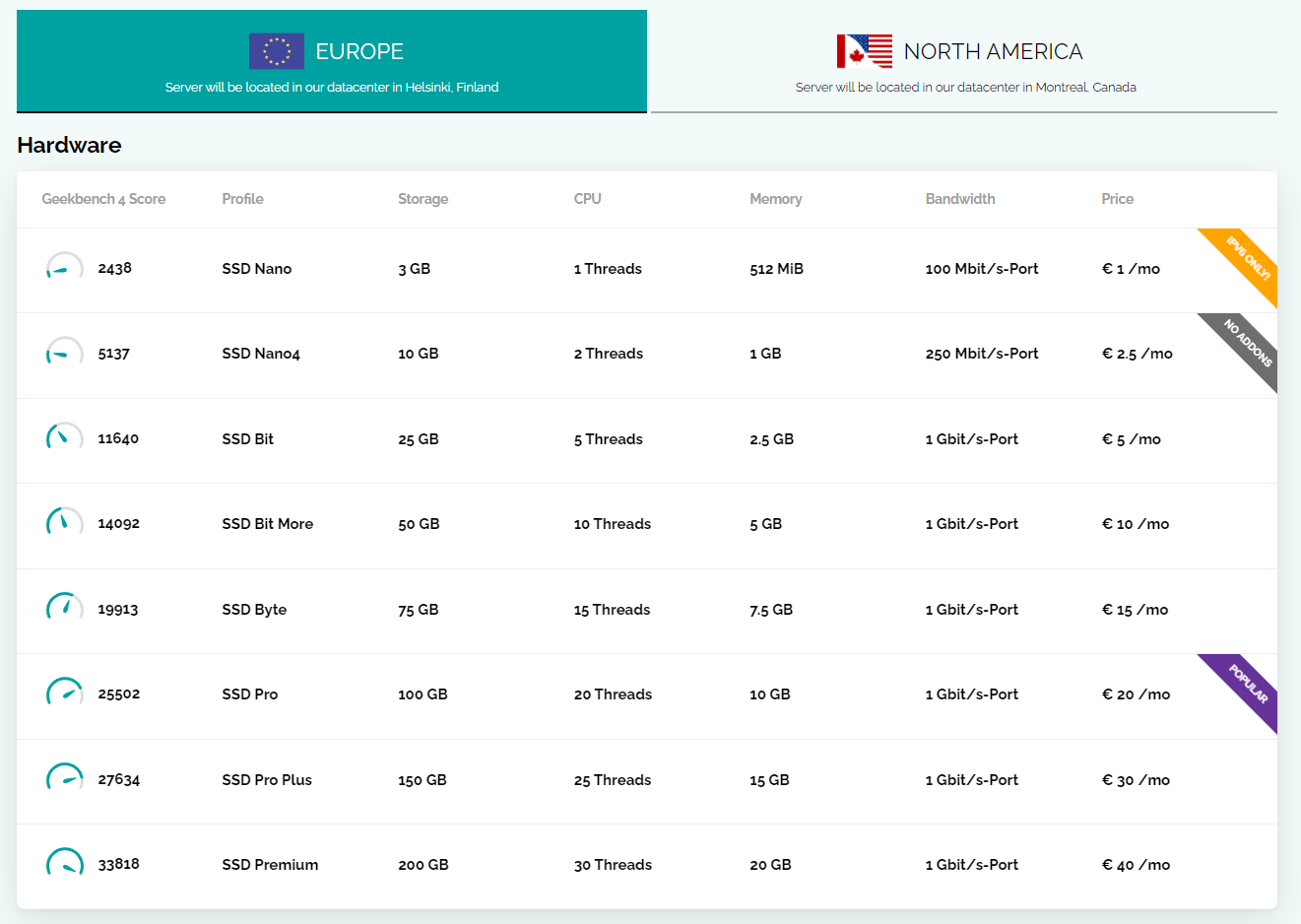
    Just coming back to this thread for review (as I often do), and it looks like Webdock have increased their available offerings - some are extremely powerful, yet very competitive from the pricing perspective. [image: 1692559685163-7cf9a928-ac21-44fe-99c6-90439030d631-image.png] 10 CPU cores, plus 20Gb RAM? Well worth a look (and the asking price) - there’s also a fixed IP which is hugely beneficial. Clearly, this is well beyond what most people will want to spend - it’s more of an example (but interestingly, Sudonix runs on something not too different from the above). However, not all that glitters is gold - just have a walk through the benchmark report I found below and you’ll see a huge difference between Heztner and Webdock https://www.vpsbenchmarks.com/compare/hetzner_vs_webdock That being said, the amount of HTTP requests that Webdock handles in relation to Hetzner is superior - @DownPW you might want to have a look at this - there’s a free 24 hour trial… [image: 1692560710486-5203639b-2f62-47e6-b87b-37580ce5deae-image.png]