Need help with ping in linux
-
Unable to ping ip or host in linux
I get this error
ping: sendmsg: Operation not permitted
I tried all the solutions listed on google none of them worked for me can anyone help me ping work in my ubuntu? -
Unable to ping ip or host in linux
I get this error
ping: sendmsg: Operation not permitted
I tried all the solutions listed on google none of them worked for me can anyone help me ping work in my ubuntu?
@linuxbeginner Are you attempting to ping an IP address, or a hostname ?
Mark Cutting also advises organisations as a Fractional CIO, Fractional CISO and Executive Advisor, helping boards improve technology governance, cyber resilience and executive decision making. Learn more at Gratmore Ltd
-
@linuxbeginner Are you attempting to ping an IP address, or a hostname ?
@phenomlab both same error
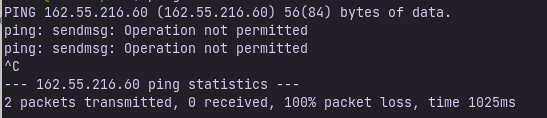
This is what I get when I ping ip
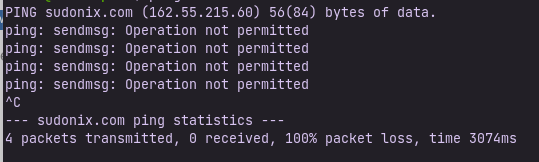
and when I ping host then this
-
@phenomlab both same error
This is what I get when I ping ip
and when I ping host then this
@linuxbeginner Can you provide the output of
iptables -L? It sounds very much like you are using SELINUX - which OS ?Mark Cutting also advises organisations as a Fractional CIO, Fractional CISO and Executive Advisor, helping boards improve technology governance, cyber resilience and executive decision making. Learn more at Gratmore Ltd
-
@linuxbeginner Can you provide the output of
iptables -L? It sounds very much like you are using SELINUX - which OS ?@phenomlab I am using ZorinOS 16 based on ubuntu and I have just uninstalled iptables.
-
@phenomlab I am using ZorinOS 16 based on ubuntu and I have just uninstalled iptables.
@linuxbeginner Typically, this means that you are not allowed to send ICMP packets. Are you sure you have removed iptables ?
Mark Cutting also advises organisations as a Fractional CIO, Fractional CISO and Executive Advisor, helping boards improve technology governance, cyber resilience and executive decision making. Learn more at Gratmore Ltd
-
@linuxbeginner Typically, this means that you are not allowed to send ICMP packets. Are you sure you have removed iptables ?
@phenomlab Yes sir I removed it with sudo apt remove iptables
see
-
@phenomlab Yes sir I removed it with sudo apt remove iptables
see
@linuxbeginner Try
sudo apt install --reinstall iputils-pingand then re-tryMark Cutting also advises organisations as a Fractional CIO, Fractional CISO and Executive Advisor, helping boards improve technology governance, cyber resilience and executive decision making. Learn more at Gratmore Ltd
-
@linuxbeginner Try
sudo apt install --reinstall iputils-pingand then re-try -
@phenomlab Still same issue.
@linuxbeginner Are you using a VPN ?
Mark Cutting also advises organisations as a Fractional CIO, Fractional CISO and Executive Advisor, helping boards improve technology governance, cyber resilience and executive decision making. Learn more at Gratmore Ltd
-
@linuxbeginner Are you using a VPN ?
@phenomlab I was using cloudflare warp now I disabled it but still the same issue.
-
@phenomlab I was using cloudflare warp now I disabled it but still the same issue.
@linuxbeginner It’s not disabled. The IP address you logged in from here belongs to Cloudflare, so it’s still connected
Mark Cutting also advises organisations as a Fractional CIO, Fractional CISO and Executive Advisor, helping boards improve technology governance, cyber resilience and executive decision making. Learn more at Gratmore Ltd
-
@linuxbeginner It’s not disabled. The IP address you logged in from here belongs to Cloudflare, so it’s still connected
@phenomlab It’s disabled I checked on whatismyip and it is showing correct location now.
-
@phenomlab It’s disabled I checked on whatismyip and it is showing correct location now.
@linuxbeginner Then really the only thing we have left is permissions.
Try
sudo chmod 4711 /usr/bin/pingthen attempt the ping againMark Cutting also advises organisations as a Fractional CIO, Fractional CISO and Executive Advisor, helping boards improve technology governance, cyber resilience and executive decision making. Learn more at Gratmore Ltd
-
@linuxbeginner Then really the only thing we have left is permissions.
Try
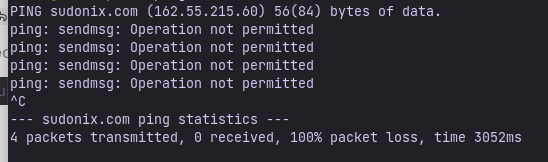
sudo chmod 4711 /usr/bin/pingthen attempt the ping again@phenomlab Still same
-
Note to everyone else here. This user was formally banned from metabullet.com for abusing the service, and as a result, has been banned here also. Quite why this person thought it was ok to come here under the guise of an account he’d previously used at metabullet.com and hope I wouldn’t notice is beyond me.
If you abuse my services once, you won’t get to use them again - period.
As a reminder, the policies surrounding this service, and it’s usage can be found here
-
phenomlab locked this topic on
Hello! It looks like you're interested in this conversation, but you don't have an account yet.
Getting fed up of having to scroll through the same posts each visit? When you register for an account, you'll always come back to exactly where you were before, and choose to be notified of new replies (either via email, or push notification). You'll also be able to save bookmarks and upvote posts to show your appreciation to other community members.
With your input, this post could be even better 💗
Register LoginRelated Topics
-
-
-

Ubuntu 22.04 to Ubuntu 24.04 Unable to ping
Locked Unsolved Linux -
-
-
-
-