[NodeBB] Auto assign a label or group title
-
Hello there

I would like to automatically assign a label/or several (group title) for new users with a validated account
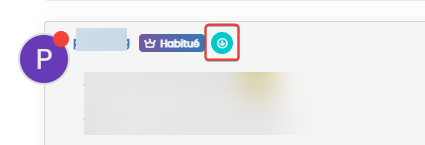
Like this all registered users will have at least one

It’s possible to do that ?
many thanks to the communauty

PW and WS Spirit alive
-
@phenomlab said in [NodeBB] Auto assign a label or group title:
@DownPW I’m almost positive there used to be a plugin that performed exactly this task, but I can’t seem to locate it within
npm. I expect you could (relatively easily) perform this function by listening to the registration hook and leveraging that to add the user to a group programmatically, although this would need some development and testingOk thanks for your answer @phenomlab
I will rather look for a plugin allowing me to do it because I don’t have time to develop this function.
I’ll keep you posted on my research
– >In fact, all my users are already in a group called “all”
What interests me the most is to automatically assign the group label in the user profile
Resolve
since all users are in this group by default. I just had to put this group in non-private and check the display of the badge.
By default, NodeBB displays the user’s default group label unless the user changes it himself
PW and WS Spirit alive
-
Hello there
I would like to automatically assign a label/or several (group title) for new users with a validated account
Like this all registered users will have at least one
It’s possible to do that ?
many thanks to the communauty
@DownPW I’m almost positive there used to be a plugin that performed exactly this task, but I can’t seem to locate it within
npm. I expect you could (relatively easily) perform this function by listening to the registration hook and leveraging that to add the user to a group programmatically, although this would need some development and testingMark Cutting also advises organisations as a Fractional CIO, Fractional CISO and Executive Advisor, helping boards improve technology governance, cyber resilience and executive decision making. Learn more at Phenomlab Ltd
-
@DownPW I’m almost positive there used to be a plugin that performed exactly this task, but I can’t seem to locate it within
npm. I expect you could (relatively easily) perform this function by listening to the registration hook and leveraging that to add the user to a group programmatically, although this would need some development and testing@phenomlab said in [NodeBB] Auto assign a label or group title:
@DownPW I’m almost positive there used to be a plugin that performed exactly this task, but I can’t seem to locate it within
npm. I expect you could (relatively easily) perform this function by listening to the registration hook and leveraging that to add the user to a group programmatically, although this would need some development and testingOk thanks for your answer @phenomlab
I will rather look for a plugin allowing me to do it because I don’t have time to develop this function.
I’ll keep you posted on my research
– >In fact, all my users are already in a group called “all”
What interests me the most is to automatically assign the group label in the user profile
PW and WS Spirit alive
-
 undefined phenomlab marked this topic as a regular topic on
-
@phenomlab said in [NodeBB] Auto assign a label or group title:
@DownPW I’m almost positive there used to be a plugin that performed exactly this task, but I can’t seem to locate it within
npm. I expect you could (relatively easily) perform this function by listening to the registration hook and leveraging that to add the user to a group programmatically, although this would need some development and testingOk thanks for your answer @phenomlab
I will rather look for a plugin allowing me to do it because I don’t have time to develop this function.
I’ll keep you posted on my research
– >In fact, all my users are already in a group called “all”
What interests me the most is to automatically assign the group label in the user profile
Resolve
since all users are in this group by default. I just had to put this group in non-private and check the display of the badge.
By default, NodeBB displays the user’s default group label unless the user changes it himself
PW and WS Spirit alive
-
 undefined DownPW marked this topic as a question on
-
undefined DownPW has marked this topic as solved on
-
Resolve
since all users are in this group by default. I just had to put this group in non-private and check the display of the badge.
By default, NodeBB displays the user’s default group label unless the user changes it himself
@DownPW very useful tip. Thanks
Hello! It looks like you're interested in this conversation, but you don't have an account yet.
Getting fed up of having to scroll through the same posts each visit? When you register for an account, you'll always come back to exactly where you were before, and choose to be notified of new replies (either via email, or push notification). You'll also be able to save bookmarks and upvote posts to show your appreciation to other community members.
With your input, this post could be even better 💗
Register LoginDid this solution help you?
Related Topics
-
Nodebb to Xenforo
Solved Configure -
-
-
-
-
-
-
NodeBB Footer
Solved Customisation