Skip to content

NodeBB recent cards customisation

Solved Customisation
3 2 713 1
  • Hi Mark,

    I’m trying to customise the nodebb-plugin-recent-cards widget that I have on my forum, I would like it to show … at the end of box so it doesn’t look so untidy, is this something that’s possible?
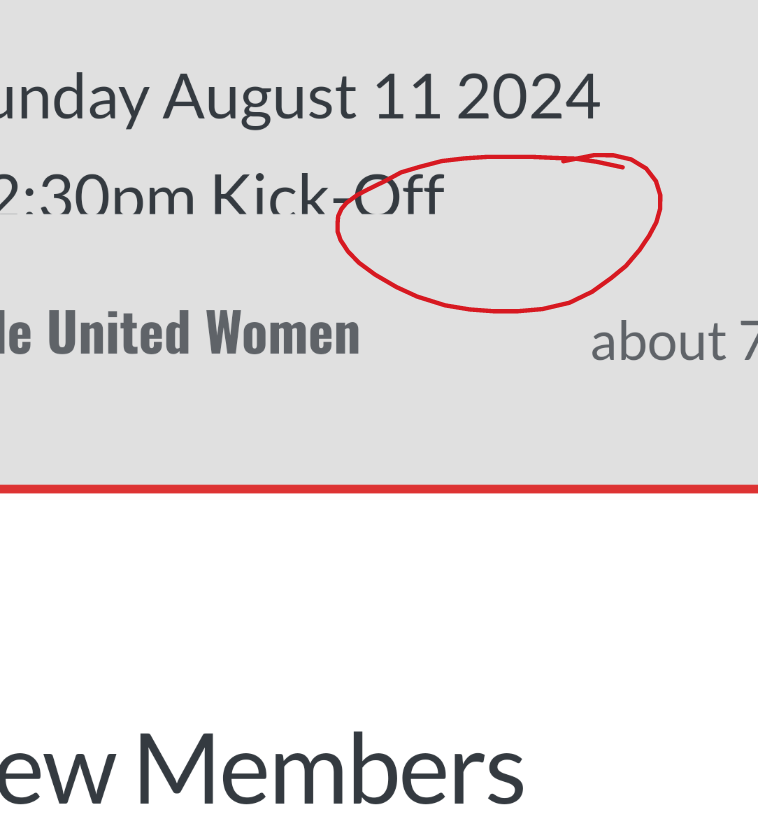
    1000003024.png

    Thanks as always 😃

  • Hi Mark,

    I’m trying to customise the nodebb-plugin-recent-cards widget that I have on my forum, I would like it to show … at the end of box so it doesn’t look so untidy, is this something that’s possible?

    1000003024.png

    Thanks as always 😃

    @JAC I’ve added this CSS block on your site

    .recent-cards-plugin .topic-info {
        height: 8em;
        display: -webkit-box;
        max-width: 200px;
        -webkit-line-clamp: 4;
        -webkit-box-orient: vertical;
        overflow: hidden;
    }
    

    This yields the below
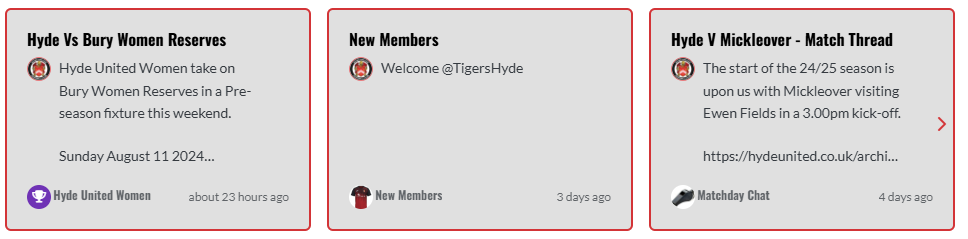
    0da353a7-2d5f-4014-9ab7-aa3a4095b6e4-image.png

  • phenomlabundefined phenomlab has marked this topic as solved on
  • @JAC I’ve added this CSS block on your site

    .recent-cards-plugin .topic-info {
        height: 8em;
        display: -webkit-box;
        max-width: 200px;
        -webkit-line-clamp: 4;
        -webkit-box-orient: vertical;
        overflow: hidden;
    }
    

    This yields the below

    0da353a7-2d5f-4014-9ab7-aa3a4095b6e4-image.png

    @phenomlab thank you very much for the assistance Mark, massively appreciated as always.

    The great thing about this is it’s all documented for other NodeBB users that come looking for solutions 😃.

    Looks far better 🤝👍🏻.


Did this solution help you?
Did you find the suggested solution useful? Support 💗 Sudonix with a coffee
If your organisation needs deeper expertise around infrastructure, security, or technology leadership, learn more about Phenomlab Ltd. Many of the deeper technical guides behind Sudonix are published there.

Related Topics
  • Difficult to move posts now, on mobile.

    Bugs nodebb
    16
    1
    5 Votes
    16 Posts
    3k Views
    @DownPW Yes, it is. It’s set far too low meaning other elements with a higher preference will sit over the top of it.
  • Changing Background on NodeBB

    Solved Customisation background image nodebb
    4
    0 Votes
    4 Posts
    1k Views
    @cagatay You’d target the body tag and use the below line of CSS background: url(/assets/customcss/backgrounds/default/default.png) no-repeat center center fixed; Obviously, you need to change the path to suit where your image is being stored. More info around the background property can be found here https://www.w3schools.com/cssref/css3_pr_background.php
  • NodeBB metadata

    Solved Configure nodebb
    4
    2 Votes
    4 Posts
    1k Views
    @phenomlab said in NodeBB metadata: @jac Are you sure ? https://www.google.co.uk/search?q=site%3Astockportcounty.fans&sxsrf=AOaemvLwnaZL-PliU_2dBOg_Eo1pMVhBjg%3A1638982328139&source=hp&ei=uOKwYeatBcOsad3yp7AE&iflsig=ALs-wAMAAAAAYbDwyLBSDcG5XYoFCKwQFhgz94wTxOcV&ved=0ahUKEwjm6dX71NT0AhVDVhoKHV35CUYQ4dUDCAk&uact=5&oq=site%3Astockportcounty.fans&gs_lcp=Cgdnd3Mtd2l6EAM6BAgjECc6CwgAEIAEELEDEIMBOg4ILhCABBCxAxDHARCjAjoRCC4QgAQQsQMQgwEQxwEQowI6BQguEIAEOggIABCABBCxAzoFCAAQgAQ6CAguELEDEIMBOgsILhCABBDHARCvAToICC4QgAQQsQM6BQgAELEDOgsILhCABBDHARDRAzoLCAAQgAQQsQMQyQM6BQgAEJIDUABYySZg0CdoAHAAeACAAW2IAa0NkgEEMjMuMpgBAKABAQ&sclient=gws-wiz Fair enough 🤪🤪.
  • Iframely (Nodebb)

    Solved Configure
    40
    4 Votes
    40 Posts
    7k Views
    @DownPW This is now resolved. The issue was an incorrect URL specified in the Nodebb plugin. I’ve corrected this, and now it works as intended.
  • NodeBB Design help

    Solved Customisation
    8
    3
    2 Votes
    8 Posts
    2k Views
    @riekmedia I’ve applied some new CSS to your site. Can you reload the page and try again ? For the record, this is what I added #footer { background: #2d343e; border-top: 4px solid #2d343e; font-size: 0.9em; margin-top: 70px; padding: 80px 0 0; position: relative; clear: both; bottom: 0; left: 0; right: 0; z-index: 1000; margin-left: -15px; margin-right: -338px; } The /categories page seems a bit messed up, so looking at that currently EDIT - issued some override CSS in the CATEGORIES widget <!--- CSS fix for overspill on /categories page - DO NOT DELETE --> <style> #footer { margin-right: -45px; } </style> That should resolve the /categories issue.
  • How to set a signature in NodeBB?

    Solved Customisation
    4
    2 Votes
    4 Posts
    1k Views
    @phenomlab said in How to set a signature in NodeBB?: @jac No issues at all with copying. This is set using the signature for the user you are posting as. In the case of Hostrisk, it’s set like the below [image: 1633427929198-7bf04183-f6e8-4d72-b0eb-c9a05c9cd24b-image.png] You can set the signature by using https://domain.com/user/theuser/edit Mamy thanks Mark, I’ll set this up later .
  • unable to upvote on forum

    Solved Performance
    10
    1
    3 Votes
    10 Posts
    2k Views
    @phenomlab yes, i can understand. it is working now
  • NodeBB customisation

    Locked Customisation
    332
    27 Votes
    332 Posts
    134k Views
    @jac Given your departure away from your previous project, I’m going to close this thread…