Skip to content

NodeBB recent cards customisation

Solved Customisation
3 2 713 1
  • Hi Mark,

    I’m trying to customise the nodebb-plugin-recent-cards widget that I have on my forum, I would like it to show … at the end of box so it doesn’t look so untidy, is this something that’s possible?
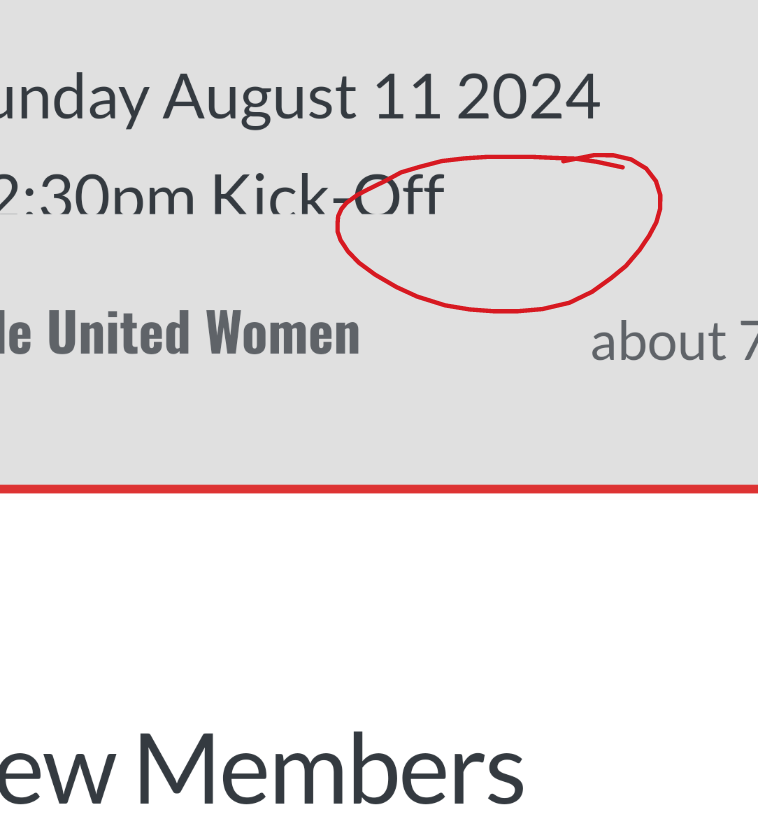
    1000003024.png

    Thanks as always 😃

  • Hi Mark,

    I’m trying to customise the nodebb-plugin-recent-cards widget that I have on my forum, I would like it to show … at the end of box so it doesn’t look so untidy, is this something that’s possible?

    1000003024.png

    Thanks as always 😃

    @JAC I’ve added this CSS block on your site

    .recent-cards-plugin .topic-info {
        height: 8em;
        display: -webkit-box;
        max-width: 200px;
        -webkit-line-clamp: 4;
        -webkit-box-orient: vertical;
        overflow: hidden;
    }
    

    This yields the below
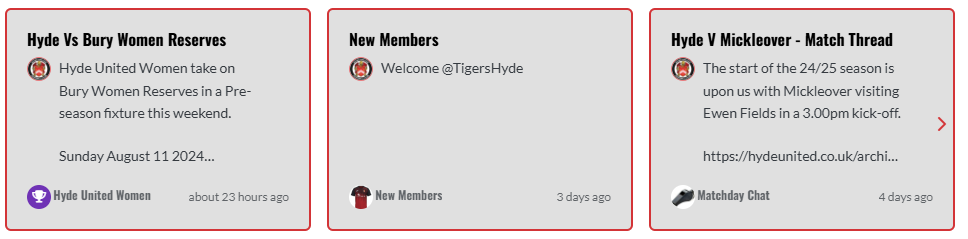
    0da353a7-2d5f-4014-9ab7-aa3a4095b6e4-image.png

  • phenomlabundefined phenomlab has marked this topic as solved on
  • @JAC I’ve added this CSS block on your site

    .recent-cards-plugin .topic-info {
        height: 8em;
        display: -webkit-box;
        max-width: 200px;
        -webkit-line-clamp: 4;
        -webkit-box-orient: vertical;
        overflow: hidden;
    }
    

    This yields the below

    0da353a7-2d5f-4014-9ab7-aa3a4095b6e4-image.png

    @phenomlab thank you very much for the assistance Mark, massively appreciated as always.

    The great thing about this is it’s all documented for other NodeBB users that come looking for solutions 😃.

    Looks far better 🤝👍🏻.


Did this solution help you?
Did you find the suggested solution useful? Support 💗 Sudonix with a coffee
If your organisation needs deeper expertise around infrastructure, security, or technology leadership, learn more about Phenomlab Ltd. Many of the deeper technical guides behind Sudonix are published there.

Related Topics
  • Difficult to move posts now, on mobile.

    Bugs nodebb
    16
    1
    5 Votes
    16 Posts
    3k Views
    @DownPW Yes, it is. It’s set far too low meaning other elements with a higher preference will sit over the top of it.
  • Upgrade Problem from 2.8.3 to 2.8.4

    Solved Configure nodebb
    35
    1
    8 Votes
    35 Posts
    6k Views
    @cagatay No, you can ignore that.
  • 1 Votes
    5 Posts
    1k Views
    @DownPW very useful tip. Thanks
  • who is read NodeBB

    Customisation read post nodebb
    6
    0 Votes
    6 Posts
    1k Views
    @cagatay You should ask in the NodeBB forums. Perhaps reference this post https://discuss.flarum.org/d/23066-who-read
  • Top Ranked Forums

    Chitchat nodebb top ranked
    9
    1
    3 Votes
    9 Posts
    2k Views
    The real issue here is that most people consider forums to be “dead” in the sense that nobody uses them anymore, and social media groups have taken their place. Their once dominant stance in the 90’s and early 00’s will never be experienced again, but having said that, there are a number of forums that did in fact survive the social media onslaught, and still enjoy a large user base. Forums tend to be niche. One that immediately sticks out is Reddit - despite looking like it was designed in the 80s, it still has an enormous user base. Another is Stack Overflow, which needs no introduction. The key to any forum is the content it offers, and the more people whom contribute in terms of posting , the more popular and widely respected it becomes as a reliable source of information. Forums are still intensely popular with gamers, alongside those that offer tips on hacking etc.
  • Changing Background on NodeBB

    Solved Customisation background image nodebb
    4
    0 Votes
    4 Posts
    1k Views
    @cagatay You’d target the body tag and use the below line of CSS background: url(/assets/customcss/backgrounds/default/default.png) no-repeat center center fixed; Obviously, you need to change the path to suit where your image is being stored. More info around the background property can be found here https://www.w3schools.com/cssref/css3_pr_background.php
  • Plugin reaction Bug

    Solved Customisation plugin nodebb reaction
    15
    1
    0 Votes
    15 Posts
    3k Views
    @DownPW That was going to be my next suggestion
  • nodebb dropdown menu

    Solved Configure nodebb
    5
    1
    0 Votes
    5 Posts
    1k Views
    @phenomlab said in nodebb dropdown menu: @kurulumu-net You set it like the below example taken from this site [image: 1637939951821-aae36790-3257-4bb2-ad5a-0d744309876a-image.png] Which presents this [image: 1637939983445-77f47260-2941-4afe-9614-8e17dcfc8c19-image.png] Very interesting… I actually thought this wasn’t possible, as I remember it being asked in the NodeBB forum. Is this something new that’s been implemented? I’ll 100% be doing that when I’m on the laptop over the weekend.