Skip to content

NodeBB recent cards customisation

Solved Customisation
3 2 713 1
  • Hi Mark,

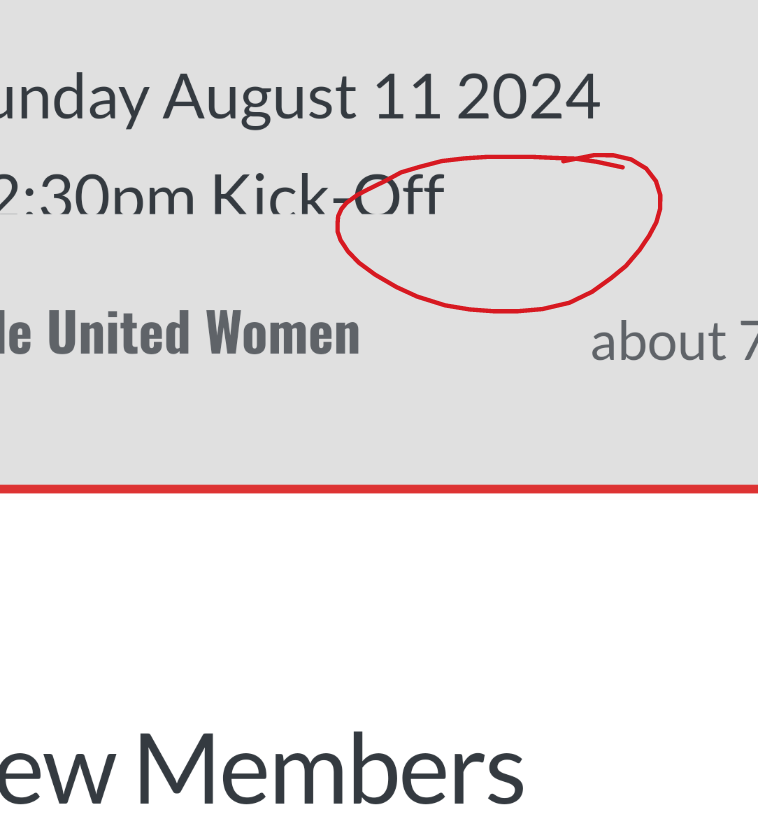
    Iโ€™m trying to customise the nodebb-plugin-recent-cards widget that I have on my forum, I would like it to show โ€ฆ at the end of box so it doesnโ€™t look so untidy, is this something thatโ€™s possible?

    1000003024.png

    Thanks as always ๐Ÿ˜ƒ

  • Hi Mark,

    Iโ€™m trying to customise the nodebb-plugin-recent-cards widget that I have on my forum, I would like it to show โ€ฆ at the end of box so it doesnโ€™t look so untidy, is this something thatโ€™s possible?

    1000003024.png

    Thanks as always ๐Ÿ˜ƒ

    @JAC Iโ€™ve added this CSS block on your site

    .recent-cards-plugin .topic-info {
        height: 8em;
        display: -webkit-box;
        max-width: 200px;
        -webkit-line-clamp: 4;
        -webkit-box-orient: vertical;
        overflow: hidden;
    }
    

    This yields the below
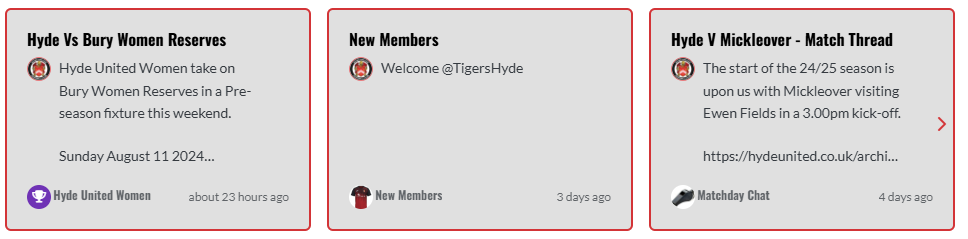
    0da353a7-2d5f-4014-9ab7-aa3a4095b6e4-image.png

  • phenomlabundefined phenomlab has marked this topic as solved on
  • @JAC Iโ€™ve added this CSS block on your site

    .recent-cards-plugin .topic-info {
        height: 8em;
        display: -webkit-box;
        max-width: 200px;
        -webkit-line-clamp: 4;
        -webkit-box-orient: vertical;
        overflow: hidden;
    }
    

    This yields the below

    0da353a7-2d5f-4014-9ab7-aa3a4095b6e4-image.png

    @phenomlab thank you very much for the assistance Mark, massively appreciated as always.

    The great thing about this is itโ€™s all documented for other NodeBB users that come looking for solutions ๐Ÿ˜ƒ.

    Looks far better ๐Ÿค๐Ÿ‘๐Ÿป.


Did this solution help you?
Did you find the suggested solution useful? Support ๐Ÿ’— Sudonix with a coffee โ˜•
If your organisation needs deeper expertise around infrastructure, security, or technology leadership, learn more about Phenomlab Ltd. Many of the deeper technical guides behind Sudonix are published there.

Related Topics
  • Block Domain

    Solved Let's Build It code javascript block domain nodebb
    26
    1 Votes
    26 Posts
    5k Views
    Yes ogproxy too is functionnal on dev
  • Composer Zen icon?

    Solved Configure nodebb
    8
    1
    2 Votes
    8 Posts
    1k Views
    @DownPW exactly. Not really a new concept, and in all honesty, not something Iโ€™ve ever used. If you consider the need to add links and references, or citations, youโ€™d need to be able to see other parts of the screen!
  • who is read NodeBB

    Customisation read post nodebb
    6
    0 Votes
    6 Posts
    1k Views
    @cagatay You should ask in the NodeBB forums. Perhaps reference this post https://discuss.flarum.org/d/23066-who-read
  • Forum Icons NodeBB

    Solved Customisation icons forum nodebb
    13
    0 Votes
    13 Posts
    2k Views
    @cagatay That matches what I see [image: 1667218162107-4f0f858d-9812-42b1-9f61-ffb13d31dccd-image.png]
  • NodeBB v3

    Announcements nodebb v3 nodebb
    2
    3 Votes
    2 Posts
    735 Views
    @cagatay JS will work fine - no changes there, and there are no plans to drop support for jQuery. More of an issue is the CSS - for which there are quite a few breaking changes. Keep an eye on sudonix.dev (my development site) where you can see progress in relation to how I am tackling the compatibility issues.
  • NodeBB 1.19.3

    Solved Performance nodebb 1.19.3 performance
    33
    4 Votes
    33 Posts
    9k Views
    @phenomlab I find the problem Mark The error message indicated this path : http://localhost:4567/assets/plugins/nodebb-plugin-emoji/emoji/styles.css?v=6983dobg16u I change the path url on config.json [image: 1645128773854-47bacc80-f141-41e4-a261-3f8d650cc6f6-image.png] And all itโ€™s good Weird, I didnโ€™t have to change that path before 1.19.3 But this does not prevent the problem from a clean install with Emoji Plugin EDIT: After test, that resolv the problem installation for 1.18.x but not for 1.19.x (I have other error message when I run ./nodebb Setup For resume: NodeJS 16_x with 1.18.x is ok
  • [NodeBB] Import custom Font

    Solved Customisation custom fonts nodebb css
    12
    3 Votes
    12 Posts
    3k Views
    @cagatay youโ€™ll need to define this in the body tag (or another element if you want greater or more granular targets) - for example body { font-family: "Poppins"; font-size: 16px; } Essentially, you use the font-size CSS directive.
  • [NodeBB] username cards

    Solved Customisation nodebb
    8
    5 Votes
    8 Posts
    2k Views
    @phenomlab Ahaโ€ฆnice to know. As always thank you for the reply and information.