How to downgrade plugin version on NodeBB
-
-
@cagatay Uninstall the previous version via ACP, then from the CLI, use
npm install nodebb-plugin-name@versionSo, for example
npm install nodebb-plugin-recent-cardsBecomes
npm install nodebb-plugin-recent-cards@1.0.2Mark Cutting also advises organisations as a Fractional CIO, Fractional CISO and Executive Advisor, helping boards improve technology governance, cyber resilience and executive decision making. Learn more at Phenomlab Ltd
-
 undefined phenomlab has marked this topic as solved on
-
@cagatay Uninstall the previous version via ACP, then from the CLI, use
npm install nodebb-plugin-name@versionSo, for example
npm install nodebb-plugin-recent-cardsBecomes
npm install nodebb-plugin-recent-cards@1.0.2@phenomlab thank you. by the way why you limeted 6 vote per day?

-
@phenomlab thank you. by the way why you limeted 6 vote per day?
@cagatay I thought I’d fixed that !! Will have to have another look. It’s not a limit set by me, but the extension itself.
Mark Cutting also advises organisations as a Fractional CIO, Fractional CISO and Executive Advisor, helping boards improve technology governance, cyber resilience and executive decision making. Learn more at Phenomlab Ltd
-
@cagatay I thought I’d fixed that !! Will have to have another look. It’s not a limit set by me, but the extension itself.
-
@phenomlab why solutions post repeated?
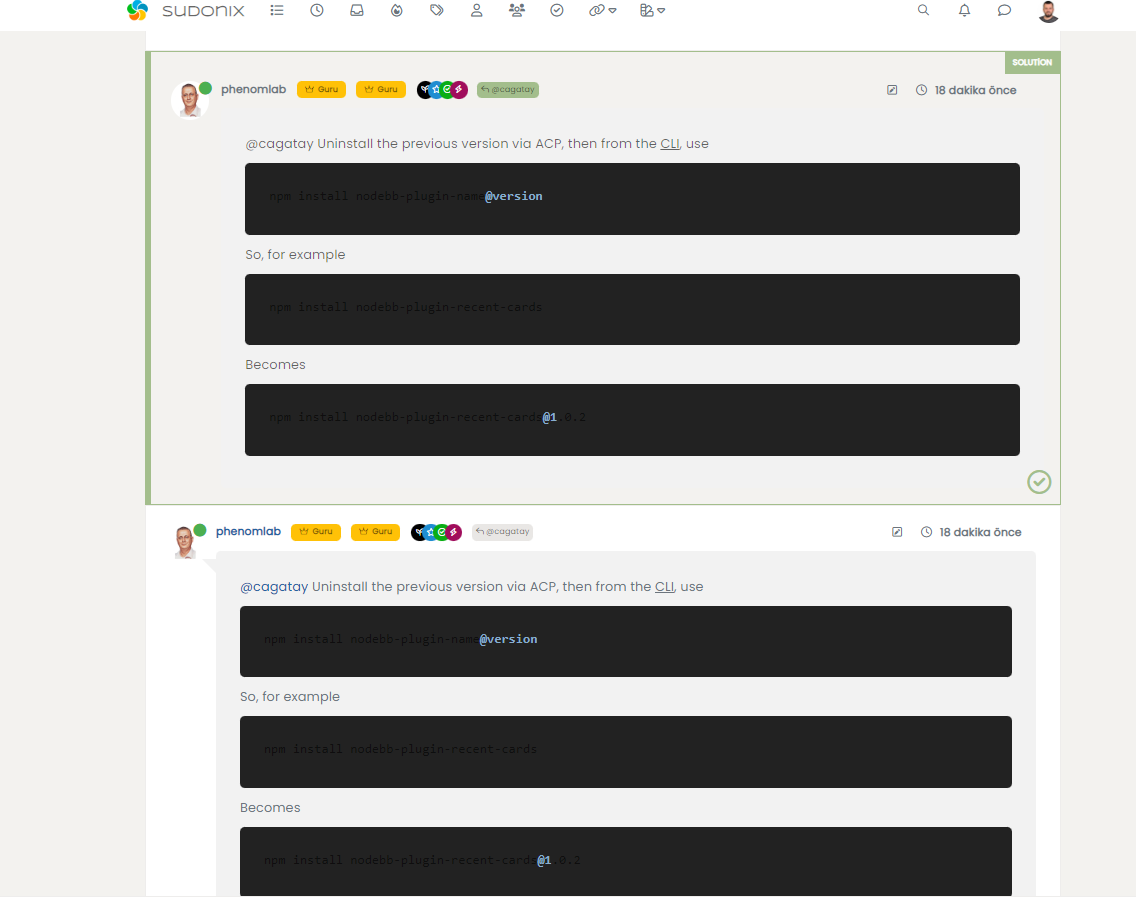
@cagatay Because the “solution” post is copied to the top of the topic. With multiple posts, it’s not simple to find. In this case, there’s only the one response, which is set as best answer, so it looks like it’s there twice.
Mark Cutting also advises organisations as a Fractional CIO, Fractional CISO and Executive Advisor, helping boards improve technology governance, cyber resilience and executive decision making. Learn more at Phenomlab Ltd
-
@cagatay Because the “solution” post is copied to the top of the topic. With multiple posts, it’s not simple to find. In this case, there’s only the one response, which is set as best answer, so it looks like it’s there twice.
@phenomlab i see.
-
@cagatay Because the “solution” post is copied to the top of the topic. With multiple posts, it’s not simple to find. In this case, there’s only the one response, which is set as best answer, so it looks like it’s there twice.
@phenomlab said in How to downgrade plugin version on NodeBB:
@cagatay Because the “solution” post is copied to the top of the topic. With multiple posts, it’s not simple to find. In this case, there’s only the one response, which is set as best answer, so it looks like it’s there twice.
How to add solution post, i m also using that plugin but i can not choose the post of solution one.
-
@phenomlab said in How to downgrade plugin version on NodeBB:
@cagatay Because the “solution” post is copied to the top of the topic. With multiple posts, it’s not simple to find. In this case, there’s only the one response, which is set as best answer, so it looks like it’s there twice.
How to add solution post, i m also using that plugin but i can not choose the post of solution one.
@cagatay you should have an option to “select this post as the best answer” in each post if
nodebb-plugin-question-answeris installedMark Cutting also advises organisations as a Fractional CIO, Fractional CISO and Executive Advisor, helping boards improve technology governance, cyber resilience and executive decision making. Learn more at Phenomlab Ltd
-
@cagatay you should have an option to “select this post as the best answer” in each post if
nodebb-plugin-question-answeris installed@phenomlab yeap find it, sorry we far from main topic

-
@phenomlab yeap find it, sorry we far from main topic
@cagatay no problems

Hello! It looks like you're interested in this conversation, but you don't have an account yet.
Getting fed up of having to scroll through the same posts each visit? When you register for an account, you'll always come back to exactly where you were before, and choose to be notified of new replies (either via email, or push notification). You'll also be able to save bookmarks and upvote posts to show your appreciation to other community members.
With your input, this post could be even better 💗
Register LoginDid this solution help you?
Related Topics
-
-
-
-
-
-
Bootstrap Version
Solved Customisation -
-
Customising NodeBB
Locked Customisation