Extended functions for Q&A NodeBB plugin
-
I wanted to add functionality into Sudonix so that it
a) Adds a new DIV in the form of a panel/card after the last post if the topic is “solved”
b) Adds a link that will take you straight to the solution
c) Scrolls to that particular DIV containing the solution using page scrolling with an offsetBasically, it would look like this - see video below:
To my mind, this is a nice touch - a key feature that is missing from the Q&A plugin. I’ve asked for it to be added, although I’m not sure how much of an appetite there is for this, so with some simple HTML, NodeBB Widget areas, and some jQuery, it’s all possible

Widget code below:
https://github.com/phenomlab/nodebb-q-a-extension/blob/main/widget.html
How to use
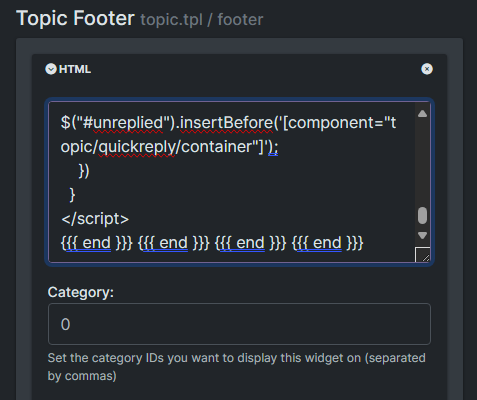
- Open
/admin/extend/widgets - Drag and drop a HTML widget into the
topic.tpltemplate, positioned in the Topic Footer - Paste the code from Github into the HTML pane like below
- Save the changes
Add this into your custom CSS
/admin/appearance/customise#custom-css. Note that this is a “starting point” that usesvarand so you will need to adjust to fir your own site.https://github.com/phenomlab/nodebb-q-a-extension/blob/main/style.css
From now, any topics which are enabled for Q&A and set to a question will look something like the below
Resolved

Unresolved
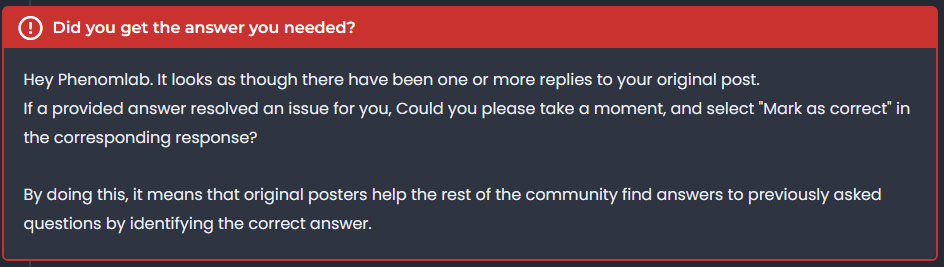
Unanswered

This makes the Q&A plugin a bit more intuitive - what do you think?
- Open
-
That looks fantastic Mark


 .
. -
Very good like always




Hello! It looks like you're interested in this conversation, but you don't have an account yet.
Getting fed up of having to scroll through the same posts each visit? When you register for an account, you'll always come back to exactly where you were before, and choose to be notified of new replies (either via email, or push notification). You'll also be able to save bookmarks and upvote posts to show your appreciation to other community members.
With your input, this post could be even better 💗
Register Login