Skip to content

Collapsing blockquotes on Harmony

General
2 2 837 1
  • On Harmony theme blockquotes are not collapsing as it seems. Or am I missing a setting? If there are nested, long quotes it can be a scrolling marathon on mobile devices.

    Does someone have an idea how this could be implemented? I guess it would need some template and css adjustments.

    For example, here there whole screen is filled by quotes:
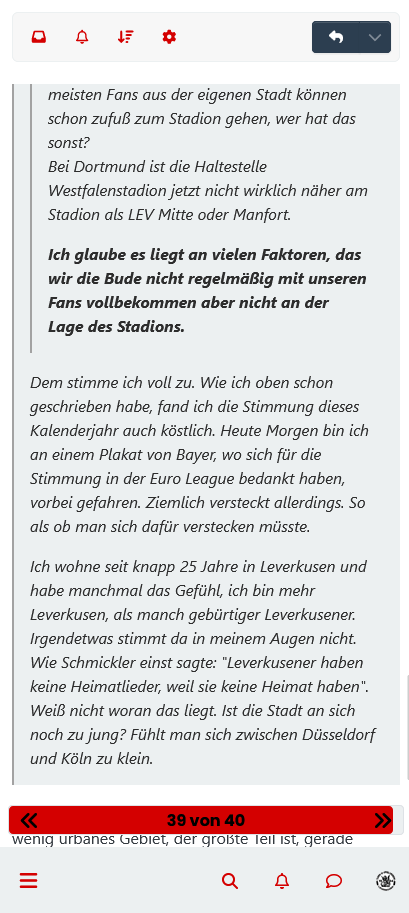
    Screenshot 2023-05-26 at 00-46-26 Stimmung und Support.png

  • On Harmony theme blockquotes are not collapsing as it seems. Or am I missing a setting? If there are nested, long quotes it can be a scrolling marathon on mobile devices.

    Does someone have an idea how this could be implemented? I guess it would need some template and css adjustments.

    For example, here there whole screen is filled by quotes:

    Screenshot 2023-05-26 at 00-46-26 Stimmung und Support.png

    @dave1904 that’s a really good point actually. I know it was there previously on Persona, but you’re right - no such function exists on harmony.

    However, putting something in place to mimick the behaviour of Persona won’t be hard from the js standpoint, although I wonder if perhaps we should ask the NodeBB developers is this feature was overlooked?

Related Topics
  • Composer options on nodebb

    Solved Configure nodebb
    8
    1
    3 Votes
    8 Posts
    2k Views
    @Panda You should be able to expose the CSS for these using F12 to get into console [image: 1686833368846-3591518c-e3a3-4ada-a43c-6b32a5e0359c-image.png] [image: 1686833399483-a2b8ed46-4157-4ff2-85f0-576543380107-image.png] That should then expose the element once selected [image: 1686833431032-89d9c545-a47a-40d1-98f4-80cf3b958e8f-image.png] Here’s the below CSS you need based on the screenshot provided. .composer .formatting-bar .formatting-group li[data-format="picture-o"], .composer .formatting-bar .formatting-group li[data-format="spoiler"] { display: none; }
  • Further Widgets question

    Solved Configure nodebb
    4
    1
    1 Votes
    4 Posts
    1k Views
    @Panda category is for a category in its own, so for example, “fruit” whereas categories is the page that contains all categories as a list.
  • NodeBB v3 Android Problem

    Solved Configure nodebb android
    4
    4 Votes
    4 Posts
    1k Views
    thank you fixed.
  • 12 Votes
    47 Posts
    14k Views
    @dave1904 just coming back to this thread as @DownPW and I both experienced issues with other plugins today, and the fix was to use the plugin ordering in the ACP and move the Harmony theme to the very top so it comes before everything else in terms of other plugins. It might be worth at least trying this to see if it gives you a result rather than the previous bulldozer approach. Thinking about it, the previous fix I proposed is along the same lines and disabling plugins does in fact change the order when they are enabled again, so this is definitely worth a try. Let me know how you get on.
  • NodeBB: The global Search option

    Solved Configure search nodebb
    5
    0 Votes
    5 Posts
    1k Views
    @mventures Yes, exactly. The other icon will restart NodeBB whilst the first icon I referenced will rebuild (recompile) it. The huge strength of NodeBB over Flarum (for example) is that the code is precompiled, and called once at boot. PHP’s code has to repeatedly reload code from source making it much slower.
  • 1 Votes
    5 Posts
    2k Views
    @DownPW very useful tip. Thanks
  • How to fix size of photos & videos NodeBB

    Solved Customisation nodebb nodebb size
    7
    3 Votes
    7 Posts
    2k Views
    @crazycells pleasure. Using percentages makes much more sense in this case. It’s the same argument with px vs pt vs em with fonts, margins, padding, etc., in the sense that em is generally preferred over px and pt https://stackoverflow.com/questions/609517/why-em-instead-of-px
  • Iframely (Nodebb)

    Solved Configure

    40
    4 Votes
    40 Posts
    12k Views
    @DownPW This is now resolved. The issue was an incorrect URL specified in the Nodebb plugin. I’ve corrected this, and now it works as intended.