NodeBB: updating Admin details not working
-
Hi,
In my ADMIN management, I made these changes:- Added a name for my “@admin” account
- Updated the email id for my “admin” account
But neither the name is visible on the public page, nor an email verification was received. I have tried twice, and nothing. Would anyone know what the reason could be?
FYI - I can see the admin name in the admin dashboard, but its not appearing on the published forum.
On the email change - Do you think its because the default email (@phenomlab created) that was used to set the forum up, cannot be changed? Maybe, it can be changged via SSH?
@mventures said in NodeBB: updating Admin details not working:
But neither the name is visible on the public page, nor an email verification was received. I have tried twice, and nothing. Would anyone know what the reason could be?
Email is not configured on the server you are running - this is why no notification was received, because none would have been sent. For this to work, you’ll need to install either a postfix server to send mail, or use one of the available plugins as detailed below
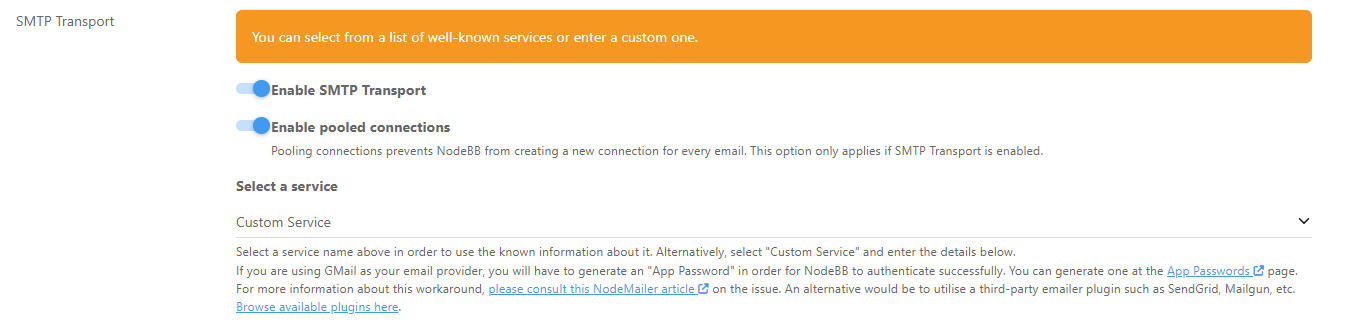
I did something similar for @JAC some time ago - provided you have a low level of mail sending, you can typically use the free plans to send mail.
SendGrid is probably the best option

Create an account there, then over PM, share with me the login and connection details, and I’ll configure this for you.
Mark Cutting also advises organisations as a Fractional CIO, Fractional CISO and Executive Advisor, helping boards improve technology governance, cyber resilience and executive decision making. Learn more at Phenomlab Ltd
-
@mventures said in NodeBB: updating Admin details not working:
But neither the name is visible on the public page, nor an email verification was received. I have tried twice, and nothing. Would anyone know what the reason could be?
Email is not configured on the server you are running - this is why no notification was received, because none would have been sent. For this to work, you’ll need to install either a postfix server to send mail, or use one of the available plugins as detailed below
I did something similar for @JAC some time ago - provided you have a low level of mail sending, you can typically use the free plans to send mail.
SendGrid is probably the best option
Create an account there, then over PM, share with me the login and connection details, and I’ll configure this for you.
@phenomlab Yes, I had a feeling SMTP was the issue. So, I have to choose between SendGrid or the available plugins, right? Are the plugins not dependable, hence you recommended SendGrid?
-
@phenomlab Yes, I had a feeling SMTP was the issue. So, I have to choose between SendGrid or the available plugins, right? Are the plugins not dependable, hence you recommended SendGrid?
@mventures No specific reason for SendGrid other than it’s free for less than 100 emails per month. Typically, I’d suggest hosting your own email, but then you’ll also need a raft of DNS records such as
txt,spf,dkimanddmarc.These should be added to DNS anyway for sake of good order, but are less dependant when you leverage a third party service. Don’t be surprised if SendGrid also wants you to add DNS records, as this is the norm.
Mark Cutting also advises organisations as a Fractional CIO, Fractional CISO and Executive Advisor, helping boards improve technology governance, cyber resilience and executive decision making. Learn more at Phenomlab Ltd
-
@mventures No specific reason for SendGrid other than it’s free for less than 100 emails per month. Typically, I’d suggest hosting your own email, but then you’ll also need a raft of DNS records such as
txt,spf,dkimanddmarc.These should be added to DNS anyway for sake of good order, but are less dependant when you leverage a third party service. Don’t be surprised if SendGrid also wants you to add DNS records, as this is the norm.
@phenomlab None of my business perhaps, but what system are you using if you don’t mind me asking? If it’s personal/sensitive, then your recommendation is strongly Sendgrid because it’s easy to set up, dependable and affordable.
Btw, I’ve heard a lot about Mailgun, and they offer 5000 free emails/month, and only $1 extra for another 1000 if it crosses the 5k mark. Are you OK if I started on this one?
-
@phenomlab None of my business perhaps, but what system are you using if you don’t mind me asking? If it’s personal/sensitive, then your recommendation is strongly Sendgrid because it’s easy to set up, dependable and affordable.
Btw, I’ve heard a lot about Mailgun, and they offer 5000 free emails/month, and only $1 extra for another 1000 if it crosses the 5k mark. Are you OK if I started on this one?
@mventures being the “traditionalist” that I am I host my own mail using
postfix(a service dedicated for this purpose, but residing on the same VPS). There’s nothing wrong with Mailgun, and NodeBB will actively support it.Mark Cutting also advises organisations as a Fractional CIO, Fractional CISO and Executive Advisor, helping boards improve technology governance, cyber resilience and executive decision making. Learn more at Phenomlab Ltd
-
Hi @cagatay
Thank you for your response.
(1) Admin email change: I did as you said and it still has the old email. No change over to the new one.
(2) A new user registration test: I signed up as a user to check. Though I entered an email for this new account, I did not receive the email verification email for this one also. All email folders were checked and nothing has come in yet.
(3) Admin name: What I meant was - I entered a “full name” for my admin account, and this name is not showing up in the posts.@mventures said in NodeBB: updating Admin details not working:
Hi @cagatay
Thank you for your response.
(1) Admin email change: I did as you said and it still has the old email. No change over to the new one.
(2) A new user registration test: I signed up as a user to check. Though I entered an email for this new account, I did not receive the email verification email for this one also. All email folders were checked and nothing has come in yet.
(3) Admin name: What I meant was - I entered a “full name” for my admin account, and this name is not showing up in the posts.If I can get help on (3) also, that would be great also! Thank you all.
-
@mventures being the “traditionalist” that I am I host my own mail using
postfix(a service dedicated for this purpose, but residing on the same VPS). There’s nothing wrong with Mailgun, and NodeBB will actively support it.@phenomlab Nice! I will give this a try tomorrow and see how it goes. By the way, do I need an email in my domain name for this to work, or is the outgoing email from Mailgun/Sendgrid email domain?
-
@phenomlab Nice! I will give this a try tomorrow and see how it goes. By the way, do I need an email in my domain name for this to work, or is the outgoing email from Mailgun/Sendgrid email domain?
@mventures said in NodeBB: updating Admin details not working:
By the way, do I need an email in my domain name for this to work, or is the outgoing email from Mailgun/Sendgrid email domain?
The outgoing email should be the default specified in the NodeBB settings. You’ll be using a username and password from the Mailgun service to send mail anyway, so the email address is cosmetic.
Mark Cutting also advises organisations as a Fractional CIO, Fractional CISO and Executive Advisor, helping boards improve technology governance, cyber resilience and executive decision making. Learn more at Phenomlab Ltd
-
@mventures said in NodeBB: updating Admin details not working:
Hi @cagatay
Thank you for your response.
(1) Admin email change: I did as you said and it still has the old email. No change over to the new one.
(2) A new user registration test: I signed up as a user to check. Though I entered an email for this new account, I did not receive the email verification email for this one also. All email folders were checked and nothing has come in yet.
(3) Admin name: What I meant was - I entered a “full name” for my admin account, and this name is not showing up in the posts.If I can get help on (3) also, that would be great also! Thank you all.
@mventures said in NodeBB: updating Admin details not working:
(3) Admin name: What I meant was - I entered a “full name” for my admin account, and this name is not showing up in the posts.
Because you need to enable that in Settings

Go to
/admin/settings/user#default-user-settingsEnable the below
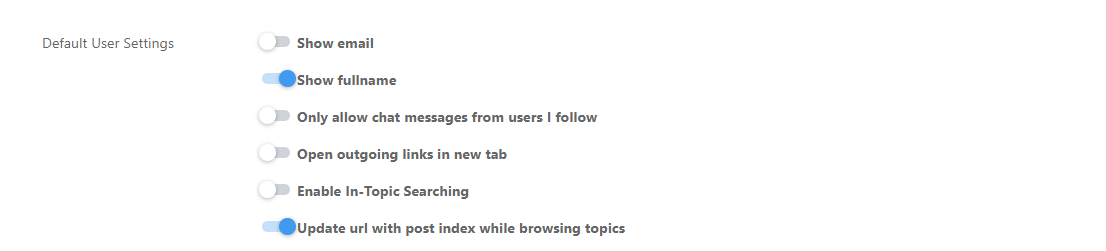
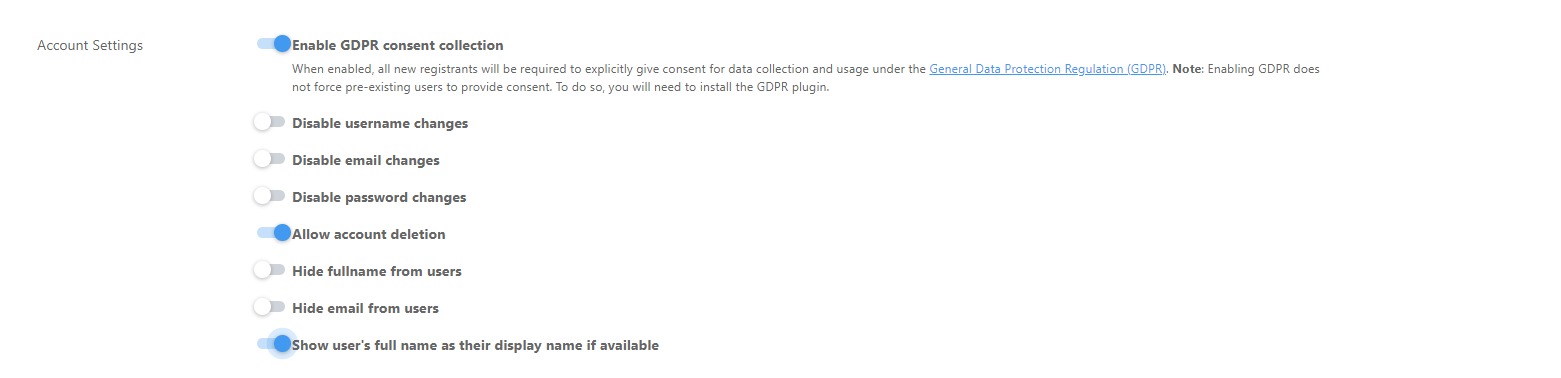
Save
And finally,
Go to
user/admin/settingsEnable “Show my full name”
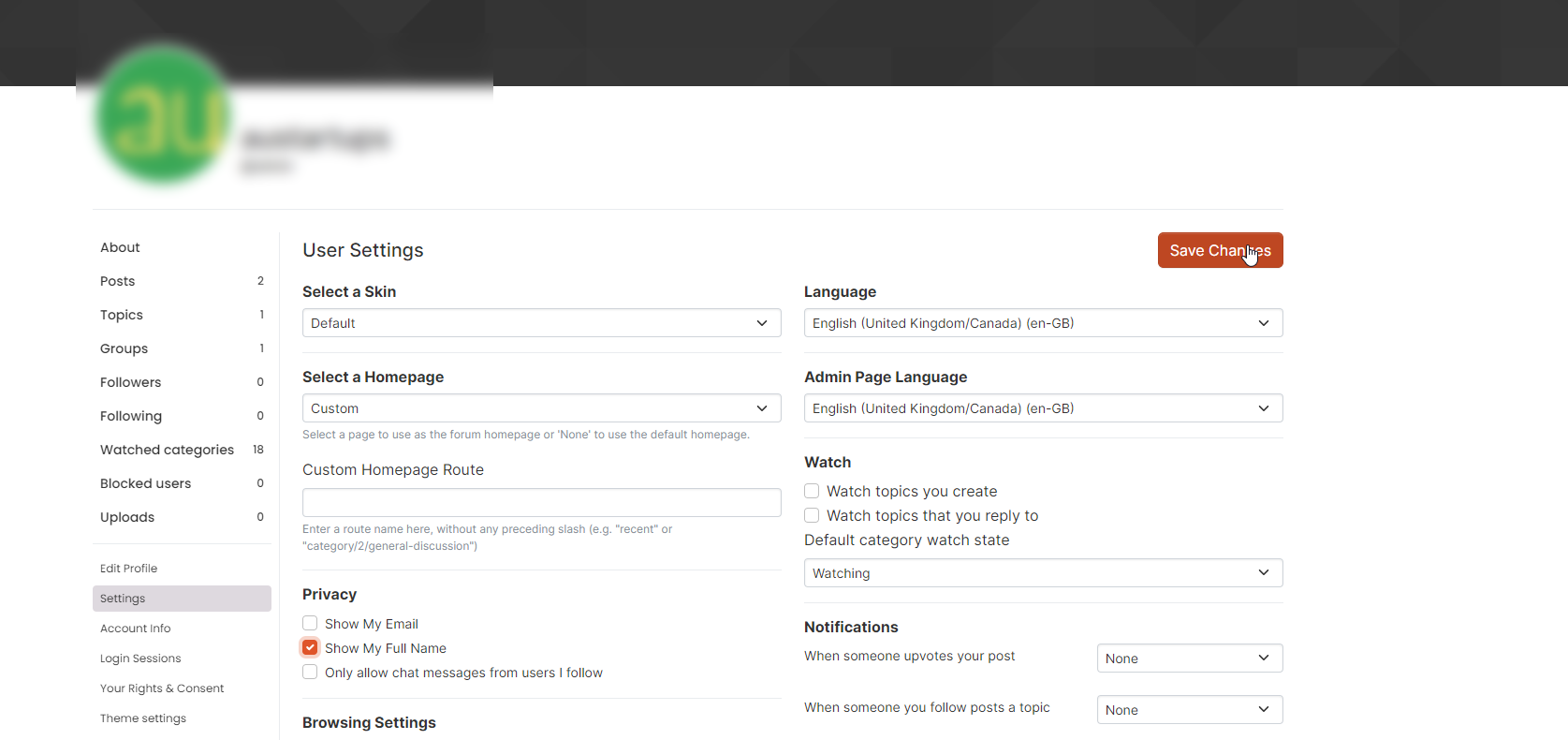
Save
I’ve done this on your site, so it should be working as intended.
Mark Cutting also advises organisations as a Fractional CIO, Fractional CISO and Executive Advisor, helping boards improve technology governance, cyber resilience and executive decision making. Learn more at Phenomlab Ltd
-
 undefined phenomlab has marked this topic as solved on
-
@mventures said in NodeBB: updating Admin details not working:
(3) Admin name: What I meant was - I entered a “full name” for my admin account, and this name is not showing up in the posts.
Because you need to enable that in Settings
Go to
/admin/settings/user#default-user-settingsEnable the below
Save
And finally,
Go to
user/admin/settingsEnable “Show my full name”
Save
I’ve done this on your site, so it should be working as intended.
@phenomlab Yes, it is working! Thank you so much
-
@mventures said in NodeBB: updating Admin details not working:
By the way, do I need an email in my domain name for this to work, or is the outgoing email from Mailgun/Sendgrid email domain?
The outgoing email should be the default specified in the NodeBB settings. You’ll be using a username and password from the Mailgun service to send mail anyway, so the email address is cosmetic.
@phenomlab Update: I haven’t forgotten the task of setting up a SendGrid account. It’s just that my account hasn’t been verified yet. It’s been a few days already and I keep getting questionnaires from them. Have chased again today.
-
@phenomlab Update: I haven’t forgotten the task of setting up a SendGrid account. It’s just that my account hasn’t been verified yet. It’s been a few days already and I keep getting questionnaires from them. Have chased again today.
@mventures Ok. No issues

Hello! It looks like you're interested in this conversation, but you don't have an account yet.
Getting fed up of having to scroll through the same posts each visit? When you register for an account, you'll always come back to exactly where you were before, and choose to be notified of new replies (either via email, or push notification). You'll also be able to save bookmarks and upvote posts to show your appreciation to other community members.
With your input, this post could be even better 💗
Register LoginDid this solution help you?
Related Topics
-
Nodebb to Xenforo
Solved Configure -
-
-
-
Nodebb design
Solved General -
-
-
Iframely (Nodebb)
Solved Configure