
Iframely (Nodebb)
-
I have seen Iframely have this result for example for URL link ?
It’s a freescript or not ?
If it’s self hosted, he have no limits ?How does it work ?
I would be very interested in using it on my forum, which is why I would like a little more explanation or why not a little tutorial from our friend @phenomlab ha ha

PW and WS Spirit alive
-
I have seen Iframely have this result for example for URL link ?
It’s a freescript or not ?
If it’s self hosted, he have no limits ?How does it work ?
I would be very interested in using it on my forum, which is why I would like a little more explanation or why not a little tutorial from our friend @phenomlab ha ha
@DownPW said in Iframely (Nodebb):
It’s a freescript or not ?
Yes, it’s the free (self hosted) version
https://iframely.com/docs/host
Everything you need is in the above document

-
I read the docs a bit and everything is not very clear, especially on the nginx reverse proxy conf for example or the cache or PM2/forever…
I need to do some test to fully understand
PW and WS Spirit alive
-
I read the docs a bit and everything is not very clear, especially on the nginx reverse proxy conf for example or the cache or PM2/forever…
I need to do some test to fully understand
@DownPW The reverse proxy is relatively simple. I’m using the below
        location / {
                proxy_set_header X-Real-IP $remote_addr;
                proxy_set_header X-Forwarded-For $proxy_add_x_forwarded_for;
                proxy_set_header Host $http_host;
                proxy_set_header X-NginX-Proxy true;

                proxy_pass http://127.0.0.1:8061/;
                proxy_redirect off;

                # Socket.IO Support
                proxy_http_version 1.1;
                proxy_set_header Upgrade $http_upgrade;
                proxy_set_header Connection "upgrade";
        }
If you’re not running
MemCachedorRedisthen you can ignore the cache part and just use theNodeJSdefaults. I much prefer PM2 as this provides greater flexibility and control (in my view)Below output from
pm2 status
Mark Cutting also advises organisations as a Fractional CIO, Fractional CISO and Executive Advisor, helping boards improve technology governance, cyber resilience and executive decision making. Learn more at Phenomlab Ltd
-
@DownPW The reverse proxy is relatively simple. I’m using the below
        location / {
                proxy_set_header X-Real-IP $remote_addr;
                proxy_set_header X-Forwarded-For $proxy_add_x_forwarded_for;
                proxy_set_header Host $http_host;
                proxy_set_header X-NginX-Proxy true;

                proxy_pass http://127.0.0.1:8061/;
                proxy_redirect off;

                # Socket.IO Support
                proxy_http_version 1.1;
                proxy_set_header Upgrade $http_upgrade;
                proxy_set_header Connection "upgrade";
        }
If you’re not running
MemCachedorRedisthen you can ignore the cache part and just use theNodeJSdefaults. I much prefer PM2 as this provides greater flexibility and control (in my view)Below output from
pm2 statusI have install iframely like the doc, no cache app, no reverse proxy with PM2 and I have not modify config file.
Results? it does not work


something I missing ?
-
what I don’t understand is how Iframely can interact with NodeBB. There is nothing to configure on the NodeBB side?
PW and WS Spirit alive
-
I have install Iframely nodebb plugin and setup with my local IP (because it’s a VM on no prod server) like this :
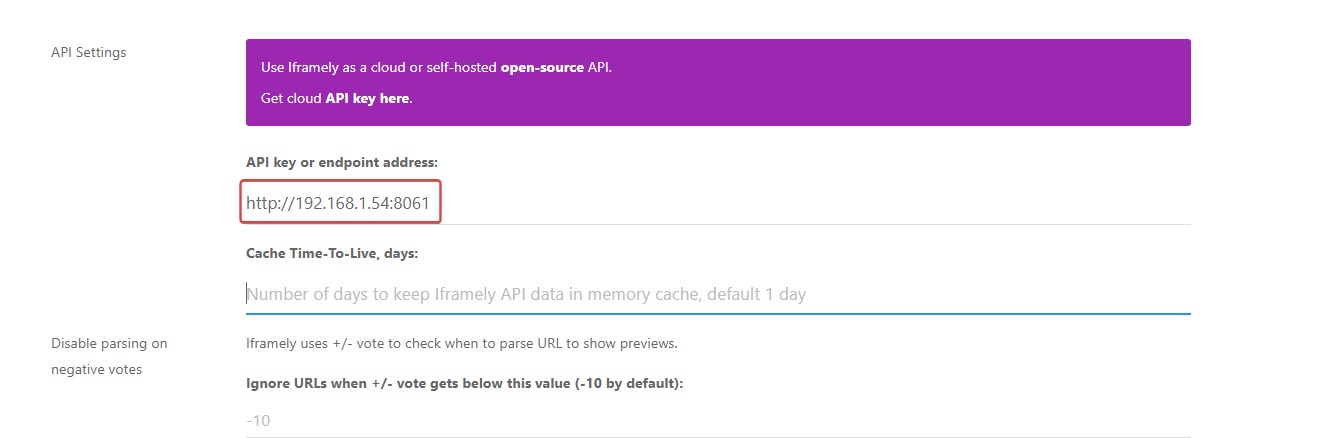
Doesn’t work
PW and WS Spirit alive
-
I have install Iframely nodebb plugin and setup with my local IP (because it’s a VM on no prod server) like this :
Doesn’t work
@DownPW can you try removing the port and just use the IP address ?
-
what I don’t understand is how Iframely can interact with NodeBB. There is nothing to configure on the NodeBB side?
@DownPW said in Iframely (Nodebb):
what I don’t understand is how Iframely can interact with NodeBB. There is nothing to configure on the NodeBB side?
We are using self-hosted iframely… Unfortunately, our developer is currently busy with relocation etc, therefore I cannot ask for more detail…
But we have this as the endpoint address:
http://0.0.0.0:8061/iframely?So, I guess we installed it as a subfolder at this port location in the same server? Maybe @phenomlab can tell it better
 sorry, I am not good at backend work
 -
@DownPW said in Iframely (Nodebb):
what I don’t understand is how Iframely can interact with NodeBB. There is nothing to configure on the NodeBB side?
We are using self-hosted iframely… Unfortunately, our developer is currently busy with relocation etc, therefore I cannot ask for more detail…
But we have this as the endpoint address:
http://0.0.0.0:8061/iframely?So, I guess we installed it as a subfolder at this port location in the same server? Maybe @phenomlab can tell it better
sorry, I am not good at backend work @crazycells typically, you do not need the port as that is handled and processed by the NGINX config. I have my instance running in a subdomain for security reasons with CORS headers adjusted to suit.
-
I have install Iframely nodebb plugin and setup with my local IP (because it’s a VM on no prod server) like this :
Doesn’t work
@DownPW from what I see, iFramely isn’t setup properly on your server as the port of
8061does not appear to be listening. For example, see below for the response I get when trying to access the port.
Another possibility here (and a strong one in fact) is that you probably need to open this port on your firewall (perhaps
iptables) and probably your router also (in terms of NAT).Mark Cutting also advises organisations as a Fractional CIO, Fractional CISO and Executive Advisor, helping boards improve technology governance, cyber resilience and executive decision making. Learn more at Phenomlab Ltd
-
@DownPW from what I see, iFramely isn’t setup properly on your server as the port of
8061does not appear to be listening. For example, see below for the response I get when trying to access the port.Another possibility here (and a strong one in fact) is that you probably need to open this port on your firewall (perhaps
iptables) and probably your router also (in terms of NAT).PW and WS Spirit alive
-
@DownPW right, but what about
iptableson the server itself? The port isn’t responding which is the first hurdle to overcome. -
I don’t know because I think you are connected to ssh, so I don’t see this
grrr it’s a debian scratch and iptables is not installed by defaut
PW and WS Spirit alive
-
I don’t know because I think you are connected to ssh, so I don’t see this
grrr it’s a debian scratch and iptables is not installed by defaut
@DownPW what happens if you perform the same telnet command from the server itself ? If that responds, then the issue is possibly the NAT translation via the router.
Fire example, if
telnet 127.0.0.1 8061connects, then the port is listening on localhost. If you try the same but with the public IP you have instead, then that’s a NAT issue (potentially) -
very odd @phenomlab
I can connect to telnet on server (local host) and externally (with my phone on 4g network = externally network) with public ip
telnet privateIP 8061is OK on the server
telnet externalPublicIP 8061is OK with my smartphone on 5G (externally network) with Termux app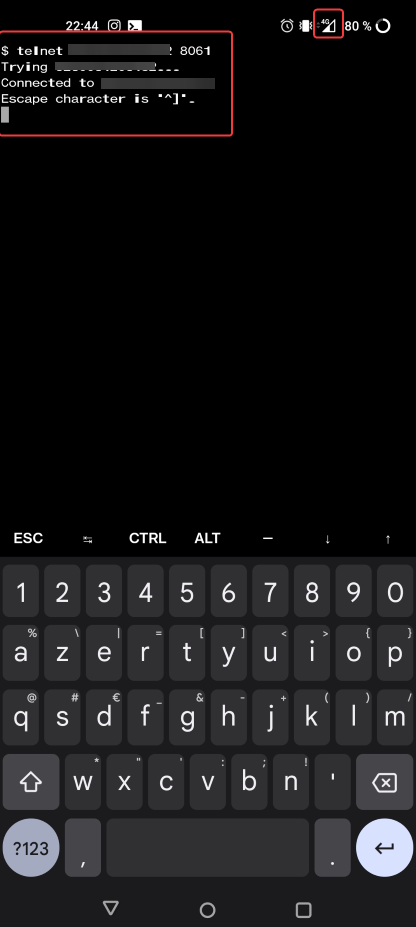
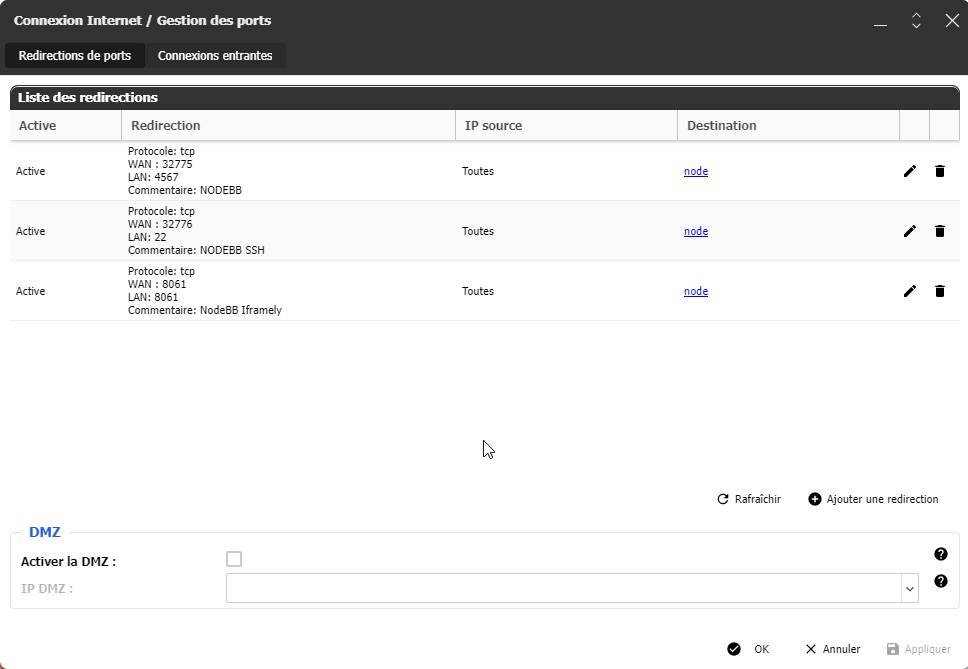
The NAT on my router and the server is OK on 8061 port
PW and WS Spirit alive
-
very odd @phenomlab
I can connect to telnet on server (local host) and externally (with my phone on 4g network = externally network) with public ip
telnet privateIP 8061is OK on the server
telnet externalPublicIP 8061is OK with my smartphone on 5G (externally network) with Termux appThe NAT on my router and the server is OK on 8061 port
@DownPW very odd. Ok. I’ll take a look at this tomorrow morning but I do need root access (and password) to this server.
Mark Cutting also advises organisations as a Fractional CIO, Fractional CISO and Executive Advisor, helping boards improve technology governance, cyber resilience and executive decision making. Learn more at Phenomlab Ltd
-
@DownPW very odd. Ok. I’ll take a look at this tomorrow morning but I do need root access (and password) to this server.
@phenomlab said in Iframely (Nodebb):
@DownPW very odd. Ok. I’ll take a look at this tomorrow morning but I do need root access (and password) to this server.
OK
you already have these information in your PMPW and WS Spirit alive
-
@phenomlab said in Iframely (Nodebb):
@DownPW very odd. Ok. I’ll take a look at this tomorrow morning but I do need root access (and password) to this server.
OK
you already have these information in your PM@DownPW confirmed. Thanks
-
@phenomlab said in Iframely (Nodebb):
@DownPW very odd. Ok. I’ll take a look at this tomorrow morning but I do need root access (and password) to this server.
OK
you already have these information in your PM@DownPW This is now resolved. The issue was an incorrect URL specified in the Nodebb plugin. I’ve corrected this, and now it works as intended.



Hello! It looks like you're interested in this conversation, but you don't have an account yet.
Getting fed up of having to scroll through the same posts each visit? When you register for an account, you'll always come back to exactly where you were before, and choose to be notified of new replies (either via email, or push notification). You'll also be able to save bookmarks and upvote posts to show your appreciation to other community members.
With your input, this post could be even better 💗
Register LoginDid this solution help you?
Related Topics
-
Nodebb to Xenforo
Solved Configure -
-
NodeBB: hCaptcha
Solved Configure -
NodeBB: Consent page
Solved Configure -
NodeBB: Creating pages
Solved Configure -
Podcast Share NodeBB
Solved Configure -
-
iFramely self host help
Solved Configure


