Skip to content

Upgrade issues

Solved Configure
2 2 786

Did this solution help you?
Did you find the suggested solution useful? Support 💗 Sudonix with a coffee
If your organisation needs deeper expertise around infrastructure, security, or technology leadership, learn more about Phenomlab Ltd. Many of the deeper technical guides behind Sudonix are published there.

Related Topics
  • Opening links in nodebb widget

    Solved Configure nodebb
    6
    4 Votes
    6 Posts
    2k Views
    A more efficient way of including this would be to not over complicate it and leverage a standard iframe (providing the CSP headers of the remote site permit this) like below <iframe src="https://www.classmarker.com/online-test/start/?quiz=gag66aea7922f0a5" width="700" height="800"></iframe> This works first time every time on your site as intended.
  • Block Domain

    Solved Let's Build It code javascript block domain nodebb
    26
    1 Votes
    26 Posts
    5k Views
    Yes ogproxy too is functionnal on dev
  • NodeBB: Upgrading to NodeBB v3.x

    Solved Configure nodebb v3.x
    6
    0 Votes
    6 Posts
    1k Views
    @mventures You’d need to connect to the server and execute it directly - not on your local terminal. Review the guide below, which will show you how to gain access via SSH to your server https://docs.ovh.com/gb/en/dedicated/ssh-introduction/ Once you have access, you’ll need to navigate to the actual folder where NodeBB is installed You’ll then need to change to the directory as shown below /home/unbuntu/nodebb [image: 1680448167972-fdffe673-bf63-4b6d-a728-5506fddc1aff-image.png] In most cases, initial access takes you to the root of the file system. You can always issue pwd in a Linux terminal which will show you the Present Working Directory. From there, you can issue the command cd /home/ubuntu/nodebb Once in the NodeBB directory, you’d use the below commands ./nodebb stop git fetch && git checkout develop && git reset --hard origin/develop ./nodebb upgrade ./nodebb start Line 1 stops the NodeBB instance Line 2 gets the latest files from GIT (repository) and then checks out the development branch. It then resets the version you are using to the development branch ready for v3 Line 3 Runs the upgrade once the new branch is set, and code pulled Line 4 Restarts the NodeBB instance after the upgrade has completed Note that when you restart NodeBB and log back in, things will look very different to what you had in v2.
  • Upgrade Problem from 2.8.3 to 2.8.4

    Solved Configure nodebb
    35
    1
    8 Votes
    35 Posts
    6k Views
    @cagatay No, you can ignore that.
  • Issues with v3 alpha and Harmony

    Moved Solved Configure
    18
    4 Votes
    18 Posts
    2k Views
    @cagatay Should be all sorted now Don’t forget to put your language back to Turkish.
  • 5 Votes
    13 Posts
    2k Views
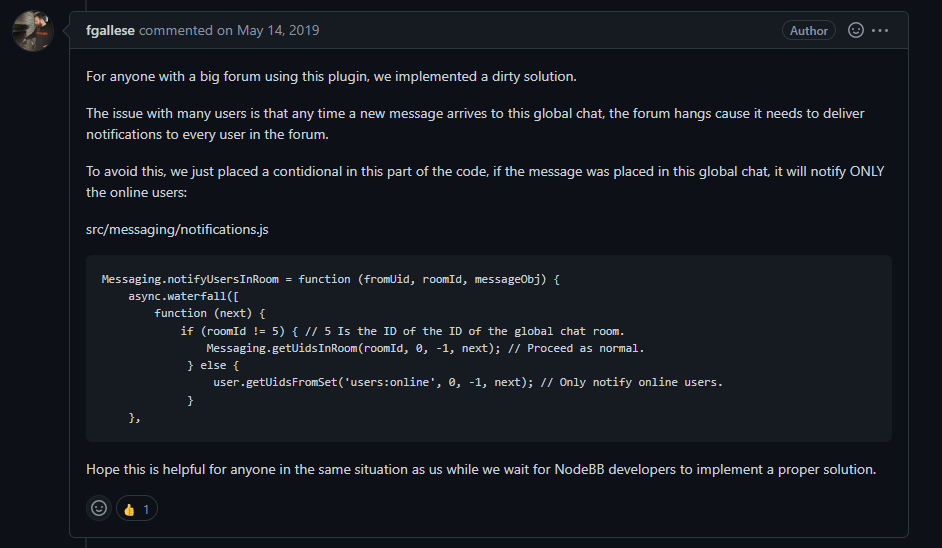
    'use strict'; const winston = require('winston'); const user = require('../user'); const notifications = require('../notifications'); const sockets = require('../socket.io'); const plugins = require('../plugins'); const meta = require('../meta'); module.exports = function (Messaging) { Messaging.notifyQueue = {}; // Only used to notify a user of a new chat message, see Messaging.notifyUser Messaging.notifyUsersInRoom = async (fromUid, roomId, messageObj) => { let uids = await Messaging.getUidsInRoom(roomId, 0, -1); uids = await user.blocks.filterUids(fromUid, uids); let data = { roomId: roomId, fromUid: fromUid, message: messageObj, uids: uids, }; data = await plugins.hooks.fire('filter:messaging.notify', data); if (!data || !data.uids || !data.uids.length) { return; } uids = data.uids; uids.forEach((uid) => { data.self = parseInt(uid, 10) === parseInt(fromUid, 10) ? 1 : 0; Messaging.pushUnreadCount(uid); sockets.in(`uid_${uid}`).emit('event:chats.receive', data); }); if (messageObj.system) { return; } // Delayed notifications let queueObj = Messaging.notifyQueue[`${fromUid}:${roomId}`]; if (queueObj) { queueObj.message.content += `\n${messageObj.content}`; clearTimeout(queueObj.timeout); } else { queueObj = { message: messageObj, }; Messaging.notifyQueue[`${fromUid}:${roomId}`] = queueObj; } queueObj.timeout = setTimeout(async () => { try { await sendNotifications(fromUid, uids, roomId, queueObj.message); } catch (err) { winston.error(`[messaging/notifications] Unabled to send notification\n${err.stack}`); } }, meta.config.notificationSendDelay * 1000); }; async function sendNotifications(fromuid, uids, roomId, messageObj) { const isOnline = await user.isOnline(uids); uids = uids.filter((uid, index) => !isOnline[index] && parseInt(fromuid, 10) !== parseInt(uid, 10)); if (!uids.length) { return; } if (roomId != 11) { // 5 Is the ID of the ID of the global chat room. Messaging.getUidsInRoom(roomId, 0, -1); // Proceed as normal. } else { user.getUidsFromSet('users:online', 0, -1); // Only notify online users. } const { displayname } = messageObj.fromUser; const isGroupChat = await Messaging.isGroupChat(roomId); const notification = await notifications.create({ type: isGroupChat ? 'new-group-chat' : 'new-chat', subject: `email:notif.chat.subject, ${displayname}`, bodyShort: `notifications:new_message_from, ${displayname}`, bodyLong: messageObj.content, nid: `chat_${fromuid}_${roomId}`, from: fromuid, path: `/chats/${messageObj.roomId}`, }); delete Messaging.notifyQueue[`${fromuid}:${roomId}`]; notifications.push(notification, uids); } };
  • Error install plugin

    Solved Customisation plugin nodebb
    8
    1
    1 Votes
    8 Posts
    3k Views
    @pobojmoks Not WP plugin but nodeBB but it a known bug
  • nodebb-plugin-customize error

    Solved Customisation
    25
    2 Votes
    25 Posts
    8k Views
    @phenomlab it work, thanks