NODEBB: Nginx error performance & High CPU
-
I wanted to test awstats on virtualmin with root account and it hasn’t updated since August 2022.
I wanted to regenerate the files but I have a problem of rights.
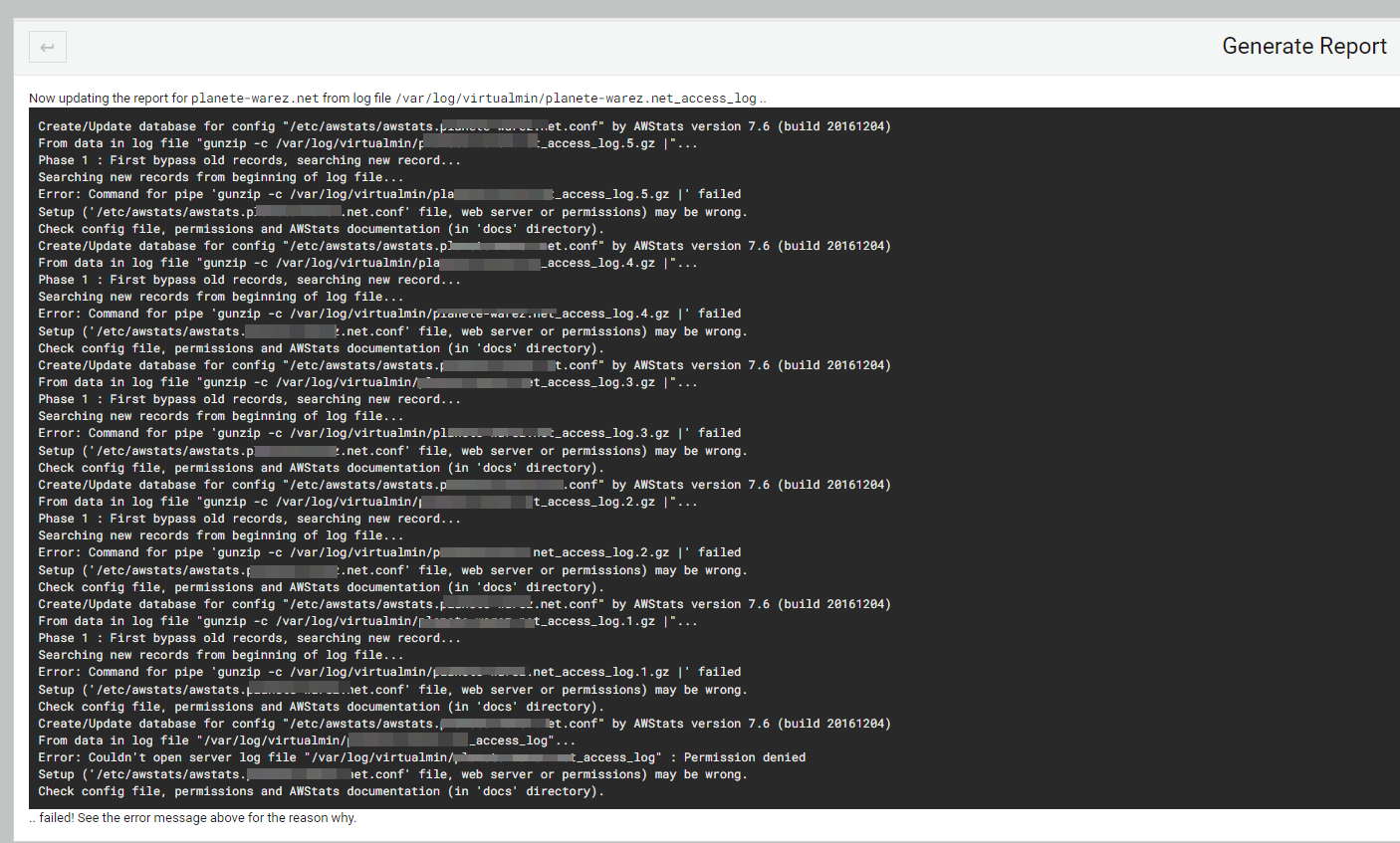
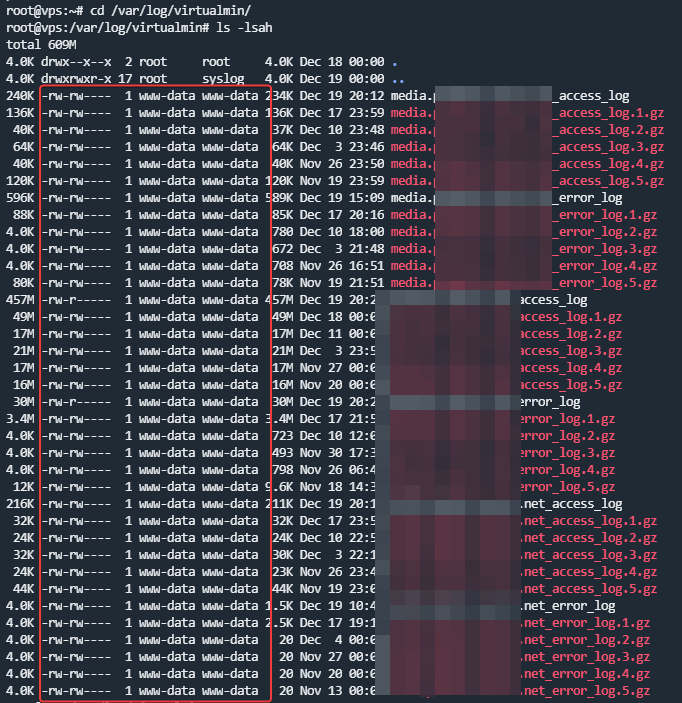
What do you think ? and how t ore-generate a rapport correctly
I would like to use it to better manage the @ips that connect to the server
PW and WS Spirit alive
-
@phenomlab said in NODEBB: Nginx error performance & High CPU:
@DownPW what settings do you have in advanced (in settings) for rate limit etc?
In cloudflare ?
@DownPW no, sorry - in NodeBB ACP
Mark Cutting also advises organisations as a Fractional CIO, Fractional CISO and Executive Advisor, helping boards improve technology governance, cyber resilience and executive decision making. Learn more at Phenomlab Ltd
-
I wanted to test awstats on virtualmin with root account and it hasn’t updated since August 2022.
I wanted to regenerate the files but I have a problem of rights.
What do you think ? and how t ore-generate a rapport correctly
I would like to use it to better manage the @ips that connect to the server
@DownPW from recollection,
awstatsis accessible via the web front end, so (for example) https://mydomain.com/awstatsHowever, as you are pushing everything into a reverse proxy you’ll need to add a custom route in the
nginx.conffile you are using on the website so this can be rendered outside of NodeBB.Mark Cutting also advises organisations as a Fractional CIO, Fractional CISO and Executive Advisor, helping boards improve technology governance, cyber resilience and executive decision making. Learn more at Phenomlab Ltd
-
@phenomlab said in NODEBB: Nginx error performance & High CPU:
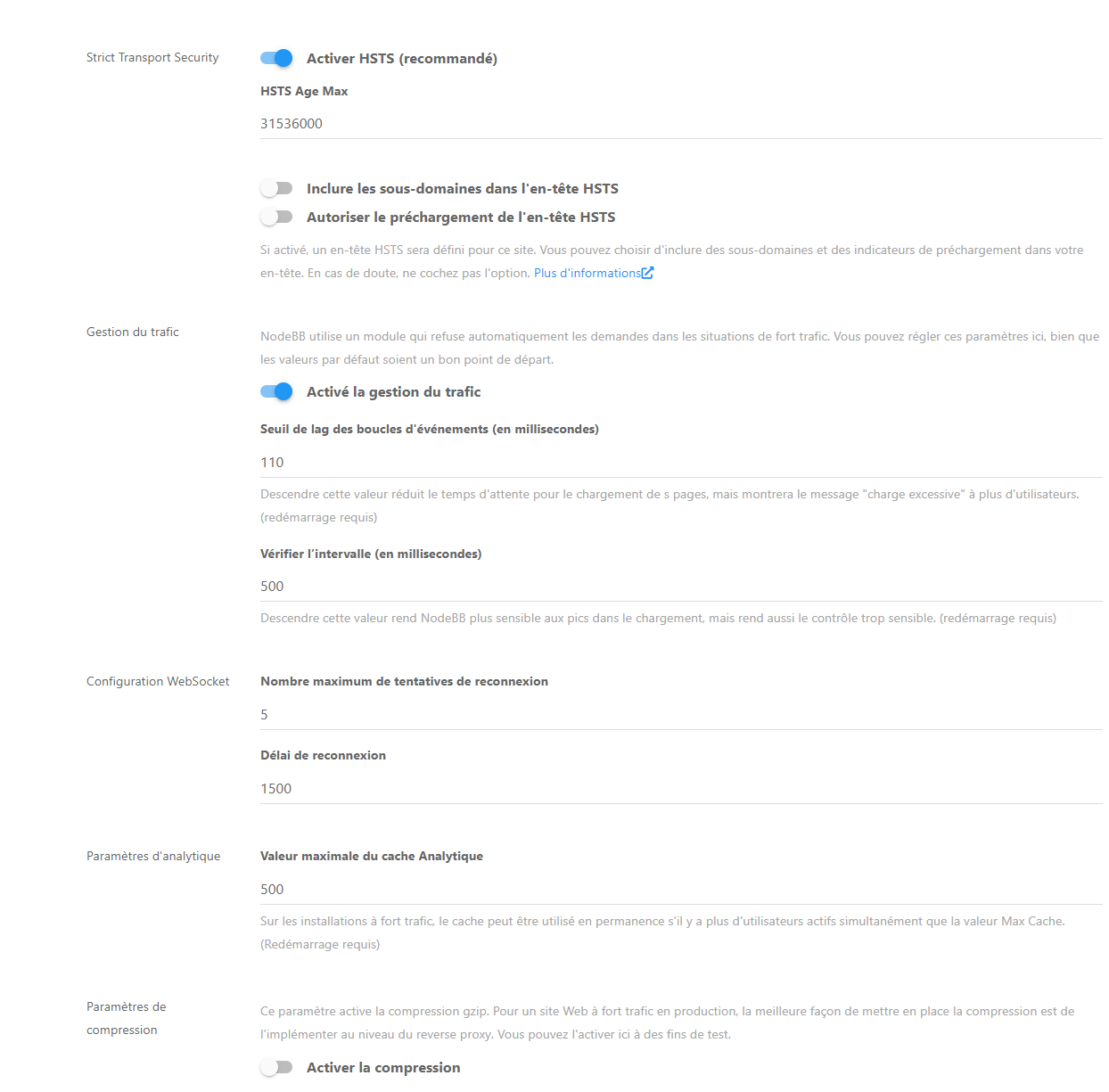
@DownPW no, sorry - in NodeBB ACP
Here is the value
PW and WS Spirit alive
-
@phenomlab said in NODEBB: Nginx error performance & High CPU:
@DownPW no, sorry - in NodeBB ACP
Here is the value
@DownPW what is the result of disabling it altogether? That will resolve the 503 rate limit error but could we leave the system exposed to bring overwhelmed.
Mark Cutting also advises organisations as a Fractional CIO, Fractional CISO and Executive Advisor, helping boards improve technology governance, cyber resilience and executive decision making. Learn more at Phenomlab Ltd
-
@DownPW what is the result of disabling it altogether? That will resolve the 503 rate limit error but could we leave the system exposed to bring overwhelmed.
@DownPW you should also review this
https://docs.nodebb.org/configuring/scaling/
In particular, the part concerning proxied assets.
-
@DownPW from recollection,
awstatsis accessible via the web front end, so (for example) https://mydomain.com/awstatsHowever, as you are pushing everything into a reverse proxy you’ll need to add a custom route in the
nginx.conffile you are using on the website so this can be rendered outside of NodeBB.@phenomlab said in NODEBB: Nginx error performance & High CPU:
@DownPW from recollection,
awstatsis accessible via the web front end, so (for example) https://mydomain.com/awstatsHowever, as you are pushing everything into a reverse proxy you’ll need to add a custom route in the
nginx.conffile you are using on the website so this can be rendered outside of NodeBB.Thats why I have a permission error like the screen? Odd
Nope, Awstats is accessible like this via Virtualmin:
https://XXXX:8443/virtualmin-awstats/view.cgi?config=XXXXXX.XX


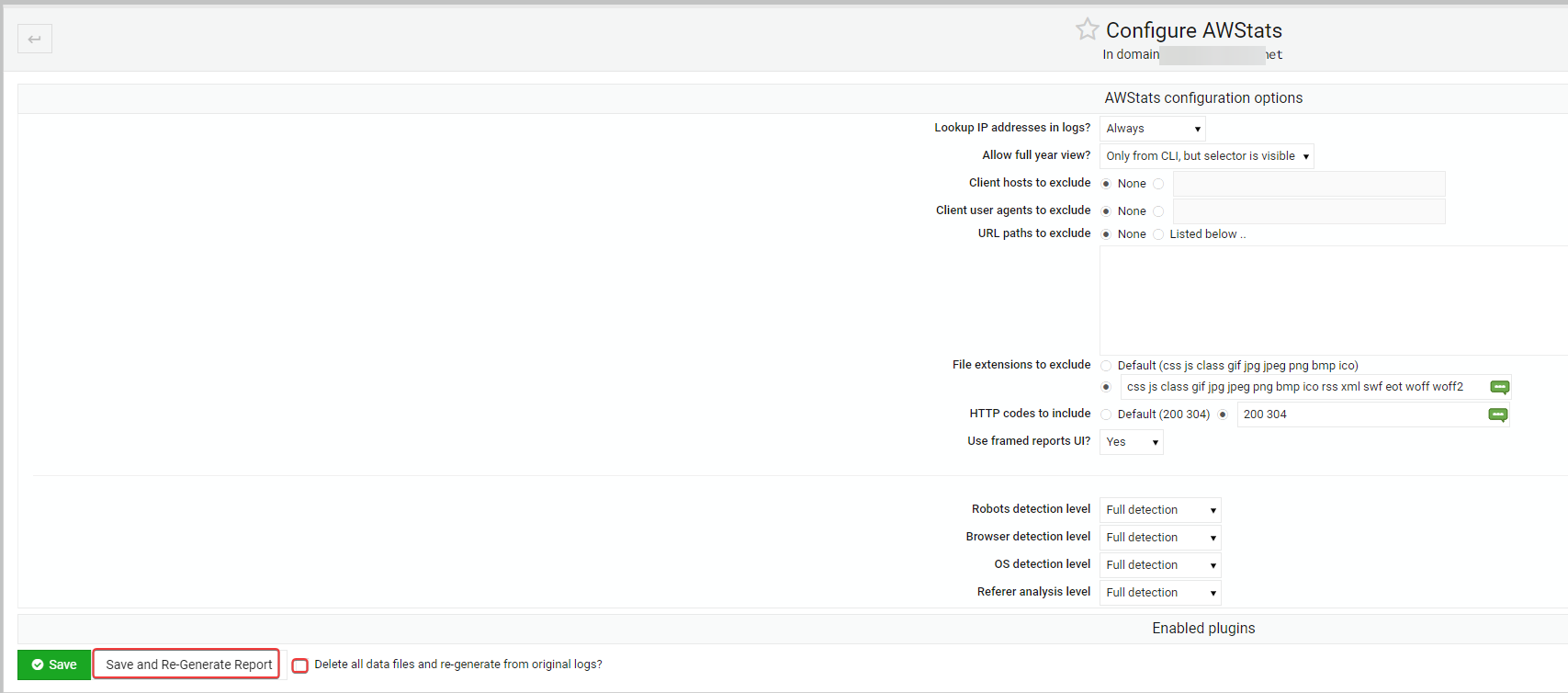
I have jsut an error of permission whe nI test to regenerate a Report because the script can’t access to log file
PW and WS Spirit alive
-
@DownPW what is the result of disabling it altogether? That will resolve the 503 rate limit error but could we leave the system exposed to bring overwhelmed.
@phenomlab said in NODEBB: Nginx error performance & High CPU:
@DownPW what is the result of disabling it altogether? That will resolve the 503 rate limit error but could we leave the system exposed to bring overwhelmed.
Disabling What ? Traffic management? HSTS ?
-
@phenomlab said in NODEBB: Nginx error performance & High CPU:
@DownPW from recollection,
awstatsis accessible via the web front end, so (for example) https://mydomain.com/awstatsHowever, as you are pushing everything into a reverse proxy you’ll need to add a custom route in the
nginx.conffile you are using on the website so this can be rendered outside of NodeBB.Thats why I have a permission error like the screen? Odd
Nope, Awstats is accessible like this via Virtualmin:
https://XXXX:8443/virtualmin-awstats/view.cgi?config=XXXXXX.XX
I have jsut an error of permission whe nI test to regenerate a Report because the script can’t access to log file
@DownPW said in NODEBB: Nginx error performance & High CPU:
Thats why I have a permission error like the screen? Odd
No, not at all. That error is because
www-dataowns the files when it should be the account you are using to run the website itself under.Mark Cutting also advises organisations as a Fractional CIO, Fractional CISO and Executive Advisor, helping boards improve technology governance, cyber resilience and executive decision making. Learn more at Phenomlab Ltd
-
@DownPW said in NODEBB: Nginx error performance & High CPU:
Thats why I have a permission error like the screen? Odd
No, not at all. That error is because
www-dataowns the files when it should be the account you are using to run the website itself under.@phenomlab said in NODEBB: Nginx error performance & High CPU:
@DownPW said in NODEBB: Nginx error performance & High CPU:
Thats why I have a permission error like the screen? Odd
No, not at all. That error is because
www-dataowns the files when it should be the account you are using to run the website itself under.I thought that was weird

strange than that.
–> Would you have a solution so that I can regenerate the report and use awstats via virtualmin?
PW and WS Spirit alive
-
@phenomlab said in NODEBB: Nginx error performance & High CPU:
@DownPW said in NODEBB: Nginx error performance & High CPU:
Thats why I have a permission error like the screen? Odd
No, not at all. That error is because
www-dataowns the files when it should be the account you are using to run the website itself under.I thought that was weird
strange than that.
–> Would you have a solution so that I can regenerate the report and use awstats via virtualmin?
@DownPW try this
https://manpages.org/awstatsMark Cutting also advises organisations as a Fractional CIO, Fractional CISO and Executive Advisor, helping boards improve technology governance, cyber resilience and executive decision making. Learn more at Phenomlab Ltd
-
@phenomlab said in NODEBB: Nginx error performance & High CPU:
@DownPW try this
https://manpages.org/awstatsIt worked with the following command (very long) in cli but I’m afraid it won’t work with the virtualmin module
awstats -config=XXX-XXX.XXX -update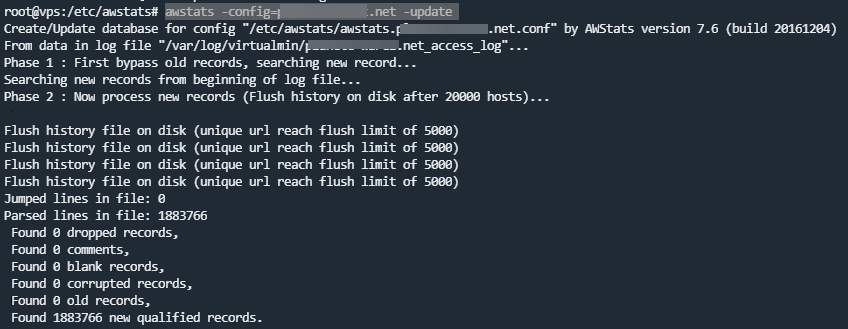
PW and WS Spirit alive
-
@phenomlab said in NODEBB: Nginx error performance & High CPU:
@DownPW try this
https://manpages.org/awstatsIt worked with the following command (very long) in cli but I’m afraid it won’t work with the virtualmin module
awstats -config=XXX-XXX.XXX -update@DownPW yes, that was a command line to get you the immediate information you needed. Did you try adding the necessary config to
nginxin order that it bypasses the reverse proxy?Mark Cutting also advises organisations as a Fractional CIO, Fractional CISO and Executive Advisor, helping boards improve technology governance, cyber resilience and executive decision making. Learn more at Phenomlab Ltd
-
Hello
Since yesterday, we have been experiencing a massive influx of new users.
Today we have more than 1000 simultaneous connections (account creation, participation in topics, etc.)
I had a lot of issues with Nginx that I think I got fixed.
I have several “worker_connections is too long” & “too many openfiles” errors on nginx log :
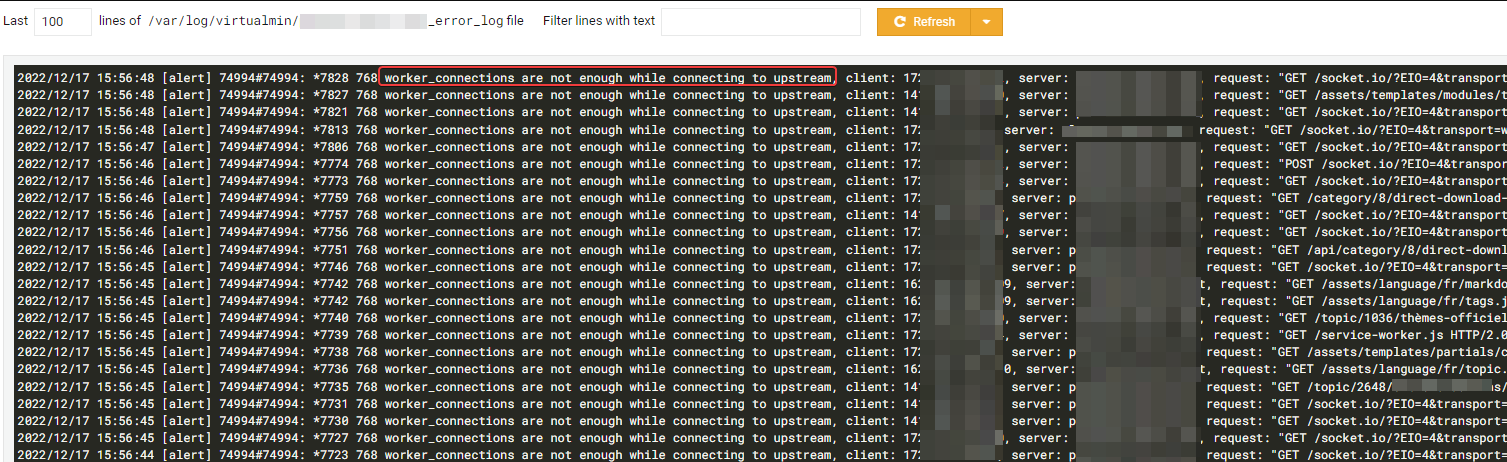
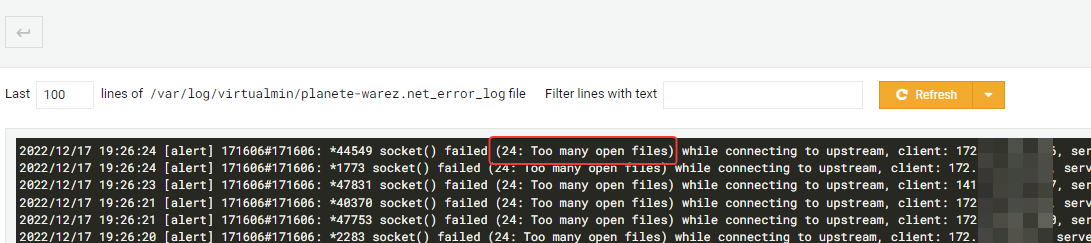
I think I solved his 2 problems in the following way :
systemctl edit --full nginx.service

	[Service]
	LimitNOFILE=70000
nano /etc/nginx/nginx.conf worker_rlimit_nofile 70000; events { # worker_connections 768; worker_connections 65535; # multi_accept on; multi_accept on; }I have “client intended to send too large body” errors too :

I think I solved this problem in the following way :
nano /etc/nginx/nginx.conf
	http {

	##
	# Basic Settings
	##

	client_max_body_size 10M;
–> I hope this will be enough for Nginx.
But now, I have a problem of CPU performance (sometimes, not ) which causes nodebb 503 errors (not nginx) or latencies because nodeJS and mongodb takes a lot of CPU.

– Would there be tweaks for nodejs, nodebb or mongodb to prevent the influx of users from draining the CPU - RAM ?
– If you have better values for nginx error (see above the topic) or better fix, tell me

Thanks in advance @phenomlab
@DownPW one day a year, we have the same problem in our forum, where several thousand users become online at the same minute and get similar problems… but we are getting better each year at handling this…
I do not have full technical details about our solution but I know for sure that using NodeBB that listens to three ports help… 4567, 4568, and 4569… Is your NodeBB set up this way?
-
@DownPW one day a year, we have the same problem in our forum, where several thousand users become online at the same minute and get similar problems… but we are getting better each year at handling this…
I do not have full technical details about our solution but I know for sure that using NodeBB that listens to three ports help… 4567, 4568, and 4569… Is your NodeBB set up this way?
@crazycells said in NODEBB: Nginx error performance & High CPU:
4567, 4568, and 4569… Is your NodeBB set up this way?
It’s not (I set their server up). Sudonix is not configured this way either, but from memory, this also requires
redisto handle the session data. I may configure this site to do exactly that.Mark Cutting also advises organisations as a Fractional CIO, Fractional CISO and Executive Advisor, helping boards improve technology governance, cyber resilience and executive decision making. Learn more at Phenomlab Ltd
-
@crazycells said in NODEBB: Nginx error performance & High CPU:
4567, 4568, and 4569… Is your NodeBB set up this way?
It’s not (I set their server up). Sudonix is not configured this way either, but from memory, this also requires
redisto handle the session data. I may configure this site to do exactly that.@phenomlab said in NODEBB: Nginx error performance & High CPU:
@crazycells said in NODEBB: Nginx error performance & High CPU:
4567, 4568, and 4569… Is your NodeBB set up this way?
It’s not (I set their server up). Sudonix is not configured this way either, but from memory, this also requires
redisto handle the session data. I may configure this site to do exactly that.yep it’s not but it interests me a lot.
I see the documentation but I would have to adapt to our configuration and is it really worth doing?
Where I put ionode directives? on nginx.conf or vhost your_website.conf ? I think on nginx.confAnd where put proxy_pass directive? on nginx.conf or vhost your_website.Conf ?
It’s still pretty blurry but I just took a look at it;
PW and WS Spirit alive
-
@phenomlab said in NODEBB: Nginx error performance & High CPU:
@crazycells said in NODEBB: Nginx error performance & High CPU:
4567, 4568, and 4569… Is your NodeBB set up this way?
It’s not (I set their server up). Sudonix is not configured this way either, but from memory, this also requires
redisto handle the session data. I may configure this site to do exactly that.yep it’s not but it interests me a lot.
I see the documentation but I would have to adapt to our configuration and is it really worth doing?
Where I put ionode directives? on nginx.conf or vhost your_website.conf ? I think on nginx.confAnd where put proxy_pass directive? on nginx.conf or vhost your_website.Conf ?
It’s still pretty blurry but I just took a look at it;
@DownPW It’s more straightforward than it sounds, although can be confusing if you look at it for the first time. I’ve just implemented it here. Can you provide your
nginxconfig and yourconfig.json(remove password obviously)Thanks
Mark Cutting also advises organisations as a Fractional CIO, Fractional CISO and Executive Advisor, helping boards improve technology governance, cyber resilience and executive decision making. Learn more at Phenomlab Ltd
-
@DownPW yes, that was a command line to get you the immediate information you needed. Did you try adding the necessary config to
nginxin order that it bypasses the reverse proxy?@phenomlab said in NODEBB: Nginx error performance & High CPU:
@DownPW yes, that was a command line to get you the immediate information you needed. Did you try adding the necessary config to
nginxin order that it bypasses the reverse proxy?Nope because I don’t know what it will be used for.
I access the report just fine without it.
I would just like to use webmin to generate it every day automatically.
I would just like to settle this permissions thing. -
@DownPW It’s more straightforward than it sounds, although can be confusing if you look at it for the first time. I’ve just implemented it here. Can you provide your
nginxconfig and yourconfig.json(remove password obviously)Thanks
@phenomlab said in NODEBB: Nginx error performance & High CPU:
@DownPW It’s more straightforward than it sounds, although can be confusing if you look at it for the first time. I’ve just implemented it here. Can you provide your
nginxconfig and yourconfig.json(remove password obviously)Thanks
here is my nginx.conf
user www-data;
worker_processes auto;
pid /run/nginx.pid;
worker_rlimit_nofile 70000;
include /etc/nginx/modules-enabled/*.conf;

events {
	# worker_connections 768;
	worker_connections 4000;
	#multi_accept on;
	#multi_accept on;
}

http {

	##
	# Basic Settings
	##

	#client_max_body_size 10M;

	#Requete maximun par ip
	limit_req_zone $binary_remote_addr zone=flood:10m rate=100r/s;

	#Connexions maximum par ip
	limit_conn_zone $binary_remote_addr zone=ddos:1m;

	sendfile on;
	tcp_nopush on;
	tcp_nodelay on;
	keepalive_timeout 65;
	types_hash_max_size 2048;
	# server_tokens off;

	# server_names_hash_bucket_size 64;
	# server_name_in_redirect off;

	include /etc/nginx/mime.types;
	default_type application/octet-stream;

	##
	# SSL Settings
	##

	ssl_protocols TLSv1 TLSv1.1 TLSv1.2 TLSv1.3; # Dropping SSLv3, ref: POODLE
	ssl_prefer_server_ciphers on;

	##
	# Logging Settings
	##

	access_log /var/log/nginx/access.log;
	error_log /var/log/nginx/error.log;

	##
	# Gzip Settings
	##

	gzip on;

	gzip_min_length 1000; #test Violence
	gzip_proxied off; #test Violence
	gzip_types text/plain application/xml text/javascript application/javascript application/x-javascript text/css application/json;

	# gzip_vary on;
	# gzip_proxied any;
	# gzip_comp_level 6;
	# gzip_buffers 16 8k;
	# gzip_http_version 1.1;
	# gzip_types text/plain text/css application/json application/javascript text/xml application/xml application/xml+rss text/javascript;

	##
	# Virtual Host Configs
	##

	include /etc/nginx/conf.d/*.conf;
	include /etc/nginx/sites-enabled/*;
	server_names_hash_bucket_size 128;
}


#mail {
#	# See sample authentication script at:
#	# http://wiki.nginx.org/ImapAuthenticateWithApachePhpScript
#
#	# auth_http localhost/auth.php;
#	# pop3_capabilities "TOP" "USER";
#	# imap_capabilities "IMAP4rev1" "UIDPLUS";
#
#	server {
#		listen     localhost:110;
#		protocol   pop3;
#		proxy      on;
#	}
#
#	server {
#		listen     localhost:143;
#		protocol   imap;
#		proxy      on;
#	}
#}
And my NodebB website.conf :
server {
	server_name XX-XX.net www.XX-XX.net;
	listen XX.XX.XX.X;
	listen [XX:XX:XX:XX::];
	root /home/XX-XX/nodebb;
	index index.php index.htm index.html;
	access_log /var/log/virtualmin/XX-XX.net_access_log;
	error_log /var/log/virtualmin/XX-XX.net_error_log;

        location / {

		limit_req zone=flood burst=100 nodelay;
		limit_conn ddos 10;
		proxy_read_timeout 180;

                proxy_set_header X-Real-IP $remote_addr;
                proxy_set_header X-Forwarded-For $proxy_add_x_forwarded_for;
                proxy_set_header Host $http_host;
                proxy_set_header X-NginX-Proxy true;

                proxy_pass http://127.0.0.1:4567/;
                proxy_redirect off;

                # Socket.IO Support
                proxy_http_version 1.1;
                proxy_set_header Upgrade $http_upgrade;
                proxy_set_header Connection "upgrade";
        }

	listen XX.XX.XX.XX:XXssl http2;
	listen [XX:XX:XX:XX::]:443 ssl http2;
	ssl_certificate /etc/ssl/virtualmin/166195366750642/ssl.cert;
	ssl_certificate_key /etc/ssl/virtualmin/166195366750642/ssl.key;
	if ($scheme = http) {
		rewrite ^/(?!.well-known)(.*) "https://XX-XX.net/$1" break;
	}
}
and my nodebb config.json :
{
    "url": "https://XX-XX.net",
    "secret": "XXXXXXXXXXXXXXXX",
    "database": "mongo",
    "mongo": {
        "host": "127.0.0.1",
        "port": "27017",
        "username": "XXXXXXXXXXX",
        "password": "XXXXXXXXXXX",
        "database": "nodebb",
        "uri": ""
    }
}
PW and WS Spirit alive
-
@phenomlab said in NODEBB: Nginx error performance & High CPU:
@DownPW It’s more straightforward than it sounds, although can be confusing if you look at it for the first time. I’ve just implemented it here. Can you provide your
nginxconfig and yourconfig.json(remove password obviously)Thanks
here is my nginx.conf
user www-data;
worker_processes auto;
pid /run/nginx.pid;
worker_rlimit_nofile 70000;
include /etc/nginx/modules-enabled/*.conf;

events {
	# worker_connections 768;
	worker_connections 4000;
	#multi_accept on;
	#multi_accept on;
}

http {

	##
	# Basic Settings
	##

	#client_max_body_size 10M;

	#Requete maximun par ip
	limit_req_zone $binary_remote_addr zone=flood:10m rate=100r/s;

	#Connexions maximum par ip
	limit_conn_zone $binary_remote_addr zone=ddos:1m;

	sendfile on;
	tcp_nopush on;
	tcp_nodelay on;
	keepalive_timeout 65;
	types_hash_max_size 2048;
	# server_tokens off;

	# server_names_hash_bucket_size 64;
	# server_name_in_redirect off;

	include /etc/nginx/mime.types;
	default_type application/octet-stream;

	##
	# SSL Settings
	##

	ssl_protocols TLSv1 TLSv1.1 TLSv1.2 TLSv1.3; # Dropping SSLv3, ref: POODLE
	ssl_prefer_server_ciphers on;

	##
	# Logging Settings
	##

	access_log /var/log/nginx/access.log;
	error_log /var/log/nginx/error.log;

	##
	# Gzip Settings
	##

	gzip on;

	gzip_min_length 1000; #test Violence
	gzip_proxied off; #test Violence
	gzip_types text/plain application/xml text/javascript application/javascript application/x-javascript text/css application/json;

	# gzip_vary on;
	# gzip_proxied any;
	# gzip_comp_level 6;
	# gzip_buffers 16 8k;
	# gzip_http_version 1.1;
	# gzip_types text/plain text/css application/json application/javascript text/xml application/xml application/xml+rss text/javascript;

	##
	# Virtual Host Configs
	##

	include /etc/nginx/conf.d/*.conf;
	include /etc/nginx/sites-enabled/*;
	server_names_hash_bucket_size 128;
}


#mail {
#	# See sample authentication script at:
#	# http://wiki.nginx.org/ImapAuthenticateWithApachePhpScript
#
#	# auth_http localhost/auth.php;
#	# pop3_capabilities "TOP" "USER";
#	# imap_capabilities "IMAP4rev1" "UIDPLUS";
#
#	server {
#		listen     localhost:110;
#		protocol   pop3;
#		proxy      on;
#	}
#
#	server {
#		listen     localhost:143;
#		protocol   imap;
#		proxy      on;
#	}
#}
And my NodebB website.conf :
server {
	server_name XX-XX.net www.XX-XX.net;
	listen XX.XX.XX.X;
	listen [XX:XX:XX:XX::];
	root /home/XX-XX/nodebb;
	index index.php index.htm index.html;
	access_log /var/log/virtualmin/XX-XX.net_access_log;
	error_log /var/log/virtualmin/XX-XX.net_error_log;

        location / {

		limit_req zone=flood burst=100 nodelay;
		limit_conn ddos 10;
		proxy_read_timeout 180;

                proxy_set_header X-Real-IP $remote_addr;
                proxy_set_header X-Forwarded-For $proxy_add_x_forwarded_for;
                proxy_set_header Host $http_host;
                proxy_set_header X-NginX-Proxy true;

                proxy_pass http://127.0.0.1:4567/;
                proxy_redirect off;

                # Socket.IO Support
                proxy_http_version 1.1;
                proxy_set_header Upgrade $http_upgrade;
                proxy_set_header Connection "upgrade";
        }

	listen XX.XX.XX.XX:XXssl http2;
	listen [XX:XX:XX:XX::]:443 ssl http2;
	ssl_certificate /etc/ssl/virtualmin/166195366750642/ssl.cert;
	ssl_certificate_key /etc/ssl/virtualmin/166195366750642/ssl.key;
	if ($scheme = http) {
		rewrite ^/(?!.well-known)(.*) "https://XX-XX.net/$1" break;
	}
}
and my nodebb config.json :
{ "url": "https://XX-XX.net", "secret": "XXXXXXXXXXXXXXXX", "database": "mongo", "mongo": { "host": "127.0.0.1", "port": "27017", "username": "XXXXXXXXXXX", "password": "XXXXXXXXXXX", "database": "nodebb", "uri": "" } }@DownPW Can you check to ensure that
redis-serveris installed on your server before we proceed ?Mark Cutting also advises organisations as a Fractional CIO, Fractional CISO and Executive Advisor, helping boards improve technology governance, cyber resilience and executive decision making. Learn more at Phenomlab Ltd



Hello! It looks like you're interested in this conversation, but you don't have an account yet.
Getting fed up of having to scroll through the same posts each visit? When you register for an account, you'll always come back to exactly where you were before, and choose to be notified of new replies (either via email, or push notification). You'll also be able to save bookmarks and upvote posts to show your appreciation to other community members.
With your input, this post could be even better 💗
Register Login