Skip to content

nodebb chat roll dice game

Solved Customisation
29 2 13.5k 1
  • hi @phenomlab

    Have you got an idea for improve that bug ? :

    9822ed8e-14ed-48b3-b7f8-ea113d94b573-image.png

    Hello @oplik0

    It’s appear when the result of a roll appear on 2 lines in the timeline (Example: lot of dice roll)

    Example here with no bugs on 1 line :

    869657eb-40d5-4d8b-8dc4-28d5f12fe40b-image.png

    thanks for your futur replies 😉

    wrote on last edited by
    #12

    @DownPW is there a url where I can see this ?

  • wrote on last edited by
    #13

    @phenomlab

    You can test on my VM test as usual
    MP

  • wrote on last edited by
    #14

    @phenomlab

    I have test some CSS code but it’s difficult for me.

    I just manage to remove the span time but it also removes it for other system events appearing on the timeline.

    span.timeago.timeline-text {
        display: none;
    }

    

    c4a0ce7b-0aeb-4f22-9c20-f7a533e71b21-image.png

    I can’t figure out why the username and timestamp display correctly on one line and not on 2. It’s almost the same thing finally 😲

  • @phenomlab

    I have test some CSS code but it’s difficult for me.

    I just manage to remove the span time but it also removes it for other system events appearing on the timeline.

    span.timeago.timeline-text {
        display: none;
    }
    

    c4a0ce7b-0aeb-4f22-9c20-f7a533e71b21-image.png

    I can’t figure out why the username and timestamp display correctly on one line and not on 2. It’s almost the same thing finally 😲

    wrote on last edited by
    #15

    @DownPW This isn’t going to be a simple fix you can resolve with CSS. The issue here is how the plugin injects new code into an existing HTML structure, but doesn’t provide any means of identifying elements by ID rather than using a shared class name. Based on this, “best effort” is all that can be offered without directly changing any code.

    For example

    .dice-event-text {
        display: inline-block;
        align-items: center;
        flex-wrap: wrap;
        max-width: 800px;
        width: 800px;
    }
    

    This yields
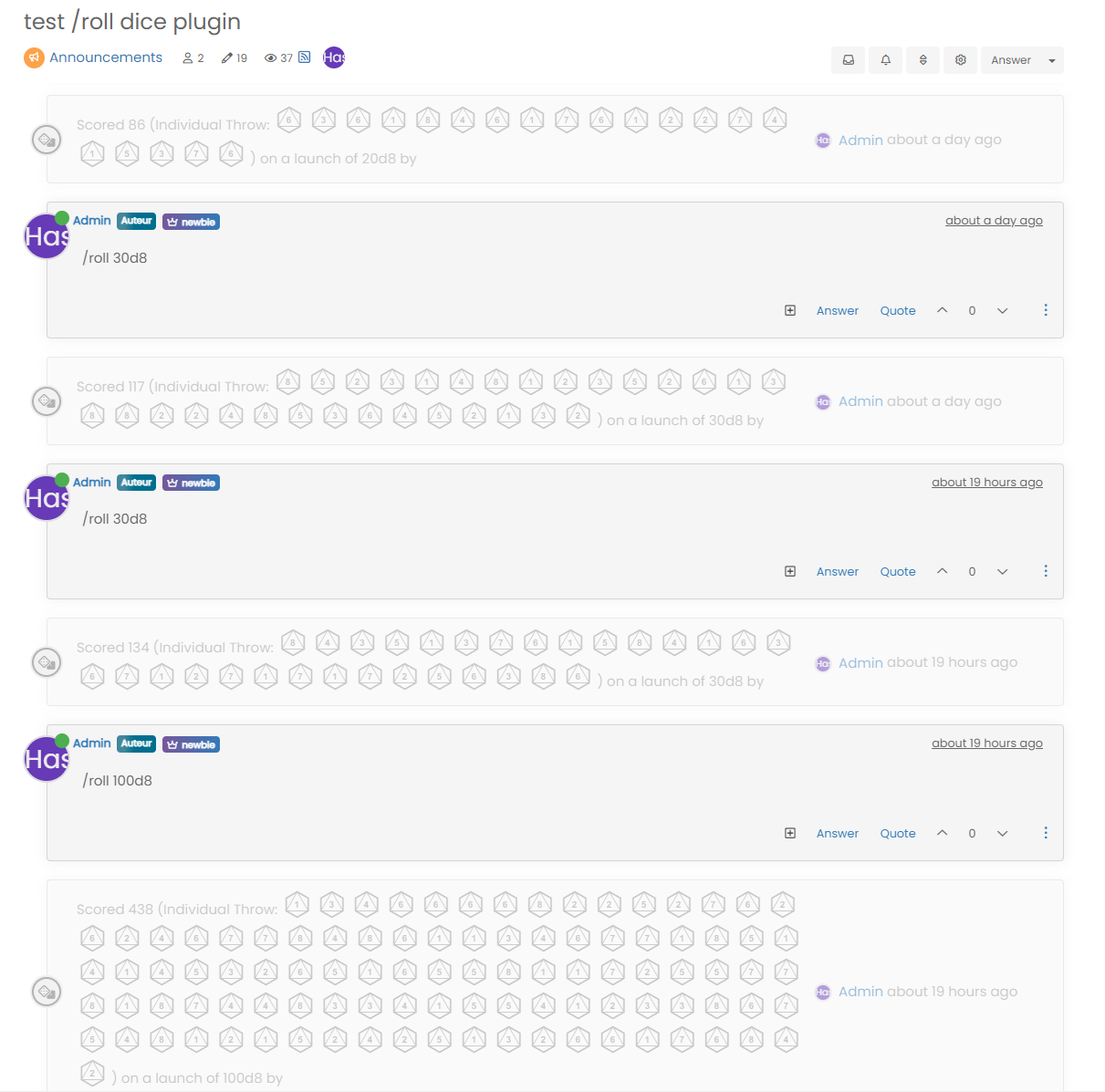
    248f43d6-23c7-4e78-a9cd-329665161393-image.png

    Not perfect of course, but certainly better than what you have.

  • wrote on last edited by DownPW
    #16

    indeed it is better but it also modifies the result on 1 line…

    As you say, we can’t do much until the plugin is modified 😞

  • indeed it is better but it also modifies the result on 1 line…

    As you say, we can’t do much until the plugin is modified 😞

    wrote on last edited by
    #17

    @DownPW Yes, it’s not very elegant sadly, and there is an impact to other elements. You could write a jQuery function that only modifies the CSS when there are more than x of the same element in that div… 🙂

  • wrote on last edited by DownPW
    #18

    Why not @phenomlab but like you know, i’m not a good JS develloper 😉 lol
    I have not the skills for that 😞

  • wrote on last edited by DownPW
    #19

    @phenomlab do you think it is difficult to do?

    EDIT: https://community.nodebb.org/post/88897

  • @phenomlab do you think it is difficult to do?

    EDIT: https://community.nodebb.org/post/88897

    wrote on last edited by
    #20

    @DownPW said in nodebb chat roll dice game:

    do you think it is difficult to do?

    No, but judging by this

    https://github.com/NodeBB/NodeBB/pull/10837/commits/e7404fd7c3d401e6adb6246c23e5567cda136dec

    It might be best to wait - or if you can’t, you could easily patch that file, or overwrite it (public/src/modules/helpers.common.js)

  • wrote on last edited by DownPW
    #21

    @phenomlab said in nodebb chat roll dice game:

    It might be best to wait - or if you can’t, you could easily patch that file, or overwrite it

    ok but I don’t understand what the correction do for my problem ?

    The interpretation of HTML is better ?

  • @phenomlab said in nodebb chat roll dice game:

    It might be best to wait - or if you can’t, you could easily patch that file, or overwrite it

    ok but I don’t understand what the correction do for my problem ?

    The interpretation of HTML is better ?

    wrote on last edited by
    #22

    @DownPW yes, exactly. It’ll enable better element styling meaning a greater flexibility in terms of being able to target specific components

  • wrote on last edited by DownPW
    #23

    I will test to see if it’s better out of curiosity but I don’t think that will be enough…

  • wrote on last edited by DownPW
    #24

    That is what I thought. patching the file is not enough. Same result

  • That is what I thought. patching the file is not enough. Same result

    wrote on last edited by
    #25

    @DownPW did you rebuild and restart after patching?

  • That is what I thought. patching the file is not enough. Same result

    wrote on last edited by
    #26

    @DownPW from what I’ve read, the patch appears in core v2.5.0 and even then, this plugin would still need to be modified so that targeting classes is then available.

  • wrote on last edited by
    #27

    Yes I see that and the correctif with type event ID

  • Yes I see that and the correctif with type event ID

    wrote on last edited by
    #28

    @DownPW I still think you could do something much quicker with jQuery.

  • @DownPW I still think you could do something much quicker with jQuery.

    wrote on last edited by
    #29

    @phenomlab said in nodebb chat roll dice game:

    @DownPW I still think you could do something much quicker with jQuery.

    Why not but like I said, I have no skills to do that.

    If you are motivated, why not but I don’t want to bother you especially since it will only be for a certain period of time.


Did this solution help you?
Did you find the suggested solution useful? Support 💗 Sudonix with a coffee ☕
If your organisation needs deeper expertise around infrastructure, security, or technology leadership, learn more about Phenomlab Ltd. Many of the deeper technical guides behind Sudonix are published there.

Related Topics
  • Issues with Imgur images in Fancybox chat module

    Bugs fancybox chat
    12
    1
    2 Votes
    12 Posts
    4k Views
    phenomlab
    @DownPW looks good to me.
  • who is read NodeBB

    Customisation read post nodebb
    6
    0 Votes
    6 Posts
    3k Views
    phenomlab
    @cagatay You should ask in the NodeBB forums. Perhaps reference this post https://discuss.flarum.org/d/23066-who-read
  • Forum Icons NodeBB

    Solved Customisation icons forum nodebb
    13
    0 Votes
    13 Posts
    5k Views
    phenomlab
    @cagatay That matches what I see [image: 4f0f858d-9812-42b1-9f61-ffb13d31dccd-image.png]
  • Changing Background on NodeBB

    Solved Customisation background image nodebb
    4
    0 Votes
    4 Posts
    2k Views
    phenomlab
    @cagatay You’d target the body tag and use the below line of CSS background: url(/assets/customcss/backgrounds/default/default.png) no-repeat center center fixed; Obviously, you need to change the path to suit where your image is being stored. More info around the background property can be found here https://www.w3schools.com/cssref/css3_pr_background.php
  • NodeBB inline videoplayer

    Solved Customisation nodebb
    12
    3 Votes
    12 Posts
    5k Views
    Panda
    @phenomlab YAY! It works Thanks so much
  • NodeBB Footer

    Solved Customisation footer nodebb
    10
    1 Votes
    10 Posts
    4k Views
    JAC
    @phenomlab said in NodeBB Footer: @jac and you. Hope all is well and you recover quickly Thanks pal
  • NodeBB Design help

    Solved Customisation
    8
    3
    2 Votes
    8 Posts
    4k Views
    phenomlab
    @riekmedia I’ve applied some new CSS to your site. Can you reload the page and try again ? For the record, this is what I added #footer { background: #2d343e; border-top: 4px solid #2d343e; font-size: 0.9em; margin-top: 70px; padding: 80px 0 0; position: relative; clear: both; bottom: 0; left: 0; right: 0; z-index: 1000; margin-left: -15px; margin-right: -338px; } The /categories page seems a bit messed up, so looking at that currently EDIT - issued some override CSS in the CATEGORIES widget <!--- CSS fix for overspill on /categories page - DO NOT DELETE --> <style> #footer { margin-right: -45px; } </style> That should resolve the /categories issue.
  • How to set a signature in NodeBB?

    Solved Customisation
    4
    2 Votes
    4 Posts
    2k Views
    JAC
    @phenomlab said in How to set a signature in NodeBB?: @jac No issues at all with copying. This is set using the signature for the user you are posting as. In the case of Hostrisk, it’s set like the below [image: 7bf04183-f6e8-4d72-b0eb-c9a05c9cd24b-image.png] You can set the signature by using https://domain.com/user/theuser/edit Mamy thanks Mark, I’ll set this up later .