Skip to content

Error install plugin

Solved Customisation
8 3 5.6k 1
  • wrote on last edited by
    #1

    Hi

    I have this error on fresh install nodebb 2.2.4 whein i want to install plugin via ACP
    Example here with question and answer plugin:
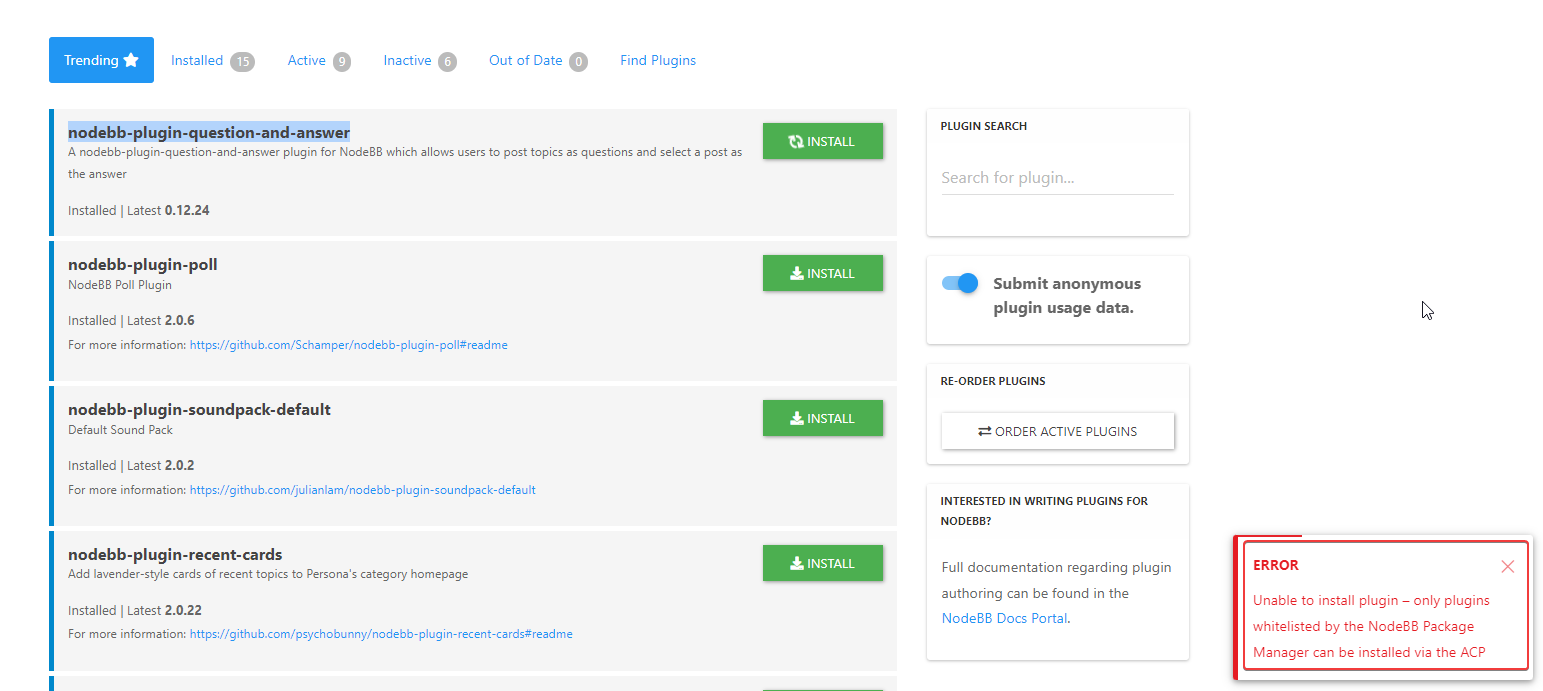
    20c09392-844b-437b-ab0d-25a03f20ef48-image.png

    An idea?

  • wrote on last edited by DownPW
    #3

    In fact when I go to research plugin I have one result in the list, research doesn’t work
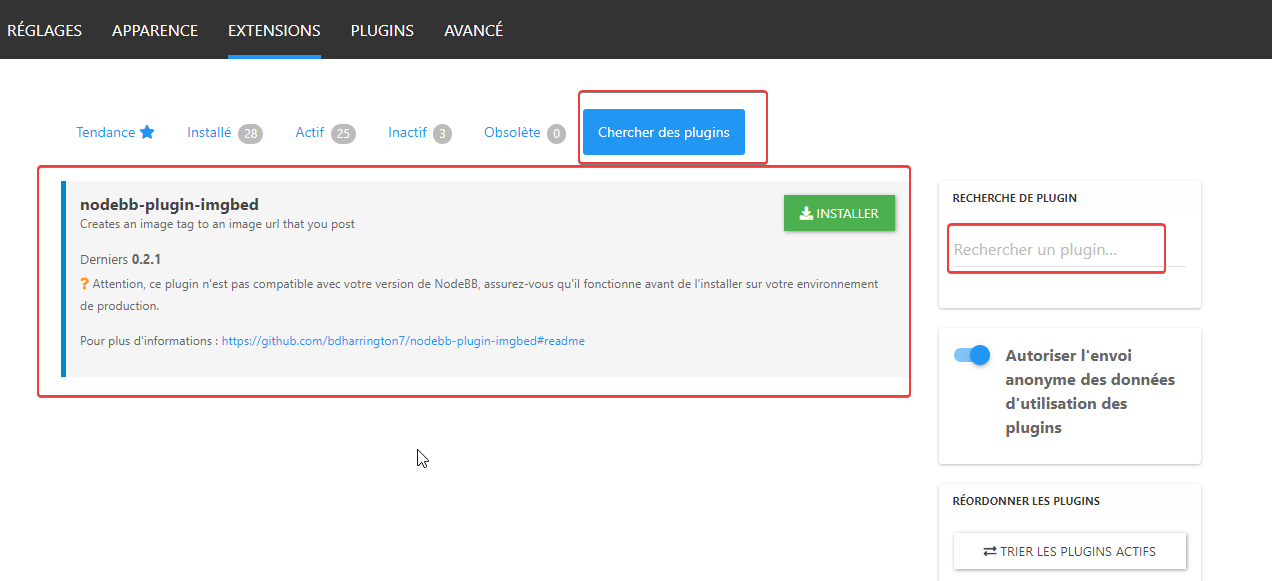
    9054b9d8-be86-4e5e-a424-45d6f4bc8dbe-image.png

    verry odd

    I have installed all plugins in command line

  • Hi

    I have this error on fresh install nodebb 2.2.4 whein i want to install plugin via ACP
    Example here with question and answer plugin:

    20c09392-844b-437b-ab0d-25a03f20ef48-image.png

    An idea?

    wrote on last edited by
    #2

    @DownPW that error message means the plugin you are trying to install doesn’t meet the minimum requirements of the latest version of NodeBB. You’d need to contact the plugin author to resolve that

  • wrote on last edited by DownPW
    #3

    In fact when I go to research plugin I have one result in the list, research doesn’t work

    9054b9d8-be86-4e5e-a424-45d6f4bc8dbe-image.png

    verry odd

    I have installed all plugins in command line

  • In fact when I go to research plugin I have one result in the list, research doesn’t work

    9054b9d8-be86-4e5e-a424-45d6f4bc8dbe-image.png

    verry odd

    I have installed all plugins in command line

    wrote on last edited by
    #4

    @DownPW yes, this was a known issue in the first 2.x release if I remember rightly.

  • phenomlab phenomlab has marked this topic as solved on
  • wrote on last edited by
    #5

    ok but it’s a 2.2.4 version with no upgrade

  • ok but it’s a 2.2.4 version with no upgrade

    wrote on last edited by
    #6

    @DownPW yes, the same issue still applies though.

  • wrote on last edited by
    #7

    it’s not very serious 😞

  • wrote on last edited by
    #8

    @pobojmoks

    Not WP plugin but nodeBB but it a known bug


Did this solution help you?
Did you find the suggested solution useful? Support 💗 Sudonix with a coffee ☕
If your organisation needs deeper expertise around infrastructure, security, or technology leadership, learn more about Phenomlab Ltd. Many of the deeper technical guides behind Sudonix are published there.

Related Topics
  • 4 Votes
    7 Posts
    3k Views
    crazycells
    @phenomlab oh no, that is 1 cent on the video, but you are right, symbols are similar… I just converted it to $1 , since it is more intuitive in daily life…
  • Custom html in nodebb to prevent cache

    Unsolved Configure nodebb
    18
    2 Votes
    18 Posts
    5k Views
    phenomlab
    @Panda You’ll need to do that with js. With some quick CSS changes, it looks like this [image: d619844f-fbfe-4cf1-a283-6b7364f6bf18-image.png] The colour choice is still really hard on the eye, but at least you can now read the text
  • 36 Votes
    55 Posts
    30k Views
    phenomlab
    @DownPW I see why. The code relies on the existence of [component="topic/quickreply/container"] However, this by definition means that the below has to be enabled [image: aeef638f-4188-489d-a9f2-f3a26dbca9d8-image.png] It will then work [image: 7fb38631-e0f3-46ef-b652-00929d927b13-image.png] For some unknown reason, this is hidden in Harmony, and only shows if you select it. In v2, it seems that the <section> is deleted altogether in Persona if “Quick Reply” is disabled, meaning it won’t fire as it can’t locate that specific component. The downside is that you might not want the quick reply function, but I think it’s a PITA to scroll up to the top of the post just to reply, so I have it on
  • How to downgrade plugin version on NodeBB

    Solved Customisation downgrade nodebb
    11
    3 Votes
    11 Posts
    4k Views
    phenomlab
    @cagatay no problems
  • Tenor GIF Plugin

    Solved Customisation plugin
    19
    1
    5 Votes
    19 Posts
    9k Views
    Sampo2910
    @phenomlab Also for me now Upgraded in ACP and all good . Thx.
  • Recent Cards plugin customization

    Solved Customisation nodebb
    21
    1
    13 Votes
    21 Posts
    12k Views
    phenomlab
    @pobojmoks that’s easily done by modifying the code provided here so that it targets background rather than border In essence, the below should work $(document).ready(function() { $(window).on('action:ajaxify.end', function(data) { $('.recent-card-container').each(function(i) { var dataId = $(this).attr("data-cid"); var color = $('[role="presentation"]', this).css("background-color"); console.log("data-cid " + dataId + " is " + color); $('[data-cid="' + dataId + '"] .recent-card').attr("style", "background-color: " + color); }); }); });
  • [NodeBB] Custom fields plugin

    Unsolved Customisation nodebb plugins javascript custom
    5
    0 Votes
    5 Posts
    3k Views
    phenomlab
    @pwsincd hi. Just following up on this thread (I know it’s old) but was curious to understand if it’s still an issue or not ?
  • NodeBB Discord Plugins

    Unsolved Customisation nodebb discord plugin

    7
    0 Votes
    7 Posts
    4k Views
    phenomlab
    @RiekMedia hi. Just following up on this thread (I know it’s old) but was curious to understand if it’s still an issue or not ?