Skip to content

Blinking text Effect

Customisation
3 2 1.4k 1
  • Hello 🙂

    small blinking text effect that I put on the name of my forum:

    here the code :

    :root {
         --site-title-blink: #CCCCCC;
    }
    
    /*Blink text effect */
    @keyframes text-blink {
        0%,
        20%,
        22%,
        25%,
        28%,
        55%,
        80%,
        100% {
            text-shadow: 0 0 2px #000,
                0 0 10px var(--site-title-blink),
                0 0 5px var(--site-title-blink),
                0 0 25px var(--site-title-blink);
            opacity: 1;
            color: var(--site-title-blink);
        }
    
        21%,
        24%,
        56% {
            opacity: 0.2;
            text-shadow: none;
        }
    }
    
    .navbar-default .navbar-brand {
        animation: 0.5s text-blink 1.5s infinite alternate;
        animation-iteration-count: 5;
        animation-duration: 1000ms;
    }
    
  • DownPWundefined DownPW marked this topic as a regular topic on
  • Hello 🙂

    small blinking text effect that I put on the name of my forum:

    here the code :

    :root {
         --site-title-blink: #CCCCCC;
    }
    
    /*Blink text effect */
    @keyframes text-blink {
        0%,
        20%,
        22%,
        25%,
        28%,
        55%,
        80%,
        100% {
            text-shadow: 0 0 2px #000,
                0 0 10px var(--site-title-blink),
                0 0 5px var(--site-title-blink),
                0 0 25px var(--site-title-blink);
            opacity: 1;
            color: var(--site-title-blink);
        }
    
        21%,
        24%,
        56% {
            opacity: 0.2;
            text-shadow: none;
        }
    }
    
    .navbar-default .navbar-brand {
        animation: 0.5s text-blink 1.5s infinite alternate;
        animation-iteration-count: 5;
        animation-duration: 1000ms;
    }
    

    @DownPW looks great ! Has that “broken neon light” look that you see in films. When I saw the title of this post, I instantly thought of the flashing text everyone had on their website in the 90’s and early 00’s but I like this effect a lot.
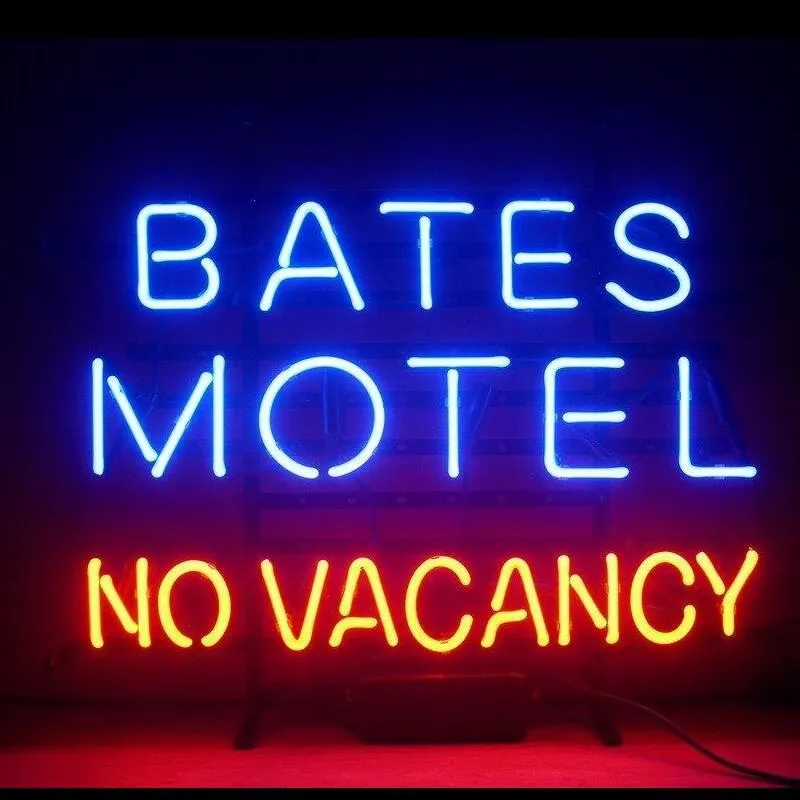
    Custom-Bates-Motel-No-Vacancy-Glass-Neon-Light-Sign-Beer-Bar.jpg_Q90.jpg_.webp

  • @DownPW looks great ! Has that “broken neon light” look that you see in films. When I saw the title of this post, I instantly thought of the flashing text everyone had on their website in the 90’s and early 00’s but I like this effect a lot.

    Custom-Bates-Motel-No-Vacancy-Glass-Neon-Light-Sign-Beer-Bar.jpg_Q90.jpg_.webp

    @phenomlab

    I love it too

    @phenomlab said in Blinking text Effect:

    Has that “broken neon light” look that you see in films.

    It’s exactly that, kind of old neon signs of bar or pubs a bit cyberpunk too 😉


Related Topics
  • What plugins are being used here on Sudonix?

    Solved General nodebb plugins development
    6
    5 Votes
    6 Posts
    2k Views
    @Roki-Antic Welcome! This site isn’t running Persona, but Harmony - a very heavily customised version at that. Do you have a URL where your site is currently located that is publicly accessible? Feel free to PM this info if you do not want to disclose here. Happy to help with any customisation needs.
  • The theme came with space on left side

    Solved WordPress css
    7
    3 Votes
    7 Posts
    2k Views
    @phenomlab yes it’s a different theme. The other one was not offering much on editable sidebar. It was like flarum hahah
  • Bug Report

    Solved Bugs nodebb bugs
    47
    1
    26 Votes
    47 Posts
    15k Views
    @crazycells Good points, thanks. I completely forgot that classes are added - makes life much simpler! EDIT - seems this is pretty straightforward, and only needs the below CSS .upvoted i { color: var(--bs-user-level) !important; } This then yields [image: 1718028529465-3f072f8a-ebfa-4910-8723-73c493b8e4eb-image.png] However, the caveat here is that the .upvoted class will only show for your upvotes, and nobody else’s. However, this does satisfy the original request however I would love to see my upvoted posts more clearly, because currently, when I upvote, nothing on the post tool is changing, it would be nicer if there is an indication that I have upvoted (like a filled or colored triangle?)
  • Upgrade issues

    Solved Configure nodebb
    2
    1
    2 Votes
    2 Posts
    1k Views
    Use this code git fetch # Grab the latest code from the NodeBB repository git checkout v3.x git reset --hard origin/v3.x And you will have the latest version without specifying it https://docs.nodebb.org/configuring/upgrade/
  • Footer bar add center text

    Solved Customisation css
    41
    1
    8 Votes
    41 Posts
    15k Views
    @phenomlab said in Footer bar add center text: div#console-nav-tab Ah ok test with bottom: 0px !important; idem
  • Link Text Colour.

    Solved Customisation customise
    5
    2
    2 Votes
    5 Posts
    2k Views
    @phenomlab Thx again for the reply. Well I am sure that it will be well worth the wait. I will watch with anticipation. For now it is OK. Just small minor irritations I fell in a lot of NodeBB ‘default’ things.
  • CSS3: Gradient Generator

    Development css gradient
    1
    1 Votes
    1 Posts
    752 Views
    No one has replied
  • NodeBB changing color of the text

    Solved Customisation
    7
    2 Votes
    7 Posts
    2k Views
    @phenomlab said in NodeBB changing color of the text: @marusaky This ought to to it a.permalink, a.permalink:active, a.permalink:focus, a.permalink:hover { color: #ffffff; } works great, thanks a lot