Skip to content

Blinking text Effect

Customisation
3 2 953 1
  • Hello 🙂

    small blinking text effect that I put on the name of my forum:

    here the code :

    :root {
         --site-title-blink: #CCCCCC;
    }
    
    /*Blink text effect */
    @keyframes text-blink {
        0%,
        20%,
        22%,
        25%,
        28%,
        55%,
        80%,
        100% {
            text-shadow: 0 0 2px #000,
                0 0 10px var(--site-title-blink),
                0 0 5px var(--site-title-blink),
                0 0 25px var(--site-title-blink);
            opacity: 1;
            color: var(--site-title-blink);
        }
    
        21%,
        24%,
        56% {
            opacity: 0.2;
            text-shadow: none;
        }
    }
    
    .navbar-default .navbar-brand {
        animation: 0.5s text-blink 1.5s infinite alternate;
        animation-iteration-count: 5;
        animation-duration: 1000ms;
    }
    
  • DownPWundefined DownPW marked this topic as a regular topic on
  • Hello 🙂

    small blinking text effect that I put on the name of my forum:

    here the code :

    :root {
         --site-title-blink: #CCCCCC;
    }
    
    /*Blink text effect */
    @keyframes text-blink {
        0%,
        20%,
        22%,
        25%,
        28%,
        55%,
        80%,
        100% {
            text-shadow: 0 0 2px #000,
                0 0 10px var(--site-title-blink),
                0 0 5px var(--site-title-blink),
                0 0 25px var(--site-title-blink);
            opacity: 1;
            color: var(--site-title-blink);
        }
    
        21%,
        24%,
        56% {
            opacity: 0.2;
            text-shadow: none;
        }
    }
    
    .navbar-default .navbar-brand {
        animation: 0.5s text-blink 1.5s infinite alternate;
        animation-iteration-count: 5;
        animation-duration: 1000ms;
    }
    

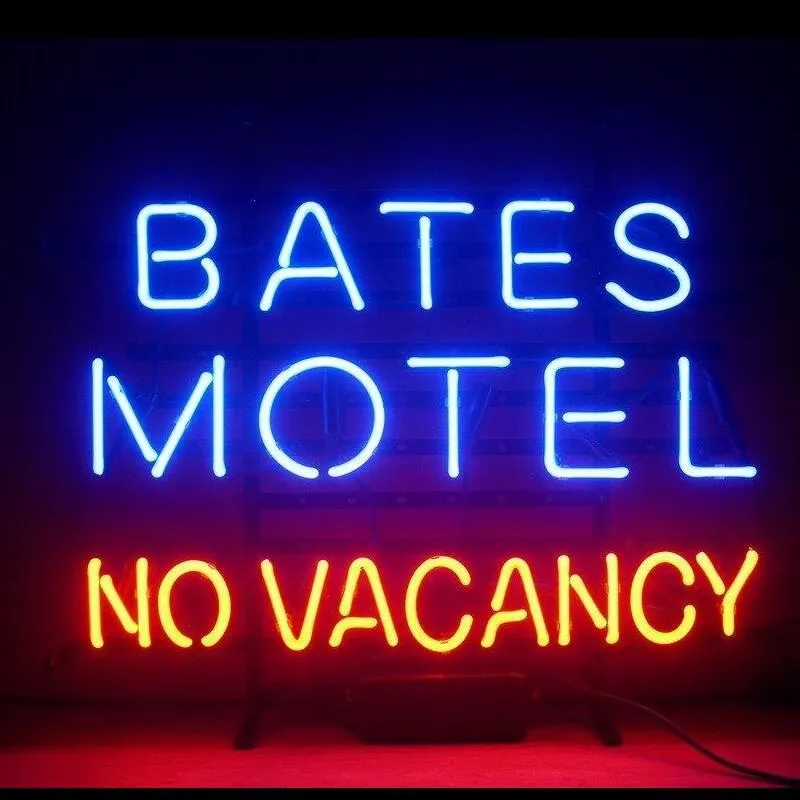
    @DownPW looks great ! Has that “broken neon light” look that you see in films. When I saw the title of this post, I instantly thought of the flashing text everyone had on their website in the 90’s and early 00’s but I like this effect a lot.
    Custom-Bates-Motel-No-Vacancy-Glass-Neon-Light-Sign-Beer-Bar.jpg_Q90.jpg_.webp

  • @DownPW looks great ! Has that “broken neon light” look that you see in films. When I saw the title of this post, I instantly thought of the flashing text everyone had on their website in the 90’s and early 00’s but I like this effect a lot.

    Custom-Bates-Motel-No-Vacancy-Glass-Neon-Light-Sign-Beer-Bar.jpg_Q90.jpg_.webp

    @phenomlab

    I love it too

    @phenomlab said in Blinking text Effect:

    Has that “broken neon light” look that you see in films.

    It’s exactly that, kind of old neon signs of bar or pubs a bit cyberpunk too 😉


Related Topics
  • TNG + Nodebb

    General tng genealogy nodebb plugin
    4
    0 Votes
    4 Posts
    917 Views
    @Madchatthew said in TNG + Nodebb: you have to try and use duck tape and super glue to change something to make it do what you want it to do I couldn’t have put that better myself.
  • 50 Votes
    107 Posts
    25k Views
    @crazycells [image: 1711908210287-7f4c7193-7c28-4e2e-80e8-d439ac7285c6-image.png] [image: 1711908232109-3ab9c33d-04b9-4c15-91e6-891450aebfc2-image.png]
  • Rotating Star Effect

    Solved Let's Build It wordpress css
    17
    12 Votes
    17 Posts
    2k Views
    @phenomlab thanks a lot for these, both of the below are awesome! https://codepen.io/bennettfeely/pen/vYLmYJz https://codepen.io/C-L-the-selector/pen/MWZbWBo
  • Heading text on NodeBB forum

    Solved Customisation
    27
    1 Votes
    27 Posts
    5k Views
    @mventures I’ve not done anything here.
  • hover link effect

    Solved Customisation css link hover
    18
    1
    6 Votes
    18 Posts
    3k Views
    @DownPW Looking at the underlying code, class start is being added on hover by jQuery in this function document.querySelectorAll(".button-gradient, .button-transparent").forEach((button) => { const style = getComputedStyle(button); const lines = document.createElement("div"); lines.classList.add("lines"); const groupTop = document.createElement("div"); const groupBottom = document.createElement("div"); const svg = createSVG( button.offsetWidth, button.offsetHeight, parseInt(style.borderRadius, 10) ); groupTop.appendChild(svg); groupTop.appendChild(svg.cloneNode(true)); groupTop.appendChild(svg.cloneNode(true)); groupTop.appendChild(svg.cloneNode(true)); groupBottom.appendChild(svg.cloneNode(true)); groupBottom.appendChild(svg.cloneNode(true)); groupBottom.appendChild(svg.cloneNode(true)); groupBottom.appendChild(svg.cloneNode(true)); lines.appendChild(groupTop); lines.appendChild(groupBottom); button.appendChild(lines); button.addEventListener("pointerenter", () => { button.classList.add("start"); }); svg.addEventListener("animationend", () => { button.classList.remove("start"); }); }); }) The CSS for start is below .button-gradient.start .lines svg, .button-transparent.start .lines svg { animation: stroke 0.3s linear; } And this is the corresponding keyframe @keyframes stroke { 30%, 55% { opacity: 1; } 100% { stroke-dashoffset: 5; opacity: 0; } } It’s using both CSS and SVG, so might not be a simple affair to replicate without the SVG files.
  • Link Text Colour.

    Solved Customisation customise
    5
    2
    2 Votes
    5 Posts
    1k Views
    @phenomlab Thx again for the reply. Well I am sure that it will be well worth the wait. I will watch with anticipation. For now it is OK. Just small minor irritations I fell in a lot of NodeBB ‘default’ things.
  • NodeBB changing color of the text

    Solved Customisation
    7
    2 Votes
    7 Posts
    2k Views
    @phenomlab said in NodeBB changing color of the text: @marusaky This ought to to it a.permalink, a.permalink:active, a.permalink:focus, a.permalink:hover { color: #ffffff; } works great, thanks a lot
  • CSS Help on my Flarum

    Solved Customisation
    5
    2
    2 Votes
    5 Posts
    1k Views
    @mike-jones Yes, you’ll typically see this type of behaviour if there is another style that has higher priority in the sense that yours will be overridden. Using !important will override the higher preference, but should be used sparingly rather than everywhere.