Skip to content

Blinking text Effect

Customisation
3 2 953 1
  • Hello 🙂

    small blinking text effect that I put on the name of my forum:

    here the code :

    :root {
         --site-title-blink: #CCCCCC;
    }
    
    /*Blink text effect */
    @keyframes text-blink {
        0%,
        20%,
        22%,
        25%,
        28%,
        55%,
        80%,
        100% {
            text-shadow: 0 0 2px #000,
                0 0 10px var(--site-title-blink),
                0 0 5px var(--site-title-blink),
                0 0 25px var(--site-title-blink);
            opacity: 1;
            color: var(--site-title-blink);
        }
    
        21%,
        24%,
        56% {
            opacity: 0.2;
            text-shadow: none;
        }
    }
    
    .navbar-default .navbar-brand {
        animation: 0.5s text-blink 1.5s infinite alternate;
        animation-iteration-count: 5;
        animation-duration: 1000ms;
    }
    
  • DownPWundefined DownPW marked this topic as a regular topic on
  • Hello 🙂

    small blinking text effect that I put on the name of my forum:

    here the code :

    :root {
         --site-title-blink: #CCCCCC;
    }
    
    /*Blink text effect */
    @keyframes text-blink {
        0%,
        20%,
        22%,
        25%,
        28%,
        55%,
        80%,
        100% {
            text-shadow: 0 0 2px #000,
                0 0 10px var(--site-title-blink),
                0 0 5px var(--site-title-blink),
                0 0 25px var(--site-title-blink);
            opacity: 1;
            color: var(--site-title-blink);
        }
    
        21%,
        24%,
        56% {
            opacity: 0.2;
            text-shadow: none;
        }
    }
    
    .navbar-default .navbar-brand {
        animation: 0.5s text-blink 1.5s infinite alternate;
        animation-iteration-count: 5;
        animation-duration: 1000ms;
    }
    

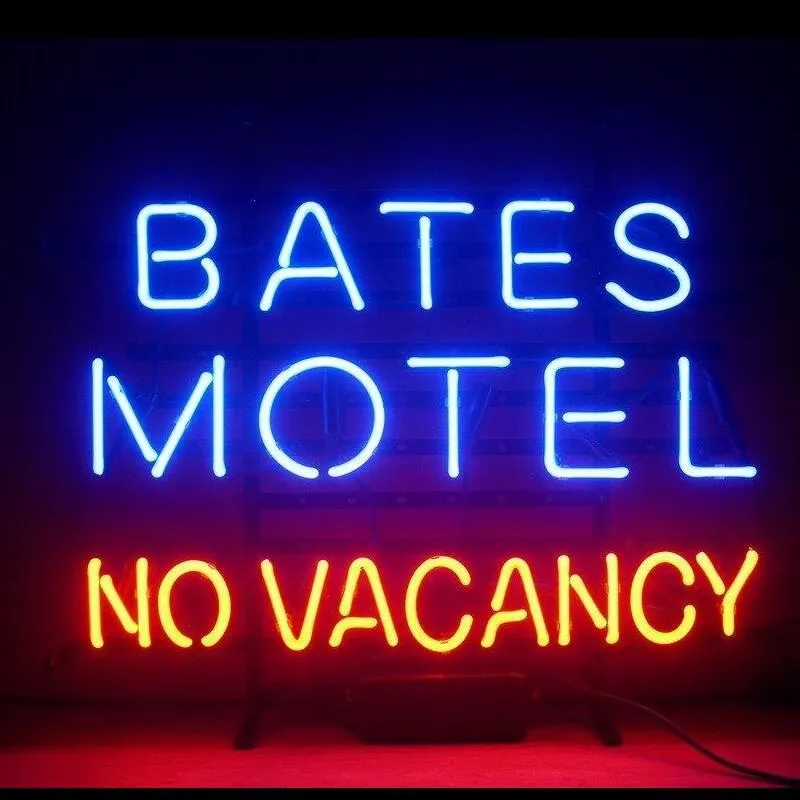
    @DownPW looks great ! Has that “broken neon light” look that you see in films. When I saw the title of this post, I instantly thought of the flashing text everyone had on their website in the 90’s and early 00’s but I like this effect a lot.
    Custom-Bates-Motel-No-Vacancy-Glass-Neon-Light-Sign-Beer-Bar.jpg_Q90.jpg_.webp

  • @DownPW looks great ! Has that “broken neon light” look that you see in films. When I saw the title of this post, I instantly thought of the flashing text everyone had on their website in the 90’s and early 00’s but I like this effect a lot.

    Custom-Bates-Motel-No-Vacancy-Glass-Neon-Light-Sign-Beer-Bar.jpg_Q90.jpg_.webp

    @phenomlab

    I love it too

    @phenomlab said in Blinking text Effect:

    Has that “broken neon light” look that you see in films.

    It’s exactly that, kind of old neon signs of bar or pubs a bit cyberpunk too 😉


Related Topics
  • The theme came with space on left side

    Solved WordPress css
    7
    3 Votes
    7 Posts
    1k Views
    @phenomlab yes it’s a different theme. The other one was not offering much on editable sidebar. It was like flarum hahah
  • 6 Votes
    15 Posts
    3k Views
    No no, I said that in the sense that he told me it was simple ^^ I was able to see that this was not the case by targeting the elements he had advised me.
  • 11 Votes
    14 Posts
    3k Views
    @dave1904 excellent news. Thanks for the feedback
  • How to fix size of photos & videos NodeBB

    Solved Customisation nodebb nodebb size
    7
    3 Votes
    7 Posts
    1k Views
    @crazycells pleasure. Using percentages makes much more sense in this case. It’s the same argument with px vs pt vs em with fonts, margins, padding, etc., in the sense that em is generally preferred over px and pt https://stackoverflow.com/questions/609517/why-em-instead-of-px
  • hover link effect

    Solved Customisation css link hover
    18
    1
    6 Votes
    18 Posts
    3k Views
    @DownPW Looking at the underlying code, class start is being added on hover by jQuery in this function document.querySelectorAll(".button-gradient, .button-transparent").forEach((button) => { const style = getComputedStyle(button); const lines = document.createElement("div"); lines.classList.add("lines"); const groupTop = document.createElement("div"); const groupBottom = document.createElement("div"); const svg = createSVG( button.offsetWidth, button.offsetHeight, parseInt(style.borderRadius, 10) ); groupTop.appendChild(svg); groupTop.appendChild(svg.cloneNode(true)); groupTop.appendChild(svg.cloneNode(true)); groupTop.appendChild(svg.cloneNode(true)); groupBottom.appendChild(svg.cloneNode(true)); groupBottom.appendChild(svg.cloneNode(true)); groupBottom.appendChild(svg.cloneNode(true)); groupBottom.appendChild(svg.cloneNode(true)); lines.appendChild(groupTop); lines.appendChild(groupBottom); button.appendChild(lines); button.addEventListener("pointerenter", () => { button.classList.add("start"); }); svg.addEventListener("animationend", () => { button.classList.remove("start"); }); }); }) The CSS for start is below .button-gradient.start .lines svg, .button-transparent.start .lines svg { animation: stroke 0.3s linear; } And this is the corresponding keyframe @keyframes stroke { 30%, 55% { opacity: 1; } 100% { stroke-dashoffset: 5; opacity: 0; } } It’s using both CSS and SVG, so might not be a simple affair to replicate without the SVG files.
  • NodeBB changing color of the text

    Solved Customisation
    7
    2 Votes
    7 Posts
    2k Views
    @phenomlab said in NodeBB changing color of the text: @marusaky This ought to to it a.permalink, a.permalink:active, a.permalink:focus, a.permalink:hover { color: #ffffff; } works great, thanks a lot
  • [NodeBB] First post customization

    Solved Customisation nodebb
    5
    4 Votes
    5 Posts
    1k Views
    @phenomlab thanks
  • CSS Help on my Flarum

    Solved Customisation
    5
    2
    2 Votes
    5 Posts
    1k Views
    @mike-jones Yes, you’ll typically see this type of behaviour if there is another style that has higher priority in the sense that yours will be overridden. Using !important will override the higher preference, but should be used sparingly rather than everywhere.