Skip to content

Blinking text Effect

Customisation
3 2 1.2k 1
  • Hello 🙂

    small blinking text effect that I put on the name of my forum:

    here the code :

    :root {
         --site-title-blink: #CCCCCC;
    }
    
    /*Blink text effect */
    @keyframes text-blink {
        0%,
        20%,
        22%,
        25%,
        28%,
        55%,
        80%,
        100% {
            text-shadow: 0 0 2px #000,
                0 0 10px var(--site-title-blink),
                0 0 5px var(--site-title-blink),
                0 0 25px var(--site-title-blink);
            opacity: 1;
            color: var(--site-title-blink);
        }
    
        21%,
        24%,
        56% {
            opacity: 0.2;
            text-shadow: none;
        }
    }
    
    .navbar-default .navbar-brand {
        animation: 0.5s text-blink 1.5s infinite alternate;
        animation-iteration-count: 5;
        animation-duration: 1000ms;
    }
    
  • DownPWundefined DownPW marked this topic as a regular topic on
  • Hello 🙂

    small blinking text effect that I put on the name of my forum:

    here the code :

    :root {
         --site-title-blink: #CCCCCC;
    }
    
    /*Blink text effect */
    @keyframes text-blink {
        0%,
        20%,
        22%,
        25%,
        28%,
        55%,
        80%,
        100% {
            text-shadow: 0 0 2px #000,
                0 0 10px var(--site-title-blink),
                0 0 5px var(--site-title-blink),
                0 0 25px var(--site-title-blink);
            opacity: 1;
            color: var(--site-title-blink);
        }
    
        21%,
        24%,
        56% {
            opacity: 0.2;
            text-shadow: none;
        }
    }
    
    .navbar-default .navbar-brand {
        animation: 0.5s text-blink 1.5s infinite alternate;
        animation-iteration-count: 5;
        animation-duration: 1000ms;
    }
    

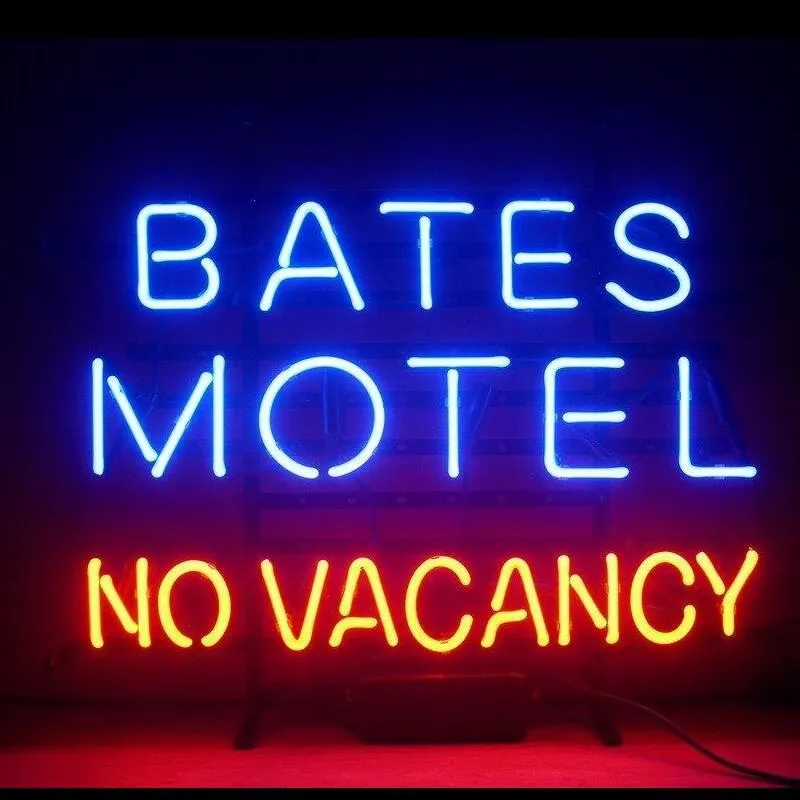
    @DownPW looks great ! Has that “broken neon light” look that you see in films. When I saw the title of this post, I instantly thought of the flashing text everyone had on their website in the 90’s and early 00’s but I like this effect a lot.
    Custom-Bates-Motel-No-Vacancy-Glass-Neon-Light-Sign-Beer-Bar.jpg_Q90.jpg_.webp

  • @DownPW looks great ! Has that “broken neon light” look that you see in films. When I saw the title of this post, I instantly thought of the flashing text everyone had on their website in the 90’s and early 00’s but I like this effect a lot.

    Custom-Bates-Motel-No-Vacancy-Glass-Neon-Light-Sign-Beer-Bar.jpg_Q90.jpg_.webp

    @phenomlab

    I love it too

    @phenomlab said in Blinking text Effect:

    Has that “broken neon light” look that you see in films.

    It’s exactly that, kind of old neon signs of bar or pubs a bit cyberpunk too 😉


Related Topics
  • nodebb error logs

    Bugs nodebb
    6
    2
    4 Votes
    6 Posts
    2k Views
    I just wanted to ask because I don’t have much knowledge about the new installation. Thank you for the explanatory answer.
  • NodeBB v3 Chat Very Slow

    Moved Performance nodebb v3 nodebb chat
    47
    11 Votes
    47 Posts
    14k Views
    @DownPW Seems fine.
  • Heading text on NodeBB forum

    Solved Customisation
    27
    1 Votes
    27 Posts
    7k Views
    @mventures I’ve not done anything here.
  • The best css to customize our logo?

    Solved Customisation css
    2
    1 Votes
    2 Posts
    1k Views
    @Sala This should look better .sidenav .navbar-brand { padding-top: 0.5rem; padding-bottom: 0.5rem; } [image: 1669026666905-e5cec20e-be36-4ee8-9129-fd11ad4656ac-image.png] You can increase the top and bottom padding by increasing the values above.
  • hover link effect

    Solved Customisation css link hover
    18
    1
    6 Votes
    18 Posts
    4k Views
    @DownPW Looking at the underlying code, class start is being added on hover by jQuery in this function document.querySelectorAll(".button-gradient, .button-transparent").forEach((button) => { const style = getComputedStyle(button); const lines = document.createElement("div"); lines.classList.add("lines"); const groupTop = document.createElement("div"); const groupBottom = document.createElement("div"); const svg = createSVG( button.offsetWidth, button.offsetHeight, parseInt(style.borderRadius, 10) ); groupTop.appendChild(svg); groupTop.appendChild(svg.cloneNode(true)); groupTop.appendChild(svg.cloneNode(true)); groupTop.appendChild(svg.cloneNode(true)); groupBottom.appendChild(svg.cloneNode(true)); groupBottom.appendChild(svg.cloneNode(true)); groupBottom.appendChild(svg.cloneNode(true)); groupBottom.appendChild(svg.cloneNode(true)); lines.appendChild(groupTop); lines.appendChild(groupBottom); button.appendChild(lines); button.addEventListener("pointerenter", () => { button.classList.add("start"); }); svg.addEventListener("animationend", () => { button.classList.remove("start"); }); }); }) The CSS for start is below .button-gradient.start .lines svg, .button-transparent.start .lines svg { animation: stroke 0.3s linear; } And this is the corresponding keyframe @keyframes stroke { 30%, 55% { opacity: 1; } 100% { stroke-dashoffset: 5; opacity: 0; } } It’s using both CSS and SVG, so might not be a simple affair to replicate without the SVG files.
  • Fresher in Nodebb install

    General nodebb
    24
    15 Votes
    24 Posts
    7k Views
    @Hari I’ve been reading a lot about APO. Looks impressive.
  • Link Text Colour.

    Solved Customisation customise
    5
    2
    2 Votes
    5 Posts
    1k Views
    @phenomlab Thx again for the reply. Well I am sure that it will be well worth the wait. I will watch with anticipation. For now it is OK. Just small minor irritations I fell in a lot of NodeBB ‘default’ things.
  • Multiple link on one ico non Navbar

    Solved Customisation links css navbar
    7
    1
    2 Votes
    7 Posts
    2k Views
    yeah you’re right @phenomlab. Problem of NodeBB Version