Skip to content

Unable to change icon in NodeBB navigation

Tips
1 1 535 1
  • I got hit with this today. As I have a Pro subscription to Font Awesome, this allows me to use a much wider range of fonts. Unfortunately, NodeBB only seems to list the free fonts, so in order to use the Pro icons, you have to manually type the font name you want (leave the fa- part off, as it’s not needed).

    No issues, so I went ahead and typed in the name. Below is the result

    9afecc8c-6a32-4e5d-882c-f72df65db513-image.png

    Now, despite the icon not showing here, it does once you save and reload the site. Great - problem solved then?

    Yes - until you want to change the icon back…

    Highlight over an unchanged icon, and you’ll see the mouse pointer change meaning there is a link behind it
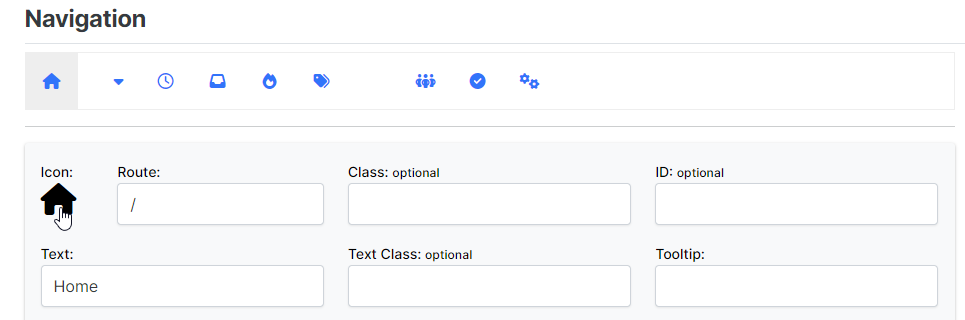
    51d117f6-8359-4136-8f04-9be892a589f7-image.png

    However, hover over one you’ve changed by typing in the value manually, and you’ll see the link is gone
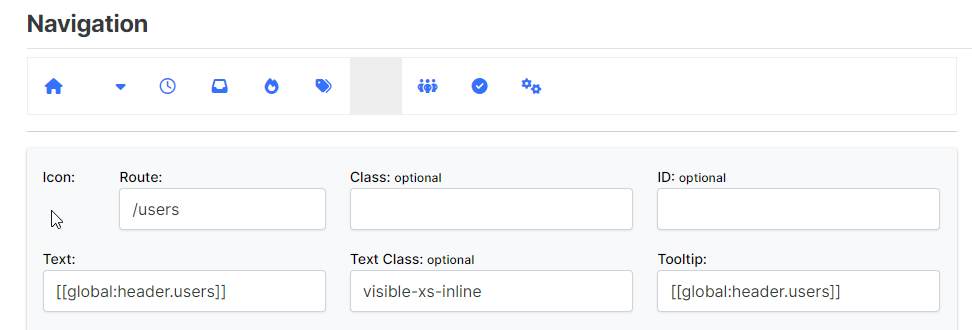
    2e69e0bf-baa0-4dc3-b653-2e14d55fdf5d-image.png

    Panic stations… headless chicken… major cussing session… No - there is a way out

    Fire up the dev tools (F12 for console), and press the select tool. Now select the element with the missing link
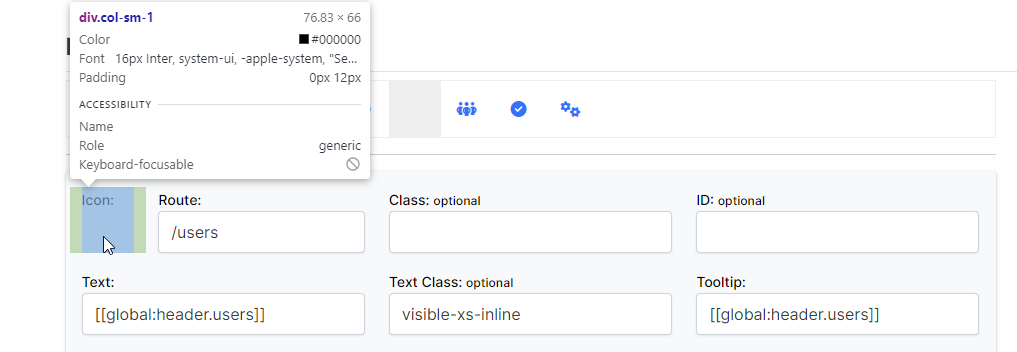
    b1a30da5-d878-4fab-9083-c9dcb3affa4a-image.png

    In the resultant element list, follow the HTML until you reach
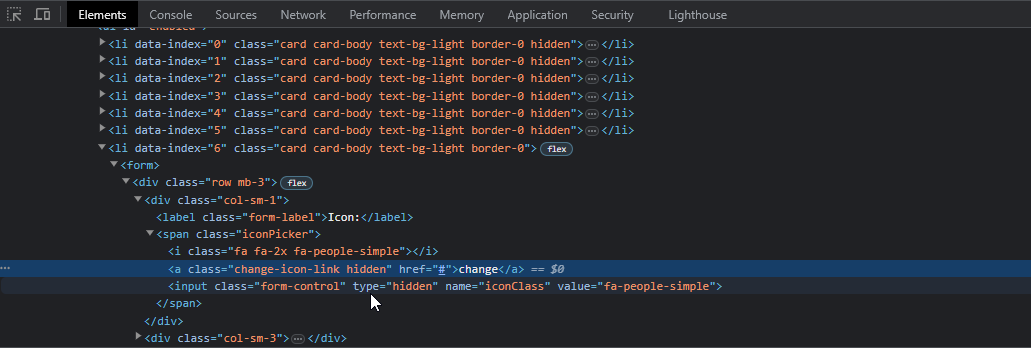
    2eedea09-2675-4fe0-a28d-a89ff29dc4f3-image.png

    change-icon-link hidden

    Now delete the hidden part, so you are left with just change-icon-link and press enter

    You’ll see that the alt text appears for the image, which is enough for you to be able to click the anchor, and change the icon
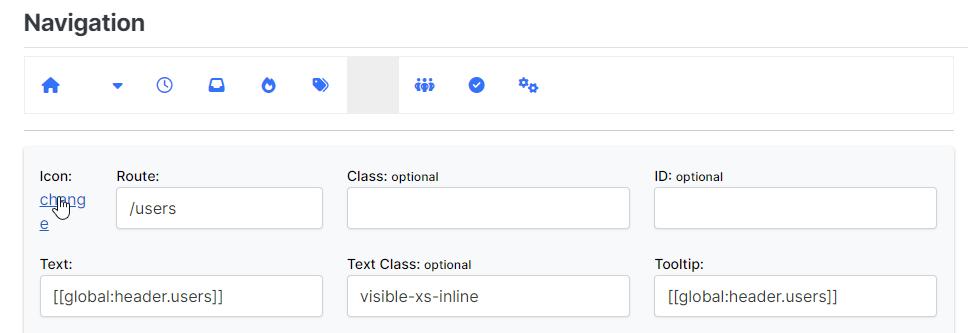
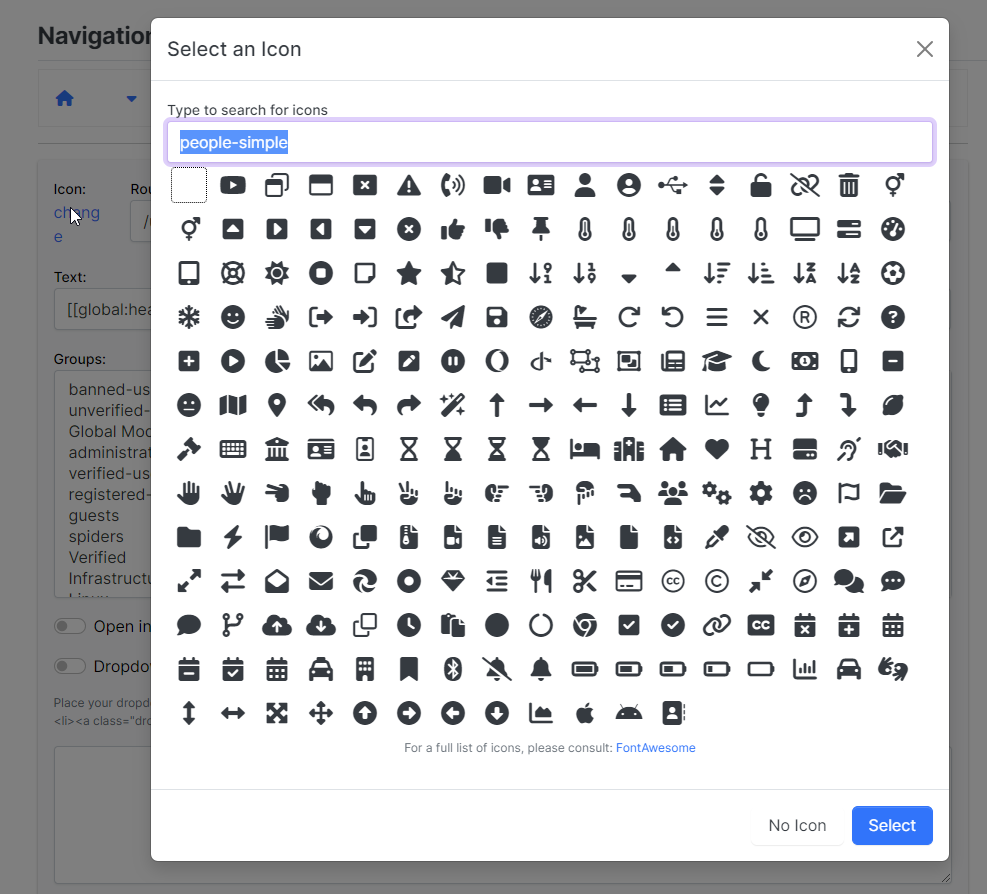
    c59af52d-9d23-4f00-839e-0d43eee4c6e1-image.png

    4005c5bb-27a3-41a9-8c19-436e9d1501ab-image.png

    There you go. Now enjoy how smug you feel that you’ve sorted this problem yourself 🙂

  • phenomlabundefined phenomlab marked this topic as a regular topic on

Related Topics
  • 3 Votes
    1 Posts
    540 Views
    No one has replied
  • Custom html in nodebb to prevent cache

    Unsolved Configure nodebb
    18
    2 Votes
    18 Posts
    3k Views
    @Panda You’ll need to do that with js. With some quick CSS changes, it looks like this [image: 1690796279348-d619844f-fbfe-4cf1-a283-6b7364f6bf18-image.png] The colour choice is still really hard on the eye, but at least you can now read the text
  • Nodebb design

    Solved General nodebb
    2
    1 Votes
    2 Posts
    844 Views
    @Panda said in Nodebb design: One negative is not being so good for SEO as more Server side rendered forums, if web crawlers dont run the JS to read the forum. From recollection, Google and Bing have the capability to read and process JS, although it’s not in the same manner as a physical person will consume content on a page. It will be seen as plain text, but will be indexed. However, it’s important to note that Yandex and Baidu will not render JS, although seeing as Google has a 90% share of the content available on the web in terms of indexing, this isn’t something you’ll likely lose sleep over. @Panda said in Nodebb design: The “write api” is preferred for server-to-server interactions. This is mostly based around overall security - you won’t typically want a client machine changing database elements or altering data. This is why you have “client-side” which could be DOM manipulation etc, and “server-side” which performs more complex operations as it can communicate directly with the database whereas the client cannot (and if it can, then you have a serious security flaw). Reading from the API is perfectly acceptable on the client-side, but not being able to write. A paradigm here would be something like SNMP. This protocol exists as a UDP (UDP is very efficient, as it is “fire and forget” and does not wait for a response like TCP does) based service which reads performance data from a remote source, thus enabling an application to parse that data for use in a monitoring application. In all cases, SNMP access should be “RO” (Read Only) and not RW (Read Write). It is completely feasible to assume complete control over a firewall for example by having RW access to SNMP and then exposing it to the entire internet with a weak passphrase. You wouldn’t do it (at least, I hope you wouldn’t) and the same ethic applies to server-side rendering and the execution of commands.
  • NodeBB: updating Admin details not working

    Solved Configure nodebb admin
    17
    3 Votes
    17 Posts
    2k Views
    @mventures Ok. No issues
  • 1 Votes
    5 Posts
    1k Views
    @DownPW very useful tip. Thanks
  • Bootstrap Version

    Solved Customisation nodebb bootstrap
    8
    5 Votes
    8 Posts
    1k Views
    @phenomlab That will be nice once they have completed that. It will be interesting to see how long that takes. So for now I will use custom css to make it look the way I want. Frameworks just make things a little faster. Thanks @phenomlab
  • NodeBB 1.19.3

    Solved Performance nodebb 1.19.3 performance
    33
    4 Votes
    33 Posts
    9k Views
    @phenomlab I find the problem Mark The error message indicated this path : http://localhost:4567/assets/plugins/nodebb-plugin-emoji/emoji/styles.css?v=6983dobg16u I change the path url on config.json [image: 1645128773854-47bacc80-f141-41e4-a261-3f8d650cc6f6-image.png] And all it’s good Weird, I didn’t have to change that path before 1.19.3 But this does not prevent the problem from a clean install with Emoji Plugin EDIT: After test, that resolv the problem installation for 1.18.x but not for 1.19.x (I have other error message when I run ./nodebb Setup For resume: NodeJS 16_x with 1.18.x is ok
  • Iframely (Nodebb)

    Solved Configure
    40
    4 Votes
    40 Posts
    7k Views
    @DownPW This is now resolved. The issue was an incorrect URL specified in the Nodebb plugin. I’ve corrected this, and now it works as intended.




