Skip to content

[NODEBB] Reply Button/arrow answer
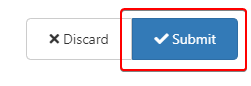
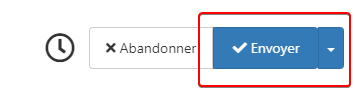
Solved Customisation
25 2 11.6k 1
  • wrote on last edited by
    #10

    Ok wait for fix and test after ^^

  • Ok wait for fix and test after ^^

    wrote on last edited by
    #11

    @downpw Updated the original post, and applied CSS here so you can test.

  • wrote on last edited by
    #12

    Great 😉

  • wrote on last edited by
    #13

    It worked on my default theme. 🙂
    It seem to have border effect on my custom themes 😞

  • It worked on my default theme. 🙂
    It seem to have border effect on my custom themes 😞

    wrote on last edited by
    #14

    @downpw do you have anything in your custom CSS that is overriding this ?

  • wrote on last edited by DownPW
    #15

    Lot of variable. Hard to debug… a little lost
    I’ve been on it for 2 hours !!

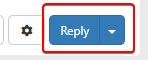
    for default theme I must add this for delete border to Reply Putton on topic

    .btn-primary {
        color: #fff;
        background-color: #337ab7;
        border-color: transparent;
    }
    
  • Lot of variable. Hard to debug… a little lost
    I’ve been on it for 2 hours !!

    for default theme I must add this for delete border to Reply Putton on topic

    .btn-primary {
        color: #fff;
        background-color: #337ab7;
        border-color: transparent;
    }
    
    wrote on last edited by
    #16

    @downpw why do you need to delete the border ?

  • wrote on last edited by
    #17

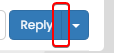
    Because it is visible

    beaee397-4637-4609-b223-7a5b6b0d5034-image.png

  • Because it is visible

    beaee397-4637-4609-b223-7a5b6b0d5034-image.png

    wrote on last edited by
    #18

    @downpw I see. Another hack here is to set the border colour to be the same as the background colour.

  • wrote on last edited by DownPW
    #19

    @downpw said in [NODEBB] Reply Button/arrow answer:

    .btn-primary {
    color: #fff;
    background-color: #337ab7;
    border-color: transparent;
    }

    .btn-primary {
        color: #fff;
        background-color: #337ab7;
        border-color: #337ab7;
    }
    
  • @downpw said in [NODEBB] Reply Button/arrow answer:

    .btn-primary {
    color: #fff;
    background-color: #337ab7;
    border-color: transparent;
    }

    .btn-primary {
        color: #fff;
        background-color: #337ab7;
        border-color: #337ab7;
    }
    
    wrote on last edited by
    #20

    @downpw and does that not work ?

  • wrote on last edited by DownPW
    #21

    Yes that work too 🙂
    I must do work on bug on other custom CSS

  • Yes that work too 🙂
    I must do work on bug on other custom CSS

    wrote on last edited by
    #22

    @downpw good. Sometimes, you have to bend the rules sightly to get to the finish line 😁

  • wrote on last edited by DownPW
    #23

    yes 😉

    If I can’t find on the other themes.
    Could I give you access to the CSS files to help me on it?

  • yes 😉

    If I can’t find on the other themes.
    Could I give you access to the CSS files to help me on it?

    wrote on last edited by
    #24

    @downpw of course

  • DownPW DownPW referenced this topic on
  • DownPW DownPW has marked this topic as solved on
  • wrote on last edited by phenomlab
    #25

Did this solution help you?
Did you find the suggested solution useful? Support 💗 Sudonix with a coffee ☕
If your organisation needs deeper expertise around infrastructure, security, or technology leadership, learn more about Phenomlab Ltd. Many of the deeper technical guides behind Sudonix are published there.

Related Topics
  • Bug Report

    Solved Bugs nodebb bugs
    47
    1
    26 Votes
    47 Posts
    20k Views
    phenomlab
    @crazycells Good points, thanks. I completely forgot that classes are added - makes life much simpler! EDIT - seems this is pretty straightforward, and only needs the below CSS .upvoted i { color: var(--bs-user-level) !important; } This then yields [image: 3f072f8a-ebfa-4910-8723-73c493b8e4eb-image.png] However, the caveat here is that the .upvoted class will only show for your upvotes, and nobody else’s. However, this does satisfy the original request however I would love to see my upvoted posts more clearly, because currently, when I upvote, nothing on the post tool is changing, it would be nicer if there is an indication that I have upvoted (like a filled or colored triangle?)
  • who is read NodeBB

    Customisation read post nodebb
    6
    0 Votes
    6 Posts
    3k Views
    phenomlab
    @cagatay You should ask in the NodeBB forums. Perhaps reference this post https://discuss.flarum.org/d/23066-who-read
  • Q&A Plugin Changes NodeBB

    Solved Customisation nodebb q&a plugin
    25
    1
    6 Votes
    25 Posts
    11k Views
    cagatay
    @phenomlab said in Q&A Plugin Changes NodeBB: float: right; left: 10px; } worked thank you
  • NodeBB inline videoplayer

    Solved Customisation nodebb
    12
    3 Votes
    12 Posts
    5k Views
    Panda
    @phenomlab YAY! It works Thanks so much
  • [NodeBB] greeting message

    Solved Customisation css nodebb javascript
    2
    1
    3 Votes
    2 Posts
    2k Views
    phenomlab
    @pwsincd welcome to sudonix, and thanks for the comments. What your looking for is here https://sudonix.com/topic/195/nodebb-welcome-message/3?_=1648295651358
  • [NODEBB] Scroll Button

    Solved Customisation css javascript html scroll button
    7
    1
    0 Votes
    7 Posts
    3k Views
    phenomlab
    @downpw ooops. Forgot that. Thanks for adding.
  • [NODEBB] Welcome Message

    Solved Customisation css html nodebb
    20
    2
    13 Votes
    20 Posts
    9k Views
    phenomlab
    @DownPW the ‘js’ code for the banner takes the time from the client, so what it displays really depends on the regional settings for the operating system. I’ve not seen this issue myself but would like to see some examples of screenshots if possible.
  • How to set a signature in NodeBB?

    Solved Customisation
    4
    2 Votes
    4 Posts
    2k Views
    JAC
    @phenomlab said in How to set a signature in NodeBB?: @jac No issues at all with copying. This is set using the signature for the user you are posting as. In the case of Hostrisk, it’s set like the below [image: 7bf04183-f6e8-4d72-b0eb-c9a05c9cd24b-image.png] You can set the signature by using https://domain.com/user/theuser/edit Mamy thanks Mark, I’ll set this up later .