Skip to content

[NODEBB] Reply Button/arrow answer
Solved Customisation
25 2 11.6k 1
  • Lot of variable. Hard to debug… a little lost
    I’ve been on it for 2 hours !!

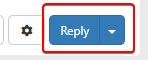
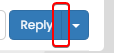
    for default theme I must add this for delete border to Reply Putton on topic

    .btn-primary {
        color: #fff;
        background-color: #337ab7;
        border-color: transparent;
    }
    
    wrote on last edited by
    #16

    @downpw why do you need to delete the border ?

  • wrote on last edited by
    #17

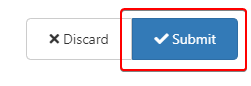
    Because it is visible

    beaee397-4637-4609-b223-7a5b6b0d5034-image.png

  • Because it is visible

    beaee397-4637-4609-b223-7a5b6b0d5034-image.png

    wrote on last edited by
    #18

    @downpw I see. Another hack here is to set the border colour to be the same as the background colour.

  • wrote on last edited by DownPW
    #19

    @downpw said in [NODEBB] Reply Button/arrow answer:

    .btn-primary {
    color: #fff;
    background-color: #337ab7;
    border-color: transparent;
    }

    .btn-primary {
        color: #fff;
        background-color: #337ab7;
        border-color: #337ab7;
    }
    
  • @downpw said in [NODEBB] Reply Button/arrow answer:

    .btn-primary {
    color: #fff;
    background-color: #337ab7;
    border-color: transparent;
    }

    .btn-primary {
        color: #fff;
        background-color: #337ab7;
        border-color: #337ab7;
    }
    
    wrote on last edited by
    #20

    @downpw and does that not work ?

  • wrote on last edited by DownPW
    #21

    Yes that work too 🙂
    I must do work on bug on other custom CSS

  • Yes that work too 🙂
    I must do work on bug on other custom CSS

    wrote on last edited by
    #22

    @downpw good. Sometimes, you have to bend the rules sightly to get to the finish line 😁

  • wrote on last edited by DownPW
    #23

    yes 😉

    If I can’t find on the other themes.
    Could I give you access to the CSS files to help me on it?

  • yes 😉

    If I can’t find on the other themes.
    Could I give you access to the CSS files to help me on it?

    wrote on last edited by
    #24

    @downpw of course

  • DownPW DownPW referenced this topic on
  • DownPW DownPW has marked this topic as solved on
  • wrote on last edited by phenomlab
    #25

Did this solution help you?
Did you find the suggested solution useful? Support 💗 Sudonix with a coffee ☕
If your organisation needs deeper expertise around infrastructure, security, or technology leadership, learn more about Phenomlab Ltd. Many of the deeper technical guides behind Sudonix are published there.

Related Topics
  • Nodebb and emails

    Solved Configure nodebb
    27
    5 Votes
    27 Posts
    10k Views
    phenomlab
    @Panda it will use SMTP. In all cases, I never use any plugin to send email. I’ll always send it raw.
  • Block Domain

    Solved Let's Build It code javascript block domain nodebb
    26
    1 Votes
    26 Posts
    11k Views
    DownPW
    Yes ogproxy too is functionnal on dev
  • Interesting Widget code, but can't fetch API

    Solved Customisation nodebb
    26
    2 Votes
    26 Posts
    11k Views
    phenomlab
    @Panda said in Interesting Widget code, but can’t fetch API: How did you drop that widget into the post there? I hadnt seen this BSgenerator anywhere on sudonix site, do you use it somewhere already? Yes, here https://sudonix.org/topic/414/corporate-bullshit-generator?_=1687774393044 It’s not a “post” or “topic” in the common sense. It is actually a page in it’s own right and leverages nodebb-plugin-custom-pages. This in turn creates a new “route” which behaves like a page, meaning it is then exposed for widgets. @Panda said in Interesting Widget code, but can’t fetch API: Also can you explain more what you mean by calling the code externally. In my API call example, how would I go about doing that? By this, I mean create all the required code in an external JS file that is reachable by the NodeBB instance - so, in “public” for example - or in my case /public/js. The widget then “calls” that file and because it runs outside of the scope of NodeBB, you just need to return the values to the widget. Hope this makes sense?
  • nodebb loading emojis

    Solved Configure nodebb emojis
    16
    1
    1 Votes
    16 Posts
    6k Views
    phenomlab
    @DownPW sure. Let me have a look at this in more detail. I know nginx plus has extensive support for this, but it’s not impossible to get somewhere near acceptable with the standard version. You might be better off handling this at the Cloudflare level given that it sits in between the requesting client and your server.
  • Custom badges

    Solved Customisation nodebb
    103
    2
    49 Votes
    103 Posts
    60k Views
    DownPW
    Perfect
  • Post Style View

    Solved Customisation post style sudonix nodebb
    67
    2
    18 Votes
    67 Posts
    35k Views
    DownPW
    @cagatay Just add margin-left on the element like @phenomlab said to you : topic [component="post/parent"] { margin-left: 10px; } [image: aa08c62b-4223-4cba-8c0f-c73d50474c0d-image.png] Maybe @phenomlab have a better way
  • [NODEBB] Stats

    Unsolved Customisation plugin stats script
    20
    1
    2 Votes
    20 Posts
    6k Views
    JAC
    @phenomlab said in [NODEBB] Stats: @jac or I land up fixing it I wouldn’t put it past you
  • [NODEBB] Welcome Message

    Solved Customisation css html nodebb
    20
    2
    13 Votes
    20 Posts
    9k Views
    phenomlab
    @DownPW the ‘js’ code for the banner takes the time from the client, so what it displays really depends on the regional settings for the operating system. I’ve not seen this issue myself but would like to see some examples of screenshots if possible.