Skip to content

[NODEBB] Reply Button/arrow answer

Solved Customisation
25 2 11.6k 1
  • wrote on last edited by DownPW
    #15

    Lot of variable. Hard to debug… a little lost
    I’ve been on it for 2 hours !!

    for default theme I must add this for delete border to Reply Putton on topic

    .btn-primary {
        color: #fff;
        background-color: #337ab7;
        border-color: transparent;
    }
    
  • Lot of variable. Hard to debug… a little lost
    I’ve been on it for 2 hours !!

    for default theme I must add this for delete border to Reply Putton on topic

    .btn-primary {
        color: #fff;
        background-color: #337ab7;
        border-color: transparent;
    }
    
    wrote on last edited by
    #16

    @downpw why do you need to delete the border ?

  • wrote on last edited by
    #17

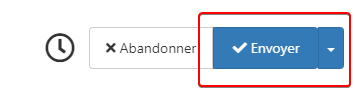
    Because it is visible

    beaee397-4637-4609-b223-7a5b6b0d5034-image.png

  • Because it is visible

    beaee397-4637-4609-b223-7a5b6b0d5034-image.png

    wrote on last edited by
    #18

    @downpw I see. Another hack here is to set the border colour to be the same as the background colour.

  • wrote on last edited by DownPW
    #19

    @downpw said in [NODEBB] Reply Button/arrow answer:

    .btn-primary {
    color: #fff;
    background-color: #337ab7;
    border-color: transparent;
    }

    .btn-primary {
        color: #fff;
        background-color: #337ab7;
        border-color: #337ab7;
    }
    
  • @downpw said in [NODEBB] Reply Button/arrow answer:

    .btn-primary {
    color: #fff;
    background-color: #337ab7;
    border-color: transparent;
    }

    .btn-primary {
        color: #fff;
        background-color: #337ab7;
        border-color: #337ab7;
    }
    
    wrote on last edited by
    #20

    @downpw and does that not work ?

  • wrote on last edited by DownPW
    #21

    Yes that work too 🙂
    I must do work on bug on other custom CSS

  • Yes that work too 🙂
    I must do work on bug on other custom CSS

    wrote on last edited by
    #22

    @downpw good. Sometimes, you have to bend the rules sightly to get to the finish line 😁

  • wrote on last edited by DownPW
    #23

    yes 😉

    If I can’t find on the other themes.
    Could I give you access to the CSS files to help me on it?

  • yes 😉

    If I can’t find on the other themes.
    Could I give you access to the CSS files to help me on it?

    wrote on last edited by
    #24

    @downpw of course

  • DownPW DownPW referenced this topic on
  • DownPW DownPW has marked this topic as solved on
  • wrote on last edited by phenomlab
    #25

Did this solution help you?
Did you find the suggested solution useful? Support 💗 Sudonix with a coffee ☕
If your organisation needs deeper expertise around infrastructure, security, or technology leadership, learn more about Phenomlab Ltd. Many of the deeper technical guides behind Sudonix are published there.

Related Topics
  • 2 Votes
    1 Posts
    639 Views
    No one has replied
  • TNG + Nodebb

    General tng genealogy nodebb plugin
    4
    0 Votes
    4 Posts
    2k Views
    phenomlab
    @Madchatthew said in TNG + Nodebb: you have to try and use duck tape and super glue to change something to make it do what you want it to do I couldn’t have put that better myself.
  • CSS codes to prevent votes to disappear

    Solved Customisation nodebb
    3
    1 Votes
    3 Posts
    1k Views
    crazycells
    @phenomlab yes, it is thanks a lot…
  • restarting nodebb on boot

    Unsolved Configure nodebb
    3
    1 Votes
    3 Posts
    2k Views
    phenomlab
    @eeeee said in restarting nodebb on boot: can I just run nodebb under nodemon for auto restarts? It’s a better method. Nodemon just looks for file system changes and would effectively die if the server was rebooted meaning you’d have to start it again anyway. Systemd is the defacto standard which is how the operating system interacts in terms of services, scheduled tasks etc.
  • Changing Background on NodeBB

    Solved Customisation background image nodebb
    4
    0 Votes
    4 Posts
    2k Views
    phenomlab
    @cagatay You’d target the body tag and use the below line of CSS background: url(/assets/customcss/backgrounds/default/default.png) no-repeat center center fixed; Obviously, you need to change the path to suit where your image is being stored. More info around the background property can be found here https://www.w3schools.com/cssref/css3_pr_background.php
  • 5 Votes
    9 Posts
    3k Views
    crazycells
    is there any way to see whose reputation is changed by this plugin?
  • [NODEBB] Stats

    Unsolved Customisation plugin stats script
    20
    1
    2 Votes
    20 Posts
    6k Views
    JAC
    @phenomlab said in [NODEBB] Stats: @jac or I land up fixing it I wouldn’t put it past you
  • [NODEBB] Welcome Message

    Solved Customisation css html nodebb
    20
    2
    13 Votes
    20 Posts
    9k Views
    phenomlab
    @DownPW the ‘js’ code for the banner takes the time from the client, so what it displays really depends on the regional settings for the operating system. I’ve not seen this issue myself but would like to see some examples of screenshots if possible.