Skip to content

NodeBB upgrade now cant post

Solved Bugs
5 2 1.1k 1
  • On my site An annoying ‘n out of n’ banner comes over the reply button, and the forum bar is just below that
    So I can just see a fraction of the reply button but cant click it.
    I cant even screenshot it to show example now as that seems ‘disabled’ as a new ‘feature’

    Id like to stop screenshot disabled, and remove this ‘8 out of 8 banner’. Is that possible?

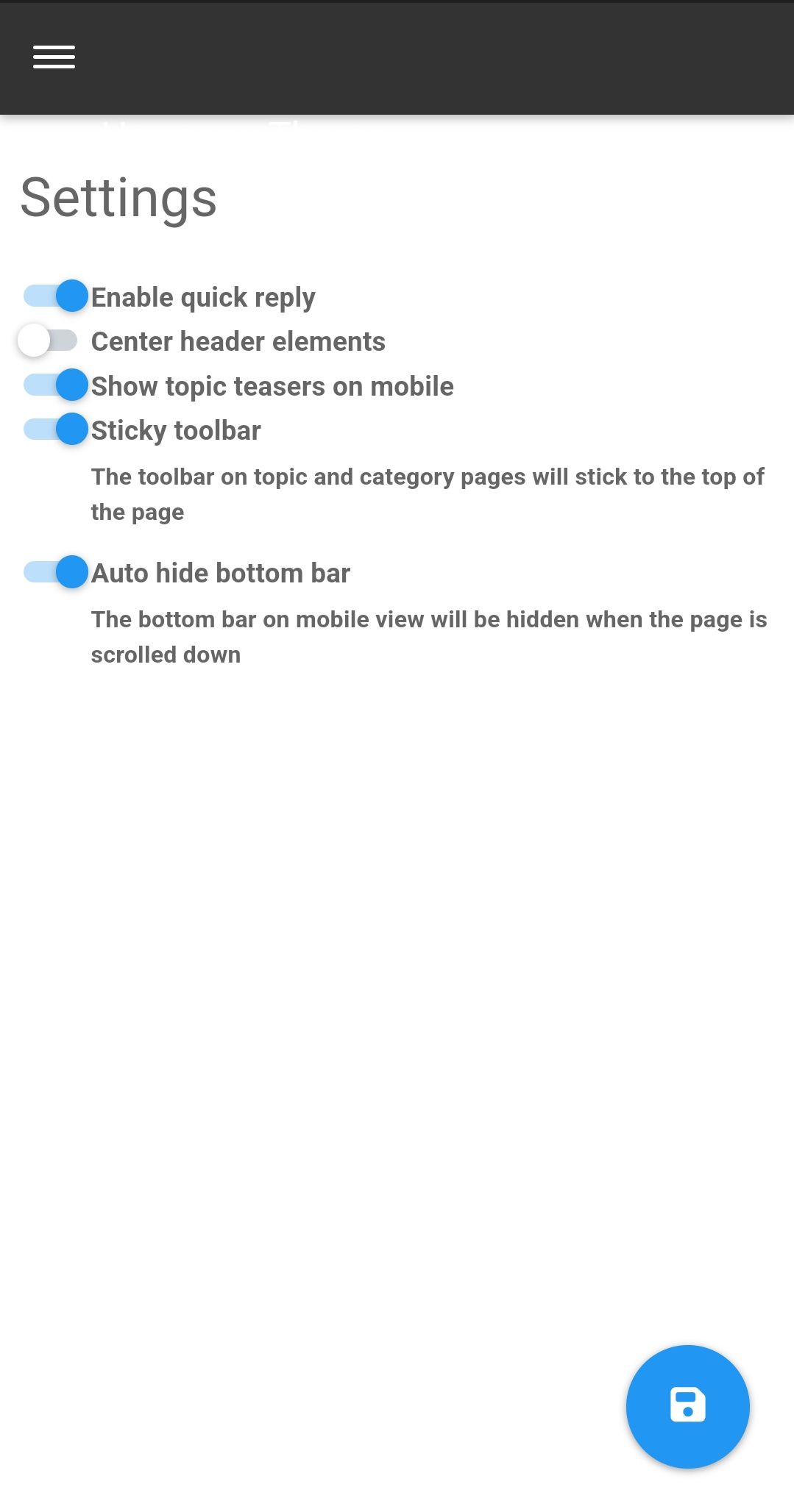
  • I’ve just seen the duplicate post on NodeBB. Can you go to /admin/plugins/harmony and match the settings below then save

    Screenshot_2023-05-28-11-10-14-46_e4424258c8b8649f6e67d283a50a2cbc.jpg

    That issue is caused by element positioning where the bottom bar should auto hide to prevent that issue. If that doesn’t work, disable the quick reply feature and see if that helps.

  • On my site An annoying ‘n out of n’ banner comes over the reply button, and the forum bar is just below that
    So I can just see a fraction of the reply button but cant click it.
    I cant even screenshot it to show example now as that seems ‘disabled’ as a new ‘feature’

    Id like to stop screenshot disabled, and remove this ‘8 out of 8 banner’. Is that possible?

    @Panda NodeBB doesn’t disable the ability to take a screenshot. That’s at operating system level not application, so something else is stopping that.

    I’ll need a screenshot of sorts, or access to your forum to be able to see what’s going on.

  • I’ve just seen the duplicate post on NodeBB. Can you go to /admin/plugins/harmony and match the settings below then save

    Screenshot_2023-05-28-11-10-14-46_e4424258c8b8649f6e67d283a50a2cbc.jpg

    That issue is caused by element positioning where the bottom bar should auto hide to prevent that issue. If that doesn’t work, disable the quick reply feature and see if that helps.

  • Thanks, can post now.
    I find it disconcerting that ‘out of the box settings’ dont work. If it wasnt for your help I would have broken forum now!
    Thats why sometimes I double post urgent questions on both forums as I appreciate your fast and accurate responses 🙂

  • Thanks, can post now.
    I find it disconcerting that ‘out of the box settings’ dont work. If it wasnt for your help I would have broken forum now!
    Thats why sometimes I double post urgent questions on both forums as I appreciate your fast and accurate responses 🙂

    @Panda yes, for some reason, that is the case. If you need an urgent response, it’s probably better to post here because of the time difference.

  • phenomlabundefined phenomlab marked this topic as a question on
  • phenomlabundefined phenomlab has marked this topic as solved on

Did this solution help you?
Did you find the suggested solution useful? Support 💗 Sudonix with a coffee
If your organisation needs deeper expertise around infrastructure, security, or technology leadership, learn more about Phenomlab Ltd. Many of the deeper technical guides behind Sudonix are published there.

Related Topics
  • 3 Votes
    1 Posts
    540 Views
    No one has replied
  • Rendering issues post migration to Sudonix theme/code

    Solved Bugs
    49
    1
    20 Votes
    49 Posts
    10k Views
    @cagatay Those are in /admin/extend/widgets/brand header. Look inside the HTML widget that is there, and you’ll find <div class="socialicons"> <a class="btn-ghost p-2" href="https://github.com/phenomlab" rel="noreferrer noopener"><i style="color: #333;background: #ffffff; width: 26px" class="fa fa-2x fa-github-square"></i></a> <a class="btn-ghost p-2" href="https://linkedin.com/in/phenomlab" rel="noreferrer noopener"><i style="color: #0077B5;background: #ffffff; width: 26px" class="fa fa-2x fa-brands fa-linkedin-square"></i></a> <a class="btn-ghost p-2" href="https://twitter.com/phenomlab" rel="noreferrer noopener"><i style="color: #1DA1F2;background: #ffffff; width: 26px" class="fa fa-2x fa-twitter-square"></i></a> <!-- <a class="btn-ghost p-2" href="https://www.facebook.com/sudonixtech" rel="noreferrer noopener"><i style="color: #4268B2;background: #ffffff; width: 26px" class="fa fa-2x fa-facebook-square"></i></a> --> </div> Remove that block and save.
  • Nodebb icon on google page

    Solved Customisation nodebb
    9
    1
    4 Votes
    9 Posts
    2k Views
    @Panda It’s been raised multiple times, but only for the open source version, and not hosted.
  • Composer Zen icon?

    Solved Configure nodebb
    8
    1
    2 Votes
    8 Posts
    1k Views
    @DownPW exactly. Not really a new concept, and in all honesty, not something I’ve ever used. If you consider the need to add links and references, or citations, you’d need to be able to see other parts of the screen!
  • Header Menu After Upgrading V3.1.1

    Solved Customisation header nodebb
    2
    1
    2 Votes
    2 Posts
    659 Views
    @cagatay this relates to a change the css classes used for the brand header meaning it will now float to the left instead of right. If you’d like to retain the original behavior, you can add this css class [data-widget-area="brand-header"] { justify-content: end; display: flex; } Further information here https://community.nodebb.org/topic/17090/manual-build-a-custom-header-in-harmony/19?_=1684069325296
  • NodeBB: Consent page

    Solved Configure nodebb consent
    16
    4 Votes
    16 Posts
    4k Views
    @DownPW I still do not see any issues.
  • Post Style View

    Solved Customisation post style sudonix nodebb
    67
    2
    18 Votes
    67 Posts
    16k Views
    @cagatay Just add margin-left on the element like @phenomlab said to you : topic [component="post/parent"] { margin-left: 10px; } [image: 1669191112290-aa08c62b-4223-4cba-8c0f-c73d50474c0d-image.png] Maybe @phenomlab have a better way
  • RSS parser script [NodeBB]

    Customisation nodebb rss script
    47
    9 Votes
    47 Posts
    12k Views
    @phenomlab said in RSS parser script [NodeBB]: @jac Not yet. Sorry. Have some other work commitments I need to prioritise. Hoping to get to this over the weekend. No worries at all mate, thanks