Skip to content

Adjusting the size of boxes in posts-list class

Solved Customisation
3 2 1.1k 1
  • Hi @phenomlab ,

    In NodeBB, there are many pages containing a list of posts such as bookmarks, upvoted, etc.

    For example:
    https://sudonix.com/user/crazycells/upvoted

    How can I change the height of the boxes containing the post with CSS? I would like to increase the box size, so a bigger part of the post will show as a preview in those lists…

    All those lists contain “posts-list” class…

  • Hi @phenomlab ,

    In NodeBB, there are many pages containing a list of posts such as bookmarks, upvoted, etc.

    For example:
    https://sudonix.com/user/crazycells/upvoted

    How can I change the height of the boxes containing the post with CSS? I would like to increase the box size, so a bigger part of the post will show as a preview in those lists…

    All those lists contain “posts-list” class…

    @crazycells It’s not so much the height of the boxes that causes the issue here, but more the CSS class overflow: hidden;. You could change that to the below

    .posts-list .posts-list-item .content {
        overflow: auto;
    }
    

    This would then give you something like this
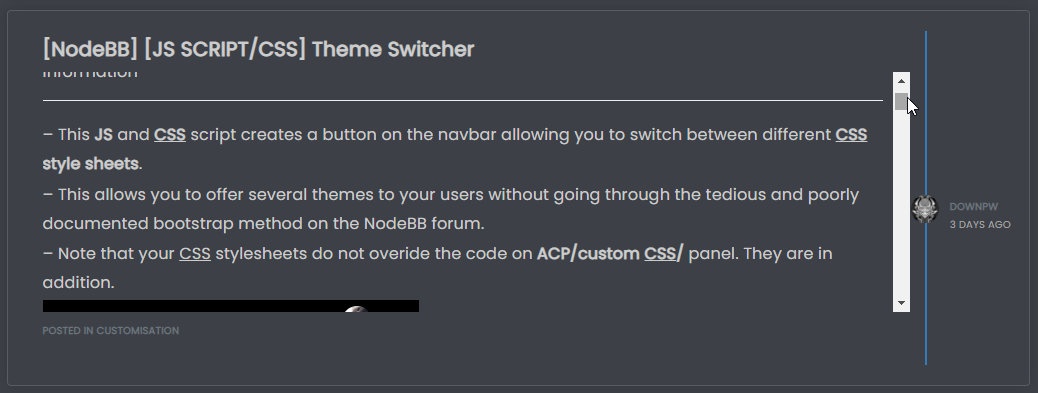
    9d3f213c-f4b7-4795-b7de-99689fd07ed4-image.png

    Notice the scrollbar that appears meaning you scan keep the same panel height, but still scroll through the message to be able to read all of it.

    If you wanted the panel height to size with the content, you’d need to do this

    .posts-list .posts-list-item .content {
        max-height: none;
        height: auto;
    }
    

    Which in turn would result in this
    569b9c79-eadc-4eb2-ae3b-d612b401f010-image.png

    I’d personally take the overflow: auto; route as this is easier on the eyes. However, you get a balance of the two by setting a higher value for max-height , so

    .posts-list .posts-list-item .content {
        max-height: 600px;
    }
    

    This would still require overflow: auto;, but by setting max-height you are able to increase the height of the panel to something more aligned with your requirements, and still be able to read the entire message without having to open it.
    c3ad820c-0cc3-4fee-b099-4cc3466959ce-image.png

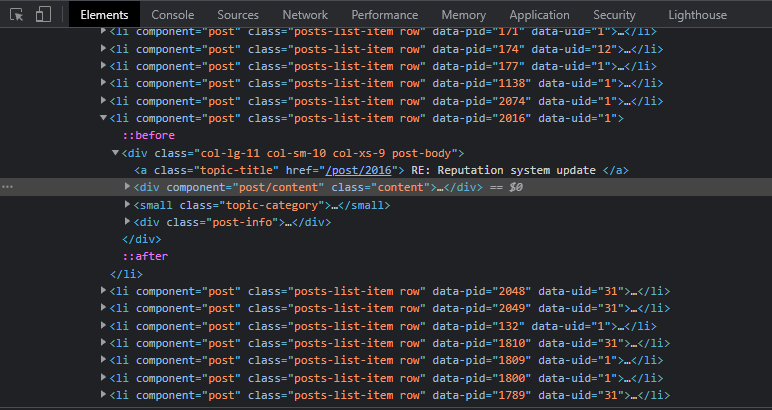
    The block of HTML being targeted here is below
    1358ca2c-4d07-4314-bf0c-8ccd1b322941-image.png

  • @crazycells It’s not so much the height of the boxes that causes the issue here, but more the CSS class overflow: hidden;. You could change that to the below

    .posts-list .posts-list-item .content {
        overflow: auto;
    }
    

    This would then give you something like this

    9d3f213c-f4b7-4795-b7de-99689fd07ed4-image.png

    Notice the scrollbar that appears meaning you scan keep the same panel height, but still scroll through the message to be able to read all of it.

    If you wanted the panel height to size with the content, you’d need to do this

    .posts-list .posts-list-item .content {
        max-height: none;
        height: auto;
    }
    

    Which in turn would result in this

    569b9c79-eadc-4eb2-ae3b-d612b401f010-image.png

    I’d personally take the overflow: auto; route as this is easier on the eyes. However, you get a balance of the two by setting a higher value for max-height , so

    .posts-list .posts-list-item .content {
        max-height: 600px;
    }
    

    This would still require overflow: auto;, but by setting max-height you are able to increase the height of the panel to something more aligned with your requirements, and still be able to read the entire message without having to open it.

    c3ad820c-0cc3-4fee-b099-4cc3466959ce-image.png

    The block of HTML being targeted here is below

    1358ca2c-4d07-4314-bf0c-8ccd1b322941-image.png

    @phenomlab thanks a lot, this combination works best 👍

    .posts-list .posts-list-item .content {
        overflow: auto;
        max-height: 600px;
    }
    
  • crazycellsundefined crazycells has marked this topic as solved on

Did this solution help you?
Did you find the suggested solution useful? Support 💗 Sudonix with a coffee
If your organisation needs deeper expertise around infrastructure, security, or technology leadership, learn more about Phenomlab Ltd. Many of the deeper technical guides behind Sudonix are published there.

Related Topics
  • 1 Votes
    5 Posts
    1k Views
    @DownPW very useful tip. Thanks
  • Forum Icons NodeBB

    Solved Customisation icons forum nodebb
    13
    0 Votes
    13 Posts
    2k Views
    @cagatay That matches what I see [image: 1667218162107-4f0f858d-9812-42b1-9f61-ffb13d31dccd-image.png]
  • Post Style View

    Solved Customisation post style sudonix nodebb
    67
    2
    18 Votes
    67 Posts
    16k Views
    @cagatay Just add margin-left on the element like @phenomlab said to you : topic [component="post/parent"] { margin-left: 10px; } [image: 1669191112290-aa08c62b-4223-4cba-8c0f-c73d50474c0d-image.png] Maybe @phenomlab have a better way
  • How to fix header side as boxed

    Solved Customisation header boxed sudonix nodebb
    10
    1
    6 Votes
    10 Posts
    2k Views
    @phenomlab yes it caused a problem for mobile users. thank you for helping …
  • Forum Statistics Box

    Solved Customisation customization
    5
    2
    4 Votes
    5 Posts
    1k Views
    @Sampo2910 said in Forum Statistics Box: Say i wanted new theme for example or again something like this? Yes, exactly the same process.
  • [NODEBB] Help for my custom CSS

    Solved Customisation nodebb css bugfix
    237
    49 Votes
    237 Posts
    80k Views
    @baris said: You should change your selectors so it doesn’t look at the entire document. You probably only want to apply fancybox to stuff inside the #content element which is what changes when the user navigates around the page. So use $('#content a').... for your selectors then the forum logo in the header won’t be selected. I modified the JS Fancybox code now and this code and it seem better // --------------------------------------------- // Fancybox Media Reader (Without Website Logo) // --------------------------------------------- if (top.location.pathname !== '/login') { $(window).on('action:posts.loaded', function(data) { console.log("Polling DOM for lazyLoaded images to apply Fancybox"); $(document).ready(function() { $('#content a').not('.forum-logo').not(".avatar").not(".emoji").not(".bmac-noanimate").each(function() { $('#content a[href*=".jpg"], #content a[href*=".jpeg"], #content a[href*=".png"], #content a[href*=".gif"], #content a[href*=".webp"]').addClass("noanimate"); }); }); }); } if (top.location.pathname !== '/login') { $(document).ready(function() { $(window).on('action:ajaxify.end', function(data) { $('#content a').not('.logo').not(".avatar").not(".emoji").not(".bmac-noanimate").each(function() { $('#content a[href*=".jpg"], #content a[href*=".jpeg"], #content a[href*=".png"], #content a[href*=".gif"], #content a[href*=".webp"]').addClass("noanimate"); data.preventDefault() // Strip out the images contained inside blockquotes as this looks nasty :) $('#content blockquote img').remove(); }); Fancybox.bind( '#content a[href*=".jpg"], #content a[href*=".jpeg"], #content a[href*=".png"], #content a[href*=".gif"], #content a[href*=".webp"]', { groupAll: true, } ); }); }); } // Chat fancybox - fires when chat module loaded and AJAX calls new chat $(document).ready(function() { $(window).on('action:chat.loaded', function(data) { // >>> Se limiter au contenu principal uniquement <<< $('#content img').not('.forum-logo').not(".avatar").not(".emoji").not(".bmac-noanimate").each(function() { var newHref = $(this).attr("src"); $(this).wrap("<a class='fancybox' href='" + newHref + "'/>"); $('#content a[href*=".jpg"], #content a[href*=".jpeg"], #content a[href*=".png"], #content a[href*=".gif"], #content a[href*=".webp"]').addClass("noanimate"); data.preventDefault(); // Strip out the images contained inside blockquotes as this looks nasty :) $('#content blockquote img').remove(); }); Fancybox.bind( '#content a[href*=".jpg"], #content a[href*=".jpeg"], #content a[href*=".png"], #content a[href*=".gif"], #content a[href*=".webp"]', { groupAll: true, } ); }); }); For the logo, I must use overflow: visible !important; on [component="brand/logo"] /* --- Logo --- */ [component="brand/logo"] { max-height: 50px; width: auto; height: auto; max-width: 100%; display: block; object-fit: contain; object-position: left center; overflow: visible !important; } Better result !!
  • [NodeBB] First post customization

    Solved Customisation nodebb
    5
    4 Votes
    5 Posts
    1k Views
    @phenomlab thanks
  • NodeBB metadata

    Solved Configure nodebb
    4
    2 Votes
    4 Posts
    1k Views
    @phenomlab said in NodeBB metadata: @jac Are you sure ? https://www.google.co.uk/search?q=site%3Astockportcounty.fans&sxsrf=AOaemvLwnaZL-PliU_2dBOg_Eo1pMVhBjg%3A1638982328139&source=hp&ei=uOKwYeatBcOsad3yp7AE&iflsig=ALs-wAMAAAAAYbDwyLBSDcG5XYoFCKwQFhgz94wTxOcV&ved=0ahUKEwjm6dX71NT0AhVDVhoKHV35CUYQ4dUDCAk&uact=5&oq=site%3Astockportcounty.fans&gs_lcp=Cgdnd3Mtd2l6EAM6BAgjECc6CwgAEIAEELEDEIMBOg4ILhCABBCxAxDHARCjAjoRCC4QgAQQsQMQgwEQxwEQowI6BQguEIAEOggIABCABBCxAzoFCAAQgAQ6CAguELEDEIMBOgsILhCABBDHARCvAToICC4QgAQQsQM6BQgAELEDOgsILhCABBDHARDRAzoLCAAQgAQQsQMQyQM6BQgAEJIDUABYySZg0CdoAHAAeACAAW2IAa0NkgEEMjMuMpgBAKABAQ&sclient=gws-wiz Fair enough 🤪🤪.