Forum Statistics Box
-
HI All,
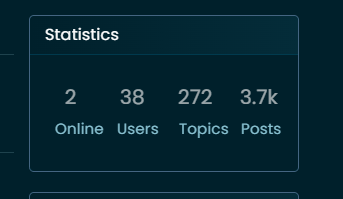
How yours looks

How the default one looks like on mine

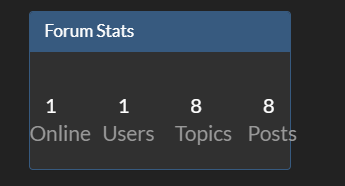
Best way that I am able to change that ? Change font size.
Thank you
-
HI All,
How yours looks
How the default one looks like on mine
Best way that I am able to change that ? Change font size.
Thank you
@Sampo2910 Try this
.row.forum-stats {
    padding: 10px;
    margin-top: -25px;
    margin-bottom: -25px;
    margin-left: auto;
    margin-right: auto;
}
.row.forum-stats small {
    font-size: 50%;
}
Mark Cutting also advises organisations as a Fractional CIO, Fractional CISO and Executive Advisor, helping boards improve technology governance, cyber resilience and executive decision making. Learn more at Phenomlab Ltd
-
@Sampo2910 Try this
.row.forum-stats { padding: 10px; margin-top: -25px; margin-bottom: -25px; margin-left: auto; margin-right: auto; } .row.forum-stats small { font-size: 50%; }Thank you
Works A Treat. 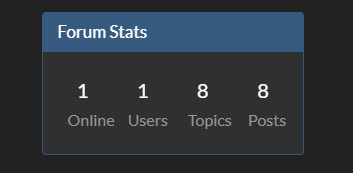
As you can see a new forum
I am wondering about this custom CSS though. Noob Question coming up
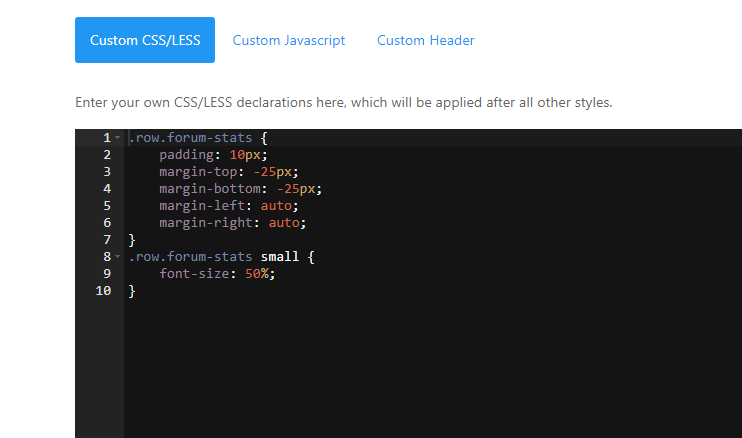
As you see I put your code in and all good. What happens when i want to put more in? Goes underneath in new thread. ? Say i wanted new theme for example or again something like this?
Thx as always.
-
 undefined Sampo2910 has marked this topic as solved on
-
Thank you
Works A Treat. As you can see a new forum
I am wondering about this custom CSS though. Noob Question coming up
As you see I put your code in and all good. What happens when i want to put more in? Goes underneath in new thread. ? Say i wanted new theme for example or again something like this?
Thx as always.
-
Thank you
Works A Treat. As you can see a new forum
I am wondering about this custom CSS though. Noob Question coming up
As you see I put your code in and all good. What happens when i want to put more in? Goes underneath in new thread. ? Say i wanted new theme for example or again something like this?
Thx as always.
@Sampo2910 said in Forum Statistics Box:
Say i wanted new theme for example or again something like this?
Yes, exactly the same process.

Hello! It looks like you're interested in this conversation, but you don't have an account yet.
Getting fed up of having to scroll through the same posts each visit? When you register for an account, you'll always come back to exactly where you were before, and choose to be notified of new replies (either via email, or push notification). You'll also be able to save bookmarks and upvote posts to show your appreciation to other community members.
With your input, this post could be even better 💗
Register Login