What’s going on with NodeBB?
-
I used to follow this forum script very actively and with great interest, but it seems like it has lost its charm lately. What do you think? Do you believe NodeBB is heading toward the same fate as other forum scripts?
-
I used to follow this forum script very actively and with great interest, but it seems like it has lost its charm lately. What do you think? Do you believe NodeBB is heading toward the same fate as other forum scripts?
@cagatay Good question. I too have noticed that things seem to be very quiet, and there seems to be less of an appetite from the developers to respond. This could be to do with workload though, and not the desire to “ignore”. My main observation would be a significant amount of effort is being placed on federation.
-
I also have the federation plugin or whatever it’s called, but its working principle is really not good. The World section isn’t active at all, and since I use a Turkish forum, the posts there are in English, no one understands, reads, or shows any interest.
-
I also have the federation plugin or whatever it’s called, but its working principle is really not good. The World section isn’t active at all, and since I use a Turkish forum, the posts there are in English, no one understands, reads, or shows any interest.
@cagatay Yes, and that’s where federation has limits - unless the content being shared in /world matches the language of your forum, it’s useless.
-
 undefined phenomlab marked this topic as a regular topic on
-
Mark, if I want to switch to another script, what forum script would you recommend?
-
Mark, if I want to switch to another script, what forum script would you recommend?
@cagatay Sorry - when you say “script”, can you provide more detail?
-
-
@cagatay That is quite the jump as importers from one forum platform to another are notoriously unreliable and could land up being quite costly if it requires managed services.
-
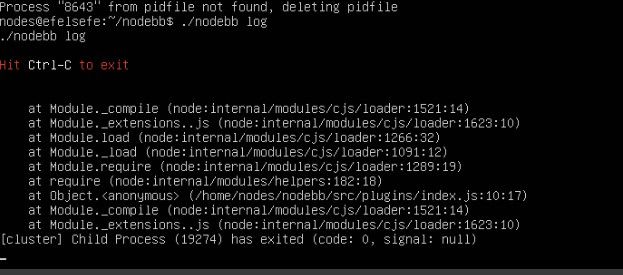
After the latest update, my entire system crashed and I’m unable to bring it back up.
-
After the latest update, my entire system crashed and I’m unable to bring it back up.
@cagatay what is in the nodebb log?
-
-
I downgraded the version, and now it is working. I think the issue is related to the version.
-
I downgraded the version, and now it is working. I think the issue is related to the version.
I downgraded the version, and now it is working. I think the issue is related to the version.
Maybe yes, maybe no. it can be plugins compatibility, nodejs, npm etc.
I don’t upgrade for now. I still waiting a little before upgrade.
I’m on 4.10.3PW and WS Spirit alive
-
@DownPW I tend to stay at least one release behind intentionally to ensure maturity before upgrading - unless there is a good reason to do so immediately - such as identified vulnerabilities
-
That’s exactly our approach on PW now. Learned it the hard way , upgraded too early once or twice and paid the price. Actually sitting two releases behind at the moment, not just one. Stability over bleeding edge, unless a vulnerability forces the hand. Solid policy.
-
To be honest, I really regret moving to NodeBB. I should have stayed with XenForo.

-
Honestly, I don’t regret the move at all on my side but I get that the experience can be very different depending on how comfortable you are with the technical side. XenForo is definitely more forgiving if you don’t want to deal with the server.
One thing worth keeping in mind though: your install has some custom code on it, and need to know what it does or stay to stock nodebb witout modification
What’s actually frustrating you the most right now? If it’s day-to-day admin stuff, there might be simpler fixes than rebuilding everything on XenForo.
-
I don’t want to keep worrying about whether the script will break with every update. Yes, we invested a lot of effort, yes, I have custom code, and yes, everything works well but somehow I end up facing issues after every update. And honestly, I think they have a development approach that doesn’t really listen to users. They just add or remove things based on their own ideas. The social plugins were a complete disaster
-
-
@cagatay The most reliable way to upgrade Node.js on Ubuntu depends on how you originally installed it.
Method 1: Using NVM (Recommended)
If you already use Node Version Manager (NVM), upgrading is simple. NVM allows you to keep both versions and switch between them if needed.
- Install Node 22:
nvm install 22 - Switch to Node 22:
nvm use 22 - Set it as your default:
nvm alias default 22 - Verify the change:
node -v
Method 2: Using NodeSource (PPA)
If you installed Node.js via
aptusing the NodeSource repository, you need to update the repository script to point to the new version.- Remove the old NodeSource list (optional but cleaner):
sudo rm /etc/apt/sources.list.d/nodesource.list - Download and run the NodeSource setup script for Node 22:
curl -fsSL [https://deb.nodesource.com/setup_22.x](https://deb.nodesource.com/setup_22.x) | sudo -E bash - - Install/Upgrade Node.js:
sudo apt-get install -y nodejs - Verify the installation:
node -v
Method 3: Using the ‘n’ Package
If you have
npminstalled, you can use theninteractive manager.- Clear the npm cache:
sudo npm cache clean -f - Install the ‘n’ helper:
sudo npm install -g n - Install Node 22:
sudo n 22 - Update your shell:
hash -r
Troubleshooting
- Permission Denied: If you see permission errors using Method 2 or 3, ensure you are using
sudo. - Path Issues: If
node -vstill shows version 20 after upgrading via NVM, restart your terminal or runsource ~/.bashrc. - Conflicts: Avoid mixing these methods. If you switch from
apttonvm, it is best tosudo apt remove nodejsfirst to avoid path conflicts.
Mark Cutting also advises organisations as a Fractional CIO, Fractional CISO and Executive Advisor, helping boards improve technology governance, cyber resilience and executive decision making. Learn more at Phenomlab Ltd
- Install Node 22:



Hello! It looks like you're interested in this conversation, but you don't have an account yet.
Getting fed up of having to scroll through the same posts each visit? When you register for an account, you'll always come back to exactly where you were before, and choose to be notified of new replies (either via email, or push notification). You'll also be able to save bookmarks and upvote posts to show your appreciation to other community members.
With your input, this post could be even better 💗
Register LoginRelated Topics
-
-
-
-
Smart Widgets
Solved Configure -
-
-
NodeBB 1.19.3
Solved Performance -