Skip to content

NodeBB Twitter / X embeds

Let's Build It
34 6 16.5k 1
  • wrote on last edited by phenomlab
    #1

    I’ve had limited success with the plugin nodebb-plugin-twitter and its various forks in the sense that the embeds failed to load - here’s an example of that exact problem (never resolved from what I can see)

    https://github.com/NodeBB-Community/nodebb-plugin-twitter/issues/2

    I decided to write my custom JS which can be found here

    https://github.com/phenomlab/nodebb-twitter-embeds

    This not only works in the same way as the NodeBB plugin, but will also render client-side so does not pile up in terms of resources on your server 🙂 In addition, the available arguments for the embeds are below

    https://developer.x.com/en/docs/twitter-for-websites/embedded-tweets/guides/embedded-tweet-parameter-reference

    Here’s a real-life example

    https://x.com/phenomlab/status/1810648261369233607

  • phenomlab phenomlab marked this topic as a regular topic on
  • wrote on last edited by
    #2

    Why not create your own plugin instead?

  • OT OT

    Why not create your own plugin instead?

    wrote on last edited by
    #3

    @OT I probably will at some point. This was really for quickness to assist a Sudonix user.

  • wrote on last edited by
    #4

    This does work well. One behavior is that sometimes it will show the link embeded multiple times, then it clears back to singular when you refresh the page.

  • OT OT

    This does work well. One behavior is that sometimes it will show the link embeded multiple times, then it clears back to singular when you refresh the page.

    wrote on last edited by
    #5

    @OT Yes, I noticed the same thing and will fix that in due course. I also looked at creating a plugin, which I will also address when I have time.

  • wrote on last edited by DownPW
    #6

    As usual : very good work my friends 👍
    I’m going on vacation for a week so I’ll try this later 😉

  • wrote on last edited by DownPW
    #7

    Tested.
    It seem embed is on a blockquote.
    I play with this class blockquote.content.twitter-tweet for better résult (transparency of blockquote)

    I notice it seems the beginning of URL appears (https://)

    Result int the screenshot :
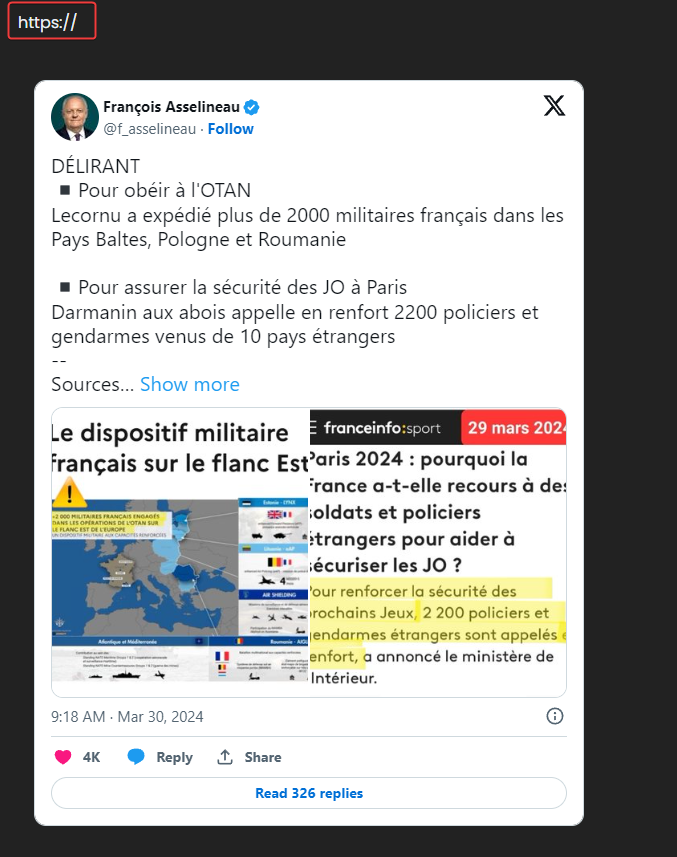
    image.png

    cya

  • Tested.
    It seem embed is on a blockquote.
    I play with this class blockquote.content.twitter-tweet for better résult (transparency of blockquote)

    I notice it seems the beginning of URL appears (https://)

    Result int the screenshot :

    image.png

    cya

    wrote on last edited by
    #8

    @DownPW strange. I’m not able to replicate these specific issues. Can you provide me with the url of the tweet in a PM so I can test?

    Thanks

  • wrote on last edited by
    #9

    great work thank you Mark.

  • wrote on last edited by
    #10

    This is how it shows up for us. Just have the random dupes of the same tweet. Of course, users are complaining of seeing a tweet repeat three times, but they quickly forgot that a tweet was just showing the X.com using Iframely or any other plugin.

    2d52ca26-02ea-47a4-8b8a-dcff0be06579-image.png

  • OT OT

    This is how it shows up for us. Just have the random dupes of the same tweet. Of course, users are complaining of seeing a tweet repeat three times, but they quickly forgot that a tweet was just showing the X.com using Iframely or any other plugin.

    2d52ca26-02ea-47a4-8b8a-dcff0be06579-image.png

    wrote on last edited by
    #11

    @OT can you post the actual tweet url ?

  • wrote on last edited by JAC
    #12

    I’ve had it where a tweet will show twice but once the page has been refreshed it’ll show the one again.

  • wrote on last edited by
    #13

    Updated code to address the duplicate tweet issue

    https://github.com/phenomlab/nodebb-twitter-embeds/blob/main/embeds.js

  • Updated code to address the duplicate tweet issue

    https://github.com/phenomlab/nodebb-twitter-embeds/blob/main/embeds.js

    wrote on last edited by
    #14

    @phenomlab That is awesome, great job!

  • wrote on last edited by
    #15

    Have you experienced that some posts will not show up after they have been posted, or that the post will look greyed out? This goes away if you refresh the page.

  • OT OT

    Have you experienced that some posts will not show up after they have been posted, or that the post will look greyed out? This goes away if you refresh the page.

    wrote on last edited by
    #16

    @OT Not seen this personally. Are you using the latest commit?

  • wrote on last edited by DownPW
    #17

    An exemple of tweet don’t embed with last code @phenomlab

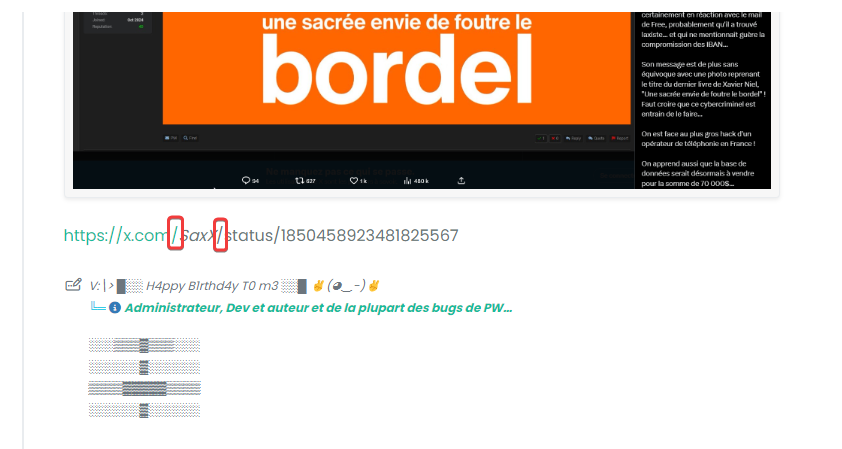
    https://x.com/SaxX/status/1850458923481825567

    EDIT:

    Strange, work here but not on my forum:

    4ef65a31-cac0-4dd3-8c1d-e588275f1455-image.png

    Other tweets works great

    6ea31c0e-7d42-4a97-8780-605c1af54faa-image.png

    Mistery 🤥

  • An exemple of tweet don’t embed with last code @phenomlab

    https://x.com/SaxX/status/1850458923481825567

    EDIT:

    Strange, work here but not on my forum:

    4ef65a31-cac0-4dd3-8c1d-e588275f1455-image.png

    Other tweets works great

    6ea31c0e-7d42-4a97-8780-605c1af54faa-image.png

    Mistery 🤥

    wrote on last edited by
    #18

    @DownPW Are you sure you’re using the latest commit?

  • An exemple of tweet don’t embed with last code @phenomlab

    https://x.com/SaxX/status/1850458923481825567

    EDIT:

    Strange, work here but not on my forum:

    4ef65a31-cac0-4dd3-8c1d-e588275f1455-image.png

    Other tweets works great

    6ea31c0e-7d42-4a97-8780-605c1af54faa-image.png

    Mistery 🤥

    wrote on last edited by
    #19

    @DownPW said in NodeBB Twitter / X embeds:

    EDIT:

    Strange, work here but not on my forum:

    Just looking at this again, and it seems that SaxX in the URL is written as SaxX - was that intentional?

  • @DownPW said in NodeBB Twitter / X embeds:

    EDIT:

    Strange, work here but not on my forum:

    Just looking at this again, and it seems that SaxX in the URL is written as SaxX - was that intentional?

    wrote on last edited by DownPW
    #20

    @phenomlab said in NodeBB Twitter / X embeds:

    Just looking at this again, and it seems that SaxX in the URL is written as SaxX - was that intentional?

    I don’t know. I guess but that doesn’t explain that working here and not on my forum… hmm

    URL:

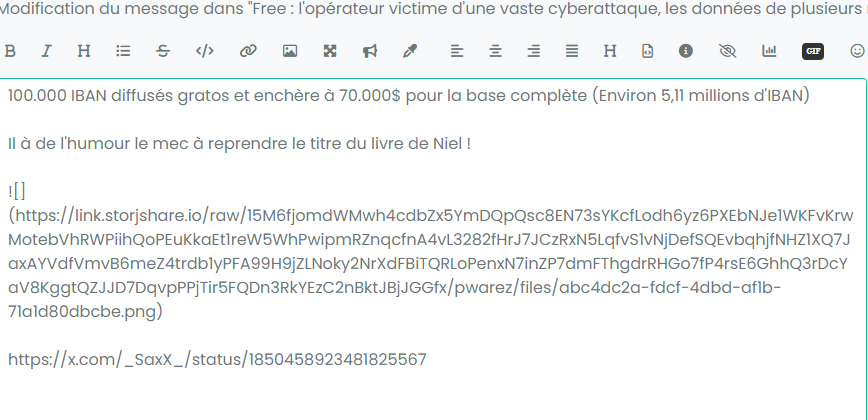
    https://x.com/_SaxX_/status/1850458923481825567

    Itt seems on my forum the “_” character was delete in the URL (Don’t know why) :
    b30dee39-bba9-461b-bdf5-972cc54a5940-image.png

    635ea3d6-8682-4103-baa6-8bc74985b331-image.png


Related Topics
  • What’s going on with NodeBB?

    Performance nodebb script die
    20
    8 Votes
    20 Posts
    5k Views
    phenomlab
    @cagatay The most reliable way to upgrade Node.js on Ubuntu depends on how you originally installed it. Method 1: Using NVM (Recommended) If you already use Node Version Manager (NVM), upgrading is simple. NVM allows you to keep both versions and switch between them if needed. Install Node 22: nvm install 22 Switch to Node 22: nvm use 22 Set it as your default: nvm alias default 22 Verify the change: node -v Method 2: Using NodeSource (PPA) If you installed Node.js via apt using the NodeSource repository, you need to update the repository script to point to the new version. Remove the old NodeSource list (optional but cleaner): sudo rm /etc/apt/sources.list.d/nodesource.list Download and run the NodeSource setup script for Node 22: curl -fsSL [https://deb.nodesource.com/setup_22.x](https://deb.nodesource.com/setup_22.x) | sudo -E bash - Install/Upgrade Node.js: sudo apt-get install -y nodejs Verify the installation: node -v Method 3: Using the ‘n’ Package If you have npm installed, you can use the n interactive manager. Clear the npm cache: sudo npm cache clean -f Install the ‘n’ helper: sudo npm install -g n Install Node 22: sudo n 22 Update your shell: hash -r Troubleshooting Permission Denied: If you see permission errors using Method 2 or 3, ensure you are using sudo. Path Issues: If node -v still shows version 20 after upgrading via NVM, restart your terminal or run source ~/.bashrc. Conflicts: Avoid mixing these methods. If you switch from apt to nvm, it is best to sudo apt remove nodejs first to avoid path conflicts.
  • Extended functions for Q&A NodeBB plugin

    Let's Build It q&a panels cards
    3
    4
    5 Votes
    3 Posts
    3k Views
    DownPW
    Very good like always
  • Threaded chat support for NodeBB

    Let's Build It threaded chat code
    35
    1
    19 Votes
    35 Posts
    16k Views
    phenomlab
    @DownPW said in Threaded chat support for NodeBB: Better like this : add shadow and border-left on self answer Of course - you style to your own requirements and taste I’ll commit that CSS we discussed yesterday also
  • Threaded post support for NodeBB

    Let's Build It threading nodebb
    146
    3
    50 Votes
    146 Posts
    116k Views
    phenomlab
    Updated git for above change https://github.com/phenomlab/nodebb-harmony-threading/commit/14a4e277521d83d219065ffb14154fd5f5cfac69
  • Setup OGProxy for use in NodeBB

    Moved Let's Build It ogproxy opengraph npm node
    110
    2
    21 Votes
    110 Posts
    55k Views
    phenomlab
    @crazycells said in Setup OGProxy for use in NodeBB: are they cached for each user separately? No. It’s a shared cache @crazycells said in Setup OGProxy for use in NodeBB: additionally, this is also handling youtube videos etc, right? No. This is handled by nodebb-plugin-ns-embed
  • Twitter announces edit "feature"

    Moved Discussion twitter features
    1
    0 Votes
    1 Posts
    593 Views
    No one has replied
  • [Wiki.js] Auto Upgrade Script

    General shell script wiki.js
    1
    1 Votes
    1 Posts
    958 Views
    No one has replied
  • New Twitter handle

    Announcements twitter
    4
    5 Votes
    4 Posts
    2k Views
    DownPW
    Off course