Page control arrows for PWA
-
hi @phenomlab , when the forum is used as PWA, there is no easy way to navigate between pages…
Several days ago, I was reading a post on a forum that mentioned another topic, I have encountered an issue when attempting to return to the original post. So, after reading the linked topic, I had to go to categories page and retrace my steps to locate the topic I was reading initially…
Although this can be achieved by page control arrows on destop and mobile browsers, there is no easy way to achieve this on PWA… so I wonder if you can help me adding some page control buttons that appear at the bottom of the page when scrolled up. (maybe it can be integrated to post navigation bar but I believe those buttons should appear in all pages, not only in topics)
Here is just some suggestions to distinguish them from other arrows…
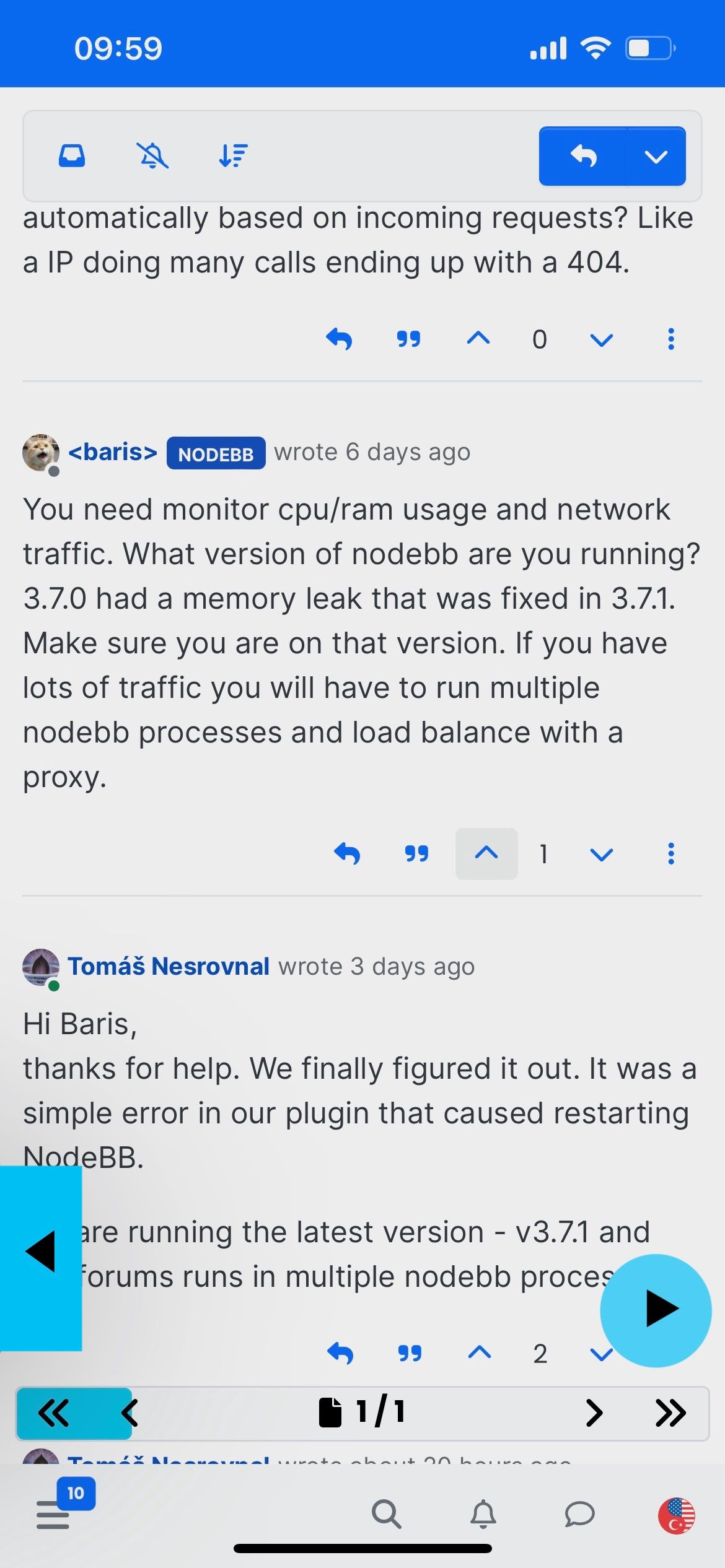
alternatively the arrows or rewind icons that YouTube uses can be used:

-
 undefined crazycells referenced this topic on
-
@phenomlab no problem at all, nothing is urgent
 please take your time and I really appreciate your help…
@crazycells Right - I’ve put together a base design on this site which will only fire when PWA mode is detected. It looks like the below - note the left and right arrows. They are “basic” but functional
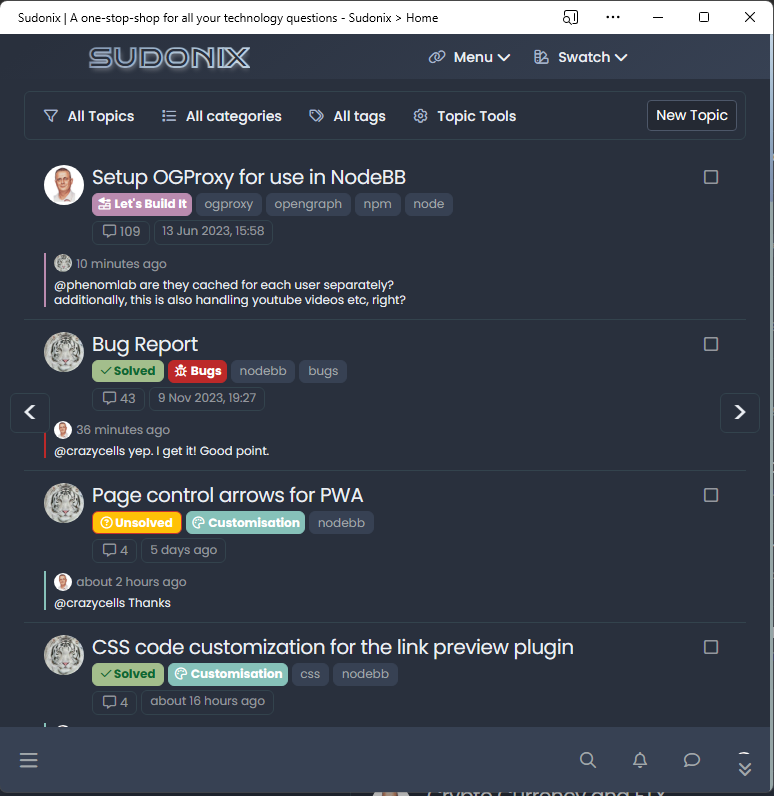
CSS
/* START - CSS settings for PWA navigation */

.arrow {
  width: 40px;
  height: 40px;
  background-color: var(--bs-body-bg);
  text-align: center;
  line-height: 30px;
  cursor: pointer;
  font-size: 30px;
  border: 1px solid var(--bs-border-color);
  border-radius: var(--bs-border-radius);
}
.arrow.left, .arrow.right {
    margin-left: 10px;
    margin-right: 10px;
    align-content: center;
    position: fixed;
    top: 50%;
}
.arrow.right {
    position: fixed;
    right: 0;
}

/* END - CSS settings for PWA navigation */
JS
The below code does rely on
serviceWorkerbut that’s typically present in all “modern” browsers$(document).ready(function() { // Check if serviceWorker API is available if ('serviceWorker' in navigator) { // The browser supports service workers console.log('This web app supports service workers.'); // Check if the app is installed (as PWA) if (window.matchMedia('(display-mode: standalone)').matches) { console.log('This web app is running as a Progressive Web App.'); // Add HTML for navigation arrows $('body').append('<div class="navigation"><div class="arrow left"><</div><div class="arrow right">></div></div>'); // Handle click on left arrow $('.arrow.left').click(function() { history.back(); // Go back in history }); // Handle click on right arrow $('.arrow.right').click(function() { history.forward(); // Go forward in history }); } else { console.log('This web app is not running as a Progressive Web App.'); } } else { console.log('This web browser does not support service workers.'); } });Again, this is basic and more of a POC. Other functionality can be added in a similar way if you’d like it.
Mark Cutting also advises organisations as a Fractional CIO, Fractional CISO and Executive Advisor, helping boards improve technology governance, cyber resilience and executive decision making. Learn more at Phenomlab Ltd
-
hi @phenomlab , when the forum is used as PWA, there is no easy way to navigate between pages…
Several days ago, I was reading a post on a forum that mentioned another topic, I have encountered an issue when attempting to return to the original post. So, after reading the linked topic, I had to go to categories page and retrace my steps to locate the topic I was reading initially…
Although this can be achieved by page control arrows on destop and mobile browsers, there is no easy way to achieve this on PWA… so I wonder if you can help me adding some page control buttons that appear at the bottom of the page when scrolled up. (maybe it can be integrated to post navigation bar but I believe those buttons should appear in all pages, not only in topics)
Here is just some suggestions to distinguish them from other arrows…
alternatively the arrows or rewind icons that YouTube uses can be used:
@crazycells haven’t forgotten. Working on this now and expect to have a usable POC you can try in the coming days.
Mark Cutting also advises organisations as a Fractional CIO, Fractional CISO and Executive Advisor, helping boards improve technology governance, cyber resilience and executive decision making. Learn more at Phenomlab Ltd
-
@crazycells haven’t forgotten. Working on this now and expect to have a usable POC you can try in the coming days.
@phenomlab no problem at all, nothing is urgent
please take your time and I really appreciate your help… -
@phenomlab no problem at all, nothing is urgent
please take your time and I really appreciate your help…@crazycells Thanks
-
@phenomlab no problem at all, nothing is urgent
please take your time and I really appreciate your help…@crazycells Right - I’ve put together a base design on this site which will only fire when PWA mode is detected. It looks like the below - note the left and right arrows. They are “basic” but functional
CSS
/* START - CSS settings for PWA navigation */

.arrow {
  width: 40px;
  height: 40px;
  background-color: var(--bs-body-bg);
  text-align: center;
  line-height: 30px;
  cursor: pointer;
  font-size: 30px;
  border: 1px solid var(--bs-border-color);
  border-radius: var(--bs-border-radius);
}
.arrow.left, .arrow.right {
    margin-left: 10px;
    margin-right: 10px;
    align-content: center;
    position: fixed;
    top: 50%;
}
.arrow.right {
    position: fixed;
    right: 0;
}

/* END - CSS settings for PWA navigation */
JS
The below code does rely on
serviceWorkerbut that’s typically present in all “modern” browsers$(document).ready(function() { // Check if serviceWorker API is available if ('serviceWorker' in navigator) { // The browser supports service workers console.log('This web app supports service workers.'); // Check if the app is installed (as PWA) if (window.matchMedia('(display-mode: standalone)').matches) { console.log('This web app is running as a Progressive Web App.'); // Add HTML for navigation arrows $('body').append('<div class="navigation"><div class="arrow left"><</div><div class="arrow right">></div></div>'); // Handle click on left arrow $('.arrow.left').click(function() { history.back(); // Go back in history }); // Handle click on right arrow $('.arrow.right').click(function() { history.forward(); // Go forward in history }); } else { console.log('This web app is not running as a Progressive Web App.'); } } else { console.log('This web browser does not support service workers.'); } });Again, this is basic and more of a POC. Other functionality can be added in a similar way if you’d like it.
Mark Cutting also advises organisations as a Fractional CIO, Fractional CISO and Executive Advisor, helping boards improve technology governance, cyber resilience and executive decision making. Learn more at Phenomlab Ltd
-
 undefined phenomlab has marked this topic as solved on
-
@crazycells Right - I’ve put together a base design on this site which will only fire when PWA mode is detected. It looks like the below - note the left and right arrows. They are “basic” but functional
CSS
/* START - CSS settings for PWA navigation */

.arrow {
  width: 40px;
  height: 40px;
  background-color: var(--bs-body-bg);
  text-align: center;
  line-height: 30px;
  cursor: pointer;
  font-size: 30px;
  border: 1px solid var(--bs-border-color);
  border-radius: var(--bs-border-radius);
}
.arrow.left, .arrow.right {
    margin-left: 10px;
    margin-right: 10px;
    align-content: center;
    position: fixed;
    top: 50%;
}
.arrow.right {
    position: fixed;
    right: 0;
}

/* END - CSS settings for PWA navigation */
JS
The below code does rely on
serviceWorkerbut that’s typically present in all “modern” browsers$(document).ready(function() { // Check if serviceWorker API is available if ('serviceWorker' in navigator) { // The browser supports service workers console.log('This web app supports service workers.'); // Check if the app is installed (as PWA) if (window.matchMedia('(display-mode: standalone)').matches) { console.log('This web app is running as a Progressive Web App.'); // Add HTML for navigation arrows $('body').append('<div class="navigation"><div class="arrow left"><</div><div class="arrow right">></div></div>'); // Handle click on left arrow $('.arrow.left').click(function() { history.back(); // Go back in history }); // Handle click on right arrow $('.arrow.right').click(function() { history.forward(); // Go forward in history }); } else { console.log('This web app is not running as a Progressive Web App.'); } } else { console.log('This web browser does not support service workers.'); } });Again, this is basic and more of a POC. Other functionality can be added in a similar way if you’d like it.
-
@phenomlab thank you very much

@crazycells what would be the
z-indexvalue to hide it when the navigation menu options appear? I believe they should be invisible when those options panels are opened… -
@crazycells what would be the
z-indexvalue to hide it when the navigation menu options appear? I believe they should be invisible when those options panels are opened…@crazycells yeah, I set that quite high at
9999which is complete overkill! Try lowering that value to something more sane like1500 -
@crazycells I think I found a bug. If you position a topic between the two navigation arrows on a mobile device, you cannot click that topic until you scroll up or down past the arrows. I noticed this last night and will address it.
-
A better explanation of that is below
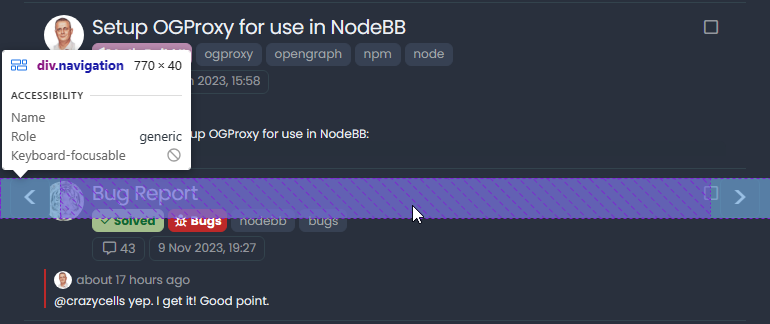
As you can see from the developer view, the
width: 100%;sits over the top of the topic meaning it cannot be clicked or tapped. A workaround here should be to setz-index: -1;on thenavigationclass, but whilst that resolves the ordering issue, it means the navigation buttons no longer work as they sit under the content. -
Fixed. Change the CSS block (original post is also updated) to the below
/* START - CSS settings for PWA navigation */ .arrow { width: 40px; height: 40px; background-color: var(--bs-body-bg); text-align: center; line-height: 30px; cursor: pointer; font-size: 30px; border: 1px solid var(--bs-border-color); border-radius: var(--bs-border-radius); } .arrow.left, .arrow.right { margin-left: 10px; margin-right: 10px; align-content: center; position: fixed; top: 50%; } .arrow.right { position: fixed; right: 0; } /* END - CSS settings for PWA navigation */ -
I have not tested them in details yet, but I will let you know about any bugs for sure


Additionally, is there any reason that they are in the middle but not close to the bottom? That is usually where the fingers will be
-
I have not tested them in details yet, but I will let you know about any bugs for sure
Additionally, is there any reason that they are in the middle but not close to the bottom? That is usually where the fingers will be
@crazycells They can be anywhere you’d prefer. You can just change the
.arrow.left, .arrow.rightclass to move to the preferred position. Currently, it’s set at 50%, but can be any value you want to reach the desired position. In this case, it would probably be better to substitutetopforbottomand set the position inpxto ensure the placement is the same no matter which screen estate you have.For example
.arrow.left, .arrow.right {
    margin-left: 10px;
    margin-right: 10px;
    align-content: center;
    position: fixed;
    bottom: 120px;
}
That now means the page scroller (the button that appears bottom right) will be in the way, although on thinking about it, we already have a page navigation when you are in the topic, so no point in having another. That would be a minor alteration to the scroll top function to have it not appear on posts.
Mark Cutting also advises organisations as a Fractional CIO, Fractional CISO and Executive Advisor, helping boards improve technology governance, cyber resilience and executive decision making. Learn more at Phenomlab Ltd
-
@crazycells They can be anywhere you’d prefer. You can just change the
.arrow.left, .arrow.rightclass to move to the preferred position. Currently, it’s set at 50%, but can be any value you want to reach the desired position. In this case, it would probably be better to substitutetopforbottomand set the position inpxto ensure the placement is the same no matter which screen estate you have.For example
.arrow.left, .arrow.right {
    margin-left: 10px;
    margin-right: 10px;
    align-content: center;
    position: fixed;
    bottom: 120px;
}
That now means the page scroller (the button that appears bottom right) will be in the way, although on thinking about it, we already have a page navigation when you are in the topic, so no point in having another. That would be a minor alteration to the scroll top function to have it not appear on posts.
@phenomlab thanks, yes, I will move them close to the menu bar, but I was asking in case there is a technical detail I was not aware…
-
@phenomlab thanks, yes, I will move them close to the menu bar, but I was asking in case there is a technical detail I was not aware…
@crazycells No, none that I am aware of - move them to where you’d prefer. In fact, I took your advice and moved them on Sudonix, which uses the CSS class I added in the previous post.
Mark Cutting also advises organisations as a Fractional CIO, Fractional CISO and Executive Advisor, helping boards improve technology governance, cyber resilience and executive decision making. Learn more at Phenomlab Ltd
-
@crazycells No, none that I am aware of - move them to where you’d prefer. In fact, I took your advice and moved them on Sudonix, which uses the CSS class I added in the previous post.
@phenomlab yes, I believe this looks more natural, they are closer to the fingers and on the top of these, it is not blocking any content in the middle of the screen…
-
@phenomlab yes, I believe this looks more natural, they are closer to the fingers and on the top of these, it is not blocking any content in the middle of the screen…
@crazycells Exactly. i’m going to hire you as a design guru! You have some great ideas on what Sudonix should look like and I’m grateful for any contribution that enhances what I hope is already a good experience.
Mark Cutting also advises organisations as a Fractional CIO, Fractional CISO and Executive Advisor, helping boards improve technology governance, cyber resilience and executive decision making. Learn more at Phenomlab Ltd
-
@crazycells Exactly. i’m going to hire you as a design guru! You have some great ideas on what Sudonix should look like and I’m grateful for any contribution that enhances what I hope is already a good experience.
@phenomlab It is nice to hear that I am able to contribute your website

-
@crazycells They can be anywhere you’d prefer. You can just change the
.arrow.left, .arrow.rightclass to move to the preferred position. Currently, it’s set at 50%, but can be any value you want to reach the desired position. In this case, it would probably be better to substitutetopforbottomand set the position inpxto ensure the placement is the same no matter which screen estate you have.For example
.arrow.left, .arrow.right {
    margin-left: 10px;
    margin-right: 10px;
    align-content: center;
    position: fixed;
    bottom: 120px;
}
That now means the page scroller (the button that appears bottom right) will be in the way, although on thinking about it, we already have a page navigation when you are in the topic, so no point in having another. That would be a minor alteration to the scroll top function to have it not appear on posts.
@phenomlab said in Page control arrows for PWA:
That now means the page scroller (the button that appears bottom right) will be in the way, although on thinking about it, we already have a page navigation when you are in the topic, so no point in having another.
Based on the above point made, I have now disabled the scroll to top button inside topics.
Mark Cutting also advises organisations as a Fractional CIO, Fractional CISO and Executive Advisor, helping boards improve technology governance, cyber resilience and executive decision making. Learn more at Phenomlab Ltd
-
@phenomlab said in Page control arrows for PWA:
That now means the page scroller (the button that appears bottom right) will be in the way, although on thinking about it, we already have a page navigation when you are in the topic, so no point in having another.
Based on the above point made, I have now disabled the scroll to top button inside topics.
@phenomlab this works great! thanks a lot. And thanks to your JS codes, it is only activated on PWA, not on mobile…

Hello! It looks like you're interested in this conversation, but you don't have an account yet.
Getting fed up of having to scroll through the same posts each visit? When you register for an account, you'll always come back to exactly where you were before, and choose to be notified of new replies (either via email, or push notification). You'll also be able to save bookmarks and upvote posts to show your appreciation to other community members.
With your input, this post could be even better 💗
Register Login