
Virgin Media Broadband
-
@riekmedia said in Virgin Media Broadband:
This is my Speedcheck

Business line with fixed ip
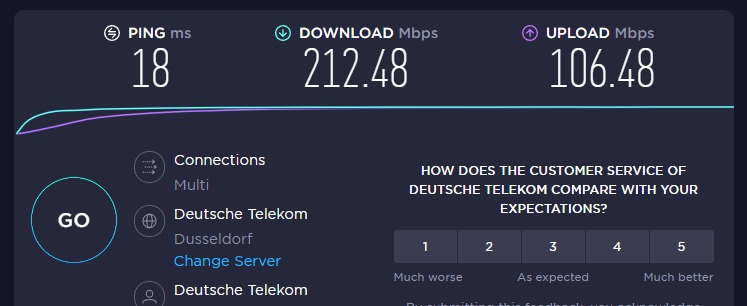
Wow, nice!


-
Looking to purchase these later

-
Purchased


@jac said in Virgin Media Broadband:
Purchased
It’s here.
Awaiting the boosters and then I’ll set up, or doesn’t that matter too much?
-
@jac said in Virgin Media Broadband:
Purchased
It’s here.
Awaiting the boosters and then I’ll set up, or doesn’t that matter too much?

@jac If you have the router then you can use the existing powerline adapters you have - you don’t need boosters.
Mark Cutting also advises organisations as a Fractional CIO, Fractional CISO and Executive Advisor, helping boards improve technology governance, cyber resilience and executive decision making. Learn more at Gratmore Ltd
-
@jac If you have the router then you can use the existing powerline adapters you have - you don’t need boosters.
@phenomlab
Also purchased these as recommended above…
-
@jac Ah, yes - I remember now. Sorry
Mark Cutting also advises organisations as a Fractional CIO, Fractional CISO and Executive Advisor, helping boards improve technology governance, cyber resilience and executive decision making. Learn more at Gratmore Ltd
-
-
@phenomlab will these still be ok?
@jac yes, they’ll be fine.
Mark Cutting also advises organisations as a Fractional CIO, Fractional CISO and Executive Advisor, helping boards improve technology governance, cyber resilience and executive decision making. Learn more at Gratmore Ltd
-
@phenomlab Thanks mate,
Just out of interest as I’ll be doing it later, how easy is it to set the router up?
-
@phenomlab Thanks mate,
Just out of interest as I’ll be doing it later, how easy is it to set the router up?
@jac Quite easy - it should just work straight out of the box provided you take the connection from the powerline adapters and place the other end of the lead into the “WAN” interface on the new router.
There will be some setup involved as you need to access the router to setup the SSID etc.
Mark Cutting also advises organisations as a Fractional CIO, Fractional CISO and Executive Advisor, helping boards improve technology governance, cyber resilience and executive decision making. Learn more at Gratmore Ltd
-
@jac Quite easy - it should just work straight out of the box provided you take the connection from the powerline adapters and place the other end of the lead into the “WAN” interface on the new router.
There will be some setup involved as you need to access the router to setup the SSID etc.
@phenomlab So basically the booster that’s plugged in take the lead out of that and place it into one of the new ones? And then set up the router? Pretty sure you login and edit the settings?
-
@phenomlab So basically the booster that’s plugged in take the lead out of that and place it into one of the new ones? And then set up the router? Pretty sure you login and edit the settings?
-
@jac or am I getting it wrong? This isn’t to replace the box? This is just purely to boost it? Am I wrong? Apologies if so
 .
-
@jac or am I getting it wrong? This isn’t to replace the box? This is just purely to boost it? Am I wrong? Apologies if so
.
@jac said in Virgin Media Broadband:
This isn’t to replace the box?
No, this is to “extend” it’s capabilities. Essentially, this will act as another access point in another room, but connected to the main router. So, instead of the normal JAC1 network, you create JAC2 in the bedroom using that new router, and connect to that.
All traffic from this new router just feeds back into the main one downstairs.
Mark Cutting also advises organisations as a Fractional CIO, Fractional CISO and Executive Advisor, helping boards improve technology governance, cyber resilience and executive decision making. Learn more at Gratmore Ltd
-
@jac said in Virgin Media Broadband:
This isn’t to replace the box?
No, this is to “extend” it’s capabilities. Essentially, this will act as another access point in another room, but connected to the main router. So, instead of the normal JAC1 network, you create JAC2 in the bedroom using that new router, and connect to that.
All traffic from this new router just feeds back into the main one downstairs.
@phenomlab so this needs to be connected upstairs in the bedroom? Or am I missing the point. Apologies matey.
-
@phenomlab so this needs to be connected upstairs in the bedroom? Or am I missing the point. Apologies matey.
@jac One powerline adapter in the lounge, and one in the bedroom. From the lounge, connect one end of the RJ45 cable to the back of the Virgin hub and plug the other into the new powerline adapter in the same room.
In the bedroom, plug in the other powerline adapter, and connect one end of the RJ45 cable into the powerline adapter, and the other into the WAN port on the new router.
Let’s get to this stage first.
Mark Cutting also advises organisations as a Fractional CIO, Fractional CISO and Executive Advisor, helping boards improve technology governance, cyber resilience and executive decision making. Learn more at Gratmore Ltd
-
@jac One powerline adapter in the lounge, and one in the bedroom. From the lounge, connect one end of the RJ45 cable to the back of the Virgin hub and plug the other into the new powerline adapter in the same room.
In the bedroom, plug in the other powerline adapter, and connect one end of the RJ45 cable into the powerline adapter, and the other into the WAN port on the new router.
Let’s get to this stage first.
@phenomlab Thanks mate for the instructions. Will do this later when got a spare moment.
As for the booster is this dangerous to have in the bedroom?
. -
@phenomlab Thanks mate for the instructions. Will do this later when got a spare moment.
As for the booster is this dangerous to have in the bedroom?
.
@jac Dangerous ? Can you elaborate ?
Mark Cutting also advises organisations as a Fractional CIO, Fractional CISO and Executive Advisor, helping boards improve technology governance, cyber resilience and executive decision making. Learn more at Gratmore Ltd
-
-
@jac One powerline adapter in the lounge, and one in the bedroom. From the lounge, connect one end of the RJ45 cable to the back of the Virgin hub and plug the other into the new powerline adapter in the same room.
In the bedroom, plug in the other powerline adapter, and connect one end of the RJ45 cable into the powerline adapter, and the other into the WAN port on the new router.
Let’s get to this stage first.
@phenomlab said in Virgin Media Broadband:
One powerline adapter in the lounge
Would this replace the current virgin one?
 .
Hello! It looks like you're interested in this conversation, but you don't have an account yet.
Getting fed up of having to scroll through the same posts each visit? When you register for an account, you'll always come back to exactly where you were before, and choose to be notified of new replies (either via email, or push notification). You'll also be able to save bookmarks and upvote posts to show your appreciation to other community members.
With your input, this post could be even better 💗
Register Login
