Skip to content

NodeBB upgrade now cant post

Solved Bugs
5 2 1.1k 1
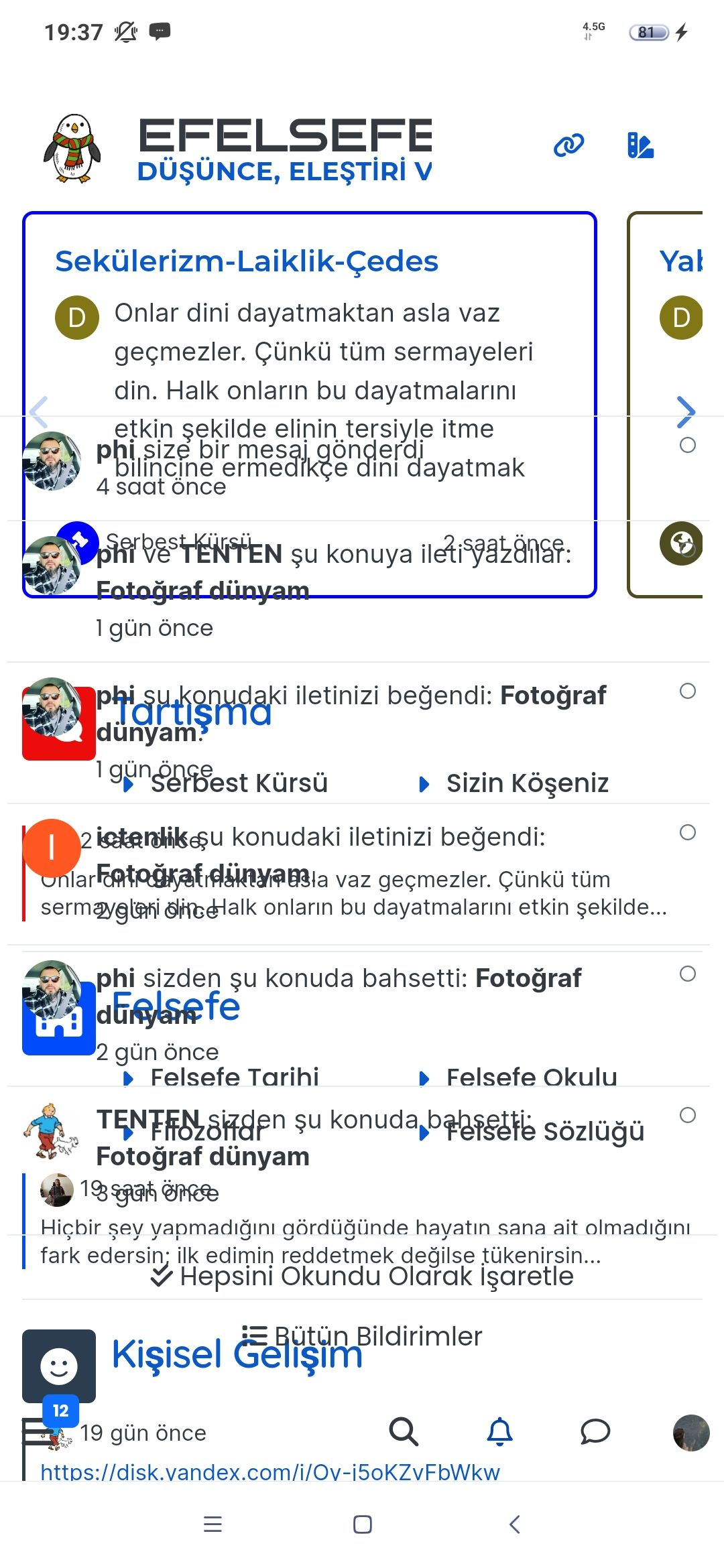
  • On my site An annoying โ€˜n out of nโ€™ banner comes over the reply button, and the forum bar is just below that
    So I can just see a fraction of the reply button but cant click it.
    I cant even screenshot it to show example now as that seems โ€˜disabledโ€™ as a new โ€˜featureโ€™

    Id like to stop screenshot disabled, and remove this โ€˜8 out of 8 bannerโ€™. Is that possible?

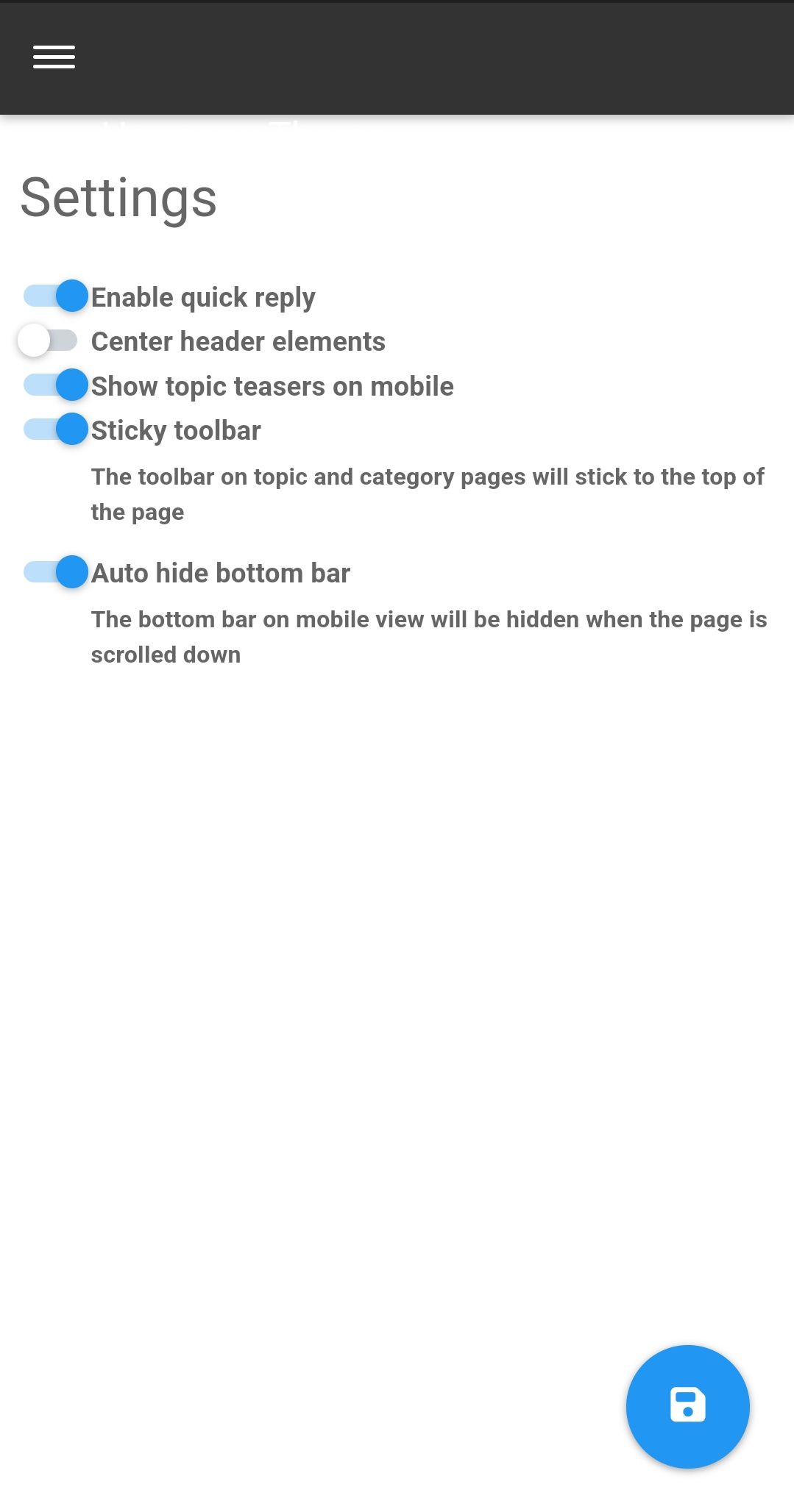
  • Iโ€™ve just seen the duplicate post on NodeBB. Can you go to /admin/plugins/harmony and match the settings below then save

    Screenshot_2023-05-28-11-10-14-46_e4424258c8b8649f6e67d283a50a2cbc.jpg

    That issue is caused by element positioning where the bottom bar should auto hide to prevent that issue. If that doesnโ€™t work, disable the quick reply feature and see if that helps.

  • On my site An annoying โ€˜n out of nโ€™ banner comes over the reply button, and the forum bar is just below that
    So I can just see a fraction of the reply button but cant click it.
    I cant even screenshot it to show example now as that seems โ€˜disabledโ€™ as a new โ€˜featureโ€™

    Id like to stop screenshot disabled, and remove this โ€˜8 out of 8 bannerโ€™. Is that possible?

    @Panda NodeBB doesnโ€™t disable the ability to take a screenshot. Thatโ€™s at operating system level not application, so something else is stopping that.

    Iโ€™ll need a screenshot of sorts, or access to your forum to be able to see whatโ€™s going on.

  • Iโ€™ve just seen the duplicate post on NodeBB. Can you go to /admin/plugins/harmony and match the settings below then save

    Screenshot_2023-05-28-11-10-14-46_e4424258c8b8649f6e67d283a50a2cbc.jpg

    That issue is caused by element positioning where the bottom bar should auto hide to prevent that issue. If that doesnโ€™t work, disable the quick reply feature and see if that helps.

  • Thanks, can post now.
    I find it disconcerting that โ€˜out of the box settingsโ€™ dont work. If it wasnt for your help I would have broken forum now!
    Thats why sometimes I double post urgent questions on both forums as I appreciate your fast and accurate responses ๐Ÿ™‚

  • Thanks, can post now.
    I find it disconcerting that โ€˜out of the box settingsโ€™ dont work. If it wasnt for your help I would have broken forum now!
    Thats why sometimes I double post urgent questions on both forums as I appreciate your fast and accurate responses ๐Ÿ™‚

    @Panda yes, for some reason, that is the case. If you need an urgent response, itโ€™s probably better to post here because of the time difference.

  • phenomlabundefined phenomlab marked this topic as a question on
  • phenomlabundefined phenomlab has marked this topic as solved on

Did this solution help you?
Did you find the suggested solution useful? Support ๐Ÿ’— Sudonix with a coffee โ˜•
If your organisation needs deeper expertise around infrastructure, security, or technology leadership, learn more about Phenomlab Ltd. Many of the deeper technical guides behind Sudonix are published there.

Related Topics
  • External Links - New Window

    Solved Customisation nodebb links settings
    8
    2 Votes
    8 Posts
    135 Views
    @Sampo2910 search the forum here for ogproxy which is the client side version of that plugin I wrote. Itโ€™s in use here on this forum.
  • nodebb error logs

    Bugs nodebb
    6
    2
    4 Votes
    6 Posts
    1k Views
    I just wanted to ask because I donโ€™t have much knowledge about the new installation. Thank you for the explanatory answer.
  • Rendering issues post migration to Sudonix theme/code

    Solved Bugs
    49
    1
    20 Votes
    49 Posts
    10k Views
    @cagatay Those are in /admin/extend/widgets/brand header. Look inside the HTML widget that is there, and youโ€™ll find <div class="socialicons"> <a class="btn-ghost p-2" href="https://github.com/phenomlab" rel="noreferrer noopener"><i style="color: #333;background: #ffffff; width: 26px" class="fa fa-2x fa-github-square"></i></a> <a class="btn-ghost p-2" href="https://linkedin.com/in/phenomlab" rel="noreferrer noopener"><i style="color: #0077B5;background: #ffffff; width: 26px" class="fa fa-2x fa-brands fa-linkedin-square"></i></a> <a class="btn-ghost p-2" href="https://twitter.com/phenomlab" rel="noreferrer noopener"><i style="color: #1DA1F2;background: #ffffff; width: 26px" class="fa fa-2x fa-twitter-square"></i></a> <!-- <a class="btn-ghost p-2" href="https://www.facebook.com/sudonixtech" rel="noreferrer noopener"><i style="color: #4268B2;background: #ffffff; width: 26px" class="fa fa-2x fa-facebook-square"></i></a> --> </div> Remove that block and save.
  • Fixed background to nodebb forum

    Solved Configure nodebb
    25
    4 Votes
    25 Posts
    5k Views
    @Panda said in Fixed background to nodebb forum: Chatgpt told me the ::before method. Go figure
  • Nodebb 3.2.0

    Bugs nodebb nodebb 3.2.0
    20
    1
    2 Votes
    20 Posts
    4k Views
    @crazycells yes, Iโ€™m aware of that. Need to fix EDIT- fixed. Caused by the same CSS that is used to absolutely position the โ€œverifiedโ€ group badge in the posts view. Amended this CSS so that is specifically targets the post stream as below li[component="post"] a[href*="/groups/verified"] { position: absolute !important; left: 8px; z-index: 2; margin-top: 1px; border-radius: 999px !important; line-height: 14px; display: block; height: 22px; margin-left: 0px !important; }
  • Can you adjust Admin settings on your NodeBB?

    Bugs nodebb
    5
    0 Votes
    5 Posts
    1k Views
    @Panda as, yes, now I understand and that makes 100% sense. It means those who get down voted can still have an opinion and use common services. And yes, youโ€™re right. Rather than down vote, just ignore if you donโ€™t agree.
  • Email validation NodeBB

    Bugs nodebb
    21
    3 Votes
    21 Posts
    5k Views
    @Panda said in Email validation NodeBB: Did you configure that as a custom change to the usual quote icon. How do you do that? I notice on NodeBB site its a solid blue quotes Yes, I changed it. NodeBB by default users the free font awesome library whereas I use the pro (paid) version SDK have access to a wider set of icons, and at different thicknesses etc. The change of colour is just simple CSS.
  • NodeBB Design help

    Solved Customisation
    8
    3
    2 Votes
    8 Posts
    2k Views
    @riekmedia Iโ€™ve applied some new CSS to your site. Can you reload the page and try again ? For the record, this is what I added #footer { background: #2d343e; border-top: 4px solid #2d343e; font-size: 0.9em; margin-top: 70px; padding: 80px 0 0; position: relative; clear: both; bottom: 0; left: 0; right: 0; z-index: 1000; margin-left: -15px; margin-right: -338px; } The /categories page seems a bit messed up, so looking at that currently EDIT - issued some override CSS in the CATEGORIES widget <!--- CSS fix for overspill on /categories page - DO NOT DELETE --> <style> #footer { margin-right: -45px; } </style> That should resolve the /categories issue.