Skip to content

NodeBB v3 Chat Very Slow

Moved Performance
47 3 20.9k 1
  • yep not box size but we don’t see the bug

    wrote on last edited by
    #36

    @DownPW what exactly is the bug? I’ve tested it, and it behaves normally from what I see (unless I completely missed something)?

  • wrote on last edited by
    #37

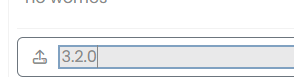
    Size is good, is just the focus when we type text it has changed

    on 3.1.7 :
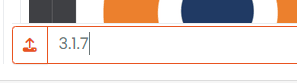
    image.png

    On 3.2.0 here :

    6e7b686d-031c-4e98-927e-a5df67906c25-image.png

  • Size is good, is just the focus when we type text it has changed

    on 3.1.7 :

    image.png

    On 3.2.0 here :

    6e7b686d-031c-4e98-927e-a5df67906c25-image.png

    wrote on last edited by
    #38

    @DownPW Yes, that’s input:focus - it’s used to style much larger boxes on focus, but I’ll need to create an exemption here.

  • wrote on last edited by
    #39

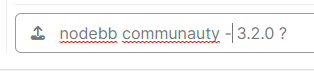
    Nodebb communauty :

    image.png

  • Nodebb communauty :

    image.png

    wrote on last edited by phenomlab
    #40

    @DownPW @cagatay Thanks for reporting. Should match now.

    f99597be-2d44-4c14-a46d-c803de6d9347-image.png

  • wrote on last edited by
    #41

    yep better 🙂

    Solution ?

  • yep better 🙂

    Solution ?

    wrote on last edited by phenomlab
    #42

    @DownPW As you indicated, but I need to make this more specific because it disables a wanted UI experience elsewhere

    .form-control:focus {
        background: var(--bs-body-bg) !important;
        color: var(--bs-body-color) !important;
        /*box-shadow: 0 0 0 2px var(--bs-tag-bg) inset !important; */
        border-color: transparent !important;
    }
    

    Starting with this CSS

    .form-control:focus {
        background: var(--bs-body-bg) !important;
        color: var(--bs-body-color) !important;
        border-color: transparent !important;
    }
    .write-container .form-control:focus {
        box-shadow: 0 0 0 2px var(--bs-tag-bg) inset !important;
    }
    
  • wrote on last edited by
    #43

    Have you find better solution or this is the final @phenomlab ?

  • Have you find better solution or this is the final @phenomlab ?

    wrote on last edited by
    #44

    @DownPW this is the final solution from my perspective. The above code resolves the issue here.

  • Have you find better solution or this is the final @phenomlab ?

    wrote on last edited by
    #45

    @DownPW i m also using last codes on my web site.

    .form-control:focus {
        background: var(--bs-body-bg) !important;
        color: var(--bs-body-color) !important;
        border-color: transparent !important;
    }
    .write-container .form-control:focus {
        box-shadow: 0 0 0 2px var(--bs-tag-bg) inset !important;
    }
    
  • wrote on last edited by
    #46

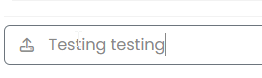
    I have search and I use this code. What do you think ?

    textarea.bg-transparent.text-body.form-control.chat-input.mousetrap.rounded-0.border-0.shadow-none.ps-1.py-0 {
        box-shadow: 0 0 0 1px transparent inset !important;
    }
    
  • I have search and I use this code. What do you think ?

    textarea.bg-transparent.text-body.form-control.chat-input.mousetrap.rounded-0.border-0.shadow-none.ps-1.py-0 {
        box-shadow: 0 0 0 1px transparent inset !important;
    }
    
    wrote on last edited by
    #47

    @DownPW Seems fine.


Related Topics
  • What’s going on with NodeBB?

    Performance nodebb script die
    20
    8 Votes
    20 Posts
    5k Views
    phenomlab
    @cagatay The most reliable way to upgrade Node.js on Ubuntu depends on how you originally installed it. Method 1: Using NVM (Recommended) If you already use Node Version Manager (NVM), upgrading is simple. NVM allows you to keep both versions and switch between them if needed. Install Node 22: nvm install 22 Switch to Node 22: nvm use 22 Set it as your default: nvm alias default 22 Verify the change: node -v Method 2: Using NodeSource (PPA) If you installed Node.js via apt using the NodeSource repository, you need to update the repository script to point to the new version. Remove the old NodeSource list (optional but cleaner): sudo rm /etc/apt/sources.list.d/nodesource.list Download and run the NodeSource setup script for Node 22: curl -fsSL [https://deb.nodesource.com/setup_22.x](https://deb.nodesource.com/setup_22.x) | sudo -E bash - Install/Upgrade Node.js: sudo apt-get install -y nodejs Verify the installation: node -v Method 3: Using the ‘n’ Package If you have npm installed, you can use the n interactive manager. Clear the npm cache: sudo npm cache clean -f Install the ‘n’ helper: sudo npm install -g n Install Node 22: sudo n 22 Update your shell: hash -r Troubleshooting Permission Denied: If you see permission errors using Method 2 or 3, ensure you are using sudo. Path Issues: If node -v still shows version 20 after upgrading via NVM, restart your terminal or run source ~/.bashrc. Conflicts: Avoid mixing these methods. If you switch from apt to nvm, it is best to sudo apt remove nodejs first to avoid path conflicts.
  • adding some console.log to Nodebb

    Solved Customisation nodebb
    4
    1 Votes
    4 Posts
    2k Views
    phenomlab
    @eeeee if you’re using the console, you could try node app.js > app.log 2>&1 This would redirect stdout to a file named app.log and redirect stderr to stdout. I’m not sure about standard logging under NodeBB, but there is an error log located at logs/error.log. Failing that, you could always stop the NodeBB service then use ./nodebb dev from the console which would then provide debug output.
  • NodeBB v3.0.0-rc.1

    Performance nodebb v3.0.0
    1
    1 Votes
    1 Posts
    701 Views
    No one has replied
  • NODEBB: Nginx error performance & High CPU

    Solved Performance performance nodebb nginx
    69
    4
    14 Votes
    69 Posts
    63k Views
    DownPW
    @phenomlab Seems to be better with some scaling fix for redis on redis.conf. I haven’t seen the message yet since the changes I made # I increase it to the value of /proc/sys/net/core/somaxconn tcp-backlog 4096 # I'm uncommenting because it can slow down Redis. Uncommented by default !!!!!!!!!!!!!!!!!!! #save 900 1 #save 300 10 #save 60 10000 If you have other Redis optimizations. I take all your advice https://severalnines.com/blog/performance-tuning-redis/
  • Detect if user is admin

    General nodebb javascript code
    2
    0 Votes
    2 Posts
    2k Views
    phenomlab
    @pwsincd I think you can use userData.isAdmin = isAdmin; if I’m not mistaken - see https://community.nodebb.org/topic/15128/how-to-hide-whitelist-user-field-only-to-owner-or-admin?_=1648802303112 for an example
  • NodeBB 1.19.3

    Solved Performance nodebb 1.19.3 performance
    33
    4 Votes
    33 Posts
    16k Views
    DownPW
    @phenomlab I find the problem Mark The error message indicated this path : http://localhost:4567/assets/plugins/nodebb-plugin-emoji/emoji/styles.css?v=6983dobg16u I change the path url on config.json [image: 47bacc80-f141-41e4-a261-3f8d650cc6f6-image.png] And all it’s good Weird, I didn’t have to change that path before 1.19.3 But this does not prevent the problem from a clean install with Emoji Plugin EDIT: After test, that resolv the problem installation for 1.18.x but not for 1.19.x (I have other error message when I run ./nodebb Setup For resume: NodeJS 16_x with 1.18.x is ok
  • IRC Server/Client - Chat App with NodeBB

    Linux nodebb irc server client
    6
    1 Votes
    6 Posts
    3k Views
    phenomlab
    @Hari not sure from the consumer perspective, but Skype has been all but completely consumed by Microsoft Teams when it comes to business usage.
  • CSS codes for fa-info icon

    Solved Customisation nodebb
    9
    1
    6 Votes
    9 Posts
    3k Views
    crazycells
    I have just figured it out… it can be targeted with text-decoration-color: I was mistakenly using color