nodebb-plugin-reactions not working @v1.0.2 with Harmony theme
-
@phenomlab After upgrading npm and node I did upgrade nodebb again but that didn’t do any changes. Can you please tell me which commands I have to use to see those peer dependencies listed in the screenshot you sent me via pn?
-
@phenomlab After upgrading npm and node I did upgrade nodebb again but that didn’t do any changes. Can you please tell me which commands I have to use to see those peer dependencies listed in the screenshot you sent me via pn?
-
-
2. Bringing base dependencies up to date...  started

up to date, audited 1180 packages in 8s

139 packages are looking for funding
  run `npm fund` for details
Looks better doesn’t it?
-
-
-
@phenomlab I gave up on this yesterday
-

@dave1904 I’ve managed to resolve this issue - see below
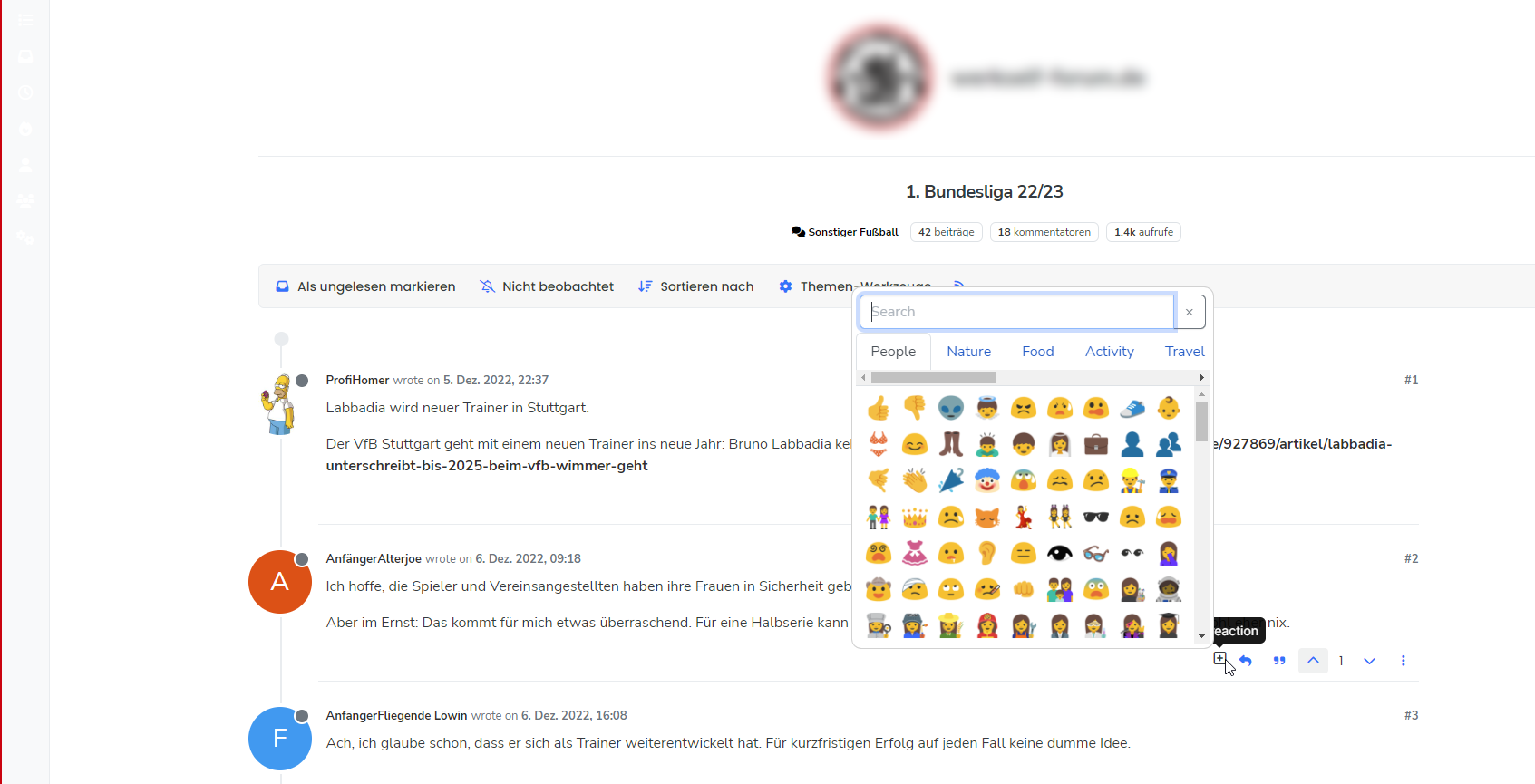
It seems that there is a conflicting plugin somewhere that causes
reactionsto not fire. Not sure which one it is, but below are the steps I took to resolve- Issue
./nodebb reset -t- this essentially resets everything back to default - be warned, as it will strip literally all customisations also - Reactivate only the essential plugins (typically those that come with the stock installation)
- Install and activate
nodebb-plugin-emoji,nodebb-plugin-emoji-androidand@nodebb/nodebb-plugin-reactions@latest - Rebuild and restart
Obviously, these steps are quite dramatic and would mean some downtime for your forum. You’d also need to put everything back the way it was in terms of CSS, Widgets, etc, so quite invasive. My suggestion would be to try a minimal approach on prod to see if we can get that to work without having to use the somewhat “sledgehammer” approach above.
- Issue
-
phenomlab has marked this topic as solved on
-
-
Again, thank you very much for taking your time. Very happy that you could fix it.
 I guess the minimal approach would be to deactivate plugins one after another, rebuild and restart and see if the reactions plugin works?
@dave1904 yes, that’s the route I would take.
Mark Cutting also advises organisations as a Fractional CIO, Fractional CISO and Executive Advisor, helping boards improve technology governance, cyber resilience and executive decision making. Learn more at Gratmore Ltd
-
-
I will try this later and keep you updated.
@dave1904 any update? More to the point, so you need any help?
Mark Cutting also advises organisations as a Fractional CIO, Fractional CISO and Executive Advisor, helping boards improve technology governance, cyber resilience and executive decision making. Learn more at Gratmore Ltd
-
At the moment I try it the other way around so avoid downtime on prod: Activating plugins on dev to see if reactions stops working. Will keep you updated!
-
At the moment I try it the other way around so avoid downtime on prod: Activating plugins on dev to see if reactions stops working. Will keep you updated!
-
@phenomlab A complete reset feels a bit like an overkill for one plugin not working which, as julian I think mentioned, could be re-developed soon. But the plugin keeps active on dev, even after activating many plugins again.
-
@phenomlab A complete reset feels a bit like an overkill for one plugin not working which, as julian I think mentioned, could be re-developed soon. But the plugin keeps active on dev, even after activating many plugins again.
@dave1904 said in nodebb-plugin-reactions not working @v1.0.2 with Harmony theme:
@phenomlab A complete reset feels a bit like an overkill for one plugin not working which, as julian I think mentioned, could be re-developed soon. But the plugin keeps active on dev, even after activating many plugins again.
Yes, I agree, but I didn’t mean that - sorry.
What I meant was using
npm config set legacy-peer-deps trueOn prod and running the
/nodebb upgradeto see if that helps.Mark Cutting also advises organisations as a Fractional CIO, Fractional CISO and Executive Advisor, helping boards improve technology governance, cyber resilience and executive decision making. Learn more at Gratmore Ltd
-
@dave1904 said in nodebb-plugin-reactions not working @v1.0.2 with Harmony theme:
@phenomlab A complete reset feels a bit like an overkill for one plugin not working which, as julian I think mentioned, could be re-developed soon. But the plugin keeps active on dev, even after activating many plugins again.
Yes, I agree, but I didn’t mean that - sorry.
What I meant was using
npm config set legacy-peer-deps trueOn prod and running the
/nodebb upgradeto see if that helps.
@phenomlab Thanks for reminding me on this one. I just tried that but still no success.
-
@phenomlab Thanks for reminding me on this one. I just tried that but still no success.
@dave1904 what was the output of the upgrade? Did it complain about any missing dependencies?
Mark Cutting also advises organisations as a Fractional CIO, Fractional CISO and Executive Advisor, helping boards improve technology governance, cyber resilience and executive decision making. Learn more at Gratmore Ltd
-
@dave1904 what was the output of the upgrade? Did it complain about any missing dependencies?
I couldn’t see that:
Updating NodeBB... 1. Updating package.json file with defaults... OK 2. Bringing base dependencies up to date... started up to date, audited 1113 packages in 7s 131 packages are looking for funding run `npm fund` for details 13 vulnerabilities (7 moderate, 6 high) To address issues that do not require attention, run: npm audit fix To address all issues possible (including breaking changes), run: npm audit fix --force Some issues need review, and may require choosing a different dependency. Run `npm audit` for details. 3. Checking installed plugins for updates...Checking installed plugins and themes for updates... OK A total of 1 package(s) can be upgraded: * nodebb-plugin-question-and-answer (1.0.17 -> 1.0.18) Proceed with upgrade (y|n)? y Upgrading packages... 4. Updating NodeBB data store schema... Parsing upgrade scripts... OK | 0 script(s) found, 125 skipped Schema update complete! 5. Rebuilding assets... started 2023-05-01T21:02:24.095Z [4567/261222] - info: [build] Building in series mode 2023-05-01T21:02:24.096Z [4567/261222] - info: [build] plugin static dirs build started 2023-05-01T21:02:24.105Z [4567/261222] - info: [build] plugin static dirs build completed in 0.009sec 2023-05-01T21:02:24.106Z [4567/261222] - info: [build] requirejs modules build started 2023-05-01T21:02:24.254Z [4567/261222] - info: [build] requirejs modules build completed in 0.148sec 2023-05-01T21:02:24.254Z [4567/261222] - info: [build] client js bundle build started 2023-05-01T21:02:24.259Z [4567/261222] - info: [build] client js bundle build completed in 0.005sec 2023-05-01T21:02:24.260Z [4567/261222] - info: [build] admin js bundle build started 2023-05-01T21:02:24.261Z [4567/261222] - info: [build] admin js bundle build completed in 0.001sec 2023-05-01T21:02:24.261Z [4567/261222] - info: [build] client side styles build started Deprecation Warning on line 68, column 52 of node_modules/bootswatch/dist/flatly/_variables.scss: !default should only be written once for each variable. This will be an error in Dart Sass 2.0.0. ╷ 68 │ $nav-link-padding-y: .5rem !default !default; │ ^^^^^^^^ ╵ Deprecation Warning on line 70, column 56 of node_modules/bootswatch/dist/flatly/_variables.scss: !default should only be written once for each variable. This will be an error in Dart Sass 2.0.0. ╷ 70 │ $nav-link-disabled-color: $gray-600 !default !default; │ ^^^^^^^^ ╵ 2023-05-01T21:02:30.523Z [4567/261222] - info: [build] client side styles build completed in 6.262sec 2023-05-01T21:02:30.524Z [4567/261222] - info: [build] admin control panel styles build started 2023-05-01T21:02:35.223Z [4567/261222] - info: [build] admin control panel styles build completed in 4.698sec 2023-05-01T21:02:35.226Z [4567/261222] - info: [build] templates build started 2023-05-01T21:02:36.223Z [4567/261222] - info: [build] templates build completed in 0.997sec 2023-05-01T21:02:36.223Z [4567/261222] - info: [build] languages build started 2023-05-01T21:02:39.308Z [4567/261222] - info: [build] languages build completed in 3.085sec 2023-05-01T21:02:39.309Z [4567/261222] - info: [build] Bundling with Webpack. 2023-05-01T21:03:07.379Z [4567/261222] - info: [build] Bundling took 23607 ms 2023-05-01T21:03:07.394Z [4567/261222] - info: [build] Asset compilation successful. Completed in 43.284sec. NodeBB Upgrade Complete! -
I couldn’t see that:
Updating NodeBB...

1. Updating package.json file with defaults...  OK

2. Bringing base dependencies up to date...  started

up to date, audited 1113 packages in 7s

131 packages are looking for funding
  run `npm fund` for details

13 vulnerabilities (7 moderate, 6 high)

To address issues that do not require attention, run:
  npm audit fix

To address all issues possible (including breaking changes), run:
  npm audit fix --force

Some issues need review, and may require choosing
a different dependency.

Run `npm audit` for details.

3. Checking installed plugins for updates...Checking installed plugins and themes for updates...   OK

A total of 1 package(s) can be upgraded:

  * nodebb-plugin-question-and-answer (1.0.17 -> 1.0.18)

Proceed with upgrade (y|n)? y

Upgrading packages...

4. Updating NodeBB data store schema...
Parsing upgrade scripts...
OK | 0 script(s) found, 125 skipped
Schema update complete!


5. Rebuilding assets...  started
2023-05-01T21:02:24.095Z [4567/261222] - info: [build] Building in series mode
2023-05-01T21:02:24.096Z [4567/261222] - info: [build]         plugin static dirs  build started
2023-05-01T21:02:24.105Z [4567/261222] - info: [build]         plugin static dirs  build completed in 0.009sec
2023-05-01T21:02:24.106Z [4567/261222] - info: [build]          requirejs modules  build started
2023-05-01T21:02:24.254Z [4567/261222] - info: [build]          requirejs modules  build completed in 0.148sec
2023-05-01T21:02:24.254Z [4567/261222] - info: [build]           client js bundle  build started
2023-05-01T21:02:24.259Z [4567/261222] - info: [build]           client js bundle  build completed in 0.005sec
2023-05-01T21:02:24.260Z [4567/261222] - info: [build]            admin js bundle  build started
2023-05-01T21:02:24.261Z [4567/261222] - info: [build]            admin js bundle  build completed in 0.001sec
2023-05-01T21:02:24.261Z [4567/261222] - info: [build]         client side styles  build started
Deprecation Warning on line 68, column 52 of node_modules/bootswatch/dist/flatly/_variables.scss:
!default should only be written once for each variable.
This will be an error in Dart Sass 2.0.0.
   ╷
68 │ $nav-link-padding-y:                .5rem !default !default;
   │                                                    ^^^^^^^^
   ╵

Deprecation Warning on line 70, column 56 of node_modules/bootswatch/dist/flatly/_variables.scss:
!default should only be written once for each variable.
This will be an error in Dart Sass 2.0.0.
   ╷
70 │ $nav-link-disabled-color:           $gray-600 !default !default;
   │                                                        ^^^^^^^^
   ╵

2023-05-01T21:02:30.523Z [4567/261222] - info: [build]         client side styles  build completed in 6.262sec
2023-05-01T21:02:30.524Z [4567/261222] - info: [build] admin control panel styles  build started
2023-05-01T21:02:35.223Z [4567/261222] - info: [build] admin control panel styles  build completed in 4.698sec
2023-05-01T21:02:35.226Z [4567/261222] - info: [build]                  templates  build started
2023-05-01T21:02:36.223Z [4567/261222] - info: [build]                  templates  build completed in 0.997sec
2023-05-01T21:02:36.223Z [4567/261222] - info: [build]                  languages  build started
2023-05-01T21:02:39.308Z [4567/261222] - info: [build]                  languages  build completed in 3.085sec
2023-05-01T21:02:39.309Z [4567/261222] - info: [build] Bundling with Webpack.
2023-05-01T21:03:07.379Z [4567/261222] - info: [build] Bundling took 23607 ms
2023-05-01T21:03:07.394Z [4567/261222] - info: [build] Asset compilation successful. Completed in 43.284sec.


                                            NodeBB Upgrade Complete!
@dave1904 yes, that looks clean. On prod, could you provide the output of
./nodebb pluginsI’m specifically interested in the version numbers of the emoji and reactions plugins. However, as dev is a replica of prod, I suspect the same “fix” (as heavy handed as it is) is needed for prod.
However, I do agree that this approach isn’t desirable for obvious reasons.

Hello! It looks like you're interested in this conversation, but you don't have an account yet.
Getting fed up of having to scroll through the same posts each visit? When you register for an account, you'll always come back to exactly where you were before, and choose to be notified of new replies (either via email, or push notification). You'll also be able to save bookmarks and upvote posts to show your appreciation to other community members.
With your input, this post could be even better 💗
Register LoginDid this solution help you?
Related Topics
-
-
-
-
Welcome to NodeBB V3!
Pinned Moved General -
-
-
-