NodeBB: hCaptcha
-
Thanks for that! I have installed the plugin but where exactly do I go to see the different mechanisms offered and input the values? I am not able to find the configuration settings as seen on your 1st screenshot.
-
Thanks for that! I have installed the plugin but where exactly do I go to see the different mechanisms offered and input the values? I am not able to find the configuration settings as seen on your 1st screenshot.
@mventures Sorry - I should have mentioned that to use
https://dashboard.hcaptcha.com/
You’ll need to create an account there first. From that point, you’ll be able to use the screenshots I provided.
-
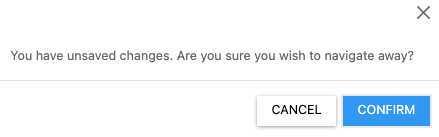
Finally, I got a chance to work on this one but it didn’t go as planned, all because NodeBB wouldn’t save the page every time I click the Save button. I tried on both Safari and Chrome. Please see below. Do you know what the issue is?
-
Finally, I got a chance to work on this one but it didn’t go as planned, all because NodeBB wouldn’t save the page every time I click the Save button. I tried on both Safari and Chrome. Please see below. Do you know what the issue is?
@mventures It won’t save because you first have to enable the “Stop Forum Spam” tab and subscribe for a (free) key

I’ve enabled this, and provided you with my key temporarily, which you should change
I then enabled hCaptcha using my details, and registered your site with my hCaptcha account
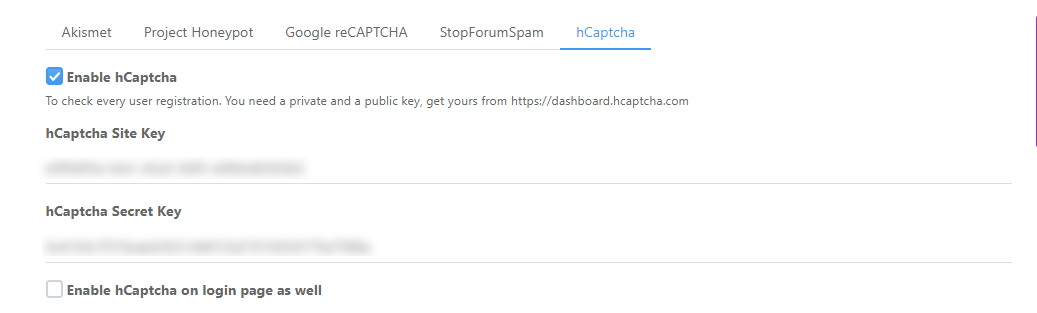
This now works as intended
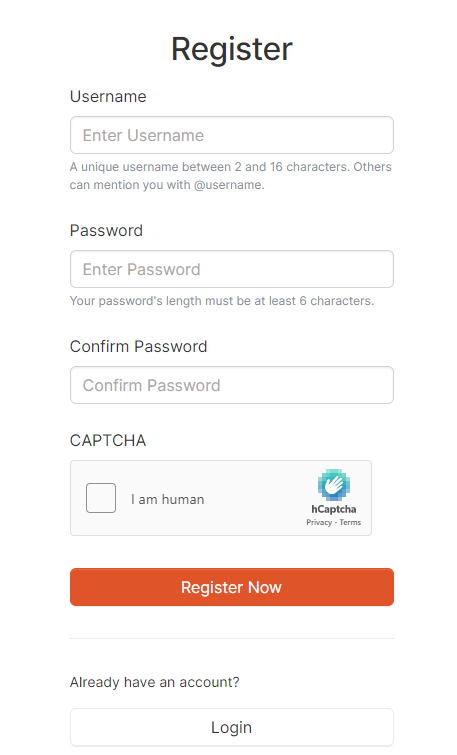
You should of course register your own site and secret keys rather than use mine

Mark Cutting also advises organisations as a Fractional CIO, Fractional CISO and Executive Advisor, helping boards improve technology governance, cyber resilience and executive decision making. Learn more at Phenomlab Ltd
-
@mventures It won’t save because you first have to enable the “Stop Forum Spam” tab and subscribe for a (free) key
I’ve enabled this, and provided you with my key temporarily, which you should change
I then enabled hCaptcha using my details, and registered your site with my hCaptcha account
This now works as intended
You should of course register your own site and secret keys rather than use mine
@phenomlab THANK YOU SO MUCH! Really much appreciated again.
I shall definitely change everything and not use your values.I have the hCAPTCHA values already but not the stopforumspam one. I signed up on that site but I am yet to receive the password by email. Have written to the admin there and waiting for a response.
-
@phenomlab THANK YOU SO MUCH! Really much appreciated again.
I shall definitely change everything and not use your values.I have the hCAPTCHA values already but not the stopforumspam one. I signed up on that site but I am yet to receive the password by email. Have written to the admin there and waiting for a response.
@mventures Ok, no real hurry - just when you can.
EDIT - I also updated your forum to RC2 as it was still at RC1.
Mark Cutting also advises organisations as a Fractional CIO, Fractional CISO and Executive Advisor, helping boards improve technology governance, cyber resilience and executive decision making. Learn more at Phenomlab Ltd
-
@mventures Ok, no real hurry - just when you can.
EDIT - I also updated your forum to RC2 as it was still at RC1.
@phenomlab
Thank you but what are RC1 and RC2?
How do you find out what needs updating?And I am still waiting on the StopForumSpam password

-
@phenomlab
Thank you but what are RC1 and RC2?
How do you find out what needs updating?And I am still waiting on the StopForumSpam password
@mventures the term
RCrefers to “Release Candidate” which is the version just before software is ready to release to market. Essentially, this signifies that software has successfully passed though bothalphaandbetabefore reachingRCstage.For the record, there were over 99 beta releases of NodeBB before the devs were satisfied it was ready for release candidate 1 - let alone 2.
The final release will tell you in the ACP when an upgrade is available.
-
@phenomlab
Thank you but what are RC1 and RC2?
How do you find out what needs updating?And I am still waiting on the StopForumSpam password
@mventures said in NodeBB: hCaptcha:
And I am still waiting on the StopForumSpam password
You might want to check your junk email. Typically, these emails are delivered in minutes and not days.
Mark Cutting also advises organisations as a Fractional CIO, Fractional CISO and Executive Advisor, helping boards improve technology governance, cyber resilience and executive decision making. Learn more at Phenomlab Ltd
-
@mventures said in NodeBB: hCaptcha:
And I am still waiting on the StopForumSpam password
You might want to check your junk email. Typically, these emails are delivered in minutes and not days.
@phenomlab Yes, but it never arrived. So, today I tried again and it worked. I have signed up for the free API key but I am yet to get the email with the details. However, they have the option to get the key from their website which I now have. I shall try using it and see if it works over your one.
-
@phenomlab Yes, but it never arrived. So, today I tried again and it worked. I have signed up for the free API key but I am yet to get the email with the details. However, they have the option to get the key from their website which I now have. I shall try using it and see if it works over your one.
@mventures
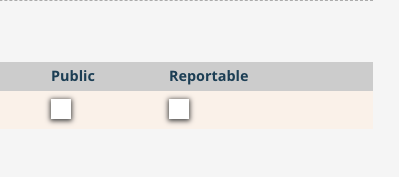
Should I tick one of these? I know it’s optional but if there is a benefit in someway, I can tick. -
Update: I have replaced your values with mine. It seems to be working now.
-
@mventures
Should I tick one of these? I know it’s optional but if there is a benefit in someway, I can tick.@mventures none that I know of. I don’t recall selecting these either for mine.


Hello! It looks like you're interested in this conversation, but you don't have an account yet.
Getting fed up of having to scroll through the same posts each visit? When you register for an account, you'll always come back to exactly where you were before, and choose to be notified of new replies (either via email, or push notification). You'll also be able to save bookmarks and upvote posts to show your appreciation to other community members.
With your input, this post could be even better 💗
Register LoginDid this solution help you?
Related Topics
-
-
-
-
-
-
Podcast Share NodeBB
Solved Configure -
-
NodeBB metadata
Solved Configure