nodebb loading emojis
-
Hello
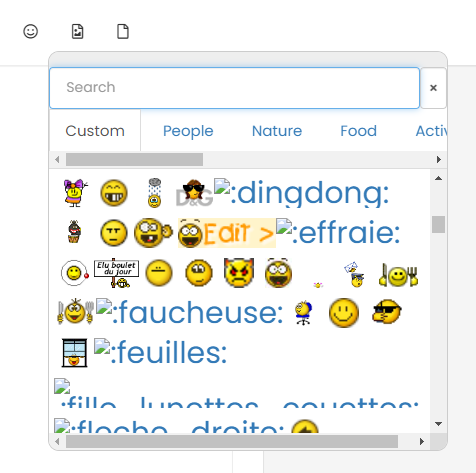
We have a lot of custom émojis on nodebb.
Sometines we have emojis not loading properly, sometimes they lload corretly after refresh
I think about a problem of nginx conf maybe, or cache, or Cloudflare but i’m not sure and I don’t know with what to begin my research
An idea about that ?
Thanks to communauty

PW and WS Spirit alive
-
I delete them now and same result i nincgnito.
–> I delete all rate config on nginx configuration and it seems to be better now. Can you test now @phenomlab ?but it bothers me, I would have liked to keep nginx protection against flood/ddos attacks with nodebb
Need to find the right setting.
PW and WS Spirit alive
-
Hello
We have a lot of custom émojis on nodebb.
Sometines we have emojis not loading properly, sometimes they lload corretly after refresh
I think about a problem of nginx conf maybe, or cache, or Cloudflare but i’m not sure and I don’t know with what to begin my research
An idea about that ?
Thanks to communauty
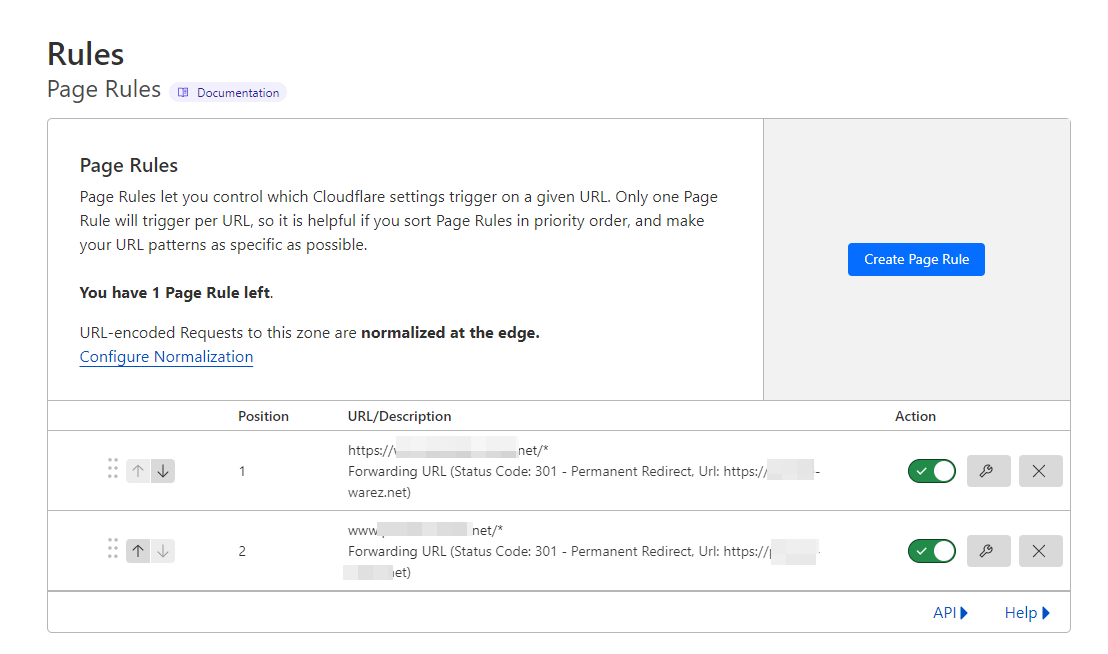
@DownPW are you using any page rules in Cloudflare?
-
-
I have test to deactivate page rules but idem.
If you find a solution, I promess you to buy you cofee my friends lol
PW and WS Spirit alive
-
I have test to deactivate page rules but idem.
If you find a solution, I promess you to buy you cofee my friends lol
@DownPW I like a challenge
 . I’ll take a look at this tomorrow.
 -
@DownPW you’re getting HTTP error 429, which is a rate limit message - your IP is being restricted in terms of what it has access to from the Emoji source perspective

Mark Cutting also advises organisations as a Fractional CIO, Fractional CISO and Executive Advisor, helping boards improve technology governance, cyber resilience and executive decision making. Learn more at Phenomlab Ltd
-
@DownPW you’re getting HTTP error 429, which is a rate limit message - your IP is being restricted in terms of what it has access to from the Emoji source perspective
Yep I was foud that on the topic on nodeBB communauty. Error 503 It’s the same. I have add rate limit on nginx when we have ddos attack long Time ago and he seems to be better now. I have play with values
Can you test now ?
PW and WS Spirit alive
-
Yep I was foud that on the topic on nodeBB communauty. Error 503 It’s the same. I have add rate limit on nginx when we have ddos attack long Time ago and he seems to be better now. I have play with values
Can you test now ?
@DownPW Same issue

-
very strange @phenomlab I haven’t got error now on the console . And now ?
here is my nginx.conf :
limit_req_zone $binary_remote_addr zone=flood:20m rate=100r/s;

# Connexions maximum par ip
limit_conn_zone $binary_remote_addr zone=ddos:1m;
And my website.conf :
   # ddos - flood
   #
   client_body_timeout 5s; # Fermeture des connexions lentes
       client_header_timeout 5s; #  Fermeture des connexions lentes
       limit_conn ddos 10;
   limit_req zone=flood burst=20 nodelay;
   limit_req_status 429;
   proxy_read_timeout 180;
PW and WS Spirit alive
-
very strange @phenomlab I haven’t got error now on the console . And now ?
here is my nginx.conf :
limit_req_zone $binary_remote_addr zone=flood:20m rate=100r/s;

# Connexions maximum par ip
limit_conn_zone $binary_remote_addr zone=ddos:1m;
And my website.conf :
# ddos - flood # client_body_timeout 5s; # Fermeture des connexions lentes client_header_timeout 5s; # Fermeture des connexions lentes limit_conn ddos 10; limit_req zone=flood burst=20 nodelay; limit_req_status 429; proxy_read_timeout 180;@DownPW 100% still there in incognito view

-
yep I have the same on incognito view but not on normal view. Strange
PW and WS Spirit alive
-
@DownPW Cache issue by the sounds of it. Have you cleared CF cache ?
-
I delete them now and same result i nincgnito.
–> I delete all rate config on nginx configuration and it seems to be better now. Can you test now @phenomlab ?but it bothers me, I would have liked to keep nginx protection against flood/ddos attacks with nodebb
Need to find the right setting.
PW and WS Spirit alive
-
I delete them now and same result i nincgnito.
–> I delete all rate config on nginx configuration and it seems to be better now. Can you test now @phenomlab ?but it bothers me, I would have liked to keep nginx protection against flood/ddos attacks with nodebb
Need to find the right setting.
@DownPW Yes, working now. At a guess, I’d say your ratelimit settings in
nginx.confare too restrictive.Mark Cutting also advises organisations as a Fractional CIO, Fractional CISO and Executive Advisor, helping boards improve technology governance, cyber resilience and executive decision making. Learn more at Phenomlab Ltd
-
@DownPW Yes, working now. At a guess, I’d say your ratelimit settings in
nginx.confare too restrictive.If you have better values rate limit settings for nginx I take it m’y friend
PW and WS Spirit alive
-
If you have better values rate limit settings for nginx I take it m’y friend
@DownPW sure. Let me have a look at this in more detail. I know nginx plus has extensive support for this, but it’s not impossible to get somewhere near acceptable with the standard version.
You might be better off handling this at the Cloudflare level given that it sits in between the requesting client and your server.
-
 undefined DownPW has marked this topic as solved on

Hello! It looks like you're interested in this conversation, but you don't have an account yet.
Getting fed up of having to scroll through the same posts each visit? When you register for an account, you'll always come back to exactly where you were before, and choose to be notified of new replies (either via email, or push notification). You'll also be able to save bookmarks and upvote posts to show your appreciation to other community members.
With your input, this post could be even better 💗
Register LoginDid this solution help you?
Related Topics
-
-
-
-
NodeBB: Consent page
Solved Configure -
-
-
-
NodeBB metadata
Solved Configure