Skip to content

Killing Linux Zombie Processes

Tips
3 2 1.0k 1
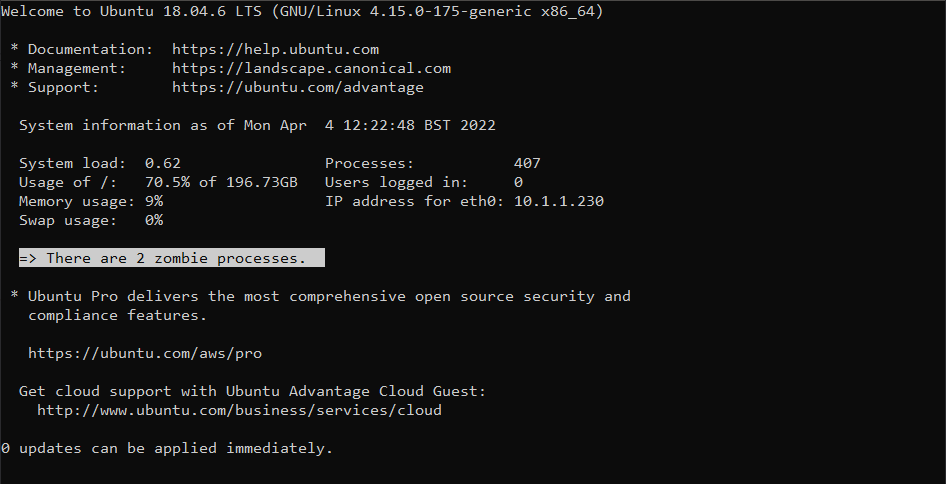
  • Periodically, when logging into any Linux based server, you may be met with the below
    32fbb04c-7cf3-4c4a-92df-7c62748f7d07-image.png

    In a typical Linux scenario, a process (or sub process) notifies its parent when it has completed its execution and has exited. The parent process should remove the process from process table. However, if the parent process is unable to read the process status from its child (the completing process or sub process), it won’t be able to remove the this from memory which causes the supposedly dead process to still continue to exist in the process table. The end result of this issue is a “zombie process” - one that has no reason to be running, and should have been terminated.

    Before you can terminate a process, you need to be able to identify it. Run the below in the terminal

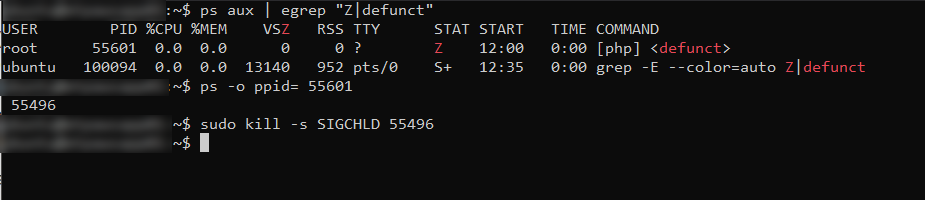
    ps aux | egrep "Z|defunct"
    

    Here’s the result

    20274412-e1e1-4ddb-8a94-a659a649c21b-image.png

    Now, you can’t actually “kill” something that is already dead, but you can notify the parent process that it should check again to see if the sub or child process is still running or not

    ps -o ppid= <Child PID>
    

    As an example

    e4df563a-8b5d-4f27-b6db-dd7810fd0689-image.png

    This tells us that the process ID we need to target is 55496. Based on this, we then use

    kill -s SIGCHLD <Parent PID>
    

    49de9c15-e0d1-4077-bab0-801cc13a5c4e-image.png

    And with all the commands together

    5ccb9788-d260-483b-90eb-506ab28c4091-image.png

    Now run

    ps aux | egrep "Z|defunct"
    

    If you still see zombie processes, you’ll need to target the parent process. Please be aware that killing a parent process will automatically kill all child processes, so use with caution.

    21d7cfad-46e9-4638-89e0-32233d7168ad-image.png

    kill -9 <Parent PID>
    

    a4846b3f-fe78-43a2-8169-21e84c181735-image.png

  • @phenomlab

    I test to kill a zombie process on SSH

    ps -o ppid= <Child PID>
    

    the command does not return me any parent process

    167fb778-eb83-49e5-a5a5-45ce03e87504-image.png

    EDIT: Strange things

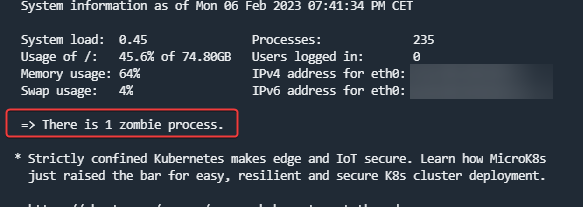
    When I log into SSH I see the zombie process message
    e26541d3-4fe6-4345-a0ac-aa8e8eb6dd27-image.png

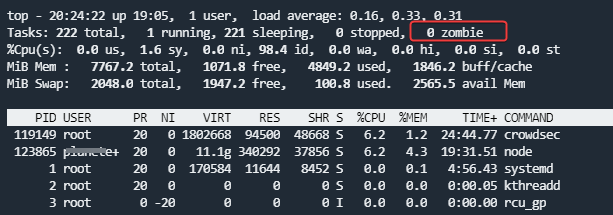
    but not in top :

    3198cec2-e888-4542-9ca9-598803657d58-image.png

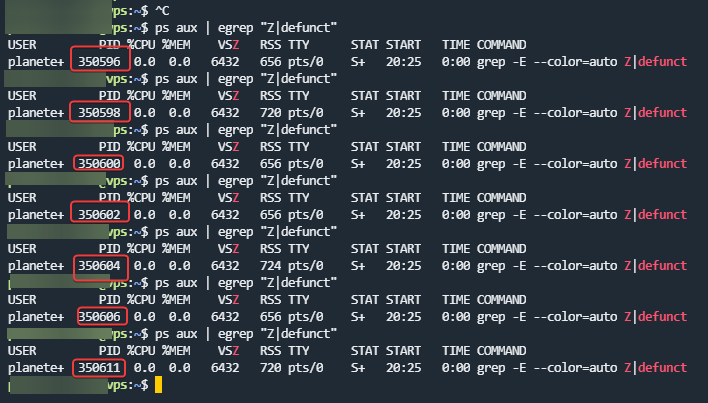
    And the zombie process number change with each order cli commands :
    593e5a88-b108-4f56-bf30-e2e4af9346c2-image.png

  • @phenomlab

    I test to kill a zombie process on SSH

    ps -o ppid= <Child PID>
    

    the command does not return me any parent process

    167fb778-eb83-49e5-a5a5-45ce03e87504-image.png

    EDIT: Strange things

    When I log into SSH I see the zombie process message

    e26541d3-4fe6-4345-a0ac-aa8e8eb6dd27-image.png

    but not in top :

    3198cec2-e888-4542-9ca9-598803657d58-image.png

    And the zombie process number change with each order cli commands :

    593e5a88-b108-4f56-bf30-e2e4af9346c2-image.png

    @DownPW odd indeed. Looks like it’s spawning, immediately dying, then spawning again.


Related Topics
  • To the Window to the Linux . . .

    Pinned Linux arch linux windows endoflife
    22
    19 Votes
    22 Posts
    2k Views
    @phenomlab said: @Madchatthew ouch. Sounds nasty. Did you get to the bottom of why it happened? I believe it is due to not everything getting upgraded because i wasn’t checking on the different packages I had installed from the AUR. Then when I ran yay it was like, hey would you like to update all of these things that you haven’t updated in months, perhaps years or ever for that matter and I was like yes please If you don’t have yay there are no notifications that you need more updates than what you realize. Chrome was staying updated because it would give me a notification, but there was the nvidia package that needed to be upgraded as well and I had never upgraded it. I didn’t realize it and should have. Then some of those packages use cmake and that needed to be updated as well. So using yay is beneficial to make sure you get all the updates you need.
  • Arch Linux | Reflector

    Linux arch linux pacman reflector updates
    4
    4 Votes
    4 Posts
    2k Views
    I have another update for reflector that I just figured out. You will want to edit the following file and add details to make sure that every time it updates the mirror list, it is grabbing them from your country and I grab 10 and sort them by rate. This will ensure that your mirrorlist isn’t getting populated with links from other countries which can slow down you downloads. sudo nano /etc/xdg/reflector/reflector.conf This is what the file looks like. # Reflector configuration file for the systemd service. # # Empty lines and lines beginning with "#" are ignored. All other lines should # contain valid reflector command-line arguments. The lines are parsed with # Python's shlex modules so standard shell syntax should work. All arguments are # collected into a single argument list. # # See "reflector --help" for details. # Recommended Options # Set the output path where the mirrorlist will be saved (--save). --save /etc/pacman.d/mirrorlist # Select the transfer protocol (--protocol). --protocol https # Select the country (--country). # Consult the list of available countries with "reflector --list-countries" and # select the countries nearest to you or the ones that you trust. For example: --country US # Use only the most recently synchronized mirrors (--latest). --latest 10 # Sort the mirrors by synchronization time (--sort). --sort rate Here are the different flag options that you can change or add to this file. I found this on google by searching arch linux reflector flags. Filtering Options (What to find) --country <CODE/Name>: Selects mirrors from specific countries (e.g., US, France,Germany). Use {Link: reflector --list-countries https://archlinux.org/mirrors/status/}, for a full list. --protocol <http|https>: Filters for HTTP or HTTPS mirrors. --age <hours>: Only includes mirrors synced within the last X hours (e.g., --age 12). --delay <hours>: Limits to mirrors with a reported sync delay of X hours or less (e.g., --delay 0.25 for 15 mins). --latest <N>: Limits results to the top N newest mirrors. Sorting Options (How to order) --sort rate: Sorts by download speed (requires testing, can be slow). --sort age: Sorts by most recently synced. --sort score: Sorts by overall score. --sort country: Sorts by country, useful with multiple countries. Output Options (Where to put it) --save <path>: Writes the filtered/sorted list to a file (e.g., /etc/pacman.d/mirrorlist). --verbose or -v: Shows detailed progress and mirror info.
  • Arch Server Progress

    Chitchat arch linux server web server
    52
    26 Votes
    52 Posts
    9k Views
    @phenomlab said in Arch Server Progress: PITA LOL yes for sure!!
  • Arch Linux + Me = Crazy

    Linux arch linux web server vps
    10
    0 Votes
    10 Posts
    1k Views
    @Madchatthew hmm, yes, that might be problematic.
  • Rename videos in bulk - linux commands

    Unsolved Tips gopro linux commands
    12
    4 Votes
    12 Posts
    2k Views
    @Hari Yes, that’s one (of many) I would recommend. It’s going to be easier to do this under Windows and the fact that you are already connected using SMB is a huge plus.
  • 0 Votes
    1 Posts
    2k Views
    No one has replied
  • 1 Votes
    3 Posts
    962 Views
    @Panda said in Wasting time on a system that hangs on boot: Why do you prefer to use KDE Linux distro, over say Ubuntu? A matter of taste really. I’ve tried pretty much every Linux distro out there over the years, and whilst I started with Ubuntu, I used Linux mint for a long time also. All of them are Debian backed anyway I guess I feel in love with KDE (Neon) because of the amount of effort they’d gone to in relation to the UI. I agree about the lead and the OS statement which is why I suspect that Windows simply ignored it (although the Device also worked fine there, so it clearly wasn’t that faulty)
  • Is plesk good over virtual min?

    Solved Linux linux
    6
    4 Votes
    6 Posts
    1k Views
    @phenomlab thank you