Skip to content

Killing Linux Zombie Processes

Tips
3 2 1.2k 1
  • Periodically, when logging into any Linux based server, you may be met with the below
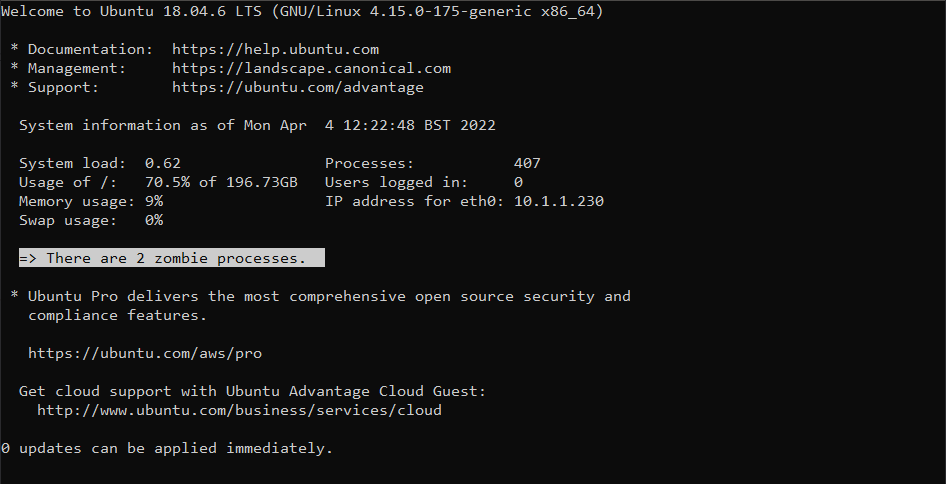
    32fbb04c-7cf3-4c4a-92df-7c62748f7d07-image.png

    In a typical Linux scenario, a process (or sub process) notifies its parent when it has completed its execution and has exited. The parent process should remove the process from process table. However, if the parent process is unable to read the process status from its child (the completing process or sub process), it won’t be able to remove the this from memory which causes the supposedly dead process to still continue to exist in the process table. The end result of this issue is a “zombie process” - one that has no reason to be running, and should have been terminated.

    Before you can terminate a process, you need to be able to identify it. Run the below in the terminal

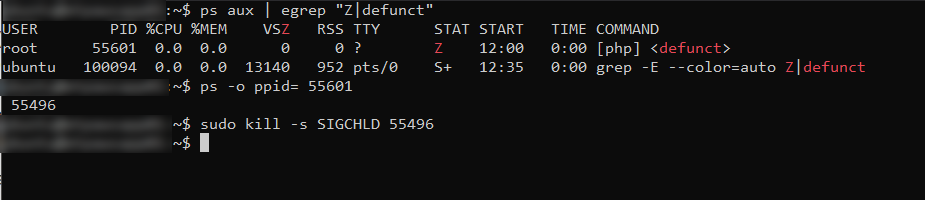
    ps aux | egrep "Z|defunct"
    

    Here’s the result

    20274412-e1e1-4ddb-8a94-a659a649c21b-image.png

    Now, you can’t actually “kill” something that is already dead, but you can notify the parent process that it should check again to see if the sub or child process is still running or not

    ps -o ppid= <Child PID>
    

    As an example

    e4df563a-8b5d-4f27-b6db-dd7810fd0689-image.png

    This tells us that the process ID we need to target is 55496. Based on this, we then use

    kill -s SIGCHLD <Parent PID>
    

    49de9c15-e0d1-4077-bab0-801cc13a5c4e-image.png

    And with all the commands together

    5ccb9788-d260-483b-90eb-506ab28c4091-image.png

    Now run

    ps aux | egrep "Z|defunct"
    

    If you still see zombie processes, you’ll need to target the parent process. Please be aware that killing a parent process will automatically kill all child processes, so use with caution.

    21d7cfad-46e9-4638-89e0-32233d7168ad-image.png

    kill -9 <Parent PID>
    

    a4846b3f-fe78-43a2-8169-21e84c181735-image.png

  • @phenomlab

    I test to kill a zombie process on SSH

    ps -o ppid= <Child PID>
    

    the command does not return me any parent process

    167fb778-eb83-49e5-a5a5-45ce03e87504-image.png

    EDIT: Strange things

    When I log into SSH I see the zombie process message
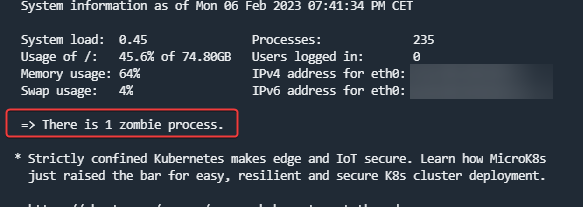
    e26541d3-4fe6-4345-a0ac-aa8e8eb6dd27-image.png

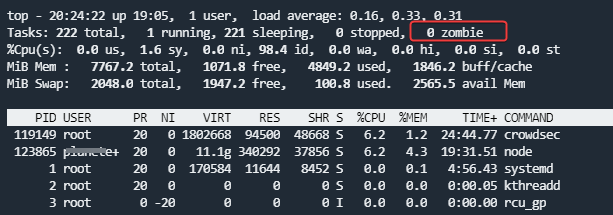
    but not in top :

    3198cec2-e888-4542-9ca9-598803657d58-image.png

    And the zombie process number change with each order cli commands :
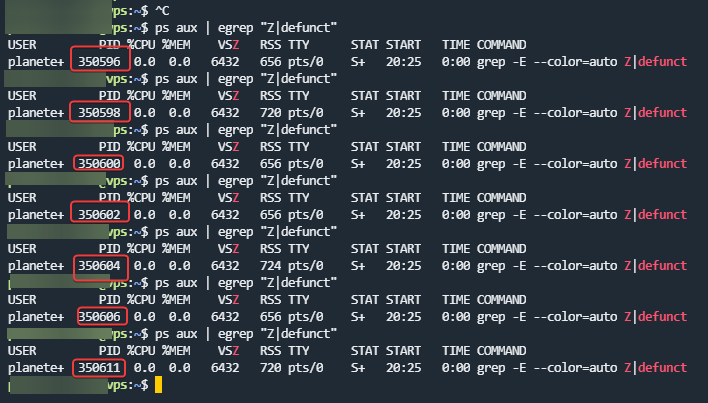
    593e5a88-b108-4f56-bf30-e2e4af9346c2-image.png

  • @phenomlab

    I test to kill a zombie process on SSH

    ps -o ppid= <Child PID>
    

    the command does not return me any parent process

    167fb778-eb83-49e5-a5a5-45ce03e87504-image.png

    EDIT: Strange things

    When I log into SSH I see the zombie process message

    e26541d3-4fe6-4345-a0ac-aa8e8eb6dd27-image.png

    but not in top :

    3198cec2-e888-4542-9ca9-598803657d58-image.png

    And the zombie process number change with each order cli commands :

    593e5a88-b108-4f56-bf30-e2e4af9346c2-image.png

    @DownPW odd indeed. Looks like it’s spawning, immediately dying, then spawning again.


Related Topics
  • Arch Linux | KDE Plasma Guide

    Moved Guides arch linux kde desktop guide
    3
    1 Votes
    3 Posts
    3k Views
    @phenomlab you are very welcome. I have bookmarks but it is also nice to have this info out there for other people to use as well, and also a place I can go to grab it again if I lose my bookmarks haha
  • Linux on a Stick

    Linux linux usb arch
    29
    16 Votes
    29 Posts
    5k Views
    @DownPW I haven’t tried either of those, I am sure they run fast as well. Linux is so versatile it is awesome!
  • Arch Server Progress

    Chitchat arch linux server web server
    63
    30 Votes
    63 Posts
    14k Views
    @phenomlab thank you! I appreciate it!
  • Linux Certification

    Linux linux certs
    4
    2 Votes
    4 Posts
    1k Views
    @Madchatthew You might be sorry you asked This is the mentoring category below. Presently, it’s unused, but we have a dedicated area for it. https://sudonix.org/category/8/mentoring Other services https://sudonix.org/services
  • 1 Votes
    3 Posts
    1k Views
    @Panda said in Wasting time on a system that hangs on boot: Why do you prefer to use KDE Linux distro, over say Ubuntu? A matter of taste really. I’ve tried pretty much every Linux distro out there over the years, and whilst I started with Ubuntu, I used Linux mint for a long time also. All of them are Debian backed anyway I guess I feel in love with KDE (Neon) because of the amount of effort they’d gone to in relation to the UI. I agree about the lead and the OS statement which is why I suspect that Windows simply ignored it (although the Device also worked fine there, so it clearly wasn’t that faulty)
  • 2 Votes
    2 Posts
    986 Views
    As an aside to this, there is also the command of tasklist which will provide a list of processes running on your machine, or a remote machine you are looking to query. [image: 1678806102692-000a408c-cc7e-450f-8e5e-bed9a4238a05-image.png] There is also a useful list of switches below, plus the ability to format into a table, or CSV. https://ss64.com/nt/tasklist.html
  • Environment Variables

    Solved Linux
    8
    1
    1 Votes
    8 Posts
    2k Views
    @madchatthew great you got this to work ! Thanks for the update.
  • 2 Votes
    28 Posts
    8k Views
    @phenomlab said in Advantages and disadvantages of changing to Ubuntu?: @jac Yeah, I wouldn’t just leap into it unless you have a valid reason (such as the laptop no longer working and needing to be reinstalled). Probably better the devil you know currently. Absolutely mate, and generally as discussed that is the only time I have changed over to Ubuntu once the laptop has got slower. For now I will carry on with Windows, purchase the VPN & BitDefender in later October / early November and then see how all that runs for a few more months .