-
@DownPW I’ve started development work on Harmony in v3 and should have some beta code for you to test soon. Stay tuned!
@phenomlab i have a problem with my new version upgrade.
i want to style as sudonix dev or nodebb officeal web site but my web site looks like not it. i dont understand where is the problem. i deleted all my configuration css and java also but nothing changed. -
@phenomlab i had same problem recent card and browsing user…
@cagatay I see the issue.
I’ve removed
nodebb-plugin-browsing-users
nodebb-plugin-recent-cards
You need to use the
CLIto install the correct versions as below, which I’m doing nownpm install nodebb-plugin-browsing-users@2.0.4 npm install nodebb-plugin-recent-cards@2.0.23The versions you are using now are not compliant with v2 which is why they do not work properly.
-
@phenomlab i have a problem with my new version upgrade.
i want to style as sudonix dev or nodebb officeal web site but my web site looks like not it. i dont understand where is the problem. i deleted all my configuration css and java also but nothing changed.the theme is sudonix.dev is Harmony and is on alpha by nodebb dev and come with nodebb v3 in the future
Don’t install on production site
PW and WS Spirit alive
-
the theme is sudonix.dev is Harmony and is on alpha by nodebb dev and come with nodebb v3 in the future
Don’t install on production site
@DownPW installed already but can not downgrade also

-
@phenomlab i have a problem with my new version upgrade.
i want to style as sudonix dev or nodebb officeal web site but my web site looks like not it. i dont understand where is the problem. i deleted all my configuration css and java also but nothing changed.@cagatay the harmony theme is designed to only work with v3.beta1 which as the name indicates, isn’t production ready and should not be used in a production environment. This is why it is not present here, but only on the Dev instance of sudonix.
Currently, the theme is still very unstable, and only creating Swatch templates for it which I fully expect to break again once the theme is updated - currently, there are two to three updates per day that vary in size and complexity.
In addition, the v3 instance of NodeBB uses bootstrap v5, which is completely different in structure to v2 NodeBB which uses bootstrap v3. In addition, BS5 comes with several other changes in the form of LESS and SCSS over standard CSS meaning most of the theming now needs to use LESS variables which can in turn be reused across the site.
In summary, this will mean that v3 of NodeBB will not be able to use most of the CSS you have defined, and will no doubt make the site look awful as a result. It’s not ready for production - the first iteration I would expect around March or April time.
-
@cagatay you should be able to downgrade if you stop your NodeBB instance, run the following commands
git fetch    # Grab the latest code from the NodeBB repository
git checkout v2.x    # Switch to the v2.x branch since we are now upgrading to NodeBB version 2
git reset --hard origin/v2.x
Then finally run
./nodebb upgradeAnd then restart NodeBB. That should return you to the v2 train.
Mark Cutting also advises organisations as a Fractional CIO, Fractional CISO and Executive Advisor, helping boards improve technology governance, cyber resilience and executive decision making. Learn more at Phenomlab Ltd
-
@cagatay you should be able to downgrade if you stop your NodeBB instance, run the following commands
git fetch    # Grab the latest code from the NodeBB repository
git checkout v2.x    # Switch to the v2.x branch since we are now upgrading to NodeBB version 2
git reset --hard origin/v2.x
Then finally run
./nodebb upgradeAnd then restart NodeBB. That should return you to the v2 train.
@phenomlab said in NodeBB v3 and Harmony Theme:
Grab the latest code from the NodeBB repository
there is eror when upgraded;
2023-01-21T12:16:27.336Z [4567/1270169] - error: [build] client side sty les build failed 2023-01-21T12:16:27.336Z [4567/1270169] - error: [build] Encountered error durin g build step FileError: './theme' wasn't found. Tried - ./theme.less,/home/nodes/nodebb/node_ modules/nodebb-theme-harmony/theme.less,/home/nodes/nodebb/node_modules/theme.le ss,/home/nodes/nodebb/public/less/theme.less,/home/nodes/nodebb/public/vendor/fo ntawesome/less/theme.less,theme.less in input on line 1, column 1: 1 @import "./theme"; 2 Error occurred during upgrade: undefined (node:1270169) UnhandledPromiseRejectionWarning: Unhandled promise rejection. Th is error originated either by throwing inside of an async function without a cat ch block, or by rejecting a promise which was not handled with .catch(). To term inate the node process on unhandled promise rejection, use the CLI flag `--unhan dled-rejections=strict` (see https://nodejs.org/api/cli.html#cli_unhandled_rejec tions_mode). (rejection id: 1) (Use `node --trace-warnings ...` to show where the warning was created) (node:1270169) [DEP0018] DeprecationWarning: Unhandled promise rejections are de precated. In the future, promise rejections that are not handled will terminate the Node.js process with a non-zero exit code. -
@phenomlab said in NodeBB v3 and Harmony Theme:
Grab the latest code from the NodeBB repository
there is eror when upgraded;
2023-01-21T12:16:27.336Z [4567/1270169] - error: [build] client side sty les build failed 2023-01-21T12:16:27.336Z [4567/1270169] - error: [build] Encountered error durin g build step FileError: './theme' wasn't found. Tried - ./theme.less,/home/nodes/nodebb/node_ modules/nodebb-theme-harmony/theme.less,/home/nodes/nodebb/node_modules/theme.le ss,/home/nodes/nodebb/public/less/theme.less,/home/nodes/nodebb/public/vendor/fo ntawesome/less/theme.less,theme.less in input on line 1, column 1: 1 @import "./theme"; 2 Error occurred during upgrade: undefined (node:1270169) UnhandledPromiseRejectionWarning: Unhandled promise rejection. Th is error originated either by throwing inside of an async function without a cat ch block, or by rejecting a promise which was not handled with .catch(). To term inate the node process on unhandled promise rejection, use the CLI flag `--unhan dled-rejections=strict` (see https://nodejs.org/api/cli.html#cli_unhandled_rejec tions_mode). (rejection id: 1) (Use `node --trace-warnings ...` to show where the warning was created) (node:1270169) [DEP0018] DeprecationWarning: Unhandled promise rejections are de precated. In the future, promise rejections that are not handled will terminate the Node.js process with a non-zero exit code.@cagatay that’s telling you that the persona theme is missing. Change the theme back to persona and then retry the upgrade.
Mark Cutting also advises organisations as a Fractional CIO, Fractional CISO and Executive Advisor, helping boards improve technology governance, cyber resilience and executive decision making. Learn more at Phenomlab Ltd
-
@cagatay that’s telling you that the persona theme is missing. Change the theme back to persona and then retry the upgrade.
@phenomlab recent cards not working normally.
downgrade is done! thank you.
i thin the problem is the avatar size.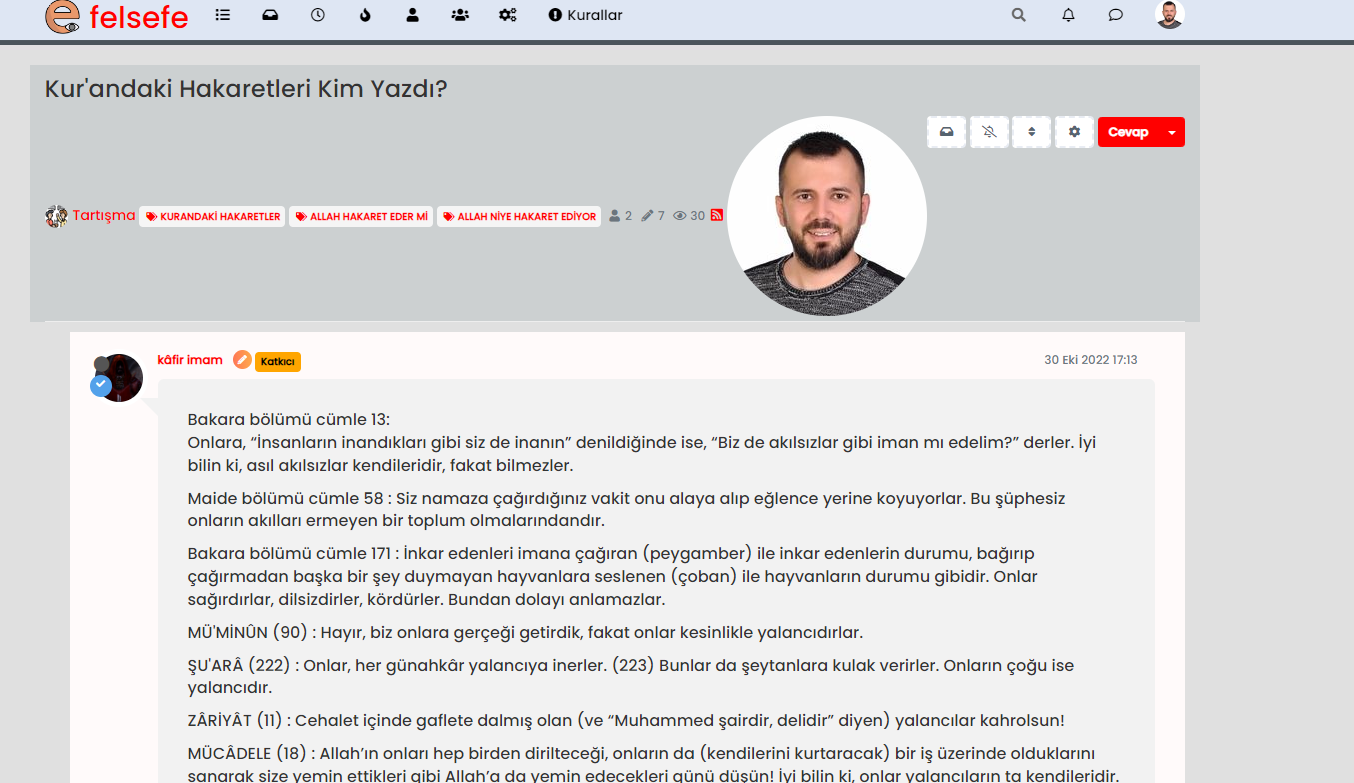
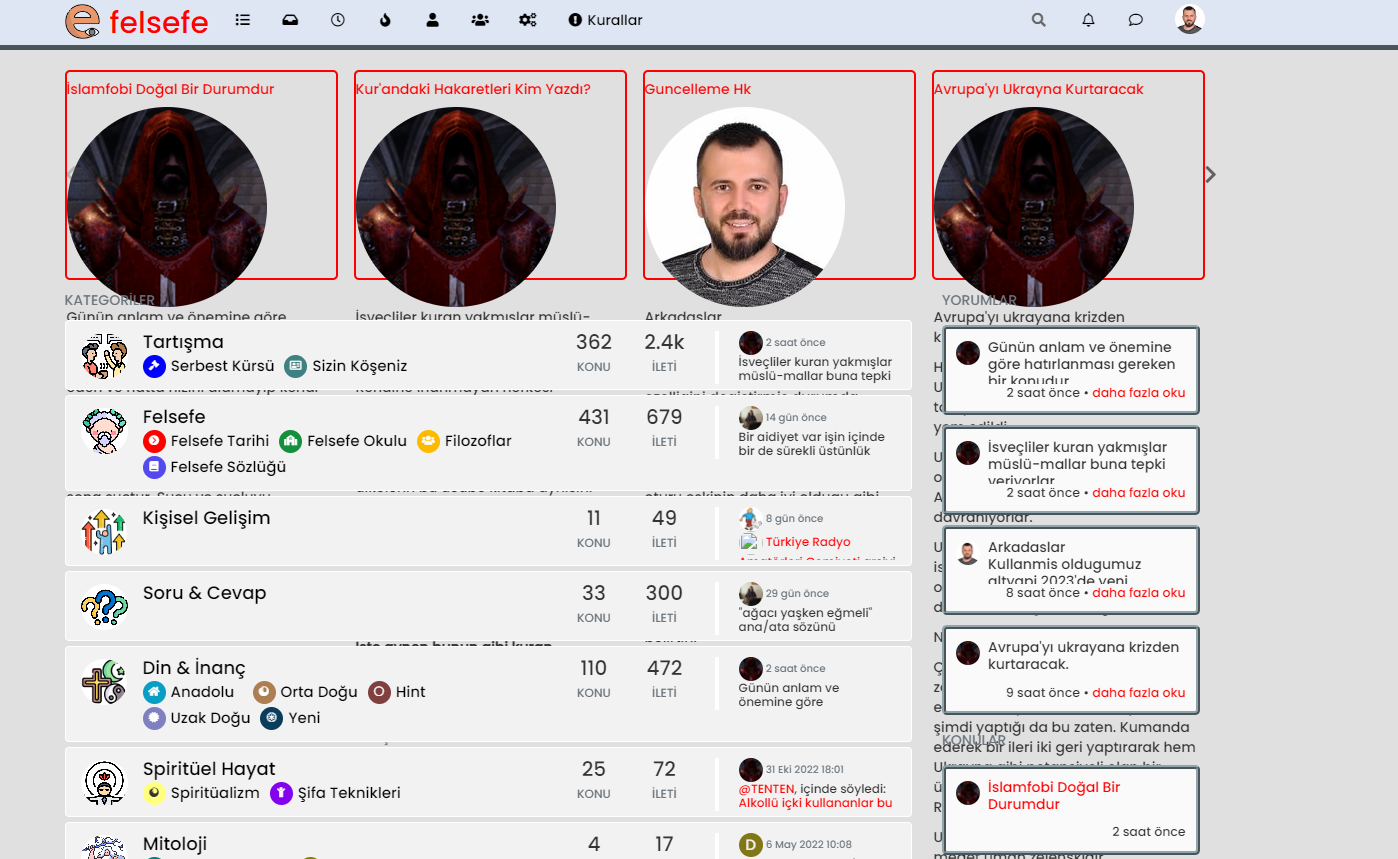
-
@phenomlab recent cards not working normally.
downgrade is done! thank you.
i thin the problem is the avatar size.@cagatay remove the recent cards plugin and reinstall it.
Mark Cutting also advises organisations as a Fractional CIO, Fractional CISO and Executive Advisor, helping boards improve technology governance, cyber resilience and executive decision making. Learn more at Phenomlab Ltd
-
@phenomlab same result.
i had deleted and reinstalled recent card but nothing chaged.
by the way without recent card my current page on topic as below;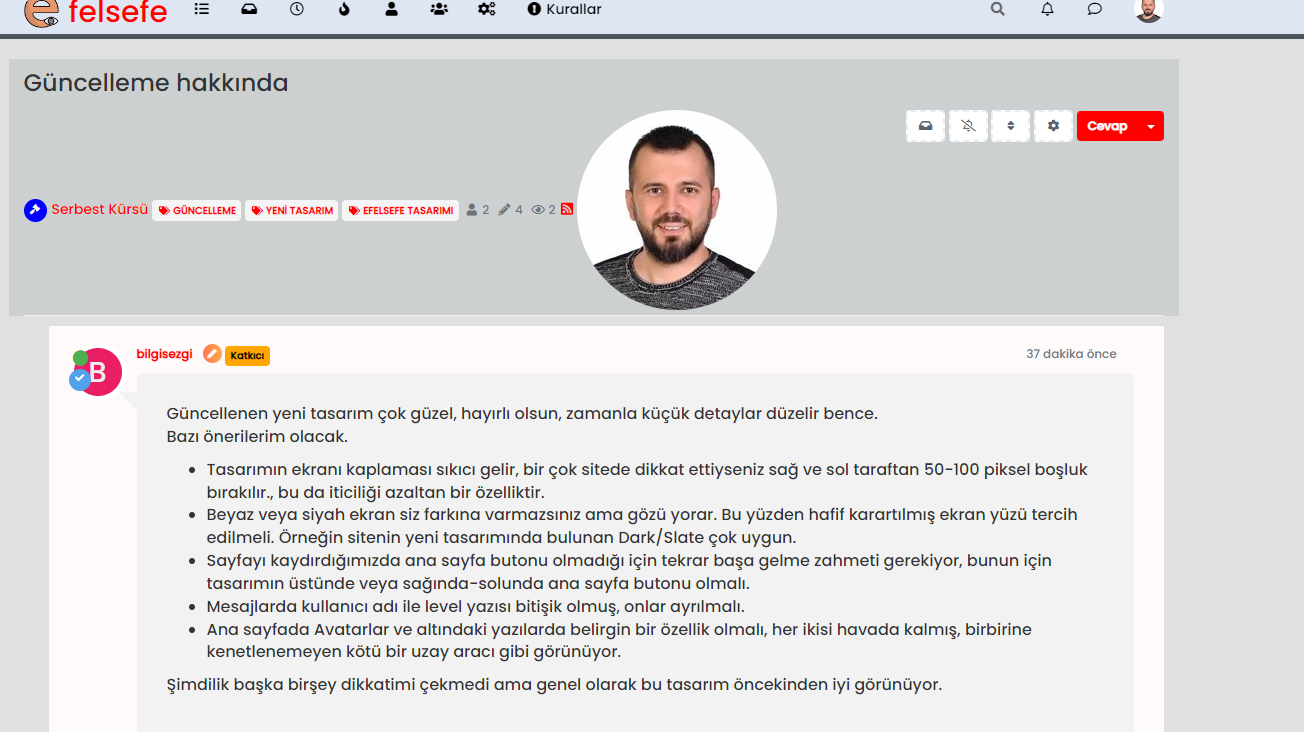
the avatar size is very big.
-
@phenomlab same result.
i had deleted and reinstalled recent card but nothing chaged.
by the way without recent card my current page on topic as below;the avatar size is very big.
@cagatay Did you rebuild and restart after the removal before you re-installed ?
Mark Cutting also advises organisations as a Fractional CIO, Fractional CISO and Executive Advisor, helping boards improve technology governance, cyber resilience and executive decision making. Learn more at Phenomlab Ltd
-
@cagatay Did you rebuild and restart after the removal before you re-installed ?
@phenomlab of course Mark i done.
this is who is reading post type;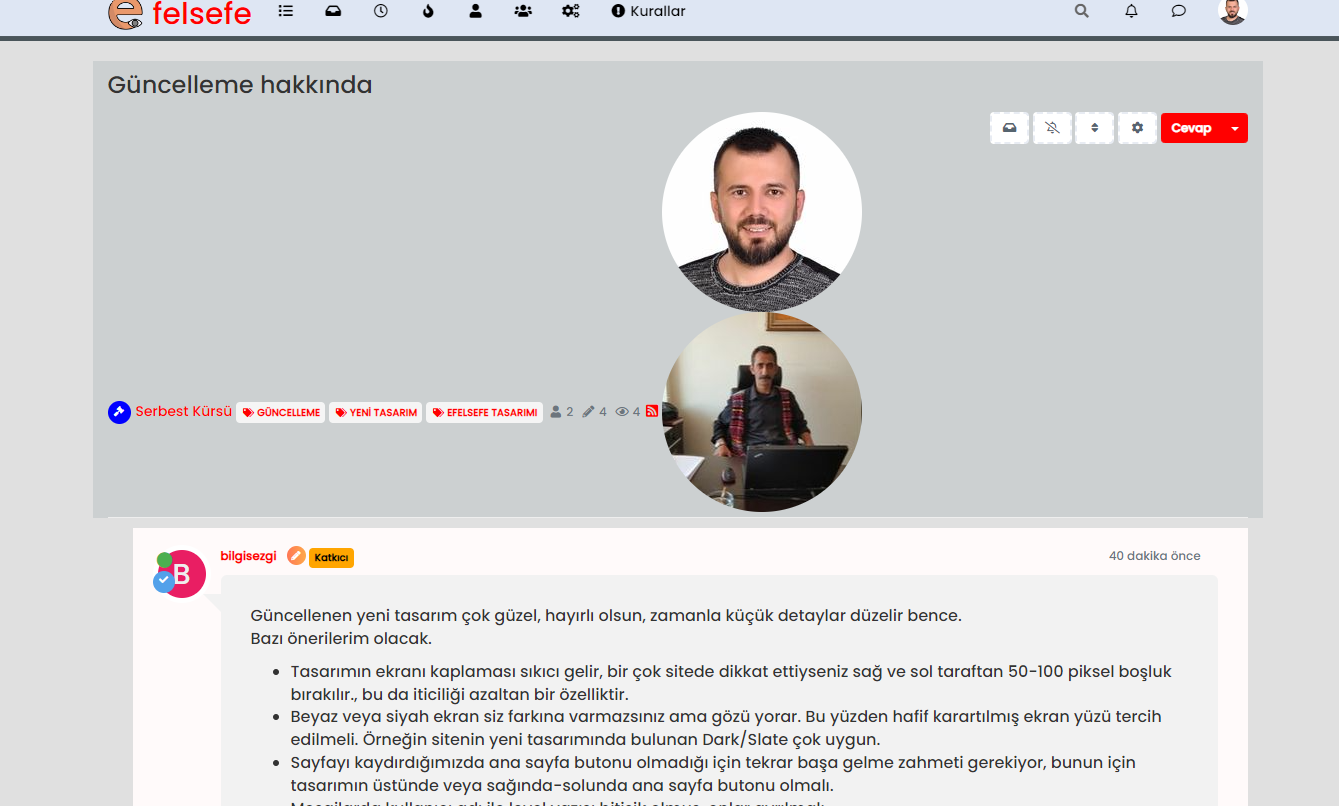
-
@phenomlab of course Mark i done.
this is who is reading post type;@cagatay Are you sure that’s not
nodebb-plugin-browsing-usersin the screenshot ?Mark Cutting also advises organisations as a Fractional CIO, Fractional CISO and Executive Advisor, helping boards improve technology governance, cyber resilience and executive decision making. Learn more at Phenomlab Ltd
-
@cagatay Are you sure that’s not
nodebb-plugin-browsing-usersin the screenshot ?@phenomlab i had same problem recent card and browsing user…
-
@phenomlab i had same problem recent card and browsing user…
@cagatay I’m logged into your site now. Taking a look
Mark Cutting also advises organisations as a Fractional CIO, Fractional CISO and Executive Advisor, helping boards improve technology governance, cyber resilience and executive decision making. Learn more at Phenomlab Ltd
-
@phenomlab thank you Mark.
-
@phenomlab i had same problem recent card and browsing user…
@cagatay I see the issue.
I’ve removed
nodebb-plugin-browsing-users
nodebb-plugin-recent-cards
You need to use the
CLIto install the correct versions as below, which I’m doing nownpm install nodebb-plugin-browsing-users@2.0.4 npm install nodebb-plugin-recent-cards@2.0.23The versions you are using now are not compliant with v2 which is why they do not work properly.
-
@phenomlab thank you Mark.
@cagatay Should be all sorted now

Don’t forget to put your language back to Turkish. -
 undefined phenomlab has marked this topic as solved on


Hello! It looks like you're interested in this conversation, but you don't have an account yet.
Getting fed up of having to scroll through the same posts each visit? When you register for an account, you'll always come back to exactly where you were before, and choose to be notified of new replies (either via email, or push notification). You'll also be able to save bookmarks and upvote posts to show your appreciation to other community members.
With your input, this post could be even better 💗
Register Login