Post Style View

-
@phenomlab css side;
@media (min-width: 1200px) {
li.topic-owner-post .content, li.topic-response-post .content {
    background: PowderBlue;
    padding: 30px;
    border-radius: 6px;
}
.topic .posts.timeline .timeline-event>div:not(.content), .topic .posts.timeline>[component=post]>div:not(.content) {
    margin-left: 2.5rem;
}
[data-index="0"] .content[component="post/content"]:before, .topic-owner-post:before, .topic-response-post:before {
    border-left: 20px solid transparent;
    border-top: 20px solid PowderBlue;
    top: 66px;
    content: "";
    position: absolute;
    left: 70px;
}
li.self-post .content:not(.isSolved [component="post/content"])[itemprop="text"] {
    background: CadetBlue;
    padding: 30px;
    border-radius: 6px;
    margin-right: 8.5rem !important;
}
li.self-post .content:not(.isSolved [component="post/content"]):after, li.self-post.topic-owner-post:first-child:after {
    border-right: 20px solid transparent;
    border-top: 20px solid var(--self-post);
    top: 66px;
    content: "";
    position: absolute;
    right: 90px;
    left: unset !important;
    border-bottom: none !important;
    bottom: unset !important;
}
li.self-post.topic-response-post .pull-left {
    float: right !important;
}
li.self-post .content:not(.isSolved [component="post/content"]):after, li.self-post.topic-owner-post:first-child:after {
    border-right: 20px solid transparent;
    border-top: 20px solid CadetBlue;
    top: 58px;
    content: "";
    position: absolute;
    right: 95px;
    left: unset !important;
    border-bottom: none !important;
    bottom: unset !important;
}
}
li.self-post.topic-response-post:before {
    display: none;
}
JS side;
$(window).on('action:ajaxify.end', function(data) { $(document).ready(function() { if (!$('li[component="post"]').hasClass('.topic-owner-post') || (!$('li[component="post"]').hasClass('.self-post'))) { console.log("Adding required classes for messenger type view"); $('li[component="post"]').addClass('topic-response-post'); } }); }); // Target those elements already loaded in the DOM $(document).ready(function() { $(window).on('action:ajaxify.end', function(data) { if ($('li[component="post"]').hasClass("")) { console.log("Adding required classes for messenger type view"); $('li[component="post"]').addClass('topic-response-post'); } }); }); // Target elements dynamically added to the DOM on post load $(document).ready(function() { $(window).on('action:ajaxify.loaded', function(data) { if ($('li[component="post"]').hasClass("")) { console.log("Adding required classes for messenger type view"); $('li[component="post"]').addClass('topic-response-post'); } }); });@cagatay Let me have a look
EDIT - I see it. Find class
[data-index="0"] .content[component="post/content"]:before, .topic-owner-post:before, .topic-response-post:beforechange it to
.topic-owner-post:before, .topic-response-post:beforeSo basically, just remove
[data-index="0"] .content[component="post/content"]:before,That should do it
Mark Cutting also advises organisations as a Fractional CIO, Fractional CISO and Executive Advisor, helping boards improve technology governance, cyber resilience and executive decision making. Learn more at Phenomlab Ltd
-
@cagatay Let me have a look
EDIT - I see it. Find class
[data-index="0"] .content[component="post/content"]:before, .topic-owner-post:before, .topic-response-post:beforechange it to
.topic-owner-post:before, .topic-response-post:beforeSo basically, just remove
[data-index="0"] .content[component="post/content"]:before,That should do it
@phenomlab said in Post Style View:
[data-index=“0”] .content[component=“post/content”]:before, .topic-owner-post:before, .topic-response-post:before
I did, everything looks like well
 thank you.
See you again when i see minor problem
-
@phenomlab said in Post Style View:
[data-index=“0”] .content[component=“post/content”]:before, .topic-owner-post:before, .topic-response-post:before
I did, everything looks like well
thank you.See you again when i see minor problem
Mark Cutting also advises organisations as a Fractional CIO, Fractional CISO and Executive Advisor, helping boards improve technology governance, cyber resilience and executive decision making. Learn more at Phenomlab Ltd
-
 undefined phenomlab referenced this topic on
-
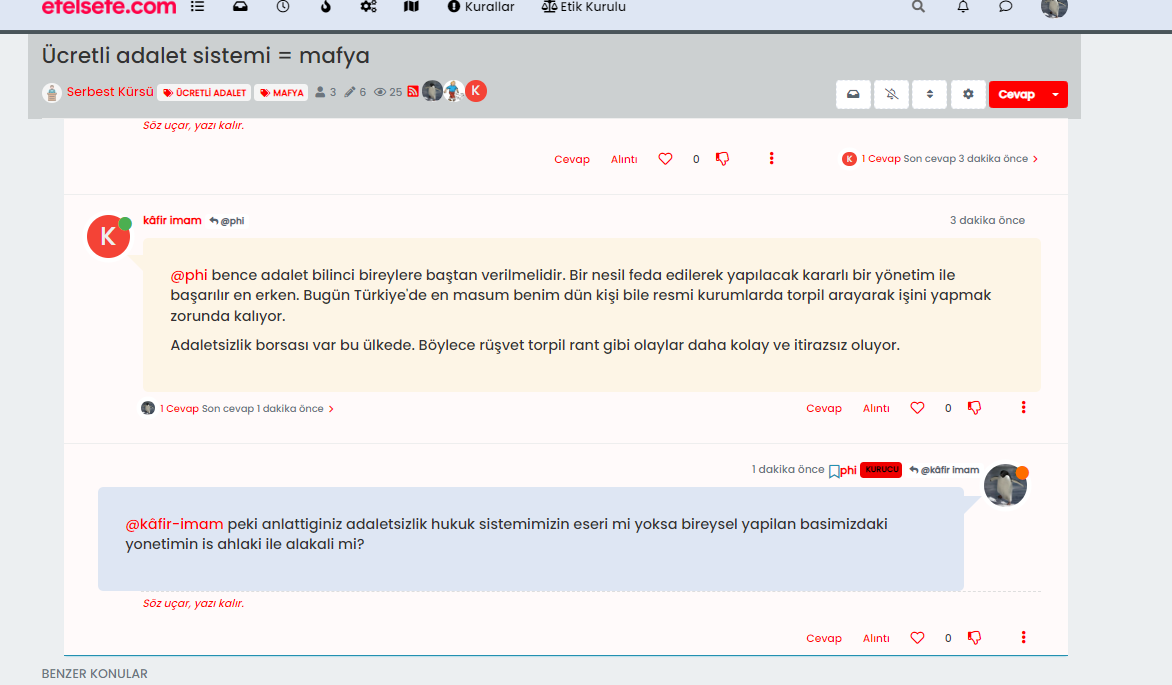
@phenomlab When I post something to the thread, my avatar can be seen on the left side of the post. However, when I refresh the page, avatar goes to the right side.
before f5;
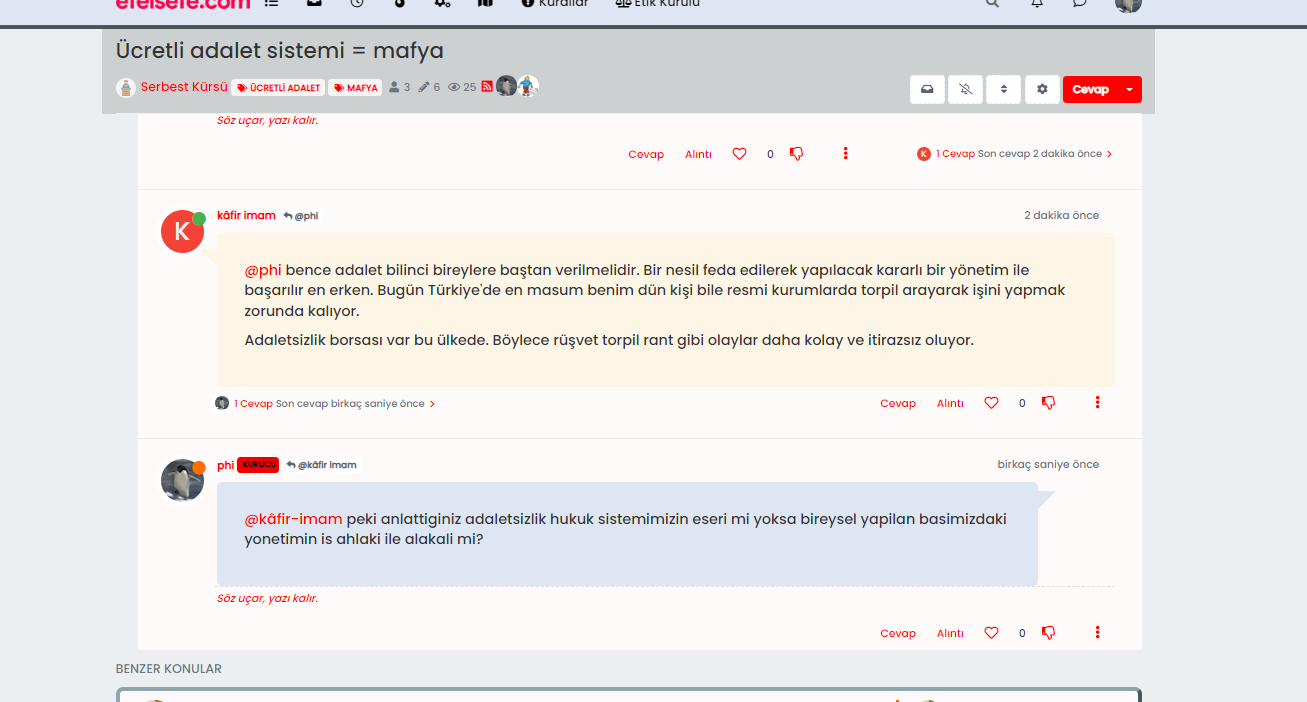
after f5;
-
That’s odd. It looks like the specific class that controls they isn’t being loaded until you perform a hard refresh. I’ll need to have a look at your site to determine why that is.
Mark Cutting also advises organisations as a Fractional CIO, Fractional CISO and Executive Advisor, helping boards improve technology governance, cyber resilience and executive decision making. Learn more at Phenomlab Ltd
-
That’s odd. It looks like the specific class that controls they isn’t being loaded until you perform a hard refresh. I’ll need to have a look at your site to determine why that is.
@phenomlab the problem still persist, did you have a look?
-
@phenomlab the problem still persist, did you have a look?
@cagatay Not yet
Will do so todayMark Cutting also advises organisations as a Fractional CIO, Fractional CISO and Executive Advisor, helping boards improve technology governance, cyber resilience and executive decision making. Learn more at Phenomlab Ltd
-
@phenomlab Sorry for waste one’s your time.
-
@phenomlab new miror problem is when i created new topic the codes are figure out not working. After F5 also…
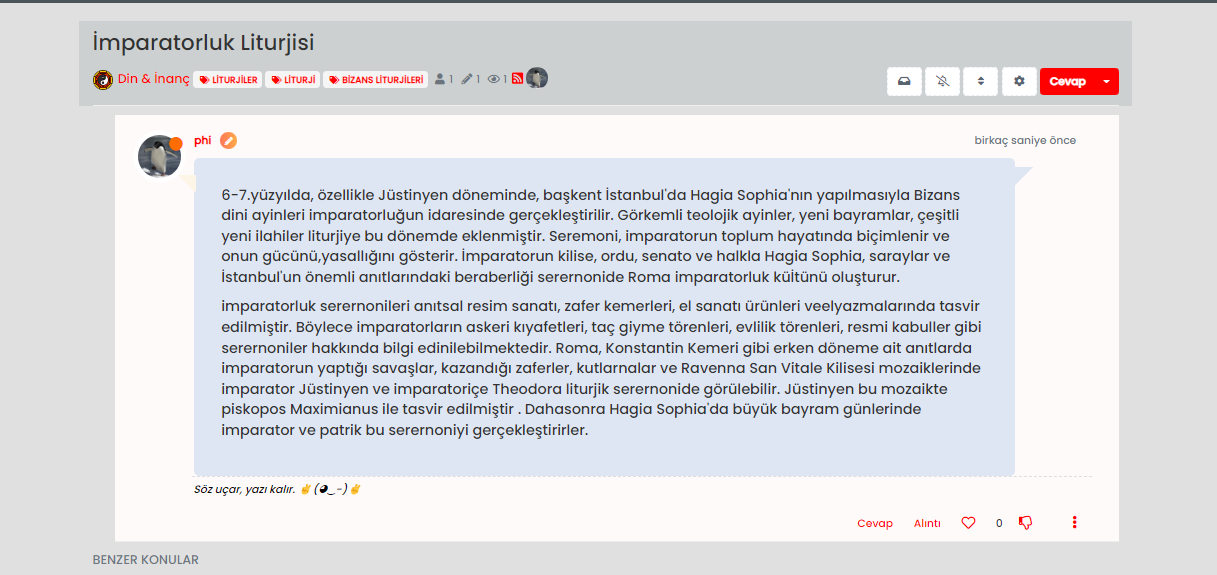
Maybe we can change the codes just for different color for user not right side avatar etc.
-
 undefined cagatay has marked this topic as unsolved on
-
@phenomlab new miror problem is when i created new topic the codes are figure out not working. After F5 also…
Maybe we can change the codes just for different color for user not right side avatar etc.
@cagatay I’ll have a look at this tomorrow. However, this is the reason why I said to do this in a DEV environment

Mark Cutting also advises organisations as a Fractional CIO, Fractional CISO and Executive Advisor, helping boards improve technology governance, cyber resilience and executive decision making. Learn more at Phenomlab Ltd
-
@cagatay I’ll have a look at this tomorrow. However, this is the reason why I said to do this in a DEV environment
@phenomlab users dont feel anything hope so
but i think this way which i m saying easy then current one which you are using in sudonix.my suggest that; just change color type without changing side metod mean right side…
-
@phenomlab users dont feel anything hope so
but i think this way which i m saying easy then current one which you are using in sudonix.my suggest that; just change color type without changing side metod mean right side…
@cagatay yep, I’ll take a look at this tomorrow and we’ll get it resolved.
Mark Cutting also advises organisations as a Fractional CIO, Fractional CISO and Executive Advisor, helping boards improve technology governance, cyber resilience and executive decision making. Learn more at Phenomlab Ltd
-
-
@phenomlab thank you waiting your free time

@cagatay Should look a bit better now - just finishing up the
jQuerycode as that is not firing properly. Let me knowMark Cutting also advises organisations as a Fractional CIO, Fractional CISO and Executive Advisor, helping boards improve technology governance, cyber resilience and executive decision making. Learn more at Phenomlab Ltd
-
@cagatay Should look a bit better now - just finishing up the
jQuerycode as that is not firing properly. Let me know@phenomlab yes i entered new topic and new post, seems everything is working great. thanks Mark…
-
@phenomlab yes i entered new topic and new post, seems everything is working great. thanks Mark…
@cagatay Thanks for confirming. Just finishing up the jQuery functions so if you are logged in as admin, the page might reload a few times, but this is expected
Mark Cutting also advises organisations as a Fractional CIO, Fractional CISO and Executive Advisor, helping boards improve technology governance, cyber resilience and executive decision making. Learn more at Phenomlab Ltd
-
@cagatay Thanks for confirming. Just finishing up the jQuery functions so if you are logged in as admin, the page might reload a few times, but this is expected
-
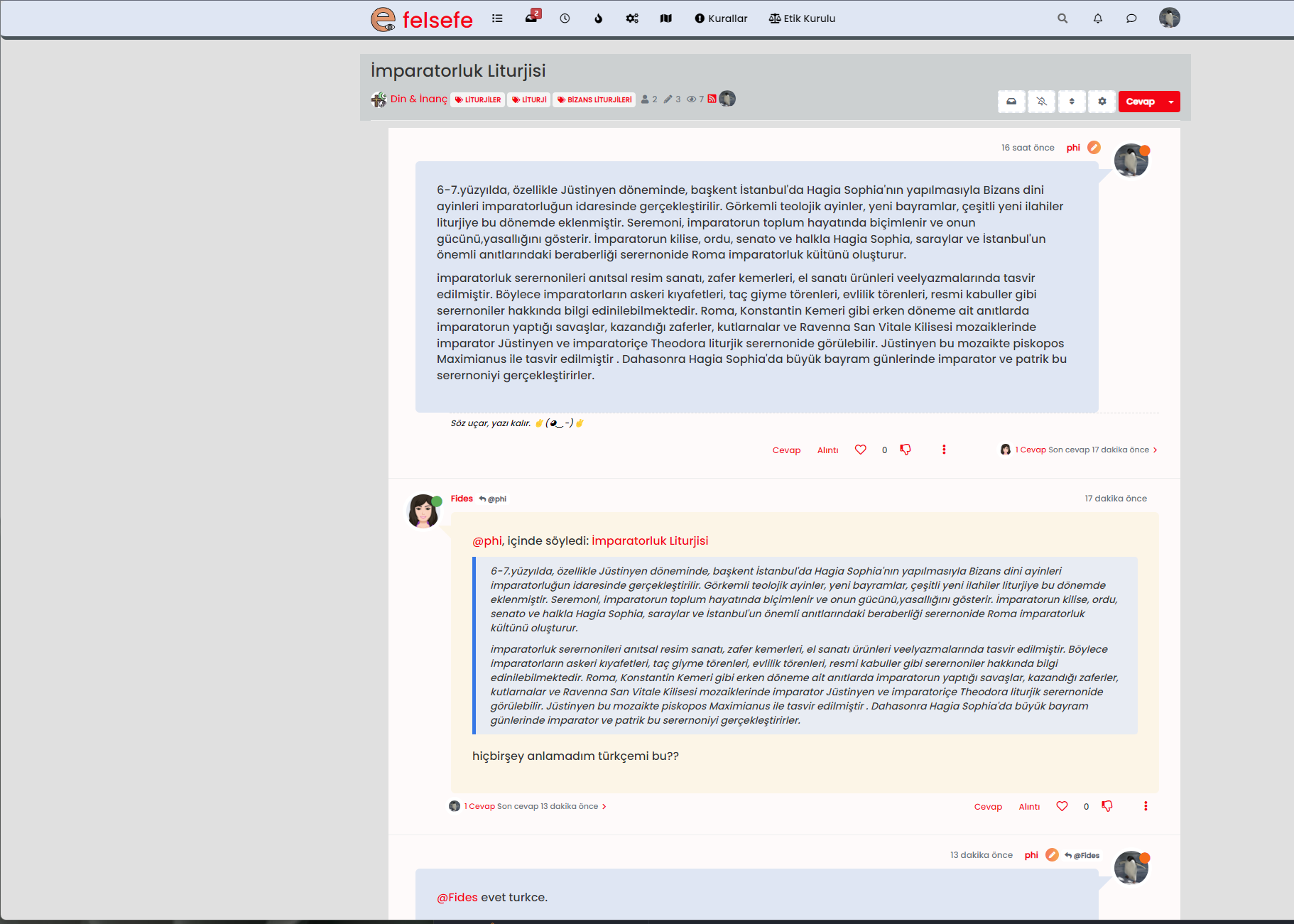
@cagatay Seems fine to me ?
Mark Cutting also advises organisations as a Fractional CIO, Fractional CISO and Executive Advisor, helping boards improve technology governance, cyber resilience and executive decision making. Learn more at Phenomlab Ltd
-
-
@phenomlab pls refresh?
@cagatay I have. No issues on my side
Mark Cutting also advises organisations as a Fractional CIO, Fractional CISO and Executive Advisor, helping boards improve technology governance, cyber resilience and executive decision making. Learn more at Phenomlab Ltd
Hello! It looks like you're interested in this conversation, but you don't have an account yet.
Getting fed up of having to scroll through the same posts each visit? When you register for an account, you'll always come back to exactly where you were before, and choose to be notified of new replies (either via email, or push notification). You'll also be able to save bookmarks and upvote posts to show your appreciation to other community members.
With your input, this post could be even better 💗
Register LoginDid this solution help you?
Related Topics
-
Nodebb and emails
Solved Configure -
Test of youtube embeds
Solved Configure -
-
-
-
-
-